2 layers39.2 × 15.9 mm

 Sparkr-tech/opentama237
An open-source reference design for MCUGotchi
Opentama is an open-source printed circuit board by Sparkr-tech, from the Sparkr-tech/opentama repository on GitHub. It is a 2-layer board of 45 × 58.2 mm with 65 parts on 69 nets, routed with 728 tracks and 114 vias.
It is built around the TPS62203DBV, LTC4054ES5-4.2#PBF and USBLC6-2SC6, with the BSS138 and BSS84 among its other parts. Its parts include 23 resistors, 16 capacitors, 5 connectors, 4 ICs and 3 transistors. It belongs with the STM32 boards of this library.


OpenTama is an open-source development board serving educational purposes, specifically designed for MCUGotchi using KiCad.
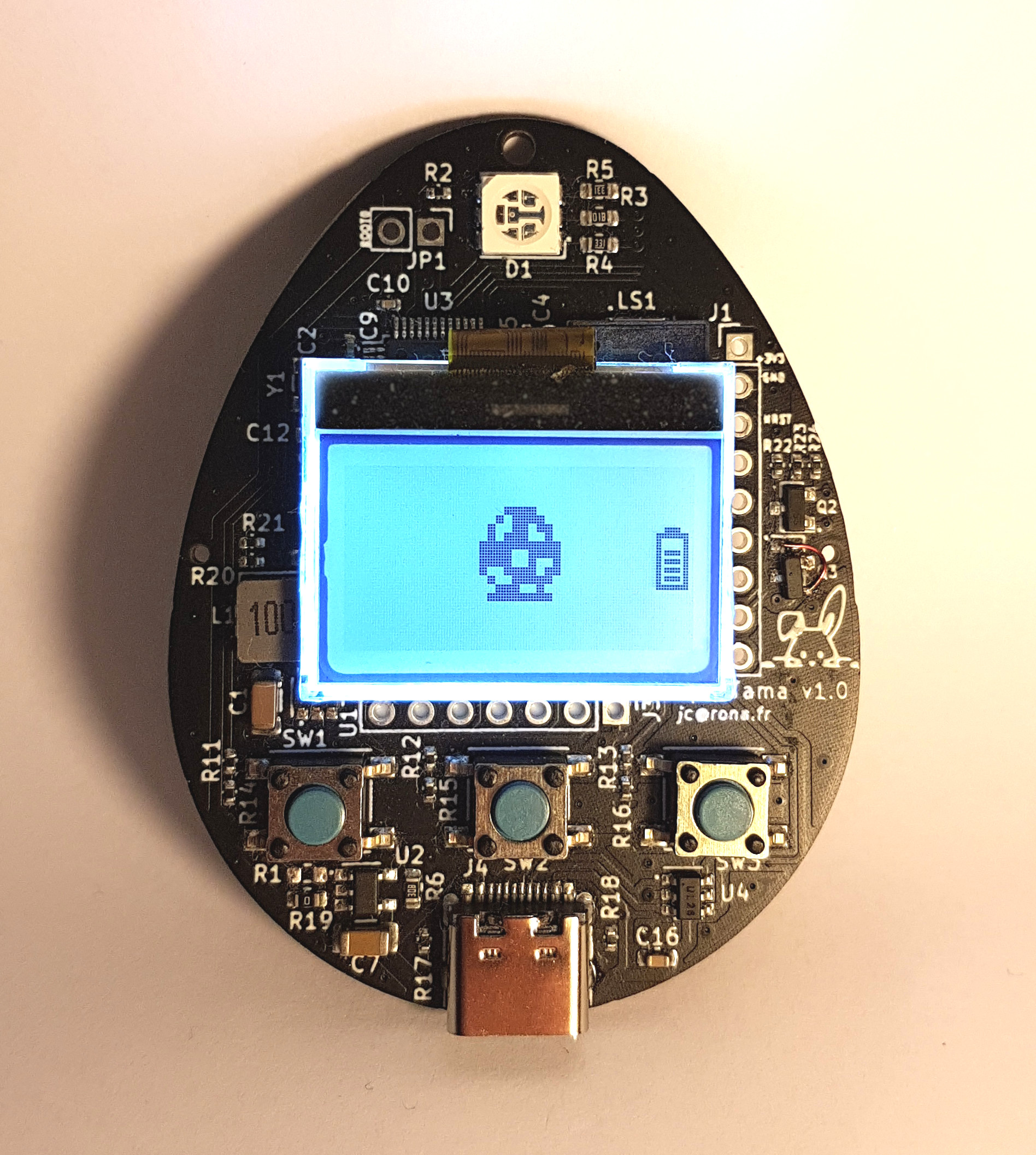
It features:
Being an open-source hardware design, anyone can manufacture his/her own board. Furthermore, all components have been placed on the top side of the board, so that the assembly as well can be performed by EMS such as JLCPCB, even for small quantities. The battery and screen must be soldered manually.
Make or buy an OpenTama board
If you decide to build it, please note that the JLCPCB references for all the components have already been provided in the project. However, those have been selected depending on their availability at a specific point in time, and will probably need adjustments if you decide to go with JLCPCB.
Decide if you want an SSD1306 OLED screen or a UC1701x LCD screen, and buy it
The UC1701x LCD is a low power display compared to the SSD1306 OLED that drains way more power. However, if you plan to use the MCUGotchi firmware, the highest power consumption will come from the MCU that will not really have time to sleep, so your choice will not have a big impact on the overall power consumption.
If you want to use an SSD1306, the board expects a regular 7-pin 0,96" integrated module. However, if you want a UC1701x, you just need the LCD itself, and you can either choose an FPC one (0.5mm pitch, 14 pins), or one that needs to be soldered (0.6mm pitch, 14 pins).
For reference, we used this one.
Buy a a battery
The design has been made assuming a 1000mAh 40x30x12mm Li-Po/Li-ion battery.
For reference, we used this one.
Plug or solder the display
Solder the battery
Your OpenTama board is ready !
Build the firmware of your choosing
For instance, checkout the MCUGotchi repository and follow the instructions to build it for the OpenTama board.
Get and build dfu-util
Boot the board in DFU mode
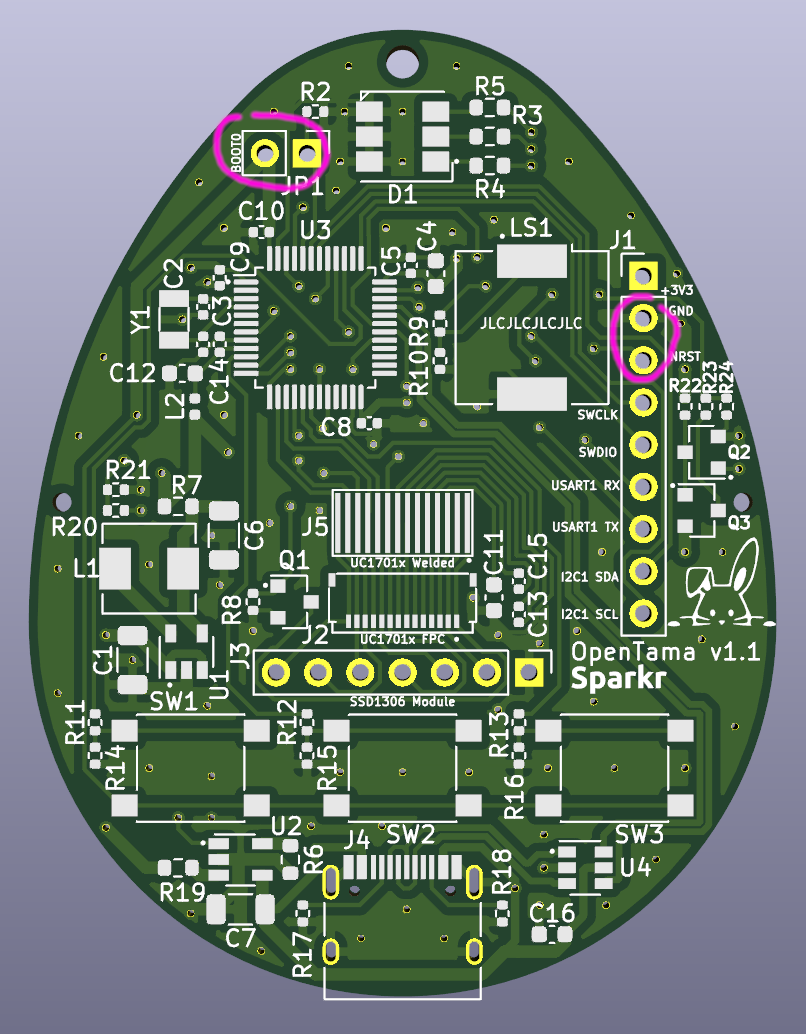
Close the BOOT0 jumper at the top of the board, and while doing so, trigger a reset by connecting together the NRST and GND pins at the right of the board.
$ cd mcugotchi
$ sudo make flash
or
$ sudo dfu-util -a 0 -s 0x08000000:leave -D <firmware.bin>OpenTama is distributed under the CERN-OHL-S v2 license. See the LICENSE file for more information.
__
Copyright (C) 2022 Sparkr
| Qty | Value | Footprint | References |
|---|---|---|---|
| 4 | 100nF | Capacitor_SMD:C_0402_1005Metric | C5, C8, C9, C10 |
| 4 | 20k | Resistor_SMD:R_0402_1005Metric | R20, R21, R23, R24 |
| 3 | 220k | Resistor_SMD:R_0402_1005Metric | R14, R15, R16 |
| 3 | 330 | Resistor_SMD:R_0402_1005Metric | R11, R12, R13 |
| 2 | 0 | Resistor_SMD:R_0603_1608Metric | R7, R19 |
| 2 | 10k | Resistor_SMD:R_0402_1005Metric | R2, R8 |
| 2 | 12pF | Capacitor_SMD:C_0402_1005Metric | C2, C3 |
| 2 | 2.2uF/5V | Capacitor_SMD:C_0402_1005Metric | C13, C15 |
| 2 | 330 | Resistor_SMD:R_0603_1608Metric | R4, R5 |
| 2 | 5.1k | Resistor_SMD:R_0402_1005Metric | R17, R18 |
| 2 | BSS138 | Package_TO_SOT_SMD:SOT-23 | Q1, Q2 |
| 1 | 100 | Resistor_SMD:R_0402_1005Metric | R9 |
| 1 | 100k | Resistor_SMD:R_0402_1005Metric | R22 |
| 1 | 100nF | Capacitor_SMD:C_0603_1608Metric | C16 |
| 1 | 10nF | Capacitor_SMD:C_0402_1005Metric | C14 |
| 1 | 10uF | Capacitor_SMD:C_1206_3216Metric | C6 |
| 1 | 10uF | Capacitor_SMD:C_0603_1608Metric | C4 |
| 1 | 10uH | Inductor_SMD:L_Sunlord_MWSA0518_5.4x5.2mm | L1 |
| 1 | 1k | Resistor_SMD:R_0603_1608Metric | R3 |
| 1 | 1k | Resistor_SMD:R_0402_1005Metric | R10 |
| 1 | 1uF | Capacitor_SMD:C_1206_3216Metric | C7 |
| 1 | 1uF | Capacitor_SMD:C_0603_1608Metric | C12 |
| 1 | 2k 1% | Resistor_SMD:R_0603_1608Metric | R6 |
| 1 | 32768Hz - 12,5 pF | Crystal:Crystal_SMD_3215-2Pin_3.2x1.5mm | Y1 |
| 1 | 330nF/25V | Capacitor_SMD:C_0603_1608Metric | C11 |
| 1 | 39nH | Inductor_SMD:L_0402_1005Metric | L2 |
| 1 | 4.7uF | Capacitor_SMD:C_1206_3216Metric | C1 |
| 1 | BOOT0 | Connector_PinHeader_2.54mm:PinHeader_1x02_P2.54mm_Vertical | JP1 |
| 1 | BSS84 | Package_TO_SOT_SMD:SOT-23 | Q3 |
| 1 | Battery_Cell | OpenTama:Battery_Pads_4x4 | BT1 |
| 1 | Conn_01x07 | Connector_PinHeader_2.54mm:PinHeader_1x07_P2.54mm_Vertical | J3 |
| 1 | Conn_01x09 | Connector_PinHeader_2.54mm:PinHeader_1x09_P2.54mm_Vertical | J1 |
| 1 | Conn_01x14 | OpenTama:LCD_14p_0.6mm | J5 |
| 1 | Conn_01x14 | OpenTama:Hirose_FH34SRJ-14S-0.5SH_1x14-1MP_P0.50mm_Horizontal | J2 |
| 1 | LED_RGB | OpenTama:LED_RGB_TC5050 | D1 |
| 1 | LEFT | Button_Switch_SMD:SW_Push_1P1T_NO_6x6mm_H9.5mm | SW1 |
| 1 | LOGO | OpenTama:Sparkr_Logo | G*** |
| 1 | LTC4054ES5-4.2 | Package_TO_SOT_SMD:TSOT-23-5 | U2 |
| 1 | Lapin | OpenTama:Lapin | G*** |
| 1 | MIDDLE | Button_Switch_SMD:SW_Push_1P1T_NO_6x6mm_H9.5mm | SW2 |
| 1 | No BATT | Jumper:SolderJumper-2_P1.3mm_Open_RoundedPad1.0x1.5mm | JP2 |
| 1 | RIGHT | Button_Switch_SMD:SW_Push_1P1T_NO_6x6mm_H9.5mm | SW3 |
| 1 | STM32L072CBTx | Package_QFP:LQFP-48_7x7mm_P0.5mm | U3 |
| 1 | Speaker_Crystal | Buzzer_Beeper:Buzzer_CUI_CPT-9019S-SMT | LS1 |
| 1 | TPS62203DBV | Package_TO_SOT_SMD:SOT-23-5 | U1 |
| 1 | USBLC6-2SC6 | Package_TO_SOT_SMD:SOT-23-6 | U4 |
| 1 | USB_C_Receptacle_USB2.0 | Connector_USB:USB_C_Receptacle_HRO_TYPE-C-31-M-12 | J4 |
The 64 most common of 65 parts.
It measures 45 × 58.2 mm and has 2 copper layers, 1.6 mm thick.
65 parts, built around the TPS62203DBV, LTC4054ES5-4.2#PBF, USBLC6-2SC6 and BSS138. The full list of its parts is on this page, with links to each part's symbol and footprint where PCBKit's library has them.
From the Sparkr-tech/opentama repository on GitHub, at the commit this page was made from: the board is OpenTama.kicad_pcb and its schematic OpenTama.kicad_sch. PCBKit opens the board in the browser, with nothing to install.
Its repository states no licence, so its author keeps all rights: ask Sparkr-tech before reusing the design.

minsk-hackerspace/accessController
Control access to BIG DANGEROUS tools in hackerspace


Michael-Manning/E-Paper-Climate-Logger
Firmware, PCB, and enclosure for the Weathergotchi E-Paper climate logger.

axpaul/KinetiCoreDC
Compact STM32G0-based DC motor controller board featuring TI DRV8874 H-bridge drivers, RS485 communication, optoisolated I/O, and hardware power protection.


