
2 layers50 × 30 mm

 sksat/kicadiff9
KiCad diff view tool
Mcu board is an open-source printed circuit board by sksat, from the sksat/kicadiff repository on GitHub, published under the MIT licence. It is a 2-layer board of 80 × 50 mm with 15 parts on 9 nets, routed with 54 tracks and 8 vias.
It is built around the AMS1117-3.3. Its parts include 3 capacitors, 2 resistors, 2 ICs, 2 connectors and 1 diode. It belongs with the microcontroller boards boards of this library.
Visual diff tool for KiCad projects — see what changed between two
states of a .kicad_pcb / .kicad_sch / .kicad_sym / .kicad_mod
file in your browser, or as a markdown report you can paste into a PR.
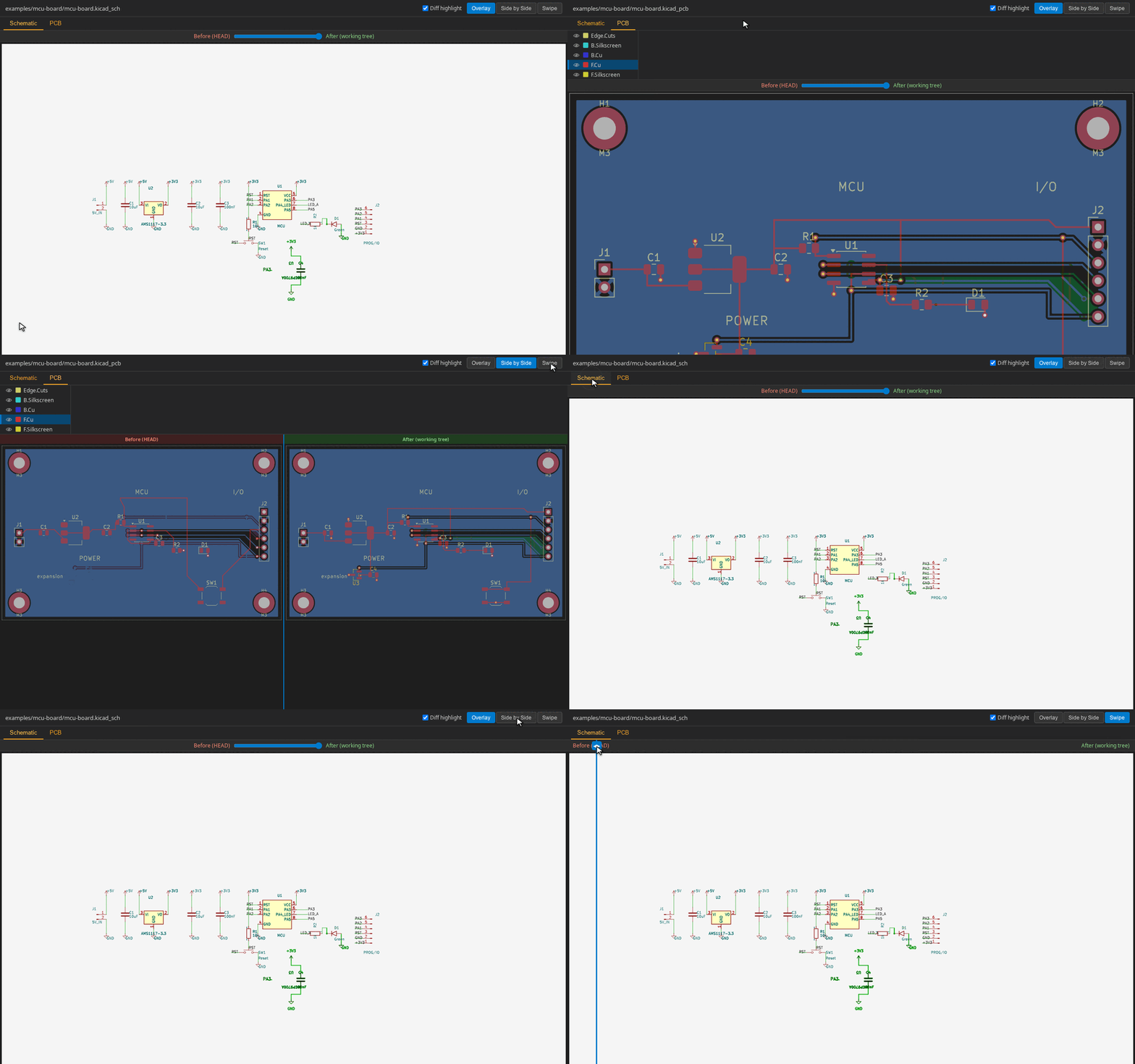
HTML viewer with side-by-side / overlay / swipe modes, layer toggles for PCBs, page navigation for hierarchical schematics, wheel-to-zoom and right-click-drag-to-pan, and an amber tab marker on files / pages whose rendered output actually changed.
Markdown report (--md) with side-by-side image tables and a
structural component diff (added / removed / changed by reference
designator), plus — for PCBs — a Nets subsection that lists added /
removed nets and pads that were rewired (R1.2: GND → /VCC). Pad
transitions to or from the unconnected net are surfaced too
(R7.1: (unconnected) → +3V3). Both legacy ((net id "name")) and
KiCad 10 ((net "name"), no top-level net table) shapes are
supported. Good for PR descriptions and commit messages.
Text-only structural diff (--text-only) — fast, no image
rendering, prints to stdout. Includes the same Nets subsection for
PCBs so routing changes show up in CI logs and grep:
blink.kicad_pcb (pcb): +0 -0 ~1 =3
  ~ R1  value: 330 → 470
  Nets: +1 -0 ~2
    + /LED_OUT
    ~ R1.2: GND → /LED_OUT
    ~ R7.1: (unconnected) → +3V3
DRC / ERC violation diff (kicadiff check) — runs design-rule and
electrical-rule checks on both sides and reports the delta as
+N new / -M fixed / =K unchanged. Exits 1 when the target side
introduces NEW violations (non-zero on operational failures too —
missing kicad-cli, git errors, JSON parse errors), so it makes a
good PR gate that fails on regressions while ignoring pre-existing
findings.
kicad-cli 9.x or later (rendering engine).The render pipeline (SVG → PNG, tri-colour pixel diff highlight) used to
need rsvg-convert and ImageMagick; both are now in-process
(@resvg/resvg-js for rasterisation, a small custom classifier on top
of pngjs for the diff overlay).
Three ways depending on what's already on your machine:
# 1. One-shot via Bun's package runner (no install)
bunx kicadiff [args...]

# 2. Global install (puts `kicadiff` on PATH)
pnpm add -g kicadiff
# or with `bun add -g kicadiff` / `npm install -g kicadiff`

# 3. Standalone binary — single file, no Bun runtime needed.
#    Drops `kicadiff` into ~/.local/bin (override with KICADIFF_INSTALL_DIR).
curl -fsSL https://raw.githubusercontent.com/sksat/kicadiff/main/install.sh | sh
kicad-cli (and rsvg-convert / magick) are not bundled — install KiCad 9+
first, then pick whichever kicadiff distribution form fits your workflow.
kicadiff works on the same positional argument shape as git diff,
plus a few subcommands when you want to scope to one file type.
# Project-level diff (cwd, both PCB and schematic, default = index vs working
# tree — same as `git diff`)
kicadiff

# Pass a project root, a .kicad_pro, or any single KiCad file
kicadiff path/to/project/
kicadiff project.kicad_pro
kicadiff project.kicad_pcb

# Staged changes only (same as `git diff --cached` / `git diff --staged`)
kicadiff --cached project/
kicadiff --staged project/             # alias

# Compare arbitrary refs
kicadiff HEAD path/to/project/         # working tree vs HEAD (includes staged)
kicadiff main path/to/project/         # working tree vs main
kicadiff v1.0 v2.0 board.kicad_pcb     # v1.0 vs v2.0
kicadiff main..feat foo.kicad_pcb      # range syntax
kicadiff main -- foo.kicad_pcb         # explicit `--` separator
kicadiff :0 project/                   # explicit index ref (alias: index / staged)

# Subcommands scope to one file type (skip sibling auto-detect)
kicadiff pcb foo.kicad_pcb
kicadiff sch foo.kicad_sch # alias: schematicBy default kicadiff writes to <repo>/.claude/preview/ (next to the git
root) so the directory is easy to find from the project. Override with
--output-dir <dir> for the image directory, and --output <path> to
relocate the HTML / markdown file specifically (image paths in the
file get rewritten to be relative to it, so the file stays portable).
The HTML viewer is a single file with the manifest + image references inline; you can email it, host it as a static asset, or open it locally with VSCode's Live Preview extension.
Every per-side render is content-addressed and cached under
$XDG_CACHE_HOME/kicadiff (or ~/.cache/kicadiff). Repeat runs
against unchanged content return in ~1 s vs ~5 s cold. Bypass with
--no-cache or override the location with KICADIFF_CACHE_DIR.
The cache grows monotonically — every kicad-cli version bump and every
content edit adds a new entry, and nothing is evicted automatically.
Inspect and reclaim space with the cache subcommand:
# Show cache directory, entry count, total size, and oldest / newest age
kicadiff cache stats

# Delete entries older than a cutoff (units: s/m/h/d, unit required)
kicadiff cache prune --older-than 30d
kicadiff cache prune --older-than 30d --dry-run    # preview, change nothing

# Wipe the whole cache (recursive rm of the cache root — any stray files
# at the root go too, not just registered entries). `--yes` skips the
# confirmation prompt and is required in non-TTY (CI) environments so
# the prompt can never hang a build. As a safety net, `--all` refuses
# to run unless the cache root contains a `.kicadiff-cache` marker
# (auto-dropped on first cache write and on any `cache stats` /
# read) — that way a misconfigured `KICADIFF_CACHE_DIR` can't silently
# wipe an unrelated directory. For a pre-existing cache from before
# this marker was introduced, run `kicadiff cache stats` once to
# install the marker, then retry `--all`. Use `rm -rf` manually if
# you really mean to delete such a directory.
#
# Note: `cache stats` does NOT recurse into foreign top-level
# directories (anything whose name doesn't match the cache layout's
# 2-char hex bucket pattern). Their bytes are excluded from "Total
# size" — a misconfigured `KICADIFF_CACHE_DIR` (e.g. `$HOME`) won't
# make `stats` walk a huge unrelated tree. `--all` will still wipe
# the entire cache root, so it may reclaim more than `stats` reports.
kicadiff cache prune --all --yesDrop the action into a workflow to render a visual diff for every PR that touches a KiCad file. The action handles KiCad install, runs kicadiff, and (opt-in) uploads the rendered images as a build artifact, writes a job summary with inline before/after images, upserts a sticky PR comment, and updates a marked section in the PR description.
# .github/workflows/kicad-diff.yml
name: KiCad visual diff
on:
  pull_request:
    paths: ["**/*.kicad_pcb", "**/*.kicad_sch"]
permissions:
  contents: read
  pull-requests: write   # only needed for pr-comment / pr-description
jobs:
  diff:
    runs-on: ubuntu-latest
    steps:
      - uses: actions/checkout@v6
        with: { fetch-depth: 0 }
      - uses: sksat/kicadiff@v0.2.0
        with:
          path: hardware/main-board   # default: cwd
          upload-artifact: 'true'
          pr-comment:      'true'
          pr-description:  'true'
Job summary embeds combined PNGs as base64 data URIs (no extra hosting
needed) up to a 1 MiB cap; if a project's images would overflow, the
action drops the rest, emits ::warning::, and links to the artifact
for the full set. PR comment / description are kept text-only and link
to the artifact for images.
install-kicadiff: bunx (default) pulls the latest published kicadiff
on demand; pin a version with install-kicadiff: <semver>. Pre-installed
on PATH? Use install-kicadiff: skip.
DESIGN.md — architecture, render pipeline, cache key shape,
manifest schema, viewer mode semanticsexamples/blink/ — minimal KiCad project used as the test fixture
and a usable starting point. Ships with a .claude/settings.json
PostToolUse hook (kicadiff hook) that re-renders the diff every
time a .kicad_pcb / .kicad_sch is Edited / Written.examples/mcu-board/ — a more realistic small-board layout: an
8-pin MCU stand-in with the usual stuff around it (5 V → 3.3 V
AMS1117 LDO, decoupling caps, reset switch with pull-up, status
LED, and a 6-pin programming/breakout header). Hierarchical
schematic — root for the power chain and MCU itself,
peripherals.kicad_sch sub-sheet for the reset/LED/header — so
the per-page tabs in the viewer have something to switch between.| Qty | Value | Footprint | References |
|---|---|---|---|
| 4 | M3 | MountingHole:MountingHole_3.2mm_M3 | H1, H2, H3, H4 |
| 2 | 10uF | C_0805_2012Metric | C1, C2 |
| 1 | 100nF | C_0805_2012Metric | C3 |
| 1 | 10k | R_0805_2012Metric | R1 |
| 1 | 1k | R_0805_2012Metric | R2 |
| 1 | 5V_IN | PinHeader_1x02_P2.54mm_Vertical | J1 |
| 1 | AMS1117-3.3 | SOT-223-3_TabPin2 | U2 |
| 1 | Green | LED_0805_2012Metric | D1 |
| 1 | MCU | SOIC-8_3.9x4.9mm_P1.27mm | U1 |
| 1 | PROG/IO | PinHeader_1x06_P2.54mm_Vertical | J2 |
| 1 | Reset | SW_SPST_TL3342 | SW1 |


pascallanger/DIY-Multiprotocol-TX-Module
Multiprotocol TX Module (or MULTI-Module) is a 2.4GHz transmitter module which controls many different receivers and models.

fossasia/pslab-hardware
PSLab Hardware Design and Schematics https://pslab.io


MaltWhiskey/Mega-Cube
16x16x16 PL9823 Cube with Teensy 4.0 and FlexIO driver


shamansystems/Cheap-FOCer-2
Low-Cost Motor Controller based on the VESC 6
It measures 80 × 50 mm and has 2 copper layers, 1.6 mm thick.
15 parts, built around the AMS1117-3.3. The full list of its parts is on this page, with links to each part's symbol and footprint where PCBKit's library has them.
From the sksat/kicadiff repository on GitHub, at the commit this page was made from: the board is examples/mcu-board/mcu-board.kicad_pcb and its schematic examples/blink/blink.kicad_sch. PCBKit opens the board in the browser, with nothing to install.
Its repository publishes it under the MIT licence: you may reuse it on that licence's terms (keep the author's notice, and for a copyleft licence share your changes alike).