

2 layers

 SeryiBaran/ardustat2
Термостат на Arduino
Ardustat is an open-source printed circuit board by SeryiBaran, from the SeryiBaran/ardustat repository on GitHub. It is a 2-layer board of 62 × 58 mm with 16 parts on 31 nets, routed with 38 tracks and 0 vias.
It is built around the TM1637 and BC547. Its parts include 5 connectors, 2 resistors, 1 diode and 1 transistor. It belongs with the home automation and IoT boards and the AVR (ATmega, ATtiny) boards of this library.
Термостат на Arduino Nano + NTC с 4-разрядным 7-сегментным дисплеем.
Схема:
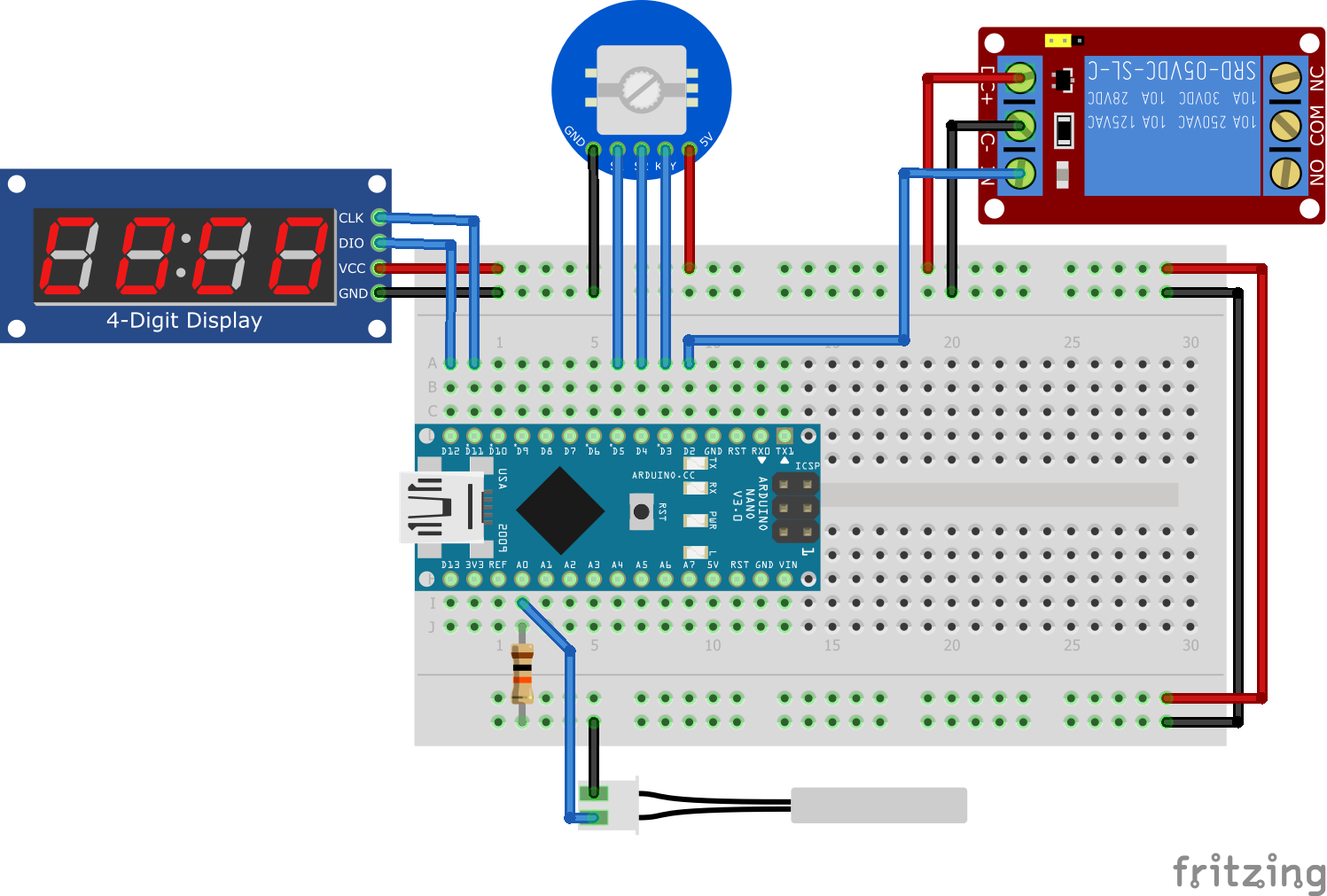
Схема в KiCad здесь.
Схема KiCad в PDF здесь.
ВНИМАНИЕ!!! Код создавался в онлайн-симуляторе Wokwi и не проверялся в реальности.
Настройки сохраняются в EEPROM. Беспокоиться не стоит, используется библиотека EEManager с удобной логикой.
Занятые ресурсы МК по мнению PlatformIO:
RAM:   [=         ]  10.0% (used 205 bytes from 2048 bytes)
Flash: [== ] 24.7% (used 7586 bytes from 30720 bytes)мощность / напряжение + запас. Например ТЭН на 2КВт с напряжением 220V потребляет ток ~9A - лучше взять реле с запасом, например на 16 ампер. На али лично я не видел модулей реле выше 10 ампер, поэтому можно взять твердотельное. Но оно существенно дороже обычного - 500 рублей против 60. Зато оно не боится частых переключений, не нужна никакая обвязка, контакты не могут износиться (их там нет -_-). Минус твердотельного реле - оно греется, поэтому нужно брать с запасом по току и/или крепить на радиаторВ формате .Docx - в нем удобнее делать дизайн для печати.
Приложено к Github релизу и лежит тут
| Qty | Value | Footprint | References |
|---|---|---|---|
| 4 | MountingHole | MountingHole:MountingHole_3.2mm_M3_DIN965_Pad | H1, H2, H3, H4 |
| 1 | 10k | Resistor_THT:R_Axial_DIN0207_L6.3mm_D2.5mm_P10.16mm_Horizontal | R1 |
| 1 | 1N4007 | Diode_THT:D_DO-41_SOD81_P10.16mm_Horizontal | D1 |
| 1 | 1k | Resistor_THT:R_Axial_DIN0207_L6.3mm_D2.5mm_P10.16mm_Horizontal | R2 |
| 1 | Arduino_Nano_v3.x | Module:Arduino_Nano | A1 |
| 1 | BC547 | Package_TO_SOT_THT:TO-92_Inline | Q1 |
| 1 | Enc | Connector_PinHeader_2.54mm:PinHeader_1x05_P2.54mm_Vertical | J3 |
| 1 | NTC | Connector_PinHeader_2.54mm:PinHeader_1x02_P2.54mm_Vertical | J5 |
| 1 | Power | Connector_PinHeader_2.54mm:PinHeader_1x02_P2.54mm_Vertical | J1 |
| 1 | Relay | Connector_PinHeader_2.54mm:PinHeader_1x02_P2.54mm_Vertical | J4 |
| 1 | TM1637 | Connector_PinHeader_2.54mm:PinHeader_1x04_P2.54mm_Vertical | J2 |
The 14 most common of 16 parts.

keeos-io/ogham
Ogham — a dual-voice bytebeat synthesizer for Eurorack. Firmware (MIT) and hardware (CC BY-SA 4.0).

bitsandpixels-io/kids-control-panel
Spaceship-like control panel for kids, based on Arduino

fehlfarbe/ESP32-Alarm-clock
This is an ESP32 based alarm clock that plays mp3 files from SD, webstreams or even FM radio. You can configure multiple alarms and add new songs to your sd card with a simple webinterface.

galopago/panel-mount-7-segment-display
Open source 7 segment serially controlled led display that fits inside a generic 45x26mm panel mount plastic enclosure. Upgrade your function specific panel meter PCB with a new one controllable by your preferred MCU.

pmalessa/homegreen-Node
The system is based on an inexpensive node, which is able to control up to 3 pumps and can be powered by nearly any conventional powerbank.


It measures 62 × 58 mm and has 2 copper layers, 1.6 mm thick.
16 parts, built around the TM1637 and BC547. The full list of its parts is on this page, with links to each part's symbol and footprint where PCBKit's library has them.
From the SeryiBaran/ardustat repository on GitHub, at the commit this page was made from: the board is kicad/ardustat.kicad_pcb and its schematic kicad/ardustat.kicad_sch. PCBKit opens the board in the browser, with nothing to install.
Its repository states no licence, so its author keeps all rights: ask SeryiBaran before reusing the design.