Skip to the content
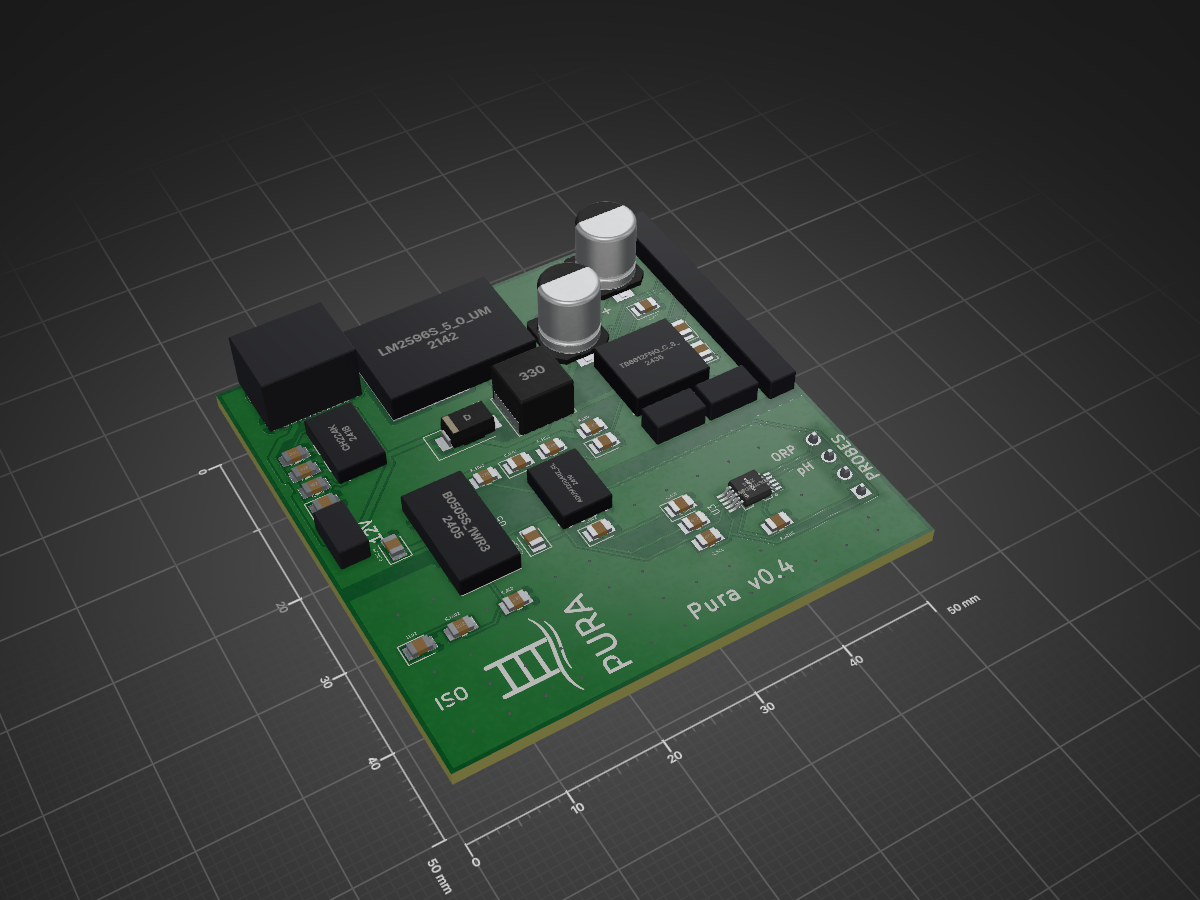
2 layers50 × 50 mmPura mainboard-0.4, the printed circuit board in 3D

Pura mainboard-0.4

rvbcrs/PoolLab

PH‑4502C (pH bordje) JC3248W535 (ESP32‑S3) VCC ────────────────────── 3.3 V GND ────────────────────── GND PO ────────────────────── GPIO6 (ADC1CH5) DO niet aansluiten TO niet aansluiten BNC ←── pH‑electrode

Size
50 × 50 mm
Copper layers
2
Thickness
1.6 mm
Parts
39
Nets
32
Pads
154
Tracks, vias
441, 60
Pours
8
Routed
Yes
KiCad
KiCad 10.0 (file 20260206)
Created
9 Sep 2025
Updated
9 Oct 2026

Overview

Pura mainboard-0.4 is an open-source printed circuit board by rvbcrs, from the rvbcrs/PoolLab repository on GitHub. It is a 2-layer board of 50 × 50 mm with 39 parts on 32 nets, routed with 441 tracks and 60 vias.

It is built around the B0505S-1WR3L, ADS1115IDGST and CH224K, with the ADUM1250ARZ-RL7-HXY among its other parts. Its parts include 6 ICs, 3 diodes, 1 connector and 1 inductor. It belongs with the computers and single-board computers boards of this library.

Main components

4

README

README.md

Pura — ESP32‑S3 zwembadmonitor (pH, ORP, Temp · LVGL · MQTT · Zigbee)

Wat het doet

  • pH en ORP meten via analoge PH‑4502C/ORP‑4502C sensorbordjes (MCP6002 op 3.3 V) rechtstreeks op de ESP32 ADC.
  • Twee modi: schakel tussen Zigbee en WiFi/MQTT via een UI‑toggle. De keuze wordt persistent opgeslagen (NVS) en bij boot toegepast.
  • MQTT integratie: publiceert pH/ORP/temperatuur en biedt Home Assistant auto‑discovery + command topics om drempels te wijzigen.
  • Doseer‑pompen: twee peristaltische pompen (pH/ORP) via TB6612FNG driver, met PWM‑snelheidsregeling vanuit de LVGL‑UI.
  • Safety: limieten voor dagvolume, sessieduur en pH/ORP sanity; automatische noodstop + WhatsApp‑notificatie.
  • Zigbee commissioning: lange druk op BOOT (>3 s) start commissioning; WiFi wordt tijdelijk uitgezet.

Primaire hardware

OnderdeelOmschrijving
MCUJC3248W535 — ESP32‑S3, 3.5" IPS 320×480 QSPI display, capacitief touch
Sensoren2× PH‑4502C bordje (één voor pH, één voor ORP), LM358 vervangen door MCP6002
Motor driverSparkFun ROB‑14450 / TB6612FNG
Pompen2× peristaltische pomp (pH‑dosering en ORP/chloor‑dosering)

Sensor bekabeling (PH‑4502C met MCP6002 op 3.3 V)

Belangrijk: Voed het bordje op 3.3 V, niet 5 V. De MCP6002 is rail‑to‑rail (1.8–6 V). Bij 5 V kan de analoge output bij zuur water boven 3.3 V uitkomen en de ESP32 ADC beschadigen.

text
PH‑4502C (pH bordje)        JC3248W535 (ESP32‑S3)
  VCC  ──────────────────────  3.3 V
  GND  ──────────────────────  GND
  PO   ──────────────────────  GPIO6   (ADC1_CH5)
  DO   niet aansluiten
  TO   niet aansluiten
  BNC  ←── pH‑electrode

PH‑4502C (ORP bordje)       JC3248W535 (ESP32‑S3)
  VCC  ──────────────────────  3.3 V
  GND  ──────────────────────  GND
  PO   ──────────────────────  GPIO7   (ADC1_CH6)
  DO   niet aansluiten
  TO   niet aansluiten
  BNC  ←── ORP‑electrode

GPIO6 en GPIO7 zijn vrije ADC1‑pinnen (geen WiFi‑conflict). De overige ADC1‑pinnen zijn in gebruik door QSPI‑display (21/39/40/45/47/48), touch I2C (4/8), motoren (9/14–18) en I2S‑speaker (2/41/42).

Testen zonder probe: Verbind de BNC center pin met de BNC outer ring via een 10 kΩ weerstand → simuleert 0 mV (pH 7 / 0 mV ORP) → de display toont ~pH 7.0 en ~0 mV.

Platformio.ini flags (al ingesteld voor esp32‑s3‑35):

ini
-D USE_ANALOG_SENSORS=1
-D PH_ADC_PIN=6
-D ORP_ADC_PIN=7

Kalibratie defaults (MCP6002 op 3.3 V, gain ≈ 5.2×):

PuntSpanning
pH 4≈ 2.58 V
pH 7≈ 1.65 V (mid‑supply)
pH 10≈ 0.72 V
ORP 0 mV≈ 1.65 V

Kalibreer altijd met pH 4 en pH 7 buffervloeistof voor nauwkeurige metingen. Waarden worden opgeslagen in NVS via WebUI → Settings → Calibration.


Wiring diagrams

ESP32‑S3 — Analoge sensoren (PH‑4502C met MCP6002)

mermaid
flowchart LR
  PH_PROBE["pH‑electrode\n(BNC)"] --> PH_BOARD["PH‑4502C\n(MCP6002 op 3.3 V)"]
  ORP_PROBE["ORP‑electrode\n(BNC)"] --> ORP_BOARD["PH‑4502C ORP\n(MCP6002 op 3.3 V)"]
  PH_BOARD  --"PO → GPIO6"--> MCU["JC3248W535\nESP32‑S3"]
  ORP_BOARD --"PO → GPIO7"--> MCU
  V33["3.3 V"] --> PH_BOARD
  V33         --> ORP_BOARD
  GND["GND"]  --> PH_BOARD
  GND         --> ORP_BOARD
  GND         --> MCU

ESP32‑C6 — ADS1115 via I2C

mermaid
flowchart LR
  PH_PROBE["pH‑electrode\n(BNC)"] --> PH_BOARD["PH‑4502C"]
  ORP_PROBE["ORP‑electrode\n(BNC)"] --> ORP_BOARD["PH‑4502C ORP"]
  PH_BOARD  --"AO → A0"--> ADS["ADS1115\n(0x48)"]
  ORP_BOARD --"AO → A1"--> ADS
  ADS --"SDA → GPIO18"--> MCU["ESP32‑C6"]
  ADS --"SCL → GPIO19"--> MCU
  V33["3.3 V"] --> ADS
  GND["GND"]   --> ADS
  GND          --> MCU

ESP32‑S3 — Motor driver (TB6612FNG)

mermaid
flowchart LR
  MCU["JC3248W535\nESP32‑S3"] --"GPIO15 IN1\nGPIO16 IN2\nGPIO17 PWM"--> M1["TB6612\nMotor A"]
  MCU --"GPIO18 IN1\nGPIO14 IN2\nGPIO9 PWM"--> M2["TB6612\nMotor B"]
  MCU --"GPIO46 STBY"--> M1
  MCU --"GPIO46 STBY"--> M2
  M1 --"A01/A02"--> PUMP1["pH‑pomp"]
  M2 --"B01/B02"--> PUMP2["ORP‑pomp"]
  VM["6–12 V"] --> M1
  VM           --> M2

ADS1115 (ESP32‑C6 build)

De C6‑build (esp32‑c6‑147) leest pH en ORP via een ADS1115 16‑bit ADC op I2C:

text
ADS1115          ESP32‑C6
  VDD ────────── 3.3 V
  GND ────────── GND
  SDA ────────── GPIO18
  SCL ────────── GPIO19
  A0  ────────── pH AO
  A1  ────────── ORP AO

Flags (al ingesteld):

ini
-D USE_ADS1115=1
-D ADS_ADDR=0x48
-D ADS_SDA=18
-D ADS_SCL=19
-D ADS_CH_PH=0
-D ADS_CH_ORP=1

Motor driver bekabeling (TB6612FNG — ESP32‑S3)

text
TB6612FNG        JC3248W535 (ESP32‑S3)
  VCC  ────────── 3.3 V  (logica)
  GND  ────────── GND
  VM   ────────── motorspanning (6–12 V)
  STBY ────────── GPIO46

  AIN1 ────────── GPIO15  (M1 IN1 / pH pomp)
  AIN2 ────────── GPIO16  (M1 IN2)
  PWMA ────────── GPIO17  (M1 PWM — LEDC CH5 / Timer 3)

  BIN1 ────────── GPIO18  (M2 IN1 / ORP pomp)
  BIN2 ────────── GPIO14  (M2 IN2)
  PWMB ────────── GPIO9   (M2 PWM — LEDC CH4 / Timer 2)

  A01/A02 ─────── Motor 1 (pH‑pomp)
  B01/B02 ─────── Motor 2 (ORP‑pomp)
  • GPIO46 is een strapping pin; zorg dat STBY niet omlaag trekt tijdens boot.
  • PWM: 10 kHz, 8‑bit. Snelheden instelbaar in LVGL‑UI en opgeslagen in NVS.

Pump Flow Tracking & Kalibratie

Wat wordt bijgehouden:

  • Real‑time flow rate (ml/min) tijdens pompen
  • Session volume (ml) — reset bij stop
  • Daily volume — reset automatisch om 00:00
  • Total volume — handmatig reset via WebUI

Flow kalibreren:

  1. WebUI → Settings → "Pump Flow Rate (ml/min @ 100%)"
  2. Laat pomp 60 s @ 100% draaien, meet volume in maatbeker
  3. Flow rate = gemeten volume / 1 minuut
  4. Systeem schaalt automatisch voor lagere snelheden (bijv. 60% = 0.6 × gekalibreerde waarde)

Safety Features & Emergency Stop

Limieten (instelbaar in src/main.cpp):

cpp
MAX_DAILY_VOLUME     = 500.0f;  // ml/dag per pomp
MAX_SESSION_VOLUME   = 200.0f;  // ml per aanslag
MAX_SESSION_DURATION = 120;     // seconden per aanslag
PH_SANITY_MIN        = 4.0f;
PH_SANITY_MAX        = 10.0f;
ORP_SANITY_MIN       = -500.0f;
ORP_SANITY_MAX       = 1500.0f;
SENSOR_TIMEOUT       = 300;     // seconden zonder data → alarm

Gedrag bij trigger:

  • Alle pompen direct gestopt
  • Rode banner op LVGL UI: ⚠️ EMERGENCY STOP - <reden>
  • MQTT alert op pool/alert/<type>
  • WhatsApp‑bericht via CallMeBot

WhatsApp Setup (CallMeBot):

  1. Verkrijg API key via https://www.callmebot.com/blog/free-api-whatsapp-messages/
  2. WebUI → Safety → telefoonnummer (bijv. 31612345678) + API key invullen
  3. Test via "Send Test Alert" button

MQTT Alert Topics:

text
pool/alert/daily_limit_m1      pool/alert/daily_limit_m2
pool/alert/session_volume_m1   pool/alert/session_volume_m2
pool/alert/session_duration_m1 pool/alert/session_duration_m2
pool/alert/ph_sanity_low       pool/alert/ph_sanity_high
pool/alert/orp_sanity_low      pool/alert/orp_sanity_high
pool/alert/ph_sensor_timeout   pool/alert/orp_sensor_timeout

Bouwen en flashen

Primaire build (ESP32‑S3 35"):

bash
pio run -e esp32-s3-35 -t upload --upload-port <ip>   # OTA
pio run -e esp32-s3-35 -t upload                       # USB

C6 build:

bash
pio run -e esp32-c6-147 -t upload

Seriële monitor: 115200 baud.


Configuratie

WiFi via captive portal:

  • Bij lege WiFi‑gegevens start automatisch AP Pura‑Setup.
  • Verbind → open willekeurige URL → vul SSID/wachtwoord in → Save & Reboot.
  • Of via Settings → Network → Configure WiFi.

MQTT instelbaar via WebUI → Settings (host/port/user/pass) of in src/main.cpp:

cpp
MQTT_HOST, MQTT_PORT, MQTT_USER, MQTT_PASS, MQTT_CLIENTID

OTA: hostnaam pura-XXXXXX (chip‑ID). Upload via PlatformIO "Upload using network" of ArduinoOTA.


MQTT Topics

State:

text
pool/sensor/ph
pool/sensor/orp
pool/sensor/temp

Home Assistant discovery:

text
homeassistant/sensor/pool_ph/config
homeassistant/sensor/pool_orp/config
homeassistant/sensor/pool_temp/config

Drempels (write/echo):

text
pool/cmd/ph_min  ↔  pool/cfg/ph_min
pool/cmd/ph_max  ↔  pool/cfg/ph_max
pool/cmd/orp_min ↔  pool/cfg/orp_min
pool/cmd/orp_max ↔  pool/cfg/orp_max

WebUI

URLPagina
http://<ip>/Live sensor tiles + pump stats (WebSocket)
http://<ip>/settingspH/ORP drempels, pompsnelheden, flow kalibratie, MQTT
http://<ip>/safetyEmergency status, WhatsApp config, volume resets, test alerts

WebSocket op poort 81.


LVGL UI

  • ESP32‑S3 (3.5"): 3‑card UI (pH / ORP / Temp), moderne donkere tegels, pump stats boven motoricoon, emergency banner.
  • ESP32‑C6 (1.47"): Compacte tileview (pH/ORP).
  • Watchdog S3: heartbeat uit BSP‑task; herbouwt UI als >8 s stil → S3 LVGL watchdog: rebuild complete.
  • Touch: debouncing ingebouwd, geen key‑repeat.

Projectstructuur

BestandRol
src/main.cppBootvolgorde, WiFi/MQTT, Zigbee, periodic publish, safety
src/core/Storage.{h,cpp}NVS wrapper (drempels, snelheden, modus, volumes, config)
src/core/boards/Esp32S3Board.{h,cpp}S3 board: display, touch, pins, LVGL lock
src/core/boards/Esp32C6Board.{h,cpp}C6 board
src/boards/BoardSelect.{h,cpp}Board‑selectie op basis van build flag
src/domain/Metrics.{h,cpp}Laatste pH/ORP/temp; bron voor UI en MQTT
src/domain/ControlPolicy.{h,cpp}Safety logic, sanity checks, emergency stop
src/io/AnalogPhOrpSensor.hADC‑lezer voor PH‑4502C via ESP32 ADC (S3)
src/io/AdsPhOrpSensor.{h,cpp}ADS1115 I2C lezer voor pH/ORP (C6)
src/io/MotorController.hMotor state machine, LEDC PWM, flow tracking
src/io/MqttClient.{h,cpp}PubSubClient: discovery, publish, command topics, alerts
src/io/WebUI.{h,cpp}Async web server: homepage, settings, safety, WebSocket, API
src/io/ZigbeeClient.{h,cpp}Zigbee abstractie (C6; no‑op op S3)
src/ui/UI.{h,cpp}LVGL UI builder (3‑card S3 / tileview C6), emergency banner
src/domain/DummySensor.hGesimuleerde sensordata voor testen
src/fonts, src/imagesLVGL assets (fonts, iconen)

Troubleshooting

pH/ORP waarden kloppen niet:

  • Kalibreer met pH 4 en pH 7 buffervloeistof via WebUI → Settings → Calibration.
  • Check de spanning op PO met een multimeter: bij VCC=3.3 V moet pH 7 ≈ 1.65 V geven.
  • Zorg dat VCC van het sensorbordje echt 3.3 V is (niet 5 V).

WiFi "NO_AP_FOUND": controleer SSID/ontvangst; auto‑reconnect + periodieke hard restart.

MQTT extern werkt niet, lokaal wel:

  • Cloudflare DNS: zet op "DNS only" (grijze wolk) voor raw TCP.
  • NPM: gebruik Streams (TCP), geen Proxy Host.
  • Test met mosquitto_sub/pub voordat je het device test.

Pompen werken niet:

  • Console: [MOTOR] Check: MOTOR_ENABLE=1 motorsEnabled=? — beide moeten 1 zijn.
  • WebUI → Settings → vink "Enable pH/ORP dosing pumps" aan → Save.

Emergency stop reset niet automatisch:

  • Sanity alerts: wacht tot sensorwaarden terug binnen limieten zijn.
  • Volume/duration limits: reset device of wacht tot 00:00 (daily reset).

WhatsApp notificaties werken niet:

  • Telefoonnummer met landcode (bijv. 31612345678).
  • Test via CallMeBot website om te bevestigen dat account actief is.
  • Console: zoek naar [SAFETY] WhatsApp API response: 200.

Changelog

Huidig:

  • ✅ Tuya UART sniffer verwijderd — alle sensordata nu via directe hardware (ADC / ADS1115).
  • ✅ PH‑4502C analoge sensoren op GPIO6 (pH) en GPIO7 (ORP) — MCP6002 op 3.3 V.
  • ✅ Kalibratie defaults aangepast voor MCP6002 op 3.3 V (mid‑supply = 1.65 V).
  • ✅ Zigbee onPh/OrpMinMaxWrite stubs voor non‑Zigbee builds (fix compile‑fout S3).
  • ✅ core::Board.h include toegevoegd aan UI.cpp (fix UiConfig compile‑fout).
  • ✅ Backup‑bestanden opgeruimd (AnalogPhOrpSensor 2.h, AdsPhOrpSensor 2.*).

Eerder:

  • ✅ Pump flow tracking: ml/min, session, daily (auto‑reset 00:00), total.
  • ✅ Safety limits: daily/session volume, session duration, pH/ORP sanity, sensor timeout.
  • ✅ Emergency stop: noodstop + rode LVGL banner.
  • ✅ WhatsApp notificaties via CallMeBot (async task).
  • ✅ MQTT alert topics pool/alert/<type>.
  • ✅ WebUI Safety page, Settings gereorganiseerd met emoji‑headers.
  • ✅ Unieke MQTT clientId per device (chip‑ID).
  • ✅ Exponential backoff bij MQTT reconnect.
  • ✅ LVGL watchdog voor C6 en S3.
  • ✅ Touch debouncing (geen key‑repeat).
  • ✅ Reset WiFi knop via captive portal.

Parts

39
QtyValueFootprintReferences
5100nFtscircuit:capacitor_0805C_ADS, C_ISO1, C_ISO2, C_VCC, C_VM2
44.7kΩtscircuit:resistor_res0805R_SCL, R_SCL2, R_SDA, R_SDA2
310uFtscircuit:capacitor_0805C_DC_IN, C_DC_OUT, C_VM
22.2kΩtscircuit:resistor_res0805R_LED, R_LED2
10Ωtscircuit:resistor_res0805R_ADDR
1100uFtscircuit:capacitorC_IN
110kΩtscircuit:resistor_res0805R_VSNS
11kΩtscircuit:resistor_res0805R_VDD
11uFtscircuit:capacitor_0805C_VDD
1220uFtscircuit:capacitorC_OUT
124kΩtscircuit:resistor_res0805R_CFG1
1330Ωtscircuit:resistor_res0805R_BLD
133Htscircuit:inductorL1
1ADS1115IDGSTtscircuit:ADS1115IDGSTU3
1ADUM1250ARZ_RL7tscircuit:ADUM1250ARZ_RL7U6
1B0505S_1WR3tscircuit:B0505S_1WR3U5
1CH224Ktscircuit:CH224KU1
1Dtscircuit:SS34D1
1J_12Vtscircuit:pin_header_pinrow2_nopinlabelsJ_12V
1J_ESPtscircuit:pin_header_pinrow11_nopinlabelsJ_ESP
1J_M1tscircuit:pin_header_pinrow2_nopinlabelsJ_M1
1J_M2tscircuit:pin_header_pinrow2_nopinlabelsJ_M2
1J_PROBEtscircuit:pin_header_pinrow4_nopinlabelsJ_PROBE
1LEDtscircuit:led_0805_color(cyan)LED2
1LEDtscircuit:led_0805_color(green)LED1
1LM2596S_5_0_UMW_tscircuit:LM2596S_5_0_UMWU2
1LOGOLOGOG***
1TB6612FNG_C_8_ELtscircuit:TB6612FNG_C_8_ELU4
1TYPE_C_16PIN_2MD_073_tscircuit:TYPE_C_16PIN_2MD_073J1

More from rvbcrs/PoolLab

1
  • 2 layers50 × 50 mmPura mainboard noroute, the printed circuit board in 3D

    Pura mainboard noroute

    rvbcrs/PoolLab

    PH‑4502C (pH bordje) JC3248W535 (ESP32‑S3) VCC ────────────────────── 3.3 V GND ────────────────────── GND PO ────────────────────── GPIO6 (ADC1CH5) DO niet aansluiten TO niet aansluiten BNC ←── pH‑electrode

    35 parts

Similar boards

  • 2 layers200 × 170 mmRouting R1, the printed circuit board in 3D

    Routing R1

    ddasdkimo/rack-atx-controller

    10-host isolated ATX rack controller hardware planning, interactive 3D model and wiring documentation

    698 parts
  • 2 layers191.3 × 181.7 mmIO Card G3, the printed circuit board in 3D

    IO Card G3

    PerMalmberg/IO-Card-G3

    This is my custom I/O card, third generation. Main purpose is to serve as an alarm system.

    400 parts7MIT
  • 4 layers75 × 170 mmOpencalc pcb V5, the printed circuit board in 3D

    Opencalc pcb V5

    CoryPearl/opencalc

    A new and improved, better than the TI-84, open-source, graphing calculator

    194 parts2
  • 2 layersAdc ads1115, the printed circuit board in 3D

    Adc ads1115

    Nuclear-Squid/KiCad-Templates

    A KiCad plugin to save and reuse schematic + routing templates.

    8 parts1GPL-3.0
  • 2 layers52 × 88 mmPRAN RAKSHAK RevA, the printed circuit board in 3D

    PRAN RAKSHAK RevA

    SrivarsanK/PranRakshak

    Project README · Hardware designs · Original PCB ZIP

    49 parts1
  • 4 layers416 × 130 mmHardware pruefadapter, the printed circuit board in 3D

    Hardware pruefadapter

    CodeByMika/technikerarbeit2026-hardwarepruefadapter

    Im Schuljahr 2025/2026 wurde im Rahmen der Ausbildung zum staatlich geprüften Techniker diese Technikerarbeit in Zusammenarbeit mit der Gottlieb Daimler Schule 2 in Sindelfingen sowie der SOTEC GmbH & Co KG in…

    454 parts

Questions

How big is the Pura mainboard-0.4 PCB?

It measures 50 × 50 mm and has 2 copper layers, 1.6 mm thick.

What parts does the Pura mainboard-0.4 use?

39 parts, built around the B0505S-1WR3L, ADS1115IDGST, CH224K and ADUM1250ARZ-RL7-HXY. The full list of its parts is on this page, with links to each part's symbol and footprint where PCBKit's library has them.

Where can I download the Pura mainboard-0.4 KiCad files?

From the rvbcrs/PoolLab repository on GitHub, at the commit this page was made from: the board is pcb/pura-mainboard-0.4.kicad/pura-mainboard-0.4.kicad_pcb and its schematic pcb/pura-mainboard-0.4.kicad/pura-mainboard-0.4.kicad_sch. PCBKit opens the board in the browser, with nothing to install.

Can I use the Pura mainboard-0.4 design in my own project?

Its repository states no licence, so its author keeps all rights: ask rvbcrs before reusing the design.