2 layers220 × 70 mm
Acpm arduino motor part
rtweera/autochess
Fully autonomous chess playing machine with a physical chess board, allowing a human player to compete as if playing against another human, with an ELO rating of 2000.
34 parts

 rtweera/autochess
Fully autonomous chess playing machine with a physical chess board, allowing a human player to compete as if playing against another human, with an ELO rating of 2000.
Acpm arduino motor part is an open-source printed circuit board by rtweera, from the rtweera/autochess repository on GitHub. It is a 2-layer board of 220 × 70 mm with 34 parts on 48 nets, routed with 405 tracks and 40 vias.
It is built around the DRV8825PWP and LM7805. Its parts include 8 capacitors, 8 resistors, 8 connectors, 3 ICs and 2 switches. It belongs with the robots and motor control boards and the AVR (ATmega, ATtiny) boards of this library.


An autonomous chess board project that combines:
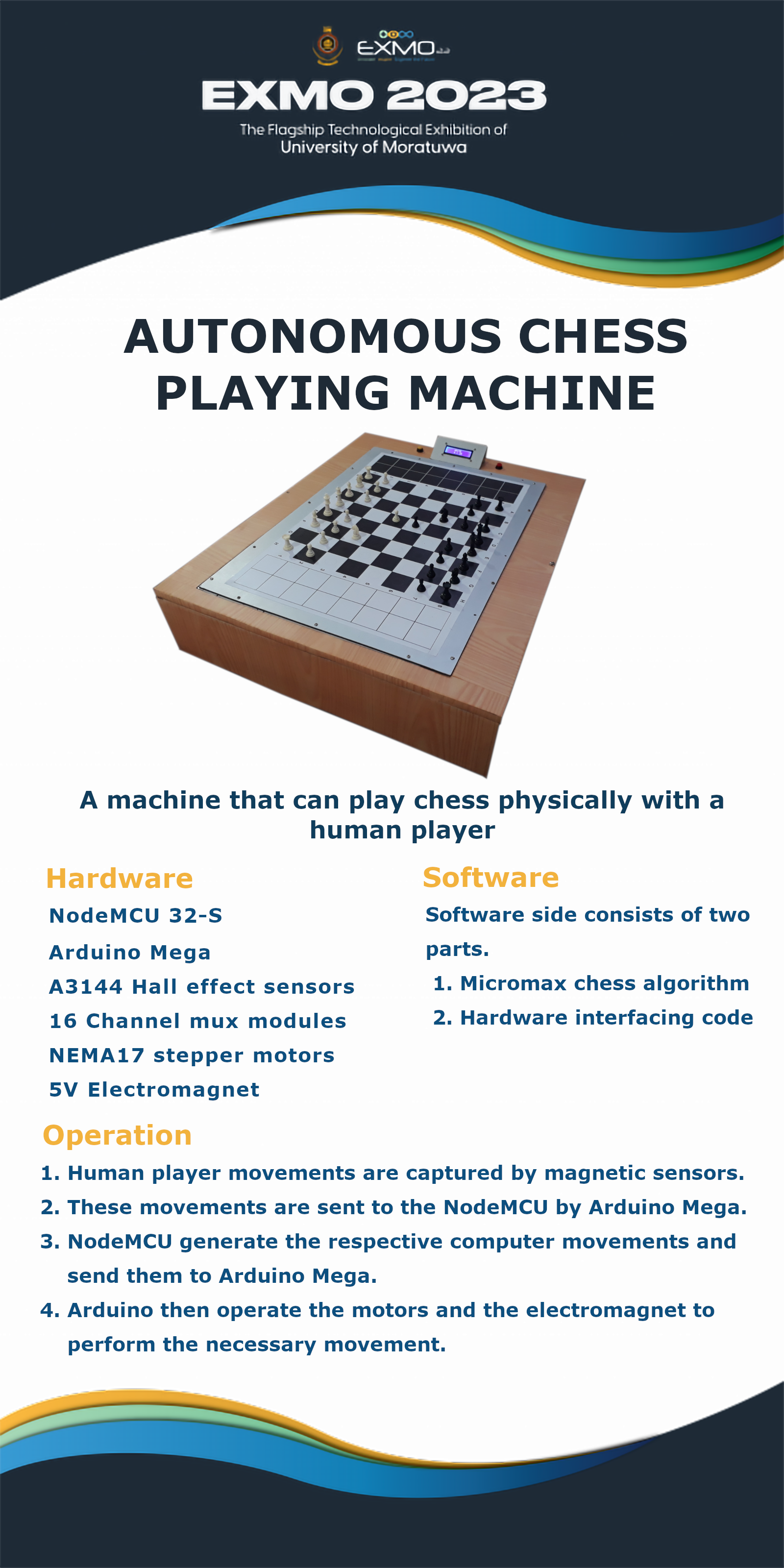
This repository contains firmware, PCB design files, and project assets for a physical chess board that:
The project appears structured for Human vs Computer (HvsC) gameplay with game-state handling (stalemate, invalid move, wins, punishment flow).
autochess/
├── node_game &mega_game_algo/
│   ├── mega_game_algo/
│   │   ├── mega_game_algo.ino
│   │   └── global.h
│   └── node_game_algo/
│       └── node_game_algo.ino
├── Mux_codes/
│   └── module_testing/
│       └── module_testing.ino
├── pcb/
│   ├── autonomous chess playing machine/
│   └── libraries/
├── pcb_to_entc/
│   ├── acpm-arduino_motor_part/
│   ├── acpm-mux_part/
│   └── pre_final_to_entc/
├── EXMO/
│   └── main_banner.png
├── Datasheets/
├── AI Group 10 - Project Report.pdf
└── Autunomous Chess Board.pptxmega_game_algo.ino)Serial2node_game_algo.ino)e2e4)s0..s3) and mux inputs (m0..m3)arr[8][8] and compared against backups to detect move origin/destinatione2e4\nRa1b2 format) or status code.S → stalemateN → no valid moveP → player winsC → computer winsI → punishment/home/runner/work/autochess/autochess/node_game &mega_game_algo/mega_game_algo/mega_game_algo.ino/home/runner/work/autochess/autochess/node_game &mega_game_algo/node_game_algo/node_game_algo.ino/home/runner/work/autochess/autochess/node_game &mega_game_algo/mega_game_algo/global.h/home/runner/work/autochess/autochess/Mux_codes/module_testing/module_testing.inos0=24, s1=26, s2=28, s3=30m0=36, m1=38, m2=40, m3=4229 / 2747 / 455312, black 1123, black 2550Confirm physical wiring against PCB schematics before powering hardware.
Primary PCB resources are under:
/home/runner/work/autochess/autochess/pcb//home/runner/work/autochess/autochess/pcb_to_entc/Includes:
.kicad_sch, .kicad_pcb, .kicad_pro design filesgerbers/ output folderspcb_to_entc/pre_final_to_entc/No automated build scripts are included in this repository. Use the Arduino toolchain.
.ino files in Arduino IDE / Arduino CLI.mega_game_algo.inonode_game_algo.inoLiquidCrystal_I2C9600 baud for diagnostics.Mux_codes/module_testing/module_testing.ino for basic mux signal testing.desktop.ini files from Windows environments.AI Group 10 - Project Report.pdfAutunomous Chess Board.pptx (filename in repository; title intent: "Autonomous Chess Board")These likely contain additional mechanical/electrical background and design rationale.
If you plan to contribute:
No top-level project license file is currently present in this repository.
Some bundled PCB library components include their own license files under pcb/libraries/.../License.txt.
| Qty | Value | Footprint | References |
|---|---|---|---|
| 8 | 1k | Resistor_THT:R_Axial_DIN0207_L6.3mm_D2.5mm_P10.16mm_Horizontal | R1, R2, R3, R4, R5, R6, R7, R8 |
| 5 | 0.1uF | Capacitor_THT:C_Disc_D5.0mm_W2.5mm_P2.50mm | C3, C4, C5, C6, C8 |
| 2 | 100uF | Capacitor_THT:CP_Radial_D6.3mm_P2.50mm | C1, C2 |
| 2 | DRV8825 | DRV8825_STEPPER_MOTOR_DRIVER_CARRIER:IC_DRV8825_STEPPER_MOTOR_DRIVER_CARRIER | U1, U2 |
| 2 | Microstepping | Button_Switch_THT:SW_DIP_SPSTx03_Slide_9.78x9.8mm_W7.62mm_P2.54mm | SW1, SW2 |
| 1 | 0.33uF | Capacitor_THT:C_Rect_L7.0mm_W3.5mm_P5.00mm | C7 |
| 1 | Arduino_Nano_v3.x | Module:Arduino_Nano | A1 |
| 1 | Circuit_Connector | Connector_JST:JST_XH_B10B-XH-A_1x10_P2.50mm_Vertical | J8 |
| 1 | LCD | Connector_JST:JST_XH_B6B-XH-A_1x06_P2.50mm_Vertical | J3 |
| 1 | LM7805 | Package_TO_SOT_THT:TO-220-3_Vertical | U3 |
| 1 | Limit_A | Connector_JST:JST_XH_B2B-XH-A_1x02_P2.50mm_Vertical | J4 |
| 1 | Limit_B | Connector_JST:JST_XH_B2B-XH-A_1x02_P2.50mm_Vertical | J5 |
| 1 | Power | Connector_JST:JST_XH_B2B-XH-A_1x02_P2.50mm_Vertical | J7 |
| 1 | Servo | Connector_JST:JST_XH_B3B-XH-A_1x03_P2.50mm_Vertical | J6 |
| 1 | Stepper_A | Connector_JST:JST_XH_B4B-XH-A_1x04_P2.50mm_Vertical | J1 |
| 1 | Stepper_B | Connector_JST:JST_XH_B4B-XH-A_1x04_P2.50mm_Vertical | J2 |
The 30 most common of 34 parts.
rtweera/autochess
Fully autonomous chess playing machine with a physical chess board, allowing a human player to compete as if playing against another human, with an ELO rating of 2000.

rtweera/autochess
Fully autonomous chess playing machine with a physical chess board, allowing a human player to compete as if playing against another human, with an ELO rating of 2000.

rtweera/autochess
Fully autonomous chess playing machine with a physical chess board, allowing a human player to compete as if playing against another human, with an ELO rating of 2000.


mathias31415/diy_robotics
Gripper, PCBs and ROS2 software for Six-Axis Robot Arm WE-R2.4 from LoboCNC


o7-machinehum/Hydroponic
Please find the electronics files in the ee folder, all pcb design is done with the open source software KiCad. Is uses an STM32 as the main controller, and an ST L6470 moter driver for the stepper motor.

eli3162/diw_printer
Direct ink Writing(DIW) is a technology that enables 3d printers to print many gels, solvents, and other liquids instead of normal plastic filaments.


It measures 220 × 70 mm and has 2 copper layers, 1.6 mm thick.
34 parts, built around the DRV8825PWP and LM7805. The full list of its parts is on this page, with links to each part's symbol and footprint where PCBKit's library has them.
From the rtweera/autochess repository on GitHub, at the commit this page was made from: the board is pcb_to_entc/acpm-arduino_motor_part/acpm-arduino_motor_part.kicad_pcb and its schematic pcb/autonomous chess playing machine/acpm-arduino_motor_part/acpm-arduino_motor_part.kicad_sch. PCBKit opens the board in the browser, with nothing to install.
Its repository states no licence, so its author keeps all rights: ask rtweera before reusing the design.