
4 layers99.2 × 94.2 mm

 roboalchemist/kicad-agent2
Agent-driven KiCad PCB design: a Pydantic AI agent, a git-versioned design workspace, and a live review UI
Blinker k10 is an open-source printed circuit board by roboalchemist, from the roboalchemist/kicad-agent repository on GitHub, published under the MIT licence. It is a 2-layer board of 25 × 20 mm with 8 parts on 7 nets, routed with 43 tracks and 2 vias.
It is built around the NE555DR. Its parts include 3 capacitors, 3 resistors, 1 IC and 1 diode.
An agent that designs PCBs in KiCad while you watch, comment, and roll back.
kicad-agent is a research harness for AI-driven board design. A Pydantic AI agent edits a real KiCad 10 board through a set of CAD tools — placement, routing, outline, zones, silkscreen — while a web UI streams the board, the agent's reasoning, and every version it commits. You can click any pad, track or via to leave a review comment, and the agent reads those comments on its next pass. A goal loop keeps it working until machine-checkable criteria (DRC counts, board size, distances, regions, open comments) pass.
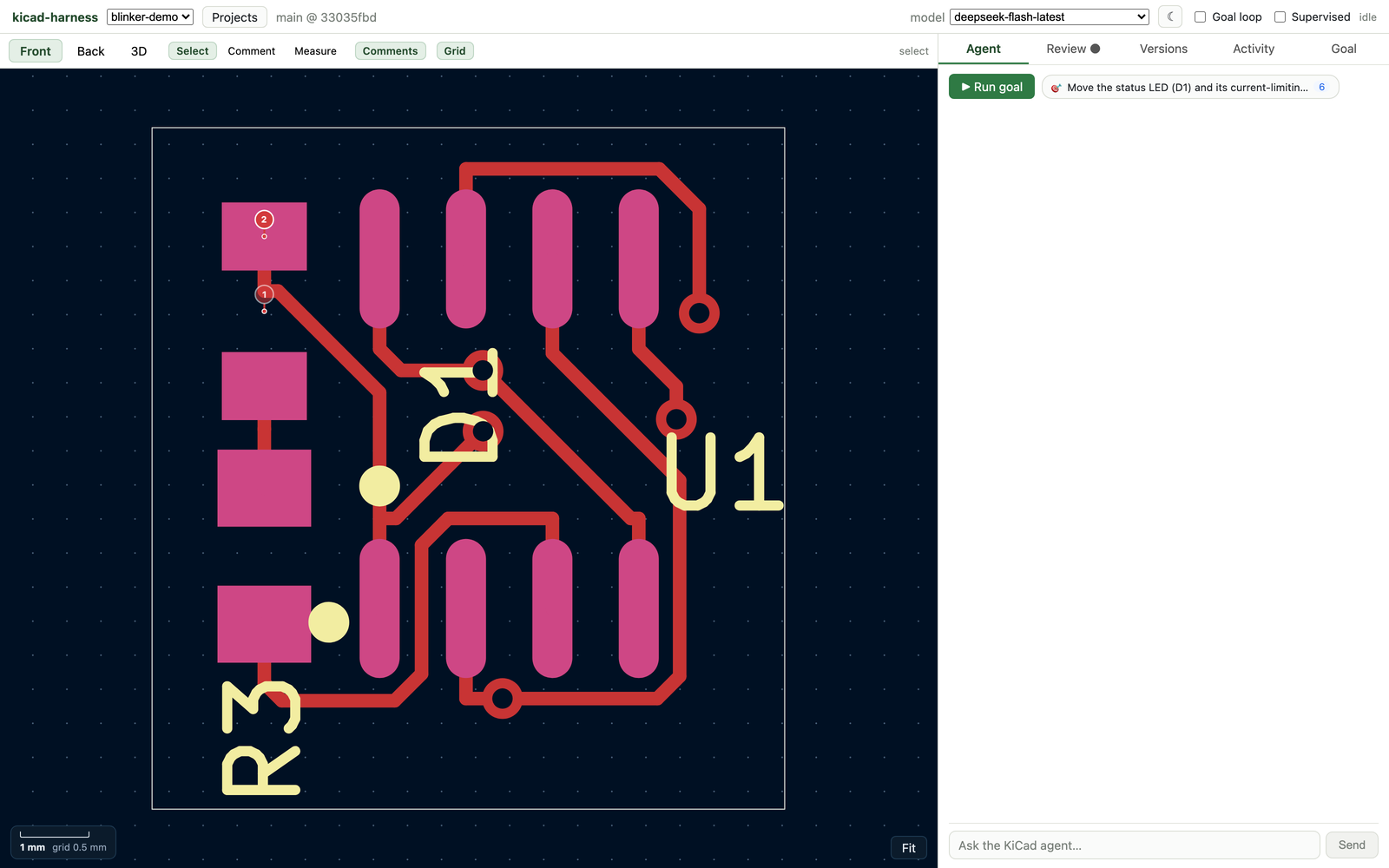
harness/) — Pydantic AI agent with KiCad tools, a git-versioned
design workspace, a goal loop, and a FastAPI/AG-UI server.harness/web/) — CopilotKit chat, 2D board viewer with review pins,
measure mode, version browser, goal editor, and a real three.js 3D viewer.demo/) — a 555 LED blinker taken from parts search to a routed,
DRC-clean board, using a pure-Python S-expression layout library..agents/) — 25 rules and a skill covering stackup, placement,
routing, DFM, EMC, thermal, high-speed and more, loaded as agent context.you ── chat / review pins ──▶ FastAPI + AG-UI ──▶ Pydantic AI agent
│ │ tools
│ ▼
SQLite store kicad_harness tools
(runs, comments, (place, route, outline,
versions, settings) nets, zones, DRC, render)
│ │
│ ▼
web UI (React) KiCad Python worker
board · 3D · diffs (pcbnew, kicad-cli)
│
└──────── design workspace (git)
one commit per editEvery edit is a commit in the design's own git repository, so "version" means the same thing to the agent, the UI, and you. The UI fetches the same board file the agent edits, so what you see is what it changed.
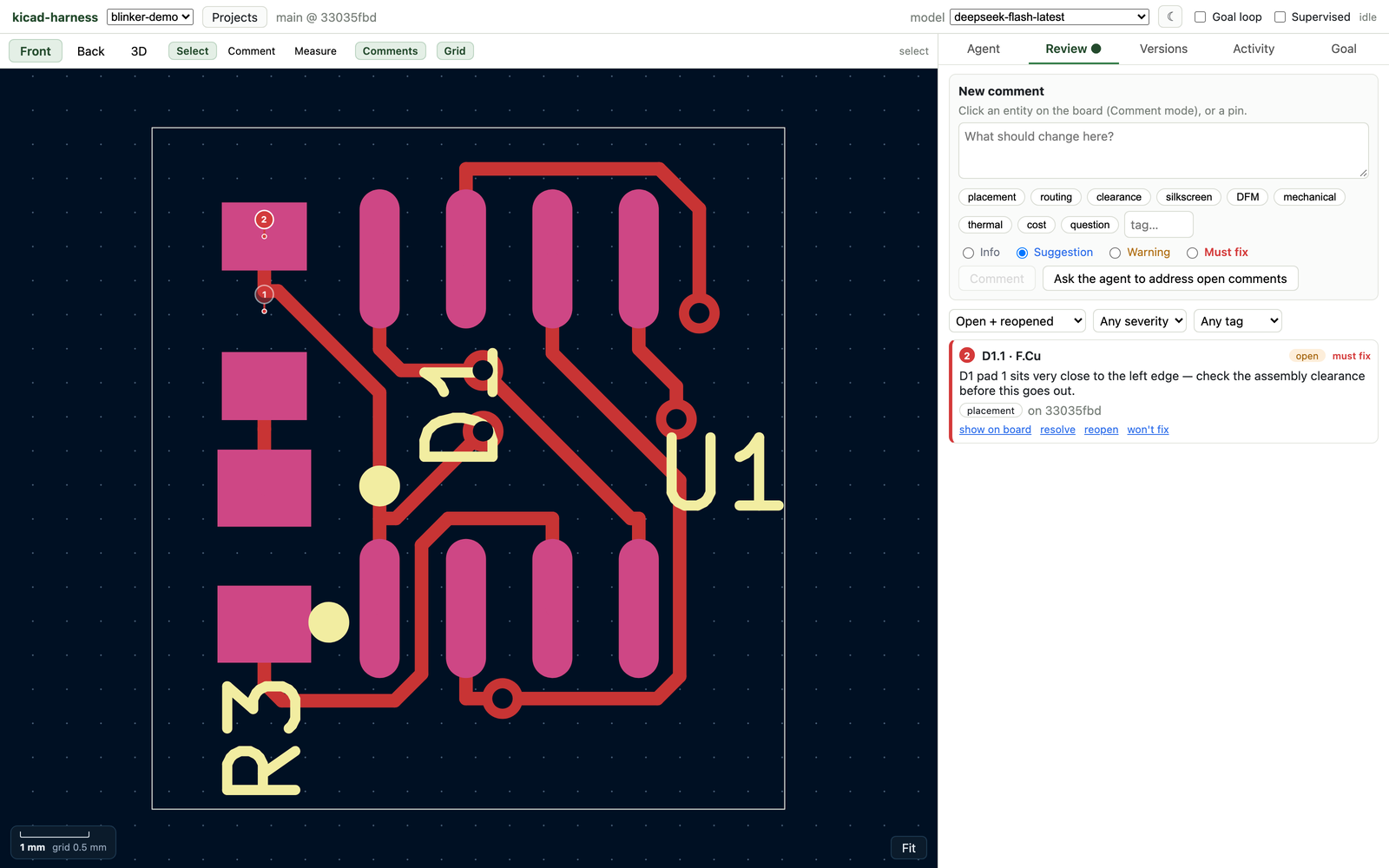
Comment pins are anchored to a pad, track, via or footprint. The agent sees open comments
as part of its context and can reply or address them; open_threads is also a goal
criterion, so "no open must-fix comments" is machine-checkable.
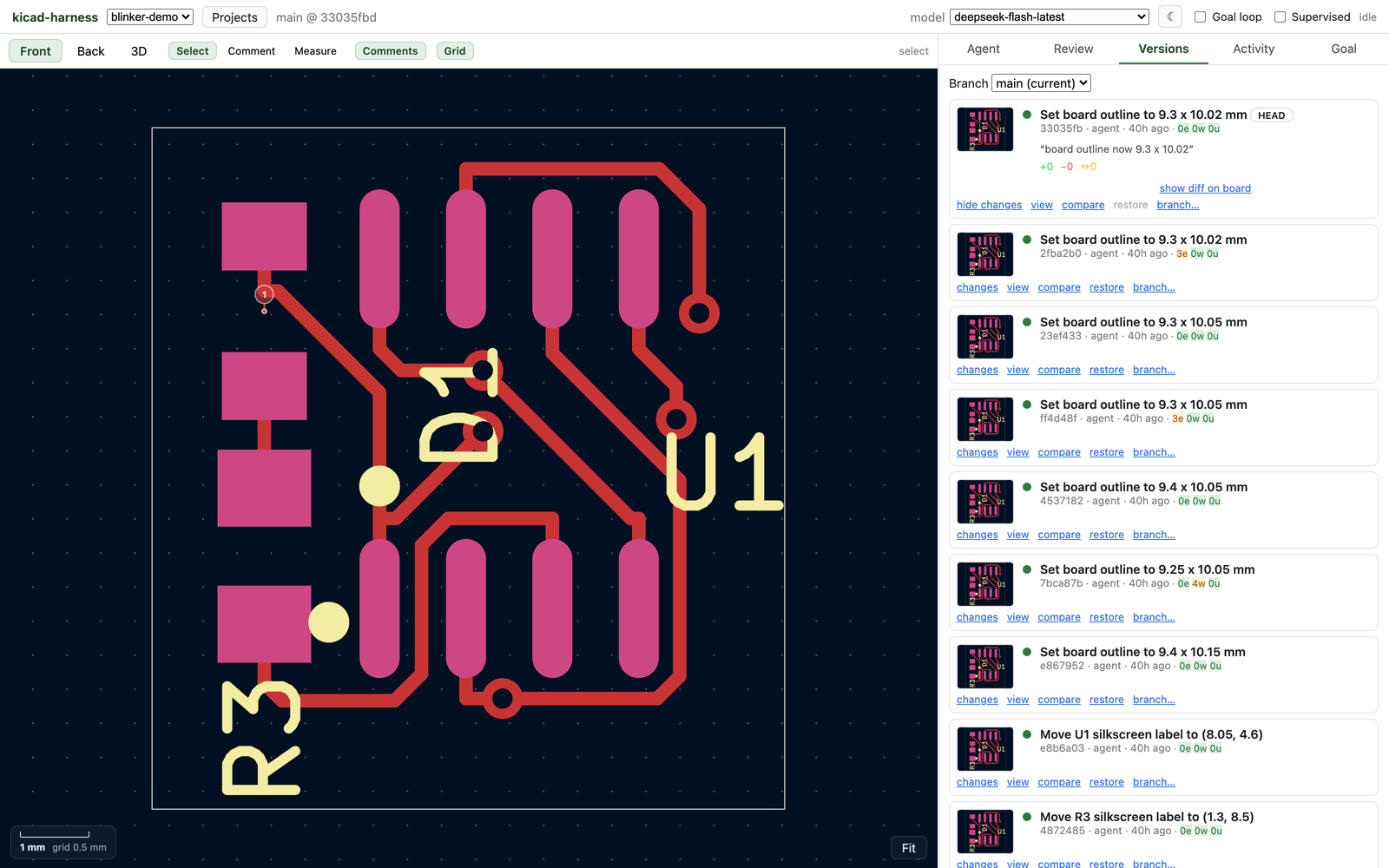
Each revision shows a rendered thumbnail, the DRC counts at that commit, an inline diff against its parent, and a few-word LLM summary generated from the real entity diff.
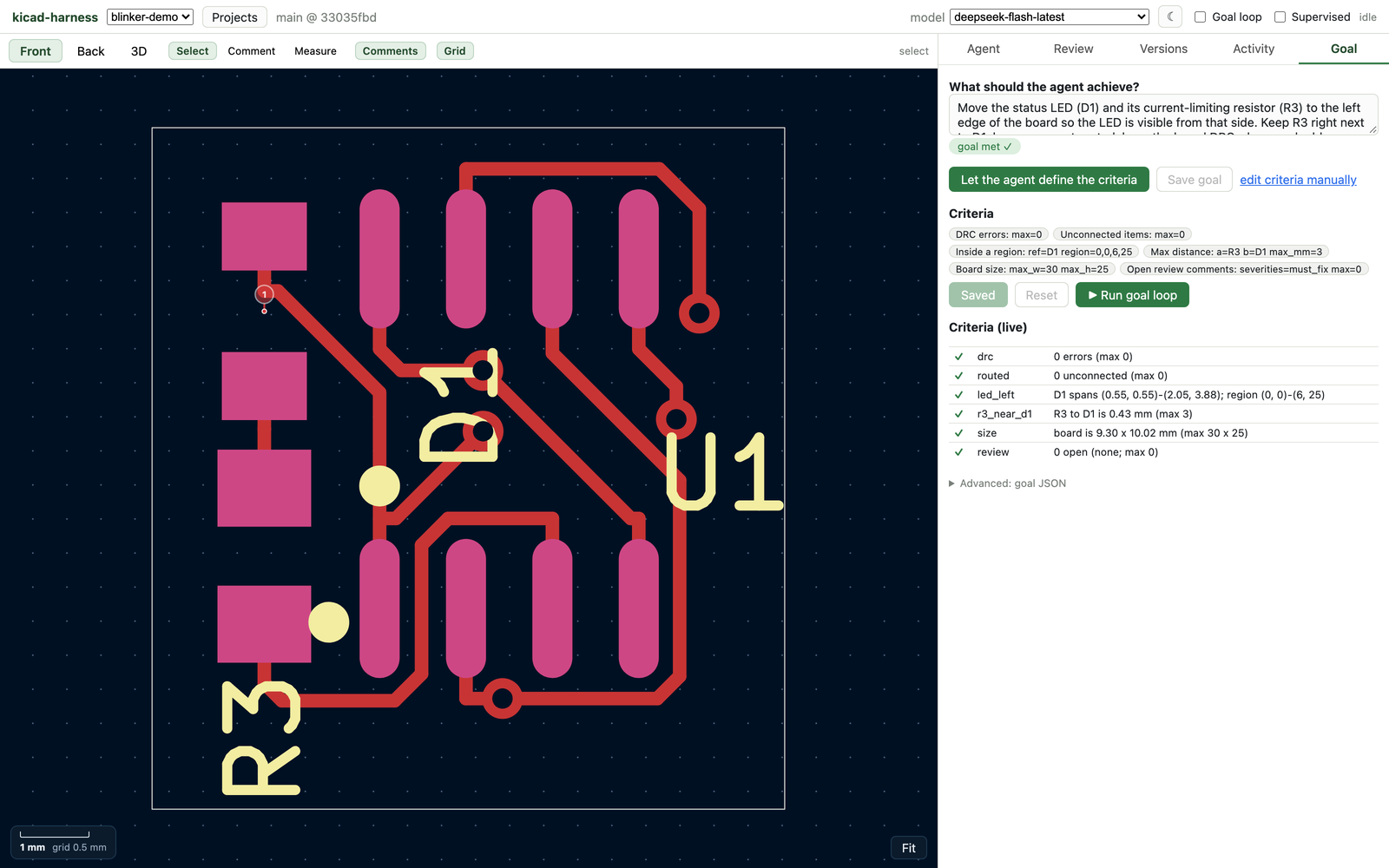
You state the goal in words. The agent inspects the board and calls set_goal with
machine-checkable criteria, then runs check against them. The Goal tab shows the
criteria it chose and their live pass/fail state.
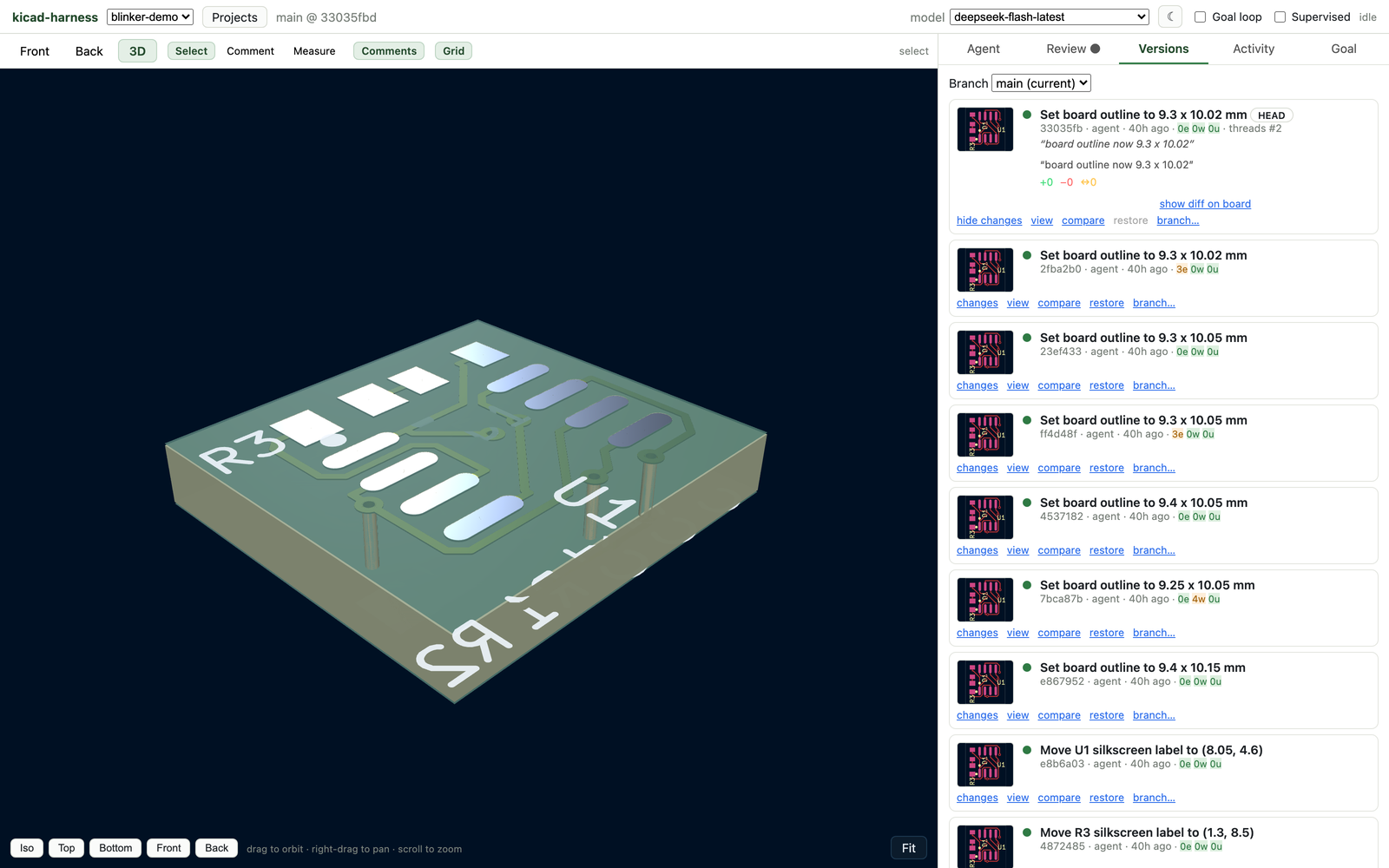
The 3D tab exports KiCad's GLB for the revision and renders it with three.js — orbit, pan, zoom, and preset views. Vias are real holes at their real positions.
Prerequisites: macOS, KiCad 10 at
/Applications/KiCad/KiCad.app, Python 3.12, uv, Node 22+,
and Homebrew cairo.
git clone --recurse-submodules https://github.com/roboalchemist/kicad-agent.git
cd kicad-agent/harness

uv venv --python 3.12 .venv
uv pip install --python .venv/bin/python -e '.[dev,openai,google]'
./scripts/fetch_vendor.sh        # Java 25 + Freerouting, for autorouting

# a model (any pydantic-ai provider; OpenAI-compatible endpoints are the easiest)
export OPENAI_API_KEY=sk-or-...
export OPENAI_BASE_URL=https://openrouter.ai/api/v1
export HARNESS_MODEL=openai:anthropic/claude-sonnet-5

.venv/bin/kicad-harness serve    # :8100
npm --prefix web run runtime     # :8101
npm --prefix web run dev         # :5173
Open http://127.0.0.1:5173 and pick a project. To create the demo project:
bash harness/scripts/demo_setup.sh # creates blinker-demo with a goal and a commentHARNESS_MODEL accepts any pydantic-ai model string.
Install the matching extra (.[openai], .[google]) and set the provider key. Any
OpenAI-compatible gateway works through openai: with OPENAI_BASE_URL. The header's
model picker lists the configured model plus HARNESS_MODELS, and optionally models from
a Bifrost gateway when BIFROST_BASE_URL / BIFROST_API_KEY are set.
The UI is optional — the same agent runs from the CLI:
K=.venv/bin/kicad-harness
$K init blinker --from tests/fixtures/blinker.kicad_pcb --goal examples/goal-led-left.json
$K run blinker                       # loop until the goal passes (exit 0) or the budget runs out (exit 3)
$K steer blinker "keep R3 on the same side as D1"
$K comment blinker --ref D1 --pad 1 --severity must_fix --tag placement --body "too close to the edge"
$K versions blinker
$K restore blinker <sha>
run prints the agent's reasoning, every tool call and result, and each version it
commits. --no-loop answers once, --supervised asks before destructive tools, and
--thread ID continues an earlier conversation.
demo/ predates the harness and is still a good tour of the CAD layer without an LLM:
cd demo
python3 blinker.py                   # parts DB search → JLC2KiCadLib → skidl netlist
cd .. && python3 demo/do_layout_v2.py # placement + routing, runs both DRC engines
./demo/scripts/render.sh demo/render_data_v2.json demo/blinker_render.png
It produces a 25×20 mm two-layer 555 blinker, routed and DRC-clean against JLCPCB rules.
demo/layout.py is a dependency-free library for reading and writing KiCad PCB
S-expressions (no pcbnew needed); demo/drc_rules.py is the design-intent checker.
| Path | What it is |
|---|---|
harness/kicad_harness/ | Agent, tools, engine bridge, store, server |
harness/web/ | React UI: board viewer, 3D viewer, review, versions, goals |
harness/tests/ | Python tests (scripted models, real KiCad) |
demo/ | Standalone 555 blinker pipeline and the BoardLayout library |
docs/ | Guides, footprint research and the engineering log (index) |
.agents/rules/, .agents/skills/ | PCB design knowledge base used as agent context |
research/ | Notes and public third-party tools/databases (git submodules) |
data/ | JLCPCB parts database (Git LFS) |
cd harness
.venv/bin/pytest tests -q        # ~2 min; uses KiCad's Python for pcbnew
npm --prefix web run builddata/jlcpcb-components.sqlite3 is a 1.2 GB SQLite database of JLCPCB parts, tracked
with Git LFS. Clone it with git lfs install first; the data is third-party and may be
stale — see data/ for provenance.research/ submodules are third-party projects under their own licenses; they are not
part of this project's code.Research code, moving fast. The demo board and the test suite are the supported paths; expect rough edges elsewhere. Issues and PRs welcome — see CONTRIBUTING.md.
| Qty | Value | Footprint | References |
|---|---|---|---|
| 2 | 100nF | C0805 | C2, C3 |
| 2 | 10K | R0805 | R1, R2 |
| 1 | 10uF | C0805 | C1 |
| 1 | 470R | R0805 | R3 |
| 1 | NE555DR | SOIC-8_L4.9-W3.9-P1.27-LS6.0-BL | U1 |
| 1 | RED | LED0805-RD | D1 |


BioroboticsLab/bb_irflash
Hard- and software for the 2016-style IR flash system of the beesbook project. Original code/hardware design done by hmoenck.


justharihere/PWM_Modulator
This is an experimental PWM Modulator I developed while experimenting with NE555 timer ICs, datasheets, and learning PCB fab.

land-barrett/EV_Design_Challenge
KiCAD files of 2026 TAMU SAE Formula EV electrical design challenge

It measures 25 × 20 mm and has 2 copper layers, 1.6 mm thick.
8 parts, built around the NE555DR. The full list of its parts is on this page, with links to each part's symbol and footprint where PCBKit's library has them.
From the roboalchemist/kicad-agent repository on GitHub, at the commit this page was made from: the board is research/spikes/2026-10-16/viewer/blinker_k10.kicad_pcb. PCBKit opens the board in the browser, with nothing to install.
Its repository publishes it under the MIT licence: you may reuse it on that licence's terms (keep the author's notice, and for a copyleft licence share your changes alike).