2 layers169.1 × 252.5 mm
Airguard v1
open-lv/air-guard
Do-it-yourself electronics kit for building an air quality monitor for your school, work and home.
38 parts7MIT

 realglobe-Inc/usb_co2
Mac, LinuxマシンにUSBで接続できて追加ドライバ不要で値を読めるCO2センサ
Kicad usb co2 is an open-source printed circuit board by realglobe-Inc, from the realglobe-Inc/usb_co2 repository on GitHub. It is a 2-layer board of 72 × 47 mm with 9 parts on 33 nets, routed with 101 tracks and 3 vias.
It is built around the MH-Z19B. Its parts include 5 ICs, 2 resistors and 2 switches. It belongs with the sensors and measurement boards and the SAM D and SAM boards of this library.
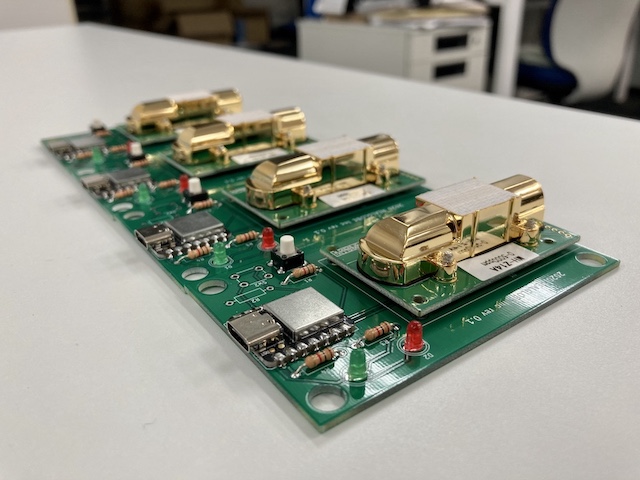
Mac, LinuxマシンにUSBで接続できて追加ドライバ不要で値を読めるCO2センサ
まず、USB機器をすべてコンピュータから取り外す。
次に、usb_co2をUSBポートに接続する。
次に、コンピュータに接続されているシリアルポートの一覧を表示する。
$ ls -1 /dev/cu.*
/dev/cu.Bluetooth-Incoming-Port
/dev/cu.iMiminashi5s-WirelessiAP
/dev/cu.usbmodem14101上記の例の場合、cu.usbmodem14101 というデバイスファイルがusb_co2を示す。
次に、sttyコマンドを実行してシリアルポートの設定を行う。
stty -f /dev/cu.usbmodem14101 raw 9600最後に、catコマンドでデバイスファイルを読み込むとCO2の値(ppm)が表示される。
$ cat /dev/cu.usbmodem14101
co2=399;status=0
co2=399;status=0
co2=399;status=0
co2=399;status=0
co2=399;status=0
co2=399;status=0まず、USB機器をすべてコンピュータから取り外す。
次に、usb_co2をUSBポートに接続する。
次に、コンピュータに接続されているシリアルポートの一覧を表示する。
$ ls -1 /dev/tty*
/dev/tty
.
. (中略)
.
/dev/ttyACM0
/dev/ttyAMA0
/dev/ttyprintk
/dev/ttyUSB0上記の例の場合、/dev/ttyACM0 というデバイスファイルがusb_co2を示す。
次に、sttyコマンドを実行してシリアルポートの設定を行う。
stty -F /dev/ttyACM0 raw 9600最後に、catコマンドでデバイスファイルを読み込むとCO2の値(ppm)が表示される。
$ cat /dev/ttyACM0
co2=399;status=0
co2=399;status=0
co2=399;status=0
co2=399;status=0
co2=399;status=0| Qty | Value | Footprint | References |
|---|---|---|---|
| 2 | PinHeader_XIAO | kicad_mylib:PinHeader_XIAO | U4, U5 |
| 2 | R | Resistor_THT:R_Axial_DIN0207_L6.3mm_D2.5mm_P10.16mm_Horizontal | R1 10k, R2 10k |
| 2 | SW_SPDT | kicad_mylib:SW_SLIDE_sengoku | SW1, SW2 |
| 1 | MH-Z14A | kicad_mylib:MH-Z14A | U3 |
| 1 | MH-Z19B | kicad_mylib:MH-Z19B | U1 |
| 1 | SeeeduinoXIAO | kicad_mylib:SeeedXIAO | U2 |
open-lv/air-guard
Do-it-yourself electronics kit for building an air quality monitor for your school, work and home.

ronaldsieber/ESP32SmartBoard_PCB
KiCad project of a Printed Cuircit Board (PCB) for ESP32 with Temperature/Humidity/CO2 Sensors, User LEDs and Buttons

strayer/EnvironmentalSensor
A WiFi environmental sensor based on Tasmota that reports temperature, air pressure, air quality, humidity and CO2 (ppm).

HiMinds/himinds-boosting-innovation-embedded-env-sensor-hw
HiMinds Open Source Wireless Environmental Sensor HW

JensFZ/CO2Sensor_PCB
Added external power suply, leds and a buzzer (all of them are optional)

Djuke-DIYAudio/indoor-sensor
Affordable indoor sensor for measuring CO2, temperature, humidity and pressure

Gonellarro/Sensor-de-CO2
Building a C02 and wheather station with Wemos D1 mini micro controller, MH Z19B and BM280 sensors

It measures 72 × 47 mm and has 2 copper layers, 1.6 mm thick.
9 parts, built around the MH-Z19B. The full list of its parts is on this page, with links to each part's symbol and footprint where PCBKit's library has them.
From the realglobe-Inc/usb_co2 repository on GitHub, at the commit this page was made from: the board is kicad/kicad_usb_co2.kicad_pcb. PCBKit opens the board in the browser, with nothing to install.
Its repository states no licence, so its author keeps all rights: ask realglobe-Inc before reusing the design.