2 layers174 × 58 mm
Breakout 112pin Connector
rusefi/rusefi
rusefi - GPL internal combustion engine control unit
42 parts1.2k

 primewildy/ODJ
Experiments in DJ controller software.
ODJController is an open-source printed circuit board by primewildy, from the primewildy/ODJ repository on GitHub. It is a 2-layer board of 96.6 × 135 mm with 42 parts on 49 nets, routed with 526 tracks and 11 vias.
Its parts include 32 connectors, 4 resistors, 3 capacitors and 3 ICs. It belongs with the RP2040 boards of this library.
A from-scratch DJ controller for Linux, written in Rust. Two decks, sub-3ms output latency on PipeWire, MIDI controller support, in-app BPM + beat-grid
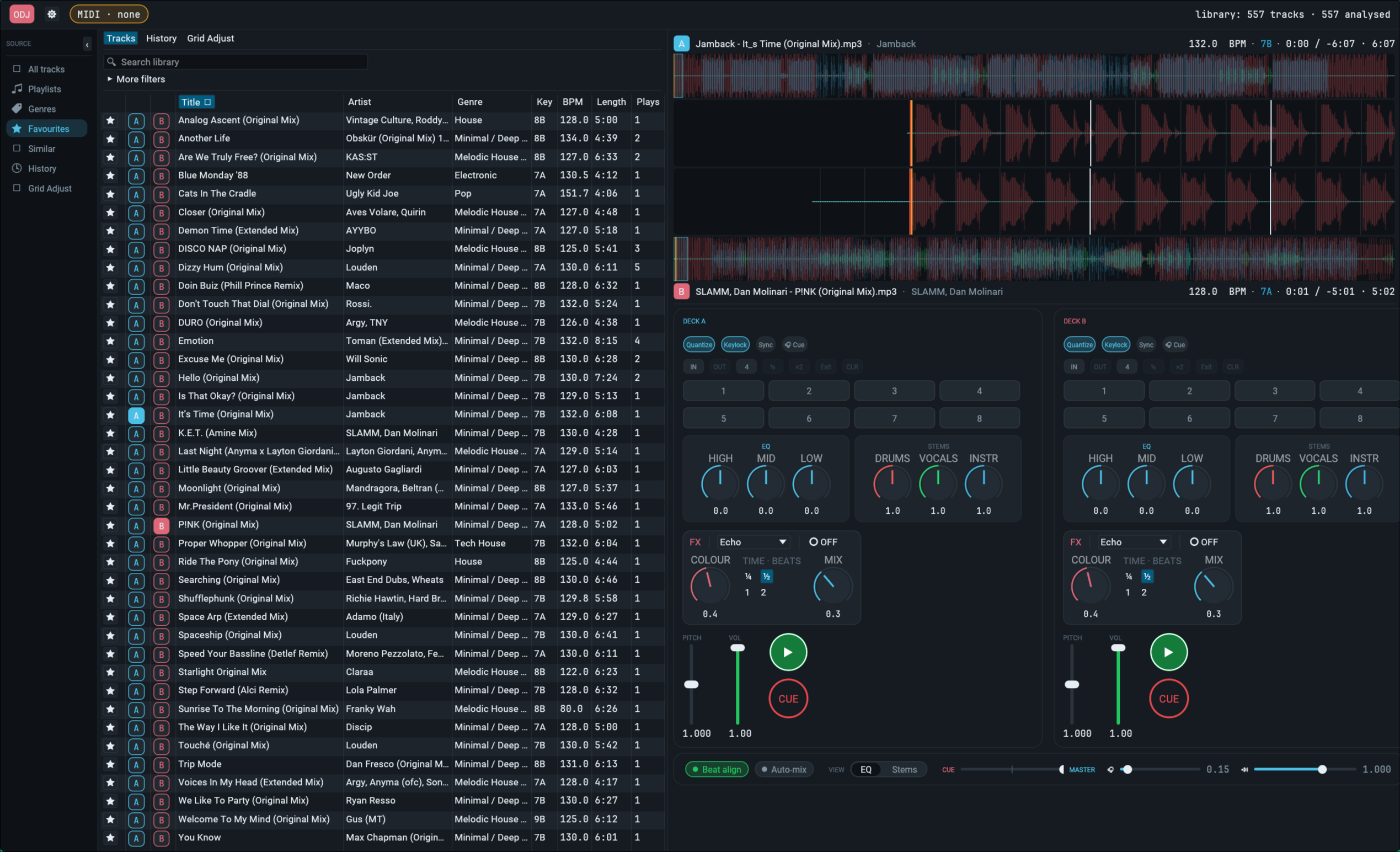
Built as a side project; on the road to driving a custom microcontroller hardware controller (RP2040 / ESP32-S3) speaking USB MIDI.
Working end-to-end as a two-deck mixing tool you can DJ a set on. Tested
with an AKAI LPD8 + homebrew ODJ Controller (hardware/) against a
library of ~550 mp3/flac tracks. The breadboard prototype of the
controller (Deck A: jog, transport buttons, 3-band EQ + volume + pitch
faders, Play LED) is fully working. A two-deck carrier PCB
(hardware/pcb/) is ready for fab — single Pico, JST-XH plug-in panel
connectors for all controls, plug-in CJMCU-4051 mux modules. A
3D-printable faceplate (hardware/enclosure/, parametric OpenSCAD)
matches it. Cue/PFL output works via a USB DAC dongle with PipeWire
routing handled automatically by start-dj.sh.
Built features:
ort (CUDA EP).
Red 4-bar lines on the beat grid; auto-snap of the playhead and cue
point to the first downbeat on load. Optional — falls back to
i%4==0 if the ONNX file isn't present.ort + TensorRT + FP16. ~7 s/track on an
RTX 4060 Laptop. Three per-deck rotary knobs (DRUMS / VOCALS /
INSTRUMENTS), 3-colour overlayed stem waveforms, in-memory
session cache (not persisted to disk — too big). Tracks load and
play immediately; the mixer transparently switches from the single
buffer to the 4-stem mix when the worker finishes..track-meta. Coloured tick markers
appear on both waveforms..track-meta; the manual
grid wins over the analyser's refined output on every subsequent
load.catch_unwind around
the DSP so a single pathological track can't kill the worker)..history. History tab groups by 2-hour gap into sessions;
one-click setlist export to clipboard.~/.config/odj/.hardware/ — RP2040
hardware/flash.sh). Two-deck carrier PCB (one Pico, both decks,
JST-XH plug-in headers, CJMCU-4051 mux modules) generated from a
SKiDL netlist (hardware/pcb/odj_controller.py) → KiCad → Gerbers.
Parametric 3D-printed faceplate in hardware/enclosure/.See DESIGN.md for architecture and TODO.md for roadmap.
Beyond cargo + the system audio stack, two of the bigger features need
out-of-band model files. The app runs fine without either — they're
gracefully optional — but you'll be missing red downbeat lines and stem
controls until they're in place.
All caches live under ~/.cache/dj/ (override with $XDG_CACHE_HOME).
| Path | What it is | Size | How to get it |
|---|---|---|---|
~/.cache/dj/model_final0.onnx | beat_this downbeat model | ~85 MB | run scripts/export_beat_this_onnx.py in a Python venv that has beat_this installed, then cp model_final0.onnx ~/.cache/dj/ |
~/.cache/dj/htdemucs.onnx | HTDemucs stem-separation model | 246 MB | curl -L -o ~/.cache/dj/htdemucs.onnx https://huggingface.co/MansfieldPlumbing/Demucs_v4_TRT/resolve/main/demucsv4.onnx |
~/.cache/dj/trt-engines/ | TensorRT engine cache | ~190 MB after first build | created automatically on first stem separation (~15 min compile, cached after) |
Both files are runtime-loaded; nothing is bundled into the binary.
The stems crate uses ort's TensorRT execution provider. That needs
TensorRT 10.x libs (libnvinfer.so.10, libnvinfer_plugin.so.10,
libnvonnxparser.so.10) discoverable on LD_LIBRARY_PATH. The
easiest way: extract them from PyPI's tensorrt-cu12-libs wheel:
curl -L -o /tmp/trt.whl \
    https://pypi.nvidia.com/tensorrt-cu12-libs/tensorrt_cu12_libs-10.16.1.11-py3-none-manylinux_2_28_x86_64.whl
mkdir -p stem-spike/trt-libs && unzip -q /tmp/trt.whl -d stem-spike/trt-libs
start-dj.sh picks them up from stem-spike/trt-libs/tensorrt_libs/
automatically.
ort ships against CUDA 12 but ships a CUDA EP that's flexible.
On Arch with system CUDA 13.2 you can either:
cuda-12.x AUR
package), ornvidia-* packages).start-dj.sh auto-prepends stem-spike/venv/lib/python*/site-packages/nvidia/*/lib/
to LD_LIBRARY_PATH if it exists, so the venv path "just works".
If neither is in place, ort silently falls back to CPU (stems take
~80 s/track instead of ~7 s; downbeat detection still works in
seconds).
--music-dir music by default (relative to CWD). Drop your library
in there; first launch pre-analyses every track in the background
(BPM, beat grid, downbeats, key) and caches results to
<music-dir>/.analysis-cache.
The convenient way (handles PipeWire routing for the cue stream and restores your normal audio setup on exit):
./start-dj.shThat's a thin wrapper around cargo run --release with sensible flags
and some PipeWire choreography (see docs/notes/pipewire_routing.md).
Or run the binary directly:
cargo run --release -- [--device <cpal-name>] [--cue-device <cpal-name>] \
                      [--midi <port-substring>] [--music-dir <path>]
Defaults / behaviour:
--device unset → uses the cpal pipewire device for the master out.
Override to target a specific sink directly. When the cpal device name
is pipewire, the PIPEWIRE_NODE env var (if set) is honoured.--cue-device unset → no cue stream is opened; deck cue toggles
have no audible effect. Set this to a cpal device name to enable PFL
monitoring. If cpal can't find that name in its ALSA enumeration
(common for USB DACs on PipeWire systems), it falls back to looking up
a PipeWire sink whose name contains the same substring and routes the
cue stream to it via PIPEWIRE_NODE — so e.g. --cue-device "KT USB"
finds alsa_output.usb-…KT_USB_Audio… without needing the full name.
The two streams have independent clocks; drift is irrelevant for cue
since master and cue are heard on separate transducers.--midi "ODJ" is what start-dj.sh passes; matches the homebrew
controller's USB-MIDI port name. The binary's default is "LPD8" for
legacy dev with an AKAI pad; either substring works. Set to "" to
disable MIDI entirely.--music-dir music (relative to CWD). Audio files in this directory
(non-recursive) populate the in-app track list.Per-build controller quirks (e.g. a backward-wired fader) go in
controls.toml in the working directory — see controls.toml.example.
It's read at startup; currently supports invert_cc = [...] to flip
specific MIDI CCs. Gitignored since it's hardware-specific.
The first launch with a populated music directory will spend a few minutes
in the background pre-analysing every track (BPM + beat grid + key).
Progress shows in the top bar. Cache file <music-dir>/.analysis-cache
makes subsequent launches instant.
space Deck A play/pause togglec (hold) Deck A CUE (Pioneer state machine; press while paused at cue
starts preview, release returns to cue)b Deck B play/pause togglen (hold) Deck B CUELayout — top row pads/knobs = Deck A, bottom row = Deck B:
[K1 K2 K3 K4]    [Pad 5 Pad 6 Pad 7 Pad 8]    ← Deck A
[K5 K6 K7 K8] [Pad 1 Pad 2 Pad 3 Pad 4] ← Deck B| Pad | Deck | Function |
|---|---|---|
| 5 | A | Play / pause toggle |
| 6 | A | CUE (Pioneer state machine, hold for preview) |
| 7 | A | Pull (slower while held — vinyl push/pull) |
| 8 | A | Push (faster while held) |
| 1 | B | Play / pause toggle |
| 2 | B | CUE |
| 3 | B | Pull |
| 4 | B | Push |
| Knob | Deck | Function |
|---|---|---|
| K1 | A | Pitch (CC 64 = unity, ±8% range) |
| K2 | A | Volume (linear 0..1) |
| K3 | A | EQ high (CC 64 = flat, ±25..+6 dB) |
| K4 | A | EQ low |
| K5 | B | Pitch |
| K6 | B | Volume |
| K7 | B | EQ high |
| K8 | B | EQ low |
If your LPD8 sends different note/CC numbers, every incoming MIDI message
is logged to stderr — read them off and edit the match arms in
src/midi.rs.
/
├── Cargo.toml          # workspace + binary
├── start-dj.sh         # launch wrapper — PipeWire routing for the cue
│                       #   stream, auto-restores your normal setup
├── src/
│   ├── main.rs         # eframe entry, CLI parse, MIDI thread spawn
│   └── midi.rs         # LPD8 / ODJ Controller MIDI input + jog handler
├── crates/
│   ├── control/        # DeckCommand enum, MusicalKey, ring buffer types
│   ├── decode/         # symphonia → TrackBuffer
│   ├── analysis/       # BPM + beat grid + downbeats (ONNX) + key
│   ├── stems/          # HTDemucs ONNX wrapper
│   ├── audio/          # cpal stream(s), mixer, EQ, FX, phase vocoder
│   └── ui/             # eframe app — see crate-level breakdown in
│                       #   DESIGN.md §4 (auto_mix, grid_edit, history,
│                       #   palette, persistence, settings, theme, fonts)
└── hardware/
    ├── firmware/       # Pico SDK C project (breadboard Deck A)
    ├── pcb/            # two-deck carrier — SKiDL netlist + KiCad
    │   ├── odj_controller.py   # SKiDL → odj_controller.net
    │   └── odj.pretty/         # project-local footprints (Pico,
    │                           #   CJMCU-4051 mux module)
    ├── enclosure/      # 3D-printable faceplate — parametric OpenSCAD
    ├── SCHEMATIC.md    # Deck-A breadboard wiring reference
└── flash.sh # sysex-reboot auto-flash workflowBeat-detection pipeline drew on the standard MIR cookbook (spectral flux
| Qty | Value | Footprint | References |
|---|---|---|---|
| 4 | 0R | Resistor_THT:R_Axial_DIN0207_L6.3mm_D2.5mm_P10.16mm_Horizontal | R1, R2, R3, R4 |
| 2 | 100nF | Capacitor_THT:C_Disc_D5.0mm_W2.5mm_P5.00mm | C1, C2 |
| 2 | CJMCU_4051 | odj:CJMCU_4051 | U2, U3 |
| 1 | 10uF | Capacitor_THT:CP_Radial_D5.0mm_P2.50mm | C3 |
| 1 | A-CUE | Connector_JST:JST_XH_B2B-XH-A_1x02_P2.50mm_Vertical | J18 |
| 1 | A-ENCODER | Connector_JST:JST_XH_B4B-XH-A_1x04_P2.50mm_Vertical | J25 |
| 1 | A-EQ_HIGH | Connector_JST:JST_XH_B3B-XH-A_1x03_P2.50mm_Vertical | J3 |
| 1 | A-EQ_LOW | Connector_JST:JST_XH_B3B-XH-A_1x03_P2.50mm_Vertical | J1 |
| 1 | A-EQ_MID | Connector_JST:JST_XH_B3B-XH-A_1x03_P2.50mm_Vertical | J2 |
| 1 | A-HPCUE | Connector_JST:JST_XH_B2B-XH-A_1x02_P2.50mm_Vertical | J19 |
| 1 | A-PITCH | Connector_JST:JST_XH_B3B-XH-A_1x03_P2.50mm_Vertical | J5 |
| 1 | A-PLAY | Connector_JST:JST_XH_B2B-XH-A_1x02_P2.50mm_Vertical | J17 |
| 1 | A-SPARE5 | Connector_JST:JST_XH_B3B-XH-A_1x03_P2.50mm_Vertical | J6 |
| 1 | A-SPARE6 | Connector_JST:JST_XH_B3B-XH-A_1x03_P2.50mm_Vertical | J7 |
| 1 | A-SPARE7 | Connector_JST:JST_XH_B3B-XH-A_1x03_P2.50mm_Vertical | J8 |
| 1 | A-SYNC | Connector_JST:JST_XH_B2B-XH-A_1x02_P2.50mm_Vertical | J23 |
| 1 | A-VOLUME | Connector_JST:JST_XH_B3B-XH-A_1x03_P2.50mm_Vertical | J4 |
| 1 | A_HPCUE-LED | Connector_JST:JST_XH_B2B-XH-A_1x02_P2.50mm_Vertical | J28 |
| 1 | A_PLAY-LED | Connector_JST:JST_XH_B2B-XH-A_1x02_P2.50mm_Vertical | J27 |
| 1 | B-CUE | Connector_JST:JST_XH_B2B-XH-A_1x02_P2.50mm_Vertical | J21 |
| 1 | B-ENCODER | Connector_JST:JST_XH_B4B-XH-A_1x04_P2.50mm_Vertical | J26 |
| 1 | B-EQ_HIGH | Connector_JST:JST_XH_B3B-XH-A_1x03_P2.50mm_Vertical | J11 |
| 1 | B-EQ_LOW | Connector_JST:JST_XH_B3B-XH-A_1x03_P2.50mm_Vertical | J9 |
| 1 | B-EQ_MID | Connector_JST:JST_XH_B3B-XH-A_1x03_P2.50mm_Vertical | J10 |
| 1 | B-HPCUE | Connector_JST:JST_XH_B2B-XH-A_1x02_P2.50mm_Vertical | J22 |
| 1 | B-PITCH | Connector_JST:JST_XH_B3B-XH-A_1x03_P2.50mm_Vertical | J13 |
| 1 | B-PLAY | Connector_JST:JST_XH_B2B-XH-A_1x02_P2.50mm_Vertical | J20 |
| 1 | B-SPARE5 | Connector_JST:JST_XH_B3B-XH-A_1x03_P2.50mm_Vertical | J14 |
| 1 | B-SPARE6 | Connector_JST:JST_XH_B3B-XH-A_1x03_P2.50mm_Vertical | J15 |
| 1 | B-SPARE7 | Connector_JST:JST_XH_B3B-XH-A_1x03_P2.50mm_Vertical | J16 |
| 1 | B-SYNC | Connector_JST:JST_XH_B2B-XH-A_1x02_P2.50mm_Vertical | J24 |
| 1 | B-VOLUME | Connector_JST:JST_XH_B3B-XH-A_1x03_P2.50mm_Vertical | J12 |
| 1 | B_HPCUE-LED | Connector_JST:JST_XH_B2B-XH-A_1x02_P2.50mm_Vertical | J30 |
| 1 | B_PLAY-LED | Connector_JST:JST_XH_B2B-XH-A_1x02_P2.50mm_Vertical | J29 |
| 1 | I2C-EXP | Connector_PinHeader_2.54mm:PinHeader_1x04_P2.54mm_Vertical | J32 |
| 1 | RPi_Pico | odj:RPi_Pico_THT | U1 |
| 1 | SPARE-GPIO | Connector_PinHeader_2.54mm:PinHeader_1x10_P2.54mm_Vertical | J31 |
It measures 96.6 × 135 mm and has 2 copper layers, 1.6 mm thick.
42 parts. The full list of its parts is on this page, with links to each part's symbol and footprint where PCBKit's library has them.
From the primewildy/ODJ repository on GitHub, at the commit this page was made from: the board is hardware/pcb/ODJController/ODJController.kicad_pcb and its schematic hardware/pcb/ODJController/ODJController.kicad_sch. PCBKit opens the board in the browser, with nothing to install.
Its repository states no licence, so its author keeps all rights: ask primewildy before reusing the design.
rusefi/rusefi
rusefi - GPL internal combustion engine control unit


hackclub/sprig
🍃 Learn to code by making games in a JavaScript web-based game editor.

jamro/tiny-engineer
A small desktop robot that brings an AI coding assistant to life, physically acting out when it reads files, thinks, writes code, and finishes work.

hoglet67/RGBtoHDMI
Bare-metal Raspberry Pi project that provides pixel-perfect sampling of Retro Computer RGB/YUV video and conversion to HDMI

hackclub/OnBoard
💡 Join 1,000 teenagers and make your first PCB with a $100 grant!

