2 layers21.2 × 51.3 mm
Pico reset
hackclub/sprig
🍃 Learn to code by making games in a JavaScript web-based game editor.
3 parts1.1kMIT

 hackclub/sprig1.1k
🍃 Learn to code by making games in a JavaScript web-based game editor.
Sprig console is an open-source printed circuit board by hackclub, from the hackclub/sprig repository on GitHub, published under the MIT licence. It is a 2-layer board of 139.7 × 64.8 mm with 42 parts on 43 nets, routed with 254 tracks and 19 vias.
It is built around the MAX98357AETE+T and SD1206T020S1R0. Its parts include 9 switches, 4 capacitors, 3 resistors, 3 ICs and 3 diodes. It belongs with the RP2040 boards of this library.


💻 Online Editor: Make a game | 👀 Gallery: Find games | 🕸 Landing Page | 🎮 Firmware | 👾 Engine
Sprig is a game console where every user is a creator. It can only be obtained by building a tile-based game in the web-based game editor and shipping it in the community gallery. It's made by Hack Club.
 [blocked]
You should be able to get started in Sprig with very little programming experience. Even if you're an expert, you should still be able to have fun. Sprig games are designed to be shared and hacked on with friends. Every game submitted is easily viewable and editable in our gallery allowing people to learn from and build off each other.
...custom handheld game console built by Hack Club. we are giving a Sprig to every teenage hacker that successfully shares a game they create in our community gallery.
 [blocked]
...web-based game editor that transforms learning to code from studying language syntax to making small creative projects. The Sprig game engine exposes a small construction kit for making tile-based games. This construction kit helps you focus on being creative instead of learning big APIs. The games are just JavaScript and we built a custom system to run that same JavaScript on the microcontroller!

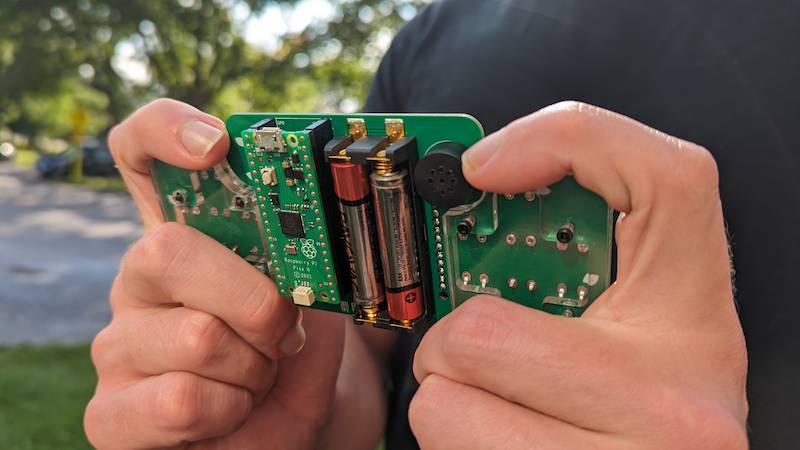
...hardware development kit. It's not just for gaming! The Sprig console is designed to be assembled and disassembled. Each kit includes parts needed for getting started with hardware engineering and embedded systems programming. This includes a Raspberry Pi Pico, a TFT7735 screen, a MAX98357A I2S class D audio amplifier, a whole bunch of buttons, LEDs, a speaker, and a carrier board which wires all these components together while exposing the remaining pins on the microcontroller. It's a complete system for generating graphics, sound, and handling tactile inputs which is reprogrammable at the touch of a button.

Sprig is open source. Shipping a game to the Sprig Gallery is contributing to an open-source project. Everything about Sprig is transparent and editable. That includes the hardware designs, the game engine, the embedded game engine for the RP2040 chip, and the editor and website itself in this repo!
We did some fun engineering to get Sprig to work and to make your games run the same on your desktop computer and a $4 microcontroller. That involved custom JS runtimes with optimizations in C and even PIO assembly. We also documented some behind-the-scenes.
Make a game → Share it with the community → Receive your device → Play Sprig games on it → Hack on the device for more projects
Only teenagers and younger can receive Sprigs! All are welcome to submit to the gallery though.
People learn best when they make things that they care about, which they can then share with others. This type of learning philosophy is called constructionism, and Sprig is a type of microworld. A microworld is an environment where you can discover programming by using it to express yourself.
To get started you can follow this challenge in the editor, check out some Sprig workshops or Sprig jams.
Join the #sprig channel on the Hack Club Slack where you can join the development discussion and ask for help. We also have other channels for Sprig specific stuff:
#sprig-platform: For discussion of development of the Sprig platform as a whole.#sprig-gaming-controller: Building a case for the Sprig console to make it a portable gaming controller.#sprig-emulator: Development of a Gameboy emulator for Sprig.#sprig-multiplayer: Development of multiplayer support.#sprig-lora: Development of Sprig-Lora communicator.#sdsprig: Development of Sprig loading from an SD Card.#sprig-minecraft: Development of Minecraft for Sprig.#sprig-ios-app: Development of iOS app.#sprig-engagement: Development of a bot to post every new game to #sprig.#vs-sprig: Development of Sprig extension for VS Code.#stationary-sprig: Making Sprig a home console.#spriggy-doom: Development of a clone of Doom.#sprigos-development: Development of the sprigOS, the sprig game that acts like an operating system.#spade: For discussions of Spade firmware/OS of the Sprig.#spaint: Make art with your sprig with sPaint and share.Learn more about how to make games with Sprig check out the docs.
Sprig's editor and site pages are built with Astro (SSR via @astrojs/node) using Preact for rendering. Perhaps somewhat unusually, we predominantly use Preact Signals for state management. The code editor uses CodeMirror. There is one legacy Svelte component on the homepage. The database is Firebase. Everything pushed to GitHub and all pull requests are automatically deployed on Vercel.
sprig/
├── src/                        # Astro website + editor
│   ├── pages/                  # Pages (.astro) and API routes (.ts), all SSR
│   ├── components/             # Preact (TSX) UI components + CSS modules
│   ├── lib/                    # Shared support code (server + client)
│   ├── legacy/                 # Old Svelte code kept for the homepage
│   ├── layouts/                # Astro layout templates
│   ├── integrations/           # Custom Astro integrations
│   ├── translations/           # i18n strings
│   ├── global.css              # Global styles
│   └── middleware.ts           # Astro middleware
│
├── engine/                     # Sprig game engine (separate package)
├── games/                      # Community-submitted game files (.js)
├── public/                     # Static assets (game metadata, images, fonts)
├── firmware/                   # RP2040 embedded firmware (Spade runtime + HAL)
├── hardware/                   # PCB designs + 3D-printable console cases
├── docs/                       # Documentation (assembly, getting started, runbooks)
├── scripts/                    # Python admin tools (plagiarism check, review, etc.)
├── bin/                        # lint-sprig game linter
├── tests/                      # Fuzzy tests for the engine
├── yjs-client/                 # Yjs WebRTC client for collaborative editing
├── yjs-signaling-server/       # Yjs signaling server (separate deploy)
├── font-things/                # Font manipulation script
└── sprig-hax/                  # Community hardware mods (gyro, etc.)
Key source directories explained:
src/pages/ contains all the site's main pages and API routes. In general, .ts files are API routes and .astro files are pages. All pages are server-side rendered on demand and can make database calls and such.src/components/ contains all the components used in the editor and site pages. Most components will have accompanying .module.css files which contain vanilla CSS stylesheets which are scoped to the component. These "CSS modules" can be imported as a JS object containing referencable class names.src/lib/ contains all the support code. Currently this is a mix of server and client code.src/legacy/ has a bunch of old code from the v1 version of the editor which is kept for ease of porting the home and Get a Sprig pages. Since Astro lets us combine multiple frameworks, we're also using old Svelte code in some places.docs/ contains documentation on how to use Sprig, including docs.md which contains the help file embedded in the editor.public/ contains static assets which are directly served.src/global.css and src/components/standard-head.astro contain code that's generally shared across all pages.Things you'll want installed:
We use Firebase as a database. To develop login/saving related features locally, you'll likely want to create a Firebase project for yourself. Then, create a service account, download the JSON file, and convert the contents to base64 (link to a tool to easily do this).
We recommend Visual Studio Code as a code editor. You should be automatically prompted to install some recommended extensions when you open the project.
In a terminal, clone the repo and install packages:
git clone https://github.com/hackclub/sprig/
cd sprig
bun install
Next, you'll want to give Sprig access to the Firebase credentials, as well as some extra credentials that you can request from the @creds team on Slack. Complete the .env.example file with those credentials and rename it to .env.
To start the dev server, run bun dev and visit http://localhost:4321 in your web browser! Please create a GitHub issue if you cannot get something to work properly.
bun test          # fuzzy engine tests
bun run test:unit # vitest unit testsdocker compose upThis starts the Astro site (port 9996), yjs-client, and yjs-signaling-server.
All engine code (responsible for running games, playing tunes, etc.) is in a different repo: https://github.com/hackclub/sprig-engine/.
If you want to work on the engine and test out your changes in the context of this repo, you'll want to use a feature called linking.
First set up the engine repo:
git clone https://github.com/hackclub/sprig-engine/
cd sprig-engine
bun install
bun link
Then, in this website's repo:
bun link sprigNow, run bun dev in the engine repo to start the TypeScript build process.
The Sprig was developed by a team at Hack Club with assistance from Brian Silverman (who helped develop Scratch and the precursor to Lego Mindstorms), Vadim Gerasimov (engineer at Google who helped create Tetris when he was 15), and Quentin Bolsée (researcher at MIT and Vrije University Brussels), and dozens contributions from teenage open-source developers!
We're also grateful for amazing open-source projects that make this possible like Kaluma, JerryScript, uhtml, and CodeMirror.
Please refer to this document for a list of current team members who are accountable for maintaining certain aspects of the Sprig platform.
The Hack Club Sprig is open source and licensed under the MIT License. Fork, remix, and make it your own! Pull requests and other contributions greatly appreciated.
| Qty | Value | Footprint | References |
|---|---|---|---|
| 8 | , , , , , , , | ||
| 2 | 1k | fab:R_1206 | R3, R4 |
| 2 | 1uF | fab:C_1206 | C1, C4 |
| 1 | 0.1uF | fab:C_1206 | C3 |
| 1 | 1020_battery_holder | local:1022 | J1 |
| 1 | 10uF | fab:C_1206 | C2 |
| 1 | 1M | fab:R_1206 | R1 |
| 1 | A | Button_Switch_THT:SW_PUSH-12mm_Wuerth-430476085716 | SW2 |
| 1 | Conn_PinHeader_2x03_P2.54mm_Vertical_SMD | fab:PinHeader_2x03_P2.54mm_Vertical_SMD | J2 |
| 1 | D | Button_Switch_THT:SW_PUSH-12mm_Wuerth-430476085716 | SW4 |
| 1 | I | Button_Switch_THT:SW_PUSH-12mm_Wuerth-430476085716 | SW5 |
| 1 | J | Button_Switch_THT:SW_PUSH-12mm_Wuerth-430476085716 | SW6 |
| 1 | K | Button_Switch_THT:SW_PUSH-12mm_Wuerth-430476085716 | SW7 |
| 1 | L | Button_Switch_THT:SW_PUSH-12mm_Wuerth-430476085716 | SW8 |
| 1 | LOGO | graphics:hcflag | G*** |
| 1 | LOGO | graphics:happyhacking | G*** |
| 1 | LOGO | graphics:sprout_dino | G*** |
| 1 | LOGO | graphics:hackaf | G*** |
| 1 | LOGO | graphics:oshlogo | G*** |
| 1 | LOGO | graphics:backleaves | G*** |
| 1 | LOGO | graphics:spriglogo | G*** |
| 1 | LOGO | graphics:frontleaves | G*** |
| 1 | L_LED | fab:LED_1206 | D2 |
| 1 | MAX98357AETE+ | local:QFN50P300X300X80-17N | U2 |
| 1 | Pico | fab:RPi_Pico_SMD_TH_mod | U5 |
| 1 | R_LED | fab:LED_1206 | D1 |
| 1 | S | Button_Switch_THT:SW_PUSH-12mm_Wuerth-430476085716 | SW3 |
| 1 | SD1206T020S1R0 | fab:Diode_Schotky_100V_1A_Mini_SMA | D3 |
| 1 | Slideswitch | slideSWSMD:slideswitchCK | SW9 |
| 1 | Speaker | fab:CVS-1508 | LS1 |
| 1 | Val** | footprints:usb | Ref** |
| 1 | W | Button_Switch_THT:SW_PUSH-12mm_Wuerth-430476085716 | SW1 |
| 1 | ~ | sprig:TFT_MSP1803 | U1 |
It measures 139.7 × 64.8 mm and has 2 copper layers, 1.6 mm thick.
42 parts, built around the MAX98357AETE+T and SD1206T020S1R0. The full list of its parts is on this page, with links to each part's symbol and footprint where PCBKit's library has them.
From the hackclub/sprig repository on GitHub, at the commit this page was made from: the board is hardware/mainboard_PCB/kicad/sprig_console.kicad_pcb and its schematic hardware/mainboard_PCB/kicad/sprig_console.kicad_sch. PCBKit opens the board in the browser, with nothing to install.
Its repository publishes it under the MIT licence: you may reuse it on that licence's terms (keep the author's notice, and for a copyleft licence share your changes alike).
hackclub/sprig
🍃 Learn to code by making games in a JavaScript web-based game editor.

avadsariya0-coder/USB-HUB
USB HUB is a custom designed USB HUB and is built using the SL2.1A USB HUB controller and USB-C Connectors based on USB-2. The project is made using KICAD for schematic and PCB and Fusion 360 for the 3D designing.


LSUTigerRacing/Electronics
This repository contains all of the KiCad Schematics for the 2026 TigerRacing Formula SAE's Electronics Subsystem.

jamro/tiny-engineer
A small desktop robot that brings an AI coding assistant to life, physically acting out when it reads files, thinks, writes code, and finishes work.

jackw01/pi-tin
Open source raspberry pi handheld retro gaming console

atomic14/esp32-tv-hardware
This is Work In Progress - I'm still working on this.

DhamuVkl/ESP32S3-AI-Voice-Assistant
This project is a complete DIY AI voice assistant built around the ESP32-S3 microcontroller. It combines custom PCB design, advanced audio processing, and cloud-based AI to create a device that rivals commercial smart…