6 layers144 × 130 mm
 PowerPlane/insert-coin1
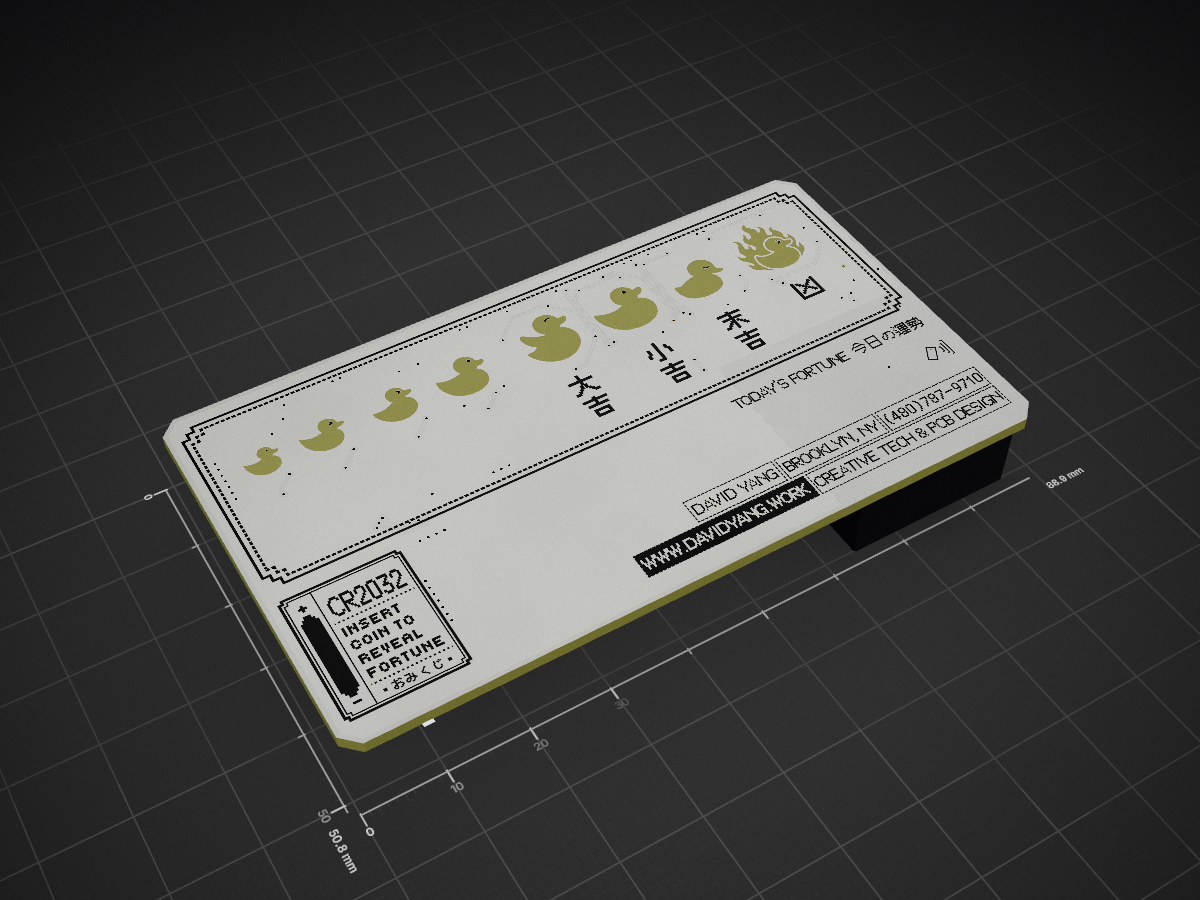
The "Insert Coin" cards are PCB-as-business-card builds where the coin cell is the user interaction: slide it into the holder and the card boots, blinks, listens, taps NFC, then sleeps.
Insert Coin Business Card is an open-source printed circuit board by PowerPlane, from the PowerPlane/insert-coin repository on GitHub. It is a 2-layer board of 88.9 × 50.8 mm with 44 parts on 34 nets, routed with 393 tracks and 88 vias.
It is built around the ATTINY1616-MN, LMA2718B381-OA7 and ST25DV04K-IER8C3, with the XL-1606SURC and CJ3400 among its other parts. Its parts include 24 diodes, 9 transistors, 3 ICs, 2 capacitors and 1 connector. It belongs with the AVR (ATmega, ATtiny) boards of this library.


A series of interactive business cards that come to life when you insert a CR2032 coin cell. Inspired by the Target gift cards of the early 2000s.
The "Insert Coin" cards are PCB-as-business-card builds where the coin cell is the user interaction: slide it into the holder and the card boots, blinks, listens, taps NFC, then sleeps. Different variants explore different form factors, sensor sets, and animations under the same playful idea.
| Slug | Form factor | MCU | Status | Notes |
|---|---|---|---|---|
business-card-v1 | Business card (85 × 54 mm) | ATtiny1616 | Hardware done, firmware pending | 24-LED matrix, MEMS mic, ST25DV04K NFC tag |
insert-coin/
├── docs/                       # cross-variant notes, photos, renders
├── shared/                     # things reused across variants
│   ├── kicad/                  # symbols, footprints, 3D models
│   ├── firmware/               # shared HAL/drivers (LED matrix, NFC, mic)
│   └── tools/                  # build-hex.sh, gerber gen helpers
└── variants/<slug>/
    ├── hardware/               # KiCad project + fab outputs
    ├── firmware/               # PlatformIO project (bringup + production envs)
└── enclosure/ # 3D-printed sleeves / holders (CAD)Use the slug pattern <form-factor>-v<n>:
business-card-v2 — next rev of the business-card form factorkeychain-v1, coaster-v1, badge-v1 — new form factorsCopy the structure of variants/business-card-v1/ (without the KiCad files) as a starting point.
PlatformIO + megaTinyCore targeting the ATtiny1616 over UPDI. Default programmer: SerialUPDI through an FTDI USB-serial adapter (one 4.7 kΩ resistor between TX and RX). Per-variant firmware/README.md has the wiring diagram and build commands.
No PlatformIO on the machine? docs/flasher/ is a browser page at ducky.davidyang.work/flash that flashes a card through an Adafruit UPDI Friend. David builds the .hex with shared/tools/build-hex.sh and sends it; the page does the rest.
| Qty | Value | Footprint | References |
|---|---|---|---|
| 20 | XL-1606UYC | KiCadPartFinder:LED-SMD_L1.7-W1.1-RD_RED-SIDE | LED1, LED2, LED3, LED4, LED5, LED10, LED11, LED12, LED13, LED14, LED15, LED16, LED17, LED18, LED19, LED20 +4 |
| 9 | CJ3400 | SparkFun-Semiconductor-Standard:SOT23-3 | Q1, Q2, Q3, Q4, Q5, Q7, Q8, Q9, Q10 |
| 2 | 1.0mm | DavidLib_Graphics:DUCKY_ICON_2.54_Spacing | TP1, TP3 |
| 2 | 100nF | PCM_JLCPCB:C_0805 | C1, C2 |
| 2 | XL-1606SURC | KiCadPartFinder:LED-SMD_L1.7-W1.1-RD_RED-SIDE | LED23, LED24 |
| 2 | XL-1606UOC | KiCadPartFinder:LED-SMD_L1.7-W1.1-RD_RED-SIDE | LED21, LED22 |
| 1 | ATtiny1616-M | Package_DFN_QFN:VQFN-20-1EP_3x3mm_P0.4mm_EP1.7x1.7mm | U1 |
| 1 | Battery-Holder_Coin-Cell_CR2032_Linx_BAT-HLD-001 | KiCadPartFinder:BAT-SMD_MY-2032-08 | BT1 |
| 1 | Conn_01x02 | DavidLib_Graphics:NFC_Mini_Antenna_22x22_ST25DV04K | J1 |
| 1 | G*** | kibuzzard-6A02E019 | kibuzzard-6A02E019 |
| 1 | G*** | kibuzzard-6A02DFFE | kibuzzard-6A02DFFE |
| 1 | LMA2718B381-OA7 | KiCadPartFinder:MIC-SMD_4P-L2.8-W1.9_LMA2718B381-OA7 | U3 |
| 1 | ST25DV04K-IER8C3 | Package_DFN_QFN:DFN-8-1EP_3x2mm_P0.5mm_EP1.36x1.46mm | U2 |
It measures 88.9 × 50.8 mm and has 2 copper layers, 1.6 mm thick.
44 parts, built around the ATTINY1616-MN, LMA2718B381-OA7, ST25DV04K-IER8C3 and XL-1606SURC. The full list of its parts is on this page, with links to each part's symbol and footprint where PCBKit's library has them.
From the PowerPlane/insert-coin repository on GitHub, at the commit this page was made from: the board is variants/business-card-v1/hardware/Insert-Coin-Business-Card.kicad_pcb and its schematic variants/business-card-v1/hardware/Insert-Coin-Business-Card.kicad_sch. PCBKit opens the board in the browser, with nothing to install.
Its repository states no licence, so its author keeps all rights: ask PowerPlane before reusing the design.

BornaBiro/Xmas-Ornament-2024
Issues is that STM32 MCU is missing it's GND.

IITB-Rocket-Team-Avionics/Ember
Experimental Flight Computer with potential mitigations of previous issues faced by FLYTE and a testbed for new systems.

MeesCode/gameboy-pcb
custom gameboy-esque pcb running an stm32 and my own tiny game engine


ToonVanEyck/OpenFlap
The OpenFlap project aims to create a open source, affordable split-flap display for the makers and tinkerers of the world.

frewden/F1-NFC-Powered-PCB
Batteryless Formula 1-inspired NFC PCB with energy harvesting, ATtiny1616 and charlieplexed LED lighting, designed in KiCad.