2 layers87 × 33 mm

 pjaos/temper
The hardware and software to monitor temperature and humidity via 4 sensors.
Temper is an open-source printed circuit board by pjaos, from the pjaos/temper repository on GitHub, published under the MIT licence. It is a 2-layer board of 36 × 96.5 mm with 60 parts on 52 nets, routed with 558 tracks and 176 vias.
It is built around the ESP32-WROOM-32, MCP9700-E/TT and AO3401A. Its parts include 22 resistors, 8 capacitors, 7 connectors, 5 diodes and 3 transistors. It belongs with the sensors and measurement boards and the ESP32 boards of this library.


A Python tool for discovering temperature and humidity sensor units on the local LAN, recording their readings to a SQLite database, and visualising the data through a web-based dashboard.
Temper consists of two programs that work together along with the ESP32 based hardware.
temper_db — a background collector that listens for sensor broadcasts on the LAN and saves every reading to a local SQLite database.temper_gui — a browser-based dashboard (built with NiceGUI and Plotly) for plotting temperature and humidity data across any time range.The two programs are independent. temper_db can run continuously as a background service while temper_gui is started on demand to view the data.
Temper is designed to work with TEMPER-branded sensor units that broadcast JSON payloads over UDP on the local network. Each unit reports up to four independent temperature/humidity sensor channels, along with system telemetry (RAM, disk, uptime, RSSI, battery voltage, etc.).
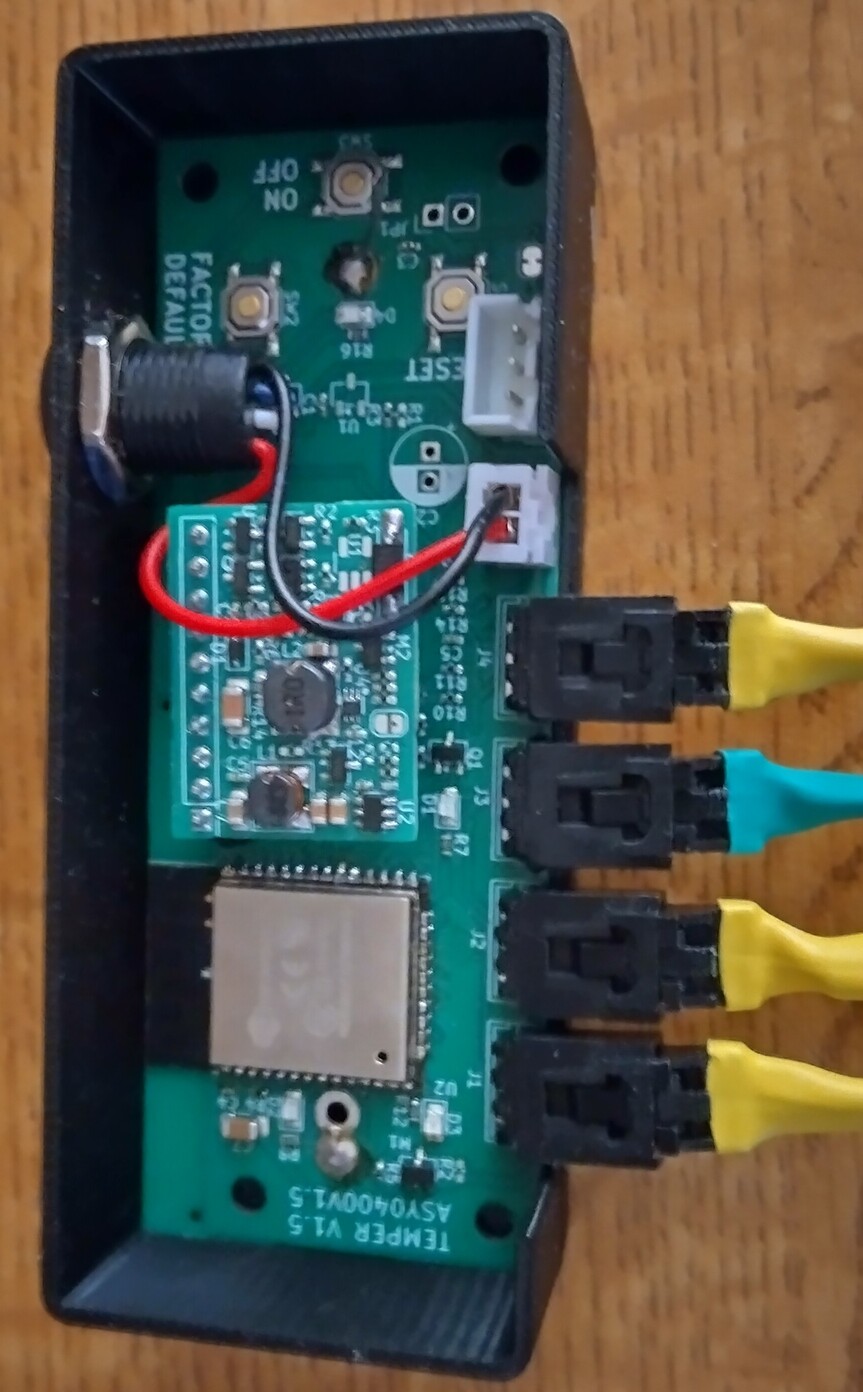
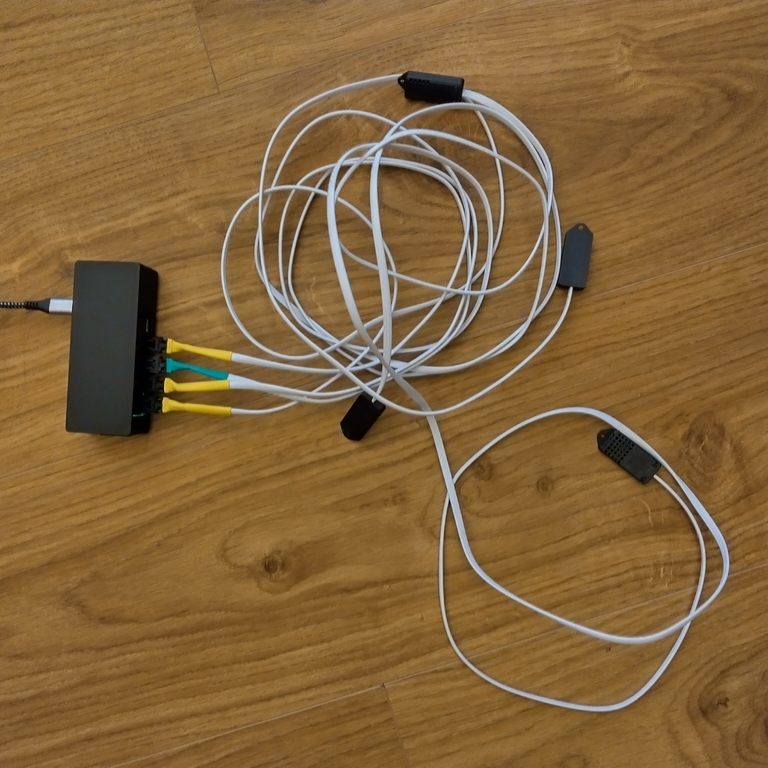
Details of the hardware including kicad schematic, PCB and BOM can be found in the hardware folder.
This hardware runs a micropython program which can be found in software/mcu folder. It listens on UDP port 2934 and responds to Are You There broadcast messages with the status (temperature/humidity etc).
The python wheel installer file can be found in the linux folder.
python3 install.py linux/temper-<version>-py3-none-any.whlThis creates a virtual environment, installs all dependencies, and adds the temper_db and temper_gui commands to your PATH. A temper_gui launch icon is also added to you desktop.
temper_dbDiscovers TEMPER hardware units on the local LAN and writes every received reading to the database.
python -m temper.temper_db [options]| Option | Description |
|---|---|
-d, --debug | Enable debug logging (prints each received JSON payload). |
-a ADDRESS, --address ADDRESS | Only record data from the unit at this IP address. If omitted, all units found are recorded. |
-s SECONDS, --seconds SECONDS | Interval between Are You There broadcasts (default: 10 s). |
--enable_auto_start | Register the tool to start on system boot |
--disable_auto_start | Un-register the tool to start on system boot |
--check_auto_start | Check the running status |
Example — record all units, broadcast every 30 seconds:
temper_db --seconds 30Example — record only one unit:
temper_db --address 192.168.0.99Example Running as a service
Use the built-in boot manager to have the tool start automatically (Linux only):
temper_db --seconds 30 --enable_auto_startPress Ctrl-C to stop.
temper_guiStarts a local web server and opens the dashboard in the default browser.
temper_gui [options]| Option | Description |
|---|---|
-d, --debug | Enable debug logging. |
-p PORT, --port PORT | TCP port for the NiceGUI web server (default: 8085). |
-n, --no_web_launch | Start the server without opening a browser tab automatically. |
--enable_auto_start | Register the tool to start on system boot |
--disable_auto_start | Un-register the tool to start on system boot |
--check_auto_start | Check the running status |
Browser Example
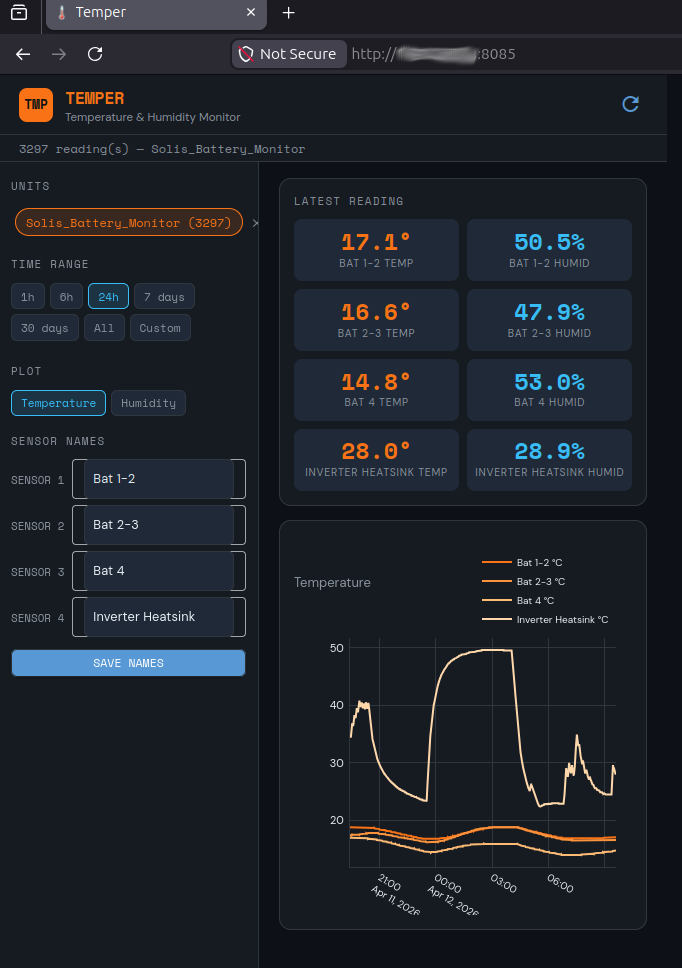
Example — start on a non-default port:
temper_gui --port 9090Example — headless server (access from another device):
temper_gui --no_web_launchThen navigate to http://<host-ip>:8085 from any browser on the same network, including a mobile phone.
Example Running as a service
Use the built-in boot manager to have the tool start automatically (Linux only):
temper_gui -n --enable_auto_startThe dashboard is responsive and works on both desktop and mobile browsers.
Sidebar controls
sensor_names.json and persist across restarts. The chart legend and stat tiles update immediately on save.Main area
The database and sensor name configuration are stored in:
| Platform | Path |
|---|---|
| Linux / macOS (XDG) | ~/.config/temper/ |
| Linux / macOS (fallback) / Windows | ~/.temper/ |
Files created:
| File | Contents |
|---|---|
temper_sensor_data.db | SQLite database containing all sensor readings. |
sensor_names.json | User-defined display names for the four sensor channels. |
Two tables are used:
units — one row per discovered device.
| Column | Type | Description |
|---|---|---|
id | INTEGER | Primary key. |
unit_name | TEXT | Unique device identifier (e.g. TEMPER_DEV). |
device_type | TEXT | Always SENSOR for TEMPER hardware. |
product_id | TEXT | Always TEMPER. |
ip_address | TEXT | Last seen IP address. |
os | TEXT | Firmware OS (e.g. MicroPython). |
group_name | TEXT | Optional group label from the device. |
service_list | TEXT | Services advertised by the device. |
first_seen | TIMESTAMP | UTC timestamp of first contact. |
last_seen | TIMESTAMP | UTC timestamp of most recent contact. |
sensor_readings — one row per received broadcast.
| Column | Type | Description |
|---|---|---|
id | INTEGER | Primary key. |
unit_id | INTEGER | Foreign key → units.id. |
recorded_at | TIMESTAMP | UTC time the reading was received. |
rx_time_secs | REAL | Unix timestamp from the device itself. |
uptime_seconds | INTEGER | Device uptime in seconds. |
sensor_1_temp … sensor_4_temp | REAL | Temperature readings in °C. |
sensor_1_humidity … sensor_4_humidity | REAL | Relative humidity readings in %RH. |
param_3v3 | REAL | 3.3 V rail voltage. |
param_vbat | REAL | Battery voltage. |
param_rssi | REAL | Wi-Fi signal strength in dBm. |
param_board_temp | REAL | On-board temperature sensor reading. |
ram_*, disk_* | INTEGER | RAM and disk usage telemetry. |
To delete readings older than 90 days from a Python session:
from temper.temper_db import TemperDB
from unittest.mock import MagicMock
db = TemperDB.__new__(TemperDB)
db._uio = MagicMock(); db._options = None
db._db_file = TemperDB.GetDBFile()
deleted = db.prune_readings_older_than(days=90)
print(f"Deleted {deleted} rows")Tests use pytest. From the client directory:
./run_tests.shThe test suite covers all database operations (TemperDB) including table creation, unit upsert, reading insertion, time-range filtering, latest-reading queries, and data pruning. No network access or real hardware is required.
temper/software/client/
├── src/
│   └── temper/
│       ├── temper_db.py        # Collector + database layer
│       └── temper_gui.py       # NiceGUI web dashboard
└── tests/
└── test_temper_db.py # pytest test suiteSee LICENSE in the repository root.
Paul Austen — pjaos@gmail.com
Development of this project was assisted by Claude (Anthropic's AI assistant), which contributed to code review, bug identification, test generation, and this documentation.
| Qty | Value | Footprint | References |
|---|---|---|---|
| 6 | 100k | Resistor_SMD:R_0402_1005Metric_Pad0.72x0.64mm_HandSolder | R5, R10, R13, R14, R17, R22 |
| 5 | 0.1uf | Capacitor_SMD:C_0402_1005Metric_Pad0.74x0.62mm_HandSolder | C1, C3, C4, C5, C6 |
| 4 | 470R | Resistor_SMD:R_0402_1005Metric_Pad0.72x0.64mm_HandSolder | R7, R8, R12, R16 |
| 4 | 4k7 | Resistor_SMD:R_0402_1005Metric_Pad0.72x0.64mm_HandSolder | R18, R19, R20, R21 |
| 4 | MountingHole_3.2mm_M3 | MountingHole:MountingHole_3.2mm_M3 | H1, H2, H3, H4 |
| 4 | conn_01x03 | Connector_JST:JST_EH_B3B-EH-A_1x03_P2.50mm_Vertical | J1, J2, J3, J4 |
| 3 | 2N7002 | Package_TO_SOT_SMD:SOT-23-3 | Q1, Q2, Q3 |
| 3 | DNF | Resistor_SMD:R_0402_1005Metric_Pad0.72x0.64mm_HandSolder | R1, R2, R9 |
| 3 | tactsw | Button_Switch_SMD:SW_SPST_SKQG_WithoutStem | SW1, SW2, SW3 |
| 2 | 10k | Resistor_SMD:R_0402_1005Metric_Pad0.72x0.64mm_HandSolder | R4, R6 |
| 2 | GreenLED | LED_SMD:LED_0805_2012Metric_Pad1.15x1.40mm_HandSolder | D2, D4 |
| 1 | 0R | Resistor_SMD:R_0402_1005Metric_Pad0.72x0.64mm_HandSolder | R3 |
| 1 | 100uf 16v | Capacitor_THT:CP_Radial_D5.0mm_P2.50mm | C8 |
| 1 | 18650 LION Battery | PJA_Connectors:18650_26700_battery_holder | BT1 |
| 1 | 1N5819 | Diode_SMD:D_SMA_Handsoldering | D5 |
| 1 | 220uf 25v | Capacitor_THT:CP_Radial_D6.3mm_P2.50mm | C2 |
| 1 | 22k | Resistor_SMD:R_0402_1005Metric_Pad0.72x0.64mm_HandSolder | R11 |
| 1 | 22uf | Capacitor_SMD:C_1206_3216Metric_Pad1.33x1.80mm_HandSolder | C7 |
| 1 | 3A | PJA_Fuses:PTC_23mm_3mm_10.2mm_wire_spacing | F1 |
| 1 | 47k | Resistor_SMD:R_0402_1005Metric_Pad0.72x0.64mm_HandSolder | R15 |
| 1 | AO3401A | Package_TO_SOT_SMD:SOT-23-3 | M1 |
| 1 | Blue Bluetooth LED | LED_SMD:LED_0805_2012Metric_Pad1.15x1.40mm_HandSolder | D1 |
| 1 | Charge Connector | Connector_JST:JST_EH_B2B-EH-A_1x02_P2.50mm_Vertical | J5 |
| 1 | Conn_01x10 | Connector_PinHeader_2.54mm:PinHeader_1x10_P2.54mm_Vertical | J7 |
| 1 | DNF | PJA_Fuses:Scherter_OMT125 | F2 |
| 1 | ESP32-WROOM-32 | PJA_ESP32-footprints-Lib:ESP32-WROOM-32 | U2 |
| 1 | Jumper_2_Bridged | Jumper:SolderJumper-2_P1.3mm_Bridged_RoundedPad1.0x1.5mm | JP2 |
| 1 | Jumper_2_Open | Connector_PinHeader_2.54mm:PinHeader_1x02_P2.54mm_Vertical | JP1 |
| 1 | MCP9700 | Package_TO_SOT_SMD:SOT-23-3 | U1 |
| 1 | MCU Serial I/F | Connector_JST:JST_EH_B3B-EH-A_1x03_P2.50mm_Vertical | J6 |
| 1 | Red Charging LED | LED_SMD:LED_0805_2012Metric_Pad1.15x1.40mm_HandSolder | D3 |
It measures 36 × 96.5 mm and has 2 copper layers, 1.6 mm thick.
60 parts, built around the ESP32-WROOM-32, MCP9700-E/TT and AO3401A. The full list of its parts is on this page, with links to each part's symbol and footprint where PCBKit's library has them.
From the pjaos/temper repository on GitHub, at the commit this page was made from: the board is hardware/schematic_pcb/temper.kicad_pcb and its schematic hardware/schematic_pcb/temper.kicad_sch. PCBKit opens the board in the browser, with nothing to install.
Its repository publishes it under the MIT licence: you may reuse it on that licence's terms (keep the author's notice, and for a copyleft licence share your changes alike).


janni0609/DC-Load
A programmable DC electronic load built on the Raspberry Pi Pico 2 (RP2350). It sinks a user-defined current from a DC source under test and measures voltage, current, power, capacity, and energy in real time on a…


Fluepke/Fluepdot
Project for controlling Annax flipdot panels used by the Berliner Verkehrsbetriebe