2 layers90 × 135 mm

 PaulusSmallus/ScopeKeypad30
To use: Make circuit - get the 'mainpcb' made. (in the Hardware/gerbers folder) - get one of the 'frontpanels' made. There is one for 7mm buttons, and one for 12mm buttons.
Scope user interface is an open-source printed circuit board by PaulusSmallus, from the PaulusSmallus/ScopeKeypad repository on GitHub, published under the MIT licence. It is a 2-layer board of 275 × 100 mm with 111 parts on 90 nets, routed with 1,317 tracks and 182 vias.
Its parts include 38 diodes, 31 resistors, 20 switches, 12 capacitors and 1 IC. It belongs with the interfaces and adapters boards of this library.
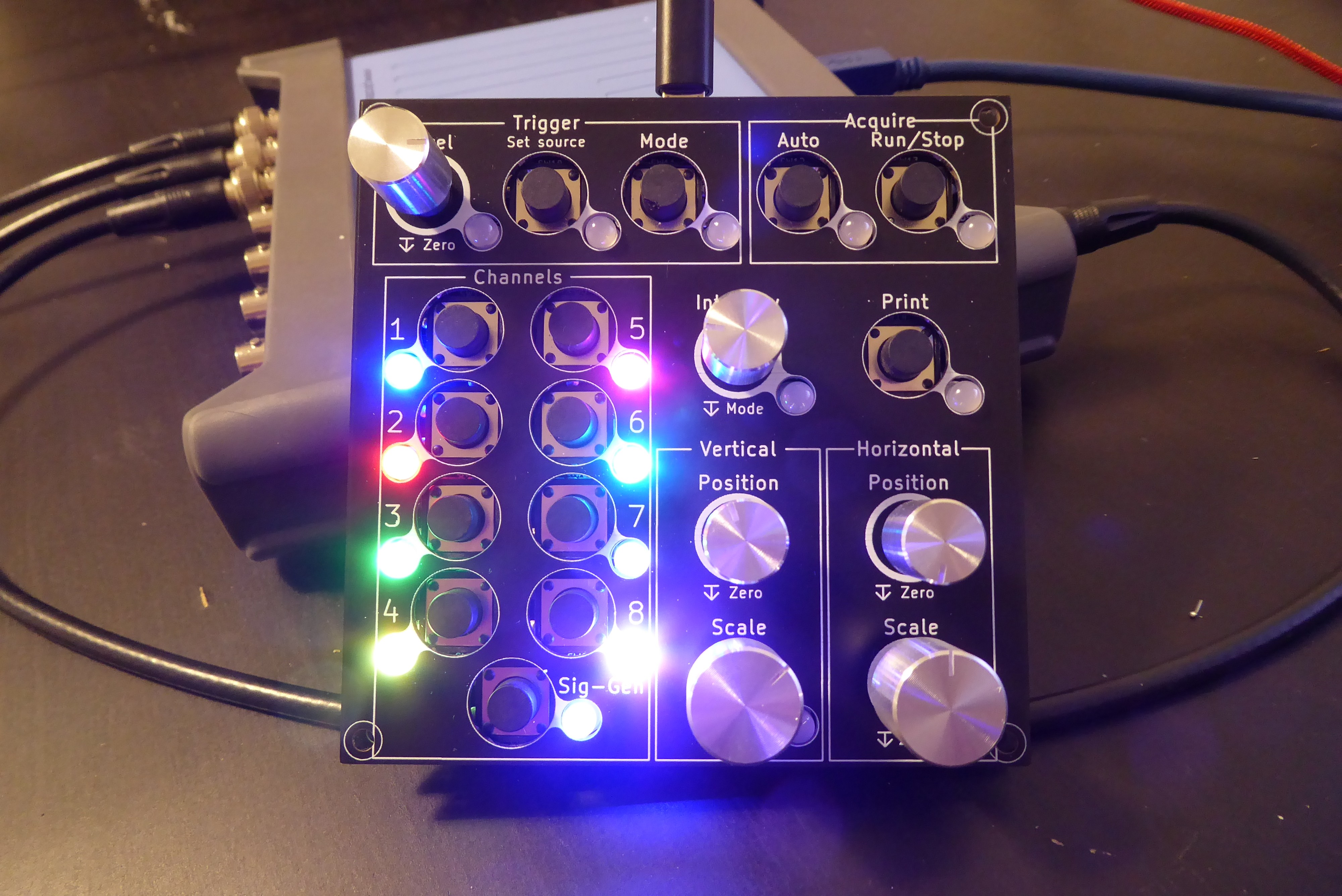
This project is to create a keypad for use with a PicoScope. The idea is to have a traditional interface to use with oscilloscope software.
To use: Make circuit - get the 'main_pcb' made. (in the Hardware/gerbers folder) - get one of the 'front_panels' made. There is one for 7mm buttons, and one for 12mm buttons. - Solder all the components on - Solder JP1 and JP2 depending on if you brought Sparkfun or Worldsemi LEDs (they have different pinouts -_- ). upload firmware - Install Arduino_STM32 ( https://github.com/rogerclarkmelbourne/Arduino_STM32 ) - Open ScopeKeypad\Firmware\ScopeKeypad_Firmware\ScopeKeypad_Firmware.ino - Upload firmware with settings: - Board: "Generic STM32F103C" - Variant: "STM32F103C8 (20k RAM, 65k Flash)" - Upload method: "STLink" - CPU Speed(MHz): "72Mhz (normal)" - Optimize: "Smallest (default)" upload shortcut settings to PicoScope software - Open PicoScope - Click 'Tools' - Click 'Preferences...' - Open the 'Keyboard' tab - Under 'Select keyboard map.', select 'import' - Open 'picoscope_shortcuts.pskeys'
| Qty | Value | Footprint | References |
|---|---|---|---|
| 20 | D | Diode_SMD:D_SOD-123F | D1, D2, D3, D4, D5, D10, D11, D12, D13, D14, D18, D19, D20, D21, D22, D23 +4 |
| 18 | NeoPixel_THT | LED_THT:LED_D5.0mm-4_RGB | D26, D27, D28, D29, D30, D31, D32, D33, D34, D35, D36, D37, D38, D39, D40, D41 +2 |
| 17 | 10k | Resistor_SMD:R_0805_2012Metric | R1, R2, R3, R4, R5, R6, R7, R8, R10, R11, R18, R19, R20, R21, R22, R23 +1 |
| 14 | SW_Push | Button_Switch_THT:SW_PUSH-12mm | SW1, SW2, SW3, SW4, SW5, SW6, SW7, SW8, SW9, SW10, SW11, SW12, SW13, SW14 |
| 12 | 100R | Resistor_SMD:R_0805_2012Metric | R12, R13, R14, R15, R16, R17, R24, R25, R26, R27, R28, R29 |
| 12 | 1nF | Capacitor_SMD:C_0805_2012Metric | C1, C2, C3, C4, C5, C6, C7, C8, C9, C10, C11, C12 |
| 6 | Rotary_Encoder_Switch | Rotary_Encoder:RotaryEncoder_Alps_EC11E-Switch_Vertical_H20mm | SW18, SW19, SW20, SW21, SW22, SW23 |
| 5 | TestPoint | TestPoint:TestPoint_Loop_D2.50mm_Drill1.85mm | TP1, TP2, TP3, TP4, TP5 |
| 2 | 22R | Resistor_SMD:R_0805_2012Metric | R38, R39 |
| 2 | SolderJumper_3_Open | Jumper:SolderJumper-3_P1.3mm_Open_RoundedPad1.0x1.5mm | JP1, JP2 |
| 1 | TestPoint_Pad_D1.0mm | TestPoint:TestPoint_Pad_D1.0mm | Gnd |
| 1 | USB_B_Micro | Connector_USB:USB_Micro-B_Molex_47346-0001 | J1 |
| 1 | bluepill | footprints:DIP-40_15.24_generic | U1 |
It measures 275 × 100 mm and has 2 copper layers, 1.6 mm thick.
111 parts. The full list of its parts is on this page, with links to each part's symbol and footprint where PCBKit's library has them.
From the PaulusSmallus/ScopeKeypad repository on GitHub, at the commit this page was made from: the board is Hardware/scope_user_interface.kicad_pcb. PCBKit opens the board in the browser, with nothing to install.
Its repository publishes it under the MIT licence: you may reuse it on that licence's terms (keep the author's notice, and for a copyleft licence share your changes alike).

Neumi/ethersweep
Open Source, easy to use Ethernet connected stepper motor controller. Built in FreeCAD, KiCAD and Arduino.

OLIMEX/ESP32-GATEWAY
ESP32 IoT Gateway board with BLE WIFI and Ethernet


DreaM117er/Explorer-Keyboard-Blank
The 3rd Explorer Keyboard series, a Planck like split keyboard with muti cursor unit.


w4ilun/neofighter
A MIDI controller using arcade buttons with RGB lighting effects