2 layers28.3 × 39.8 mm
LevelShifter
gusmanb/logicanalyzer
24 channel, 100Msps logic analyzer hardware and software
21 parts5.1kGPL-3.0
 paco7828/universal-remote
ESP32-based universal infrared remote control with touch screen. It can learn IR signals, save them to an SD card, resend them, and transmit built-in brand codes.
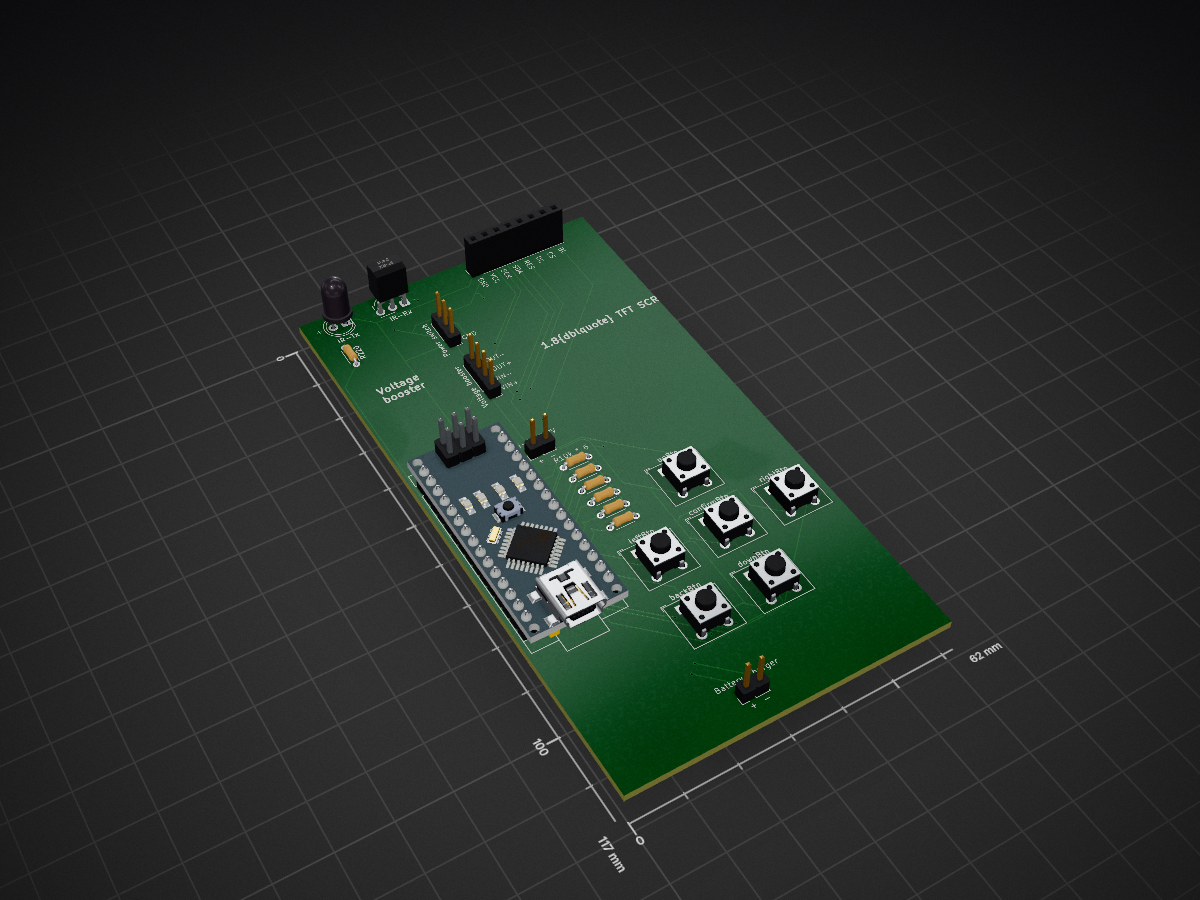
Universal remote is an open-source printed circuit board by paco7828, from the paco7828/universal-remote repository on GitHub. It is a 2-layer board of 62 × 117 mm with 21 parts on 34 nets, routed with 264 tracks and 20 vias.
Its parts include 7 resistors, 4 connectors and 1 IC. It belongs with the AVR (ATmega, ATtiny) boards of this library.
ESP32-based universal infrared remote control with touch screen. It can learn IR signals, save them to an SD card, resend them, and transmit built-in brand codes. The entire UI is touch-controlled, featuring scrollable lists and a virtual keyboard.
| Component | Description |
|---|---|
| MCU | ESP32 (Using FSPI / SPI2 bus) |
| Display | ILI9341 2.4" TFT, 240x320, portrait (rotation 0) |
| Touch | XPT2046 resistive touch, via SPI |
| Storage | MicroSD card |
| IR Transmitter | TSAL6200 |
| IR Receiver | IRM-3638T |
The display and the SD card use the same SPI bus (shared MOSI/MISO/CLK),
multiplexed with CS lines. Before sending an IR signal, the code sets SD_CS and TOUCH_CS
HIGH to avoid bus conflicts.
| Signal | GPIO |
|---|---|
| TFT CS | 7 |
| TFT RST | 10 |
| TFT DC | 2 |
| TFT MOSI | 6 |
| TFT MISO | 5 |
| TFT CLK | 4 |
| Touch CS | 8 |
| Touch IRQ | 9 |
| SD CS | 3 |
| IR TX | 0 |
| IR RX | 1 |
./IR-codes.h - custom header with built-in Pronto Hex codes
(EPSON and NEC arrays). Without this, the project will not compile.Signal options -> Receive starts listening mode.decode_results.MAX_FRAMES = 3), measuring the pause between them as gap_ms.UNKNOWN (raw) signal is only accepted if it is the first frame,
and contains at least 10 pulses, filtering out noise.SIG_VALUE - known protocol, fixed-length value (e.g., NEC)SIG_STATE - AC-like protocols with byte-array statesSIG_RAW - unknown, raw microsecond array-)./saved-signals/<group>/<name>.txt.Signal options -> Transmit -> group list -> signal list -> Send.
The group is the part of the signal's name before the - (e.g., TV-power -> TV group).Built-in signals -> brand -> signal -> Send.Send button repeats the signal (except for SIG_STATE signals).SIG_VALUE: irsend.send(protocol, value, bits) - for RC5/RC6,
the toggle bit switches automatically on each new press.SIG_STATE: irsend.send(protocol, state, bytes).SIG_RAW: irsend.sendRaw(rawData, len, khz).false, but raw data is available, an
automatic raw fallback occurs.gap_ms pause between frames.The IRCode structures declared in IR-codes.h store the codes in Pronto Hex format.
The firmware converts them to raw microsecond arrays using the prontoToRawSignal()
function and calculates the carrier frequency with prontoCarrierKHz().
Currently, only these are available from the UI in the hardcodedBrands[] array:
(Other brands will only appear if you add them to the array.)
Del button, !NO CONFIRMATION MESSAGE!)./System Volume Information and /built-in-signals
directories, deletes everything else.Three selectable color themes (persisted in NVS):
Theme switching is displayed with an animated spreading circle effect.
Other UI features:
UNIVERSAL / REMOTE text for ~2 seconds.LGFX_Sprite) to prevent flickering.REPEAT_INTERVAL = 200 ms).Main Menu
├── Signal options
│ ├── Transmit -> [Group] -> [Signal list] -> Send
│ └── Receive -> Listening... -> Captured! -> Keyboard -> Save
├── Built-in signals
│ └── [Brand] -> [Signal list] -> Send
├── SD Card options
│ ├── Info
│ ├── Files -> browser (Up / Back / Del)
│ └── Format -> Yes, format / Cancel formatting
└── Change theme
├── Futuristic Red
├── Futuristic Green
└── Futuristic PurpleIf SD initialization fails, "SD Card options" disappears from the main menu.
Not binary - each signal is a simple, line-separated .txt file:
# UniRemote IR signal
name: TV-power
carrier_khz: 38
frame: 1
gap_ms: 40
protocol: NEC
bits: 32
value: 0x20DF10EF
length: 68
raw: 9000,4500,560,560,...
frame: 2
...
Fields per frame:
gap_ms - pause before the next frame (only if there is a next frame)protocol - name returned by typeToString()bits - number of bits for SIG_VALUE, bytes×8 for SIG_STATEvalue - hex value (SIG_VALUE)bytes - space-separated hex bytes (SIG_STATE)length + raw - raw microsecond array (always saved if available)When loading the file, the code automatically determines the kind based
on the existing fields: value -> state -> raw priority.
Folder structure:
/saved-signals/
├── TV/
│   ├── power.txt
│   └── mute.txt
├── Misc/
│   └── random-signal.txt
Names without - are automatically placed in the Misc group.
| File | Role |
|---|---|
UniversalRemote.ino | Full firmware |
IR-codes.h | Built-in Pronto Hex codes (EPSON, NEC arrays, IRCode struct) |
| Qty | Value | Footprint | References |
|---|---|---|---|
| 6 | 1K | Resistor_THT:R_Axial_DIN0204_L3.6mm_D1.6mm_P5.08mm_Horizontal | R2, R3, R4, R5, R6, R7 |
| 1 | 1.8TFT-SCREEN | Connector_PinSocket_2.54mm:PinSocket_1x08_P2.54mm_Vertical | J1 |
| 1 | 220 | Resistor_THT:R_Axial_DIN0204_L3.6mm_D1.6mm_P5.08mm_Horizontal | R220 |
| 1 | Arduino_Nano_v3.x | Module:Arduino_Nano | A1 |
| 1 | Battery charger | Connector_PinHeader_2.54mm:PinHeader_1x02_P2.54mm_Vertical | J2 |
| 1 | IR-Rx | OptoDevice:Vishay_MOLD-3Pin | U1 |
| 1 | IR-Tx | LED_THT:LED_D5.0mm_IRGrey | IR-Tx |
| 1 | Li-Po-3.7V | Connector_PinHeader_2.54mm:PinHeader_1x02_P2.54mm_Vertical | BT1 |
| 1 | Power switch | Connector_PinHeader_2.54mm:PinHeader_1x03_P2.54mm_Vertical | J4 |
| 1 | Voltage booster | Connector_PinHeader_2.54mm:PinHeader_1x04_P2.54mm_Vertical | J3 |
| 1 | backBtn | Button_Switch_THT:SW_Push_2P1T_Toggle_CK_PVA1xxH2xxxxxxV2 | backBtn |
| 1 | confirmBtn | Button_Switch_THT:SW_Push_2P1T_Toggle_CK_PVA1xxH2xxxxxxV2 | confirmBtn |
| 1 | downBtn | Button_Switch_THT:SW_Push_2P1T_Toggle_CK_PVA1xxH2xxxxxxV2 | downBtn |
| 1 | leftBtn | Button_Switch_THT:SW_Push_2P1T_Toggle_CK_PVA1xxH2xxxxxxV2 | leftBtn |
| 1 | rightBtn | Button_Switch_THT:SW_Push_2P1T_Toggle_CK_PVA1xxH2xxxxxxV2 | rightBtn |
| 1 | upBtn | Button_Switch_THT:SW_Push_2P1T_Toggle_CK_PVA1xxH2xxxxxxV2 | upBtn |
It measures 62 × 117 mm and has 2 copper layers, 1.6 mm thick.
21 parts. The full list of its parts is on this page, with links to each part's symbol and footprint where PCBKit's library has them.
From the paco7828/universal-remote repository on GitHub, at the commit this page was made from: the board is v1/pcb-kicad/universal_remote.kicad_pcb and its schematic v1/pcb-kicad/universal_remote.kicad_sch. PCBKit opens the board in the browser, with nothing to install.
Its repository states no licence, so its author keeps all rights: ask paco7828 before reusing the design.
gusmanb/logicanalyzer
24 channel, 100Msps logic analyzer hardware and software

mntmn/amiga2000-gfxcard
MNT VA2000, an Open Source Amiga 2/3/4000 Graphics Card (Zorro II/III), written in Verilog


hackclub/OnBoard
💡 Join 1,000 teenagers and make your first PCB with a $100 grant!

drandyhaas/KiCadRoutingTools
A set of Python/Rust tools to aid routing in KiCad

Arrow-air/project-quiver
Project Quiver documentation, designs, and project artifacts.

