2 layers86 × 54 mm

 notevanrutten/ESP32-S3-DevBoard2
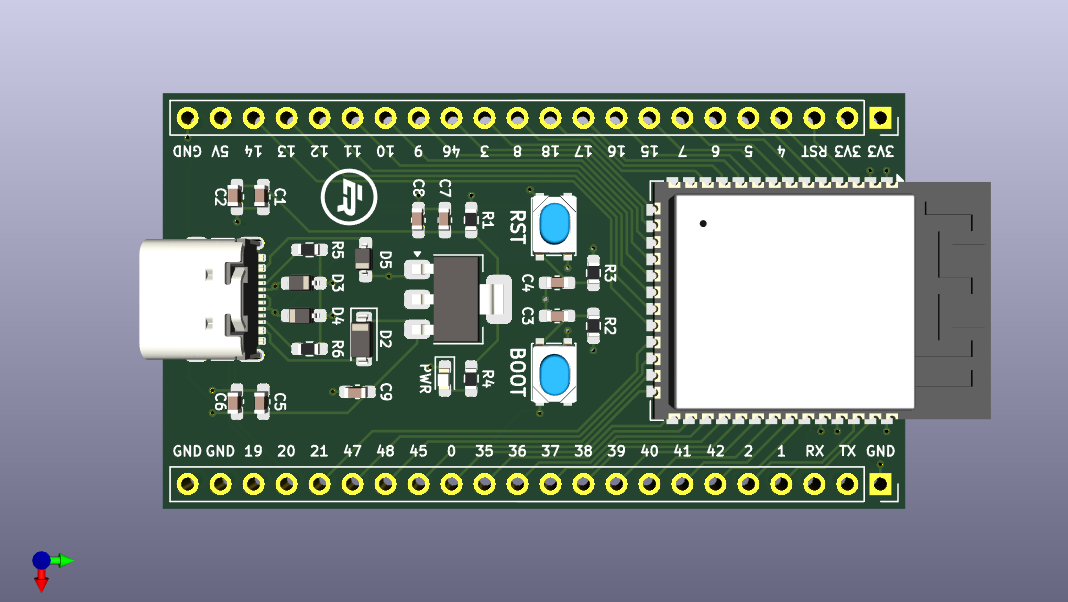
A custom-built development board using the ESP32-S3 chip
ESP32-S3-DevBoard is an open-source printed circuit board by notevanrutten, from the notevanrutten/ESP32-S3-DevBoard repository on GitHub, published under the Unlicense licence. It is a 4-layer board of 32 × 57.1 mm with 28 parts on 45 nets, routed with 314 tracks and 28 vias.
It is built around the ESP32-S3-WROOM-1-N8 and AMS1117-3.3. Its parts include 9 capacitors, 6 resistors, 5 diodes, 3 connectors and 2 ICs. It belongs with the microcontroller boards boards and the ESP32 boards of this library.


A custom-built development board using the ESP32-S3 chip
NOTE: This process only needs to be performed once for each development board
Download the Zadig driver installation program here: https://zadig.akeo.ie
Open Zadig, then click Options -> List All Devices
Select USB JTAG/serial debug unit (Interface 0) and change the driver to USB Serial (CDC)
Click "Upgrade/Downgrade Driver" (please note, this process may take a few minutes)
Select USB JTAG/serial debug unit (Interface 2) and change the driver to libusbK
Click "Upgrade/Downgrade Driver" (please note, this process may take a few minutes)
In PlatformIO, configure the platformio.ini file as follows:
 [env:esp32-s3-devboard]

 platform = https://github.com/platformio/platform-espressif32.git
 board = esp32-s3-devkitc-1
 framework = arduino

 upload_speed = 2000000
 monitor_speed = 115200

 debug_tool = esp-builtin
 debug_init_break = break setup
 build_type = debug

 ; enables CDC mode (activates USB-to-Serial)
build_flags = -DARDUINO_USB_CDC_ON_BOOT=1PROJECT TASKS > esp32-s3-devboard > General > Upload and Monitor (top left)QUICK ACCESS > Debug > Start Debugging (bottom left), or press F5PlatformIO: Serial Monitor on the Status Bar (bottom)| Qty | Value | Footprint | References |
|---|---|---|---|
| 5 | 0.1u | Capacitor_SMD:C_0603_1608Metric_Pad1.08x0.95mm_HandSolder | C2, C3, C4, C6, C7 |
| 4 | 10u | Capacitor_SMD:C_0603_1608Metric_Pad1.08x0.95mm_HandSolder | C1, C5, C8, C9 |
| 3 | SD05_SOD323 | Diode_SMD:D_SOD-323_HandSoldering | D3, D4, D5 |
| 2 | 10k | Resistor_SMD:R_0603_1608Metric_Pad0.98x0.95mm_HandSolder | R2, R3 |
| 2 | 5.1k | Resistor_SMD:R_0603_1608Metric_Pad0.98x0.95mm_HandSolder | R5, R6 |
| 2 | Conn_01x22_Socket | Connector_PinSocket_2.54mm:PinSocket_1x22_P2.54mm_Vertical | J2, J3 |
| 2 | SW_Push | Button_Switch_SMD:SW_SPST_PTS810 | SW1, SW2 |
| 1 | 0 | Resistor_SMD:R_0603_1608Metric_Pad0.98x0.95mm_HandSolder | R1 |
| 1 | 1N5819 | Diode_SMD:D_SOD-123 | D2 |
| 1 | 330 | Resistor_SMD:R_0603_1608Metric_Pad0.98x0.95mm_HandSolder | R4 |
| 1 | AMS1117-3.3 | Package_TO_SOT_SMD:SOT-223-3_TabPin2 | U2 |
| 1 | ESP32-S3-WROOM-1 | RF_Module:ESP32-S3-WROOM-1 | U1 |
| 1 | LED | LED_SMD:LED_0603_1608Metric_Pad1.05x0.95mm_HandSolder | D1 |
| 1 | LOGO | Custom:ER | G*** |
| 1 | USB_C_Receptacle_USB2.0_14P | Connector_USB:USB_C_Receptacle_GCT_USB4105-xx-A_16P_TopMnt_Horizontal | J1 |
It measures 32 × 57.1 mm and has 4 copper layers, 1.6 mm thick.
28 parts, built around the ESP32-S3-WROOM-1-N8 and AMS1117-3.3. The full list of its parts is on this page, with links to each part's symbol and footprint where PCBKit's library has them.
From the notevanrutten/ESP32-S3-DevBoard repository on GitHub, at the commit this page was made from: the board is ESP32-S3-DevBoard.kicad_pcb and its schematic ESP32-S3-DevBoard.kicad_sch. PCBKit opens the board in the browser, with nothing to install.
Its repository publishes it under the Unlicense licence: you may reuse it on that licence's terms (keep the author's notice, and for a copyleft licence share your changes alike).


DevMubarak1/PidginTranslator
Handheld translator for Nigerian languages. No internet needed for common phrases, YarnGPT for everything else.


Tomas-Kuchta-FPV/Open-ESPilot
An open-source project to develop a custom ESP32-based flight controller designed primarily for use with ArduPilot. Focused on affordability, flexibility, and ease of integration with various robotic and UAV platforms.

RoboticsBrno/Robutek
Robůtek je robotická platforma založená na čipu ESP32-S3. Je velice rozšitiřelný, ale ze základu umí jezdit, kreslit fixou, jezdit po čáře, pohybovat se bludištěm. Programování je přes Jaculus.

romioRN/Dash6.8-hardware
wifi name "service", password 12345678, connect to 192.167.4.1
