2 layers34.1 × 30.3 mm

 multigcs/riocore91
riocore
W5500 is an open-source printed circuit board by multigcs, from the multigcs/riocore repository on GitHub, published under the GPL-2.0 licence. It is a 2-layer board of 52.3 × 21.8 mm with 38 parts on 47 nets, routed with 226 tracks and 55 vias.
It is built around the W5500, TXM25M0004252DBCEO00T and UPZ1608E101-3R0TF, with the J0011D21BNL among its other parts. Its parts include 17 resistors, 13 capacitors, 1 IC, 1 connector and 1 crystal.


LinuxCNC-RIO - rewrite


Realtime-IO for Motion-Control
RIO is a cost-effective and flexible alternative to traditional hardware setups like Mesa boards, it's a code generator for using FPGA boards as Realtime-IO for LinuxCNC and other Motion-Control systems.
Furthermore, the complete configuration and hal is generated. a json configuration file serves as the basis
These features make RIO an attractive solution for hobbyists and professionals seeking a customizable, cost-effective Realtime-IO interface for Motion-Control systems
THE AUTHORS OF THIS SOFTWARE ACCEPT ABSOLUTELY NO LIABILITY FOR ANY HARM OR LOSS RESULTING FROM ITS USE. IT IS EXTREMELY UNWISE TO RELY ON SOFTWARE ALONE FOR SAFETY. Any machinery capable of harming persons must have provisions for completely removing power from all motors, etc, before persons enter any danger area. All machinery must be designed to comply with local and national safety codes, and the authors of this software can not, and do not, take any responsibility for such compliance
list of all boards: BOARDS
list of all plugins: PLUGINS
list of all toolchains: TOOLCHAINS
There are multiple ways of getting started.
if you have a Debian-Bookworm installation (e.g. from the LinuxCNC ISO or the LinuxCNC raspberry image) you can simply use this script to install all depends and the icestorm and gowin toolchain (gowin only on Intel/AMD)
wget -O- https://www.multixmedia.org/riocore-installer.sh | bashgit clone https://github.com/multigcs/riocore.git
cd riocoreapt-get update
apt-get -y install python3 python3-pip python3-yaml python3-graphviz python3-pyqtgraph python3-pyqt5 python3-pyqt5.qtsvg python3-lxml python3-psutil python3-spidevmake sure that the toolchain matching your fpga is in the path:
export PATH=$PATH:/opt/oss-cad-suite/bin/
export PATH=$PATH:/opt/Xilinx/Vivado/2023.1/bin/
export PATH=$PATH:/opt/gowin/IDE/bin/
export PATH=$PATH:/opt/intelFPGA_lite/22.1std/quartus/bin/
export PATH=$PATH:/opt/Xilinx/14.7/ISE_DS/ISE/bin/lin64/
than copy a config file that is near to your setup:
cp riocore/configs/Tangoboard/config-spi.json my_config.jsonUsing a TangNano9k or other board supported by the open-cad-suite? Check out the docker setup for an easy to use all in one way to run the riocore ui and generator, including flashing: DOCKER
you can edit your configuration file by hand (text-editor) or using the config tool (rio-flow):
bin/rio-flow riocore/configs/Tangbob/config.json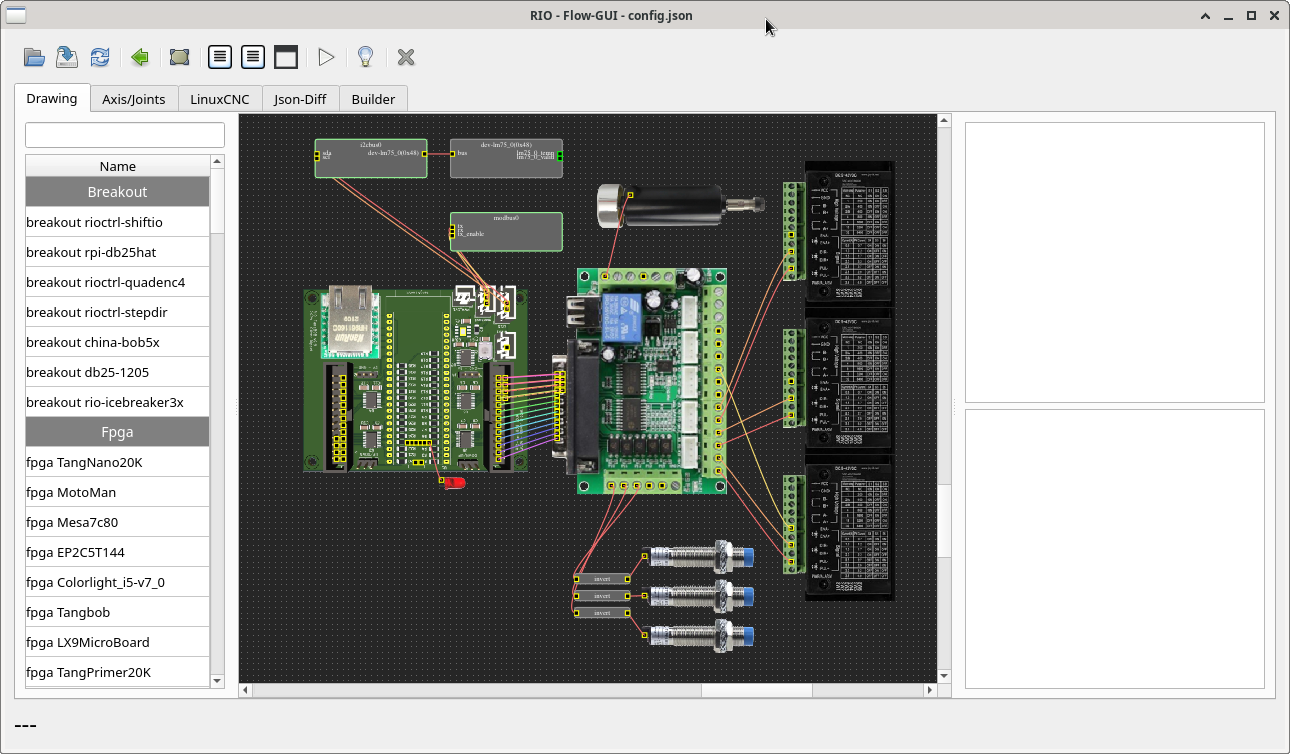
after setup, you can save your configuration and generate the output-files in the setup-tool via buttons:
you can also do this things on your console:
generate:
bin/rio-generator my_config.jsonloading: my_config.json
loading board setup: TangNano9K
writing gateware to: Output/Tangoboard/Gateware
!!! gateware changed: needs to be built and flashed |||
loading toolchain gowin
writing linuxcnc files to: Output/Tangoboard/LinuxCNCcompile:
(
cd Output/BOARD_NAME/Gateware/
make clean all
)
flash:
(
cd Output/BOARD_NAME/Gateware/
make load
)
You can find all the LinuxCNC related files in 'Output/BOARD_NAME/LinuxCNC/',
to start LinuxCNC, you have to install the rio component first:
sudo halcompile --install riocore/files/rio.cthen you can start LinuxCNC with your new .ini file:
linuxcnc Output/BOARD_NAME/LinuxCNC/rio.ini[!WARNING] all files will be overwritte by the generator tool
if you change the .ini file by hand, for example, you should make a copy of it
if you need an additional .hal file, you can incude it in the postgui_call_list.hal
rio will not overwrite this entry's
you need the toolchain for your FPGA or in some cases the https://github.com/YosysHQ/oss-cad-suite-build
graph LR;
    BOARD.JSON--rio-flow-->CONFIG.JSON;
    CONFIG.JSON--rio-generator-->/Output;
    /Output-->/Gateware;
    /Gateware-->Makefile;
    /Gateware-->verilog-files;
    /Gateware-->pins.*;
    Makefile--make-->Bitfile;
    Bitfile--make load-->FPGA;
    /Output-->/LinuxCNC;
    /LinuxCNC-->riocomp.c;
    /LinuxCNC-->rio.ini
    /LinuxCNC-->rio-gui.xml
    /LinuxCNC-->*.hal;
    /Output-->/ROS;
    /Output-->/MQTT;
/Output-->/Simulator;graph LR;
LinuxCNC<-->rio.c;
rio.c<-->riocomp.c;
riocomp.c<--UDP/SPI-->FPGA;
FPGA<--RS422/RS485-->SUB_FPGA;graph LR;
ROS-Plugin-1<--TCP-->ROS-core
ROS-Plugin-2<--TCP-->ROS-core
ROS-Plugin-N<--TCP-->ROS-core
ROS-core<--TCP-->rosbridge;
rosbridge<--UDP/SPI-->FPGA;
FPGA<--RS422/RS485-->SUB_FPGA;graph LR;
HTML+JS<--Websockets-->MQTT-Broker
MQTT-Client-1<--MQTT-->MQTT-Broker
MQTT-Client-2<--MQTT-->MQTT-Broker
MQTT-Client-N<--MQTT-->MQTT-Broker
MQTT-Broker<--MQTT-->mqttbridge;
mqttbridge<--UDP/SPI-->FPGA;
FPGA<--RS422/RS485-->SUB_FPGA;graph LR;
nodejs<-->JSLIB
JSLIB<--UDP-->FPGA;
FPGA<--RS422/RS485-->SUB_FPGA;riocore
├── bin ················ user tools / gui's
├── doc ················ documentation
├── dockerfiles ········ files to run the docker container
├┬─ ricore ············· main directory
|├── configs ··········· some demo configurations
|├── gui ··············· widgets and functions for the gui tools
|├── files ············· helper scripts and files
|├── generator ········ the generator for the LinuxCNC configuration
|├── plugins ··········· location of the plugins
├── tests ·············· unit testsOutput
├┬─ BOARD_NAME ········· for each board
|├── Gateware ·········· Gateware-Files for the FPGA
|├── LinuxCNC ·········· LinuxCNC configuration (hal/ini/component)
|├── PYLIB ············· C and Python lib with testgui.py
|├── MQTT ·············· MQTT-Bridge
|├── ROS ··············· ROS-Bridge
|├── Simulator ········· Simulator-Sources
|├── JSLIB ············· Javascrit lib
|├── DOC ··············· some Documentation files| Qty | Value | Footprint | References |
|---|---|---|---|
| 4 | 0R | Resistor_SMD:R_0603_1608Metric | R35, R36, R37, R38 |
| 4 | 10K | Resistor_SMD:R_0603_1608Metric | R29, R30, R31, R32 |
| 4 | 49.9R | Resistor_SMD:R_0603_1608Metric | R39, R40, R42, R43 |
| 4 | TestPoint | TestPoint:TestPoint_Pad_D1.0mm | TP1, TP2, TP3, TP4 |
| 3 | 0.1uF | Capacitor_SMD:C_0603_1608Metric | C36, C40, C41 |
| 2 | 10nF | Capacitor_SMD:C_0603_1608Metric | C37, C46 |
| 2 | 10uF/6.3V | Capacitor_SMD:C_0603_1608Metric | C35, C39 |
| 2 | 18pF | Capacitor_SMD:C_0603_1608Metric | C33, C34 |
| 2 | 330R | Resistor_SMD:R_0603_1608Metric | R33, R34 |
| 2 | 6.8nF | Capacitor_SMD:C_0603_1608Metric | C44, C45 |
| 1 | 10R | Resistor_SMD:R_0603_1608Metric | R41 |
| 1 | 12.4K | Resistor_SMD:R_0603_1608Metric | R25 |
| 1 | 1M | Resistor_SMD:R_0603_1608Metric | R24 |
| 1 | 22nF | Capacitor_SMD:C_0603_1608Metric | C43 |
| 1 | 4.7uF | Capacitor_SMD:C_0603_1608Metric | C38 |
| 1 | Crystal_25MHz | Crystal:Crystal_SMD_2520-4Pin_2.5x2.0mm | Y2 |
| 1 | FB_100R_3A | Inductor_SMD:L_0603_1608Metric | FB7 |
| 1 | RJ45_Pulse_J0011D21BNL | Connector_RJ:RJ45_Hanrun_HR911105A_Horizontal | J6 |
| 1 | W5500 | Package_QFP:LQFP-48_7x7mm_P0.5mm | U8 |
It measures 52.3 × 21.8 mm and has 2 copper layers, 1.6 mm thick.
38 parts, built around the W5500, TXM25M0004252DBCEO00T, UPZ1608E101-3R0TF and J0011D21BNL. The full list of its parts is on this page, with links to each part's symbol and footprint where PCBKit's library has them.
From the multigcs/riocore repository on GitHub, at the commit this page was made from: the board is riocore/plugins/w5500/kicad/w5500/w5500.kicad_pcb. PCBKit opens the board in the browser, with nothing to install.
Its repository publishes it under the GPL-2.0 licence: you may reuse it on that licence's terms (keep the author's notice, and for a copyleft licence share your changes alike).


festlv/rioctrl-hw
Hardware design for modular CNC controller

festlv/kanalog-jp12-breakout
Breakout board for KFlop's Kanalog JP12 (adds 8 inputs, 8 outputs to Kanalog)


alxlab-zone66x/Macintosh-Comm-Slot-I-Ethernet-Card
This is a reproduction of the Farallon LC Comm Slot Ethernet Card.


Neumi/ethersweep
Open Source, easy to use Ethernet connected stepper motor controller. Built in FreeCAD, KiCAD and Arduino.

tombueng/LuxDMX
Open-source Art-Net / sACN (E1.31) → DMX512 gateway for ESP32 / ESP32-S3 / Ethernet. Live web UI shows all 512 channels in real time, flags console conflicts, and drives galvanically-isolated DMX.

OpenJBOD/rp2040
This repository contains the hardware design files OpenJBOD RP2040 Baseboard.