2 layers57.3 × 19 mm

 mignon-p/ButterflyChain1
KiCad files for a chainable NeoPixel butterfly.
ButterflyChain is an open-source printed circuit board by mignon-p, from the mignon-p/ButterflyChain repository on GitHub, published under the CC-BY-SA-4.0 licence. It is a 2-layer board of 93.1 × 65.5 mm with 26 parts on 22 nets, routed with 250 tracks and 0 vias.
Its parts include 18 diodes, 3 connectors and 1 capacitor. It belongs with the lEDs and displays boards of this library.
This repository contains the KiCad and Gerber files for a PCB shaped like a butterfly. The butterfly contains 18 "NeoPixel" (WS-2812) LEDs. The butterflies can be chained together, and controlled by just about any microcontroller. However, I specifically had the BBC micro:bit in mind, and designed these chainable butterflies together with my neo:bit and feather:bit boards.
The butterfly design is based on my butterfly nightlight, but I have removed the microcontroller so that it can be controlled externally.
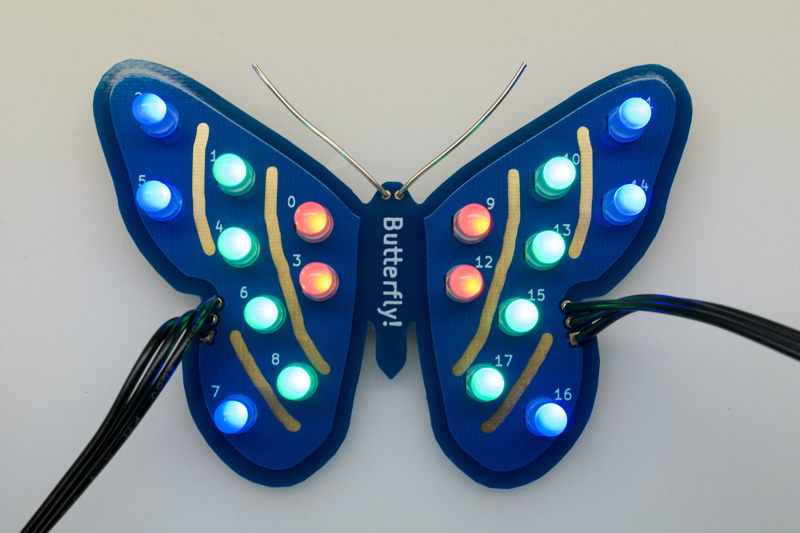
You can use any NeoPixel library on any microcontroller to control the LEDs on the butterfly. The silkscreen shows how the LEDs are numbered. Note that the NeoPixel butterflies use RGB format, rather than the more common GRB format.
If you're using the micro:bit MakeCode editor, you can optionally use my butterfly package. It makes it easier to control the inner, middle, or outer LEDs on the butterfly as a group.
My butterfly package is not an "approved" package, so you'll need to
enter its URL specifically. Expand the "Advanced" box, and choose
"Add Package". Then enter https://github.com/ppelleti/pxt-butterfly
in the search box:

Then just choose the "butterfly" package that appears.
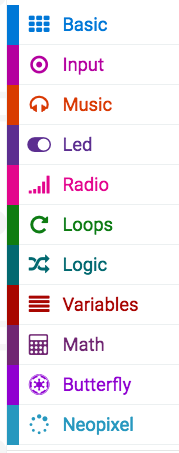
You should then have a "Butterfly" category in your toolbox:
Now you can use the butterfly blocks:
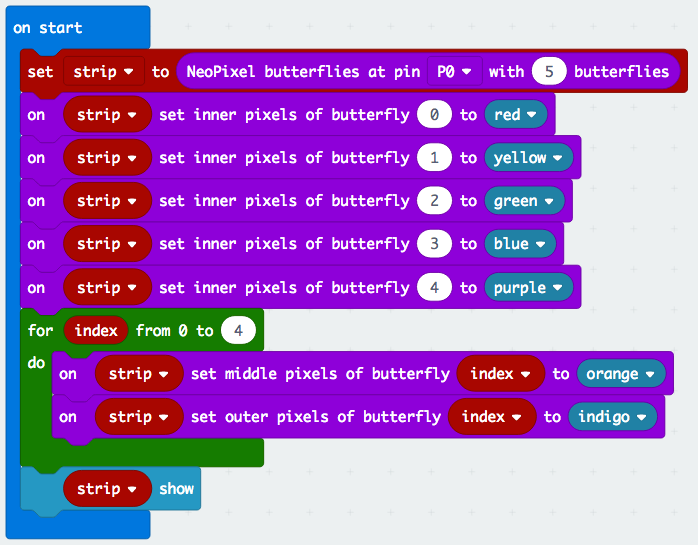
Be sure to use the NeoPixel "show" block once you've set your butterfly colors.
This board is big enough that it would be rather expensive to order from OSH Park, so I would recommend a Chinese fab such as Elecrow or JLCPCB. I chose blue soldermask for my boards, but red or yellow might work, as well. I chose the ENIG finish.
If you're not making any changes to the board, all you need to do is
zip up the files in the gerber directory, and upload the zipfile to
Elecrow or JLCPCB.
Note that in the KiCad files and Gerber files, the "front" of the board is actually the back, and vice-versa. This is because JLCPCB adds a customer ID number to the front of the board, but I wanted the number to be on the actual back of the board, where it doesn't disrupt the esthetics of the butterfly. (It turns out it's possible to specify the location of the customer ID, but I hadn't read that when I first came up with this trick.)
Solder the surface-mount capacitor C1 onto the back of the board.
Solder the 18 LEDs to the front of the board. The LED should be positioned so that the square pad gets one of the longer legs, not one of the shorter ones.
Solder the JST SM plug and receptacle to the J1 and J2 locations. Be sure to get the polarity right!
Create the butterfly's antennae by inserting a length of bare wire into the holes on the butterfly's head. (These two holes are represented by J3 on the schematic.) It's a tight fit, so friction may be enough to hold the wire in place, but you can always solder it to be sure.
This design is licensed under the Creative Commons Attribution-ShareAlike 4.0 International license.
Some of the footprints in myLibrary.pretty are based on footprints
in the KiCad library, which is licensed under the
KiCad library license (which is now also CC-BY-SA-4.0, with an
exception).
| Qty | Value | Footprint | References |
|---|---|---|---|
| 18 | Neopixel_THT | myLibrary:LED_D5.0mm-4 | D1, D2, D3, D4, D5, D6, D7, D10, D11, D12, D13, D14, D15, D16, D17, D18 +2 |
| 1 | 47µF | Capacitors_SMD:C_1210_HandSoldering | C1 |
| 1 | Antennae | myLibrary:Antennae | J3 |
| 1 | Input | Pin_Headers:Pin_Header_Straight_1x03_Pitch2.54mm | J1 |
| 1 | LOGO | myLibrary:copper-on-wing-left | G*** |
| 1 | LOGO | myLibrary:copper-on-wing-right | G*** |
| 1 | LOGO | myLibrary:Fingerprint | G*** |
| 1 | Output | Pin_Headers:Pin_Header_Straight_1x03_Pitch2.54mm | J2 |
The 25 most common of 26 parts.

hackclub/OnBoard
💡 Join 1,000 teenagers and make your first PCB with a $100 grant!


harbaum/galagino
A Galaga, Pac-Man and Donkey Kong arcade emulator for the ESP32

Luos-io/luos_engine
Open-source and real-time orchestrator for cyber-physical-systems, to easily design, test and deploy embedded applications and digital twins.

google/walt
A device for measuring latency of physical sensors and outputs on phones and computers

It measures 93.1 × 65.5 mm and has 2 copper layers, 1.6 mm thick.
26 parts. The full list of its parts is on this page, with links to each part's symbol and footprint where PCBKit's library has them.
From the mignon-p/ButterflyChain repository on GitHub, at the commit this page was made from: the board is ButterflyChain.kicad_pcb. PCBKit opens the board in the browser, with nothing to install.
Its repository publishes it under the CC-BY-SA-4.0 licence: you may reuse it on that licence's terms (keep the author's notice, and for a copyleft licence share your changes alike).