2 layers138.8 × 89.8 mm

 diepala/cantor756
Cantor keyboard, a 42 key diodeless split keyboard.
Cantor MX is an open-source printed circuit board by diepala, from the diepala/cantor repository on GitHub, published under the GPL-3.0 licence. It is a 2-layer board of 142.9 × 98.5 mm with 26 parts on 38 nets, routed with 303 tracks and 1 via.
Its parts include 21 switches, 1 IC and 1 connector. It belongs with the keyboards and input boards of this library.
The Cantor keyboard is a 42 key diodeless split keyboard, designed with simplicity in mind. It is inspired on the popular corne, ferris and sweep keyboards, aiming to provide a more ergonomic (stronger column stagger) corne-like layout with a simple, easy to assemble and cheap design.
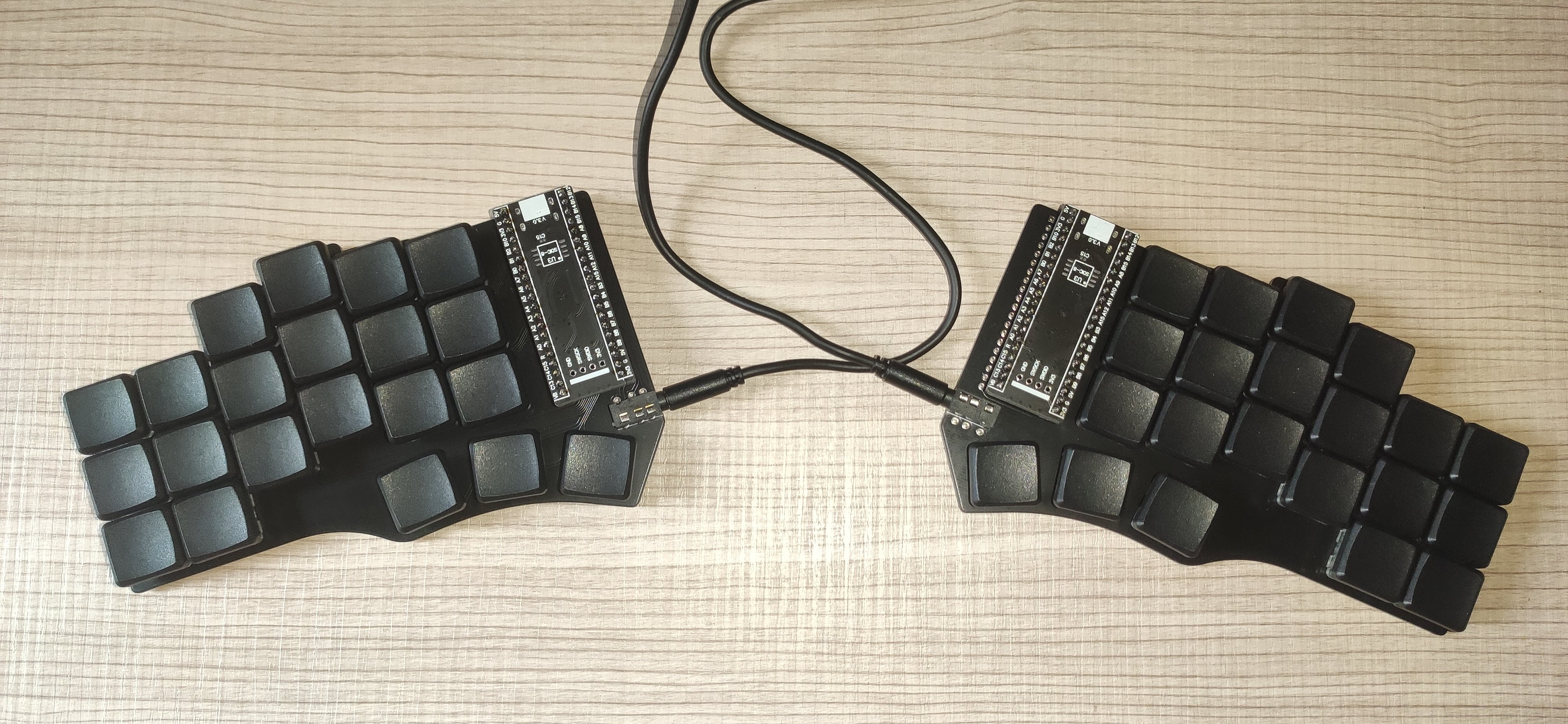
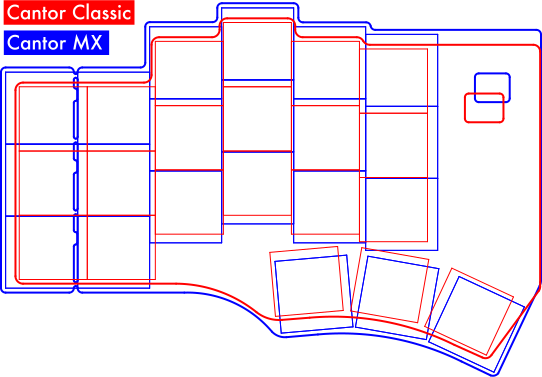
There are two versions of the Cantor:
The Cantor Classic uses choc switches with choc spacing. Therefore, only MBK keycaps can be used.
The Cantor MX uses either choc V1, choc V2, or MX switches with the slightly larger MX spacing. Keycaps for MX stems can be used. (OEM/SA/XDM/Cherry, etc.)
A diodeless design reduces the keyboard assembly time, as the amount of components to solder is significantly reduced. Moreover, soldering diodes can cause trouble during the keyboard build. Diodes need to be placed in the correct direction, if not, the keys won't work well! Eliminating diodes will prevent many errors during the assembly process.
All the designs and files are provided "AS IS" without any warranty or support.
The Cantor is designed with the following goals:
The PCB is reversible to reduce manufacturing costs.
Would you like to build this keyboard? Then continue reading!
You can also buy a kit to build the Cantor keyboard from one of the honorable sponsors:


To build the keyboard, you will need the following materials:
Same as the classic, but switches can be choc v1, choc v2, MX 5 pin, or MX 3pin, and the compatible keycaps for chosen switches. MX 5 pin are preferable to 3 pin because they have more points of contact with the PCB.
Cantor MX has slots for optional 'Tenting pucks'. They can be purchased or 3d printed.
Download the gerber file from releases, and submit it to your favorite PCB manufacturer. The keyboard designs have been tested with JLCPCB. More details on the ordering process can be found in the PCB Ordering Guide.
Note: if you don't want a random tracking number to be printed in the PCB, make sure to select the option 'Remove Order Number' in JLCPCB.
To build the keyboard, you'll also need a soldering iron and some tin. Follow the build guide.
The Cantor keyboard uses the QMK firmware, which already supports this keyboard.
To flash the firmware to the microcontroller connect the blackpill to your computer and set it to bootloader mode. To do this the first time:
The following times you want to flash the keyboard, it is much simpler thanks to bootmagic. Hold the top left key of the keyboard and plug the microcontroller. If flashing the right part, hold the top right key.
If you have build this keyboard, please fill this form to provide feedback. This will help to improve the keyboard design in future revisions.
Also, you can open an issue reporting any problem or feature request.
The development of a keyboard takes time and money. If you like this keyboard a want to support me for the work and to develop future revisions of the keyboard, consider donating:
PayPal:  GitHub: Here
Thank you very much to everyone contributing and/or sponsoring this project. Special thanks to the honorable sponsors:
| Qty | Value | Footprint | References |
|---|---|---|---|
| 21 | KEYSW | Cantor_MX:CherryMX_ChocV2_1u_DS | K00, K01, K02, K03, K04, K05, K10, K11, K12, K13, K14, K15, K20, K21, K22, K23 +5 |
| 1 | Cantor MX logo 3-switches ortho | Cantor_MX:Cantor MX logo 3-switches ortho | G*** |
| 1 | Cantor MX logo 3-switches top | Cantor_MX:Cantor MX logo 3-switches top | G*** |
| 1 | TRRS | Cantor_MX:MJ-4PP-9_Cantor_MX_TX-RX_Crossover | J1 |
| 1 | YAAJ_WeAct_BlackPill_Part_Like | Cantor_MX:Cantor_DS_YAAJ_WeAct_BlackPill_2 | U1 |
The 25 most common of 26 parts.


hackclub/OnBoard
💡 Join 1,000 teenagers and make your first PCB with a $100 grant!


harbaum/galagino
A Galaga, Pac-Man and Donkey Kong arcade emulator for the ESP32

Luos-io/luos_engine
Open-source and real-time orchestrator for cyber-physical-systems, to easily design, test and deploy embedded applications and digital twins.

google/walt
A device for measuring latency of physical sensors and outputs on phones and computers


It measures 142.9 × 98.5 mm and has 2 copper layers, 1.6 mm thick.
26 parts. The full list of its parts is on this page, with links to each part's symbol and footprint where PCBKit's library has them.
From the diepala/cantor repository on GitHub, at the commit this page was made from: the board is Cantor_MX/Cantor_MX.kicad_pcb and its schematic Cantor_Classic/keyboard_pcb.kicad_sch. PCBKit opens the board in the browser, with nothing to install.
Its repository publishes it under the GPL-3.0 licence: you may reuse it on that licence's terms (keep the author's notice, and for a copyleft licence share your changes alike).