Skip to the content
2 layers25.4 × 42.9 mmCAN Click, the printed circuit board in 3D

Collection of add-on boards in mikroBUS™ standard

Size
25.4 × 42.9 mm
Copper layers
2
Thickness
1.6 mm
Parts
25
Nets
30
Pads
84
Tracks, vias
158, 52
Pours
1
Routed
Yes
KiCad
KiCad 9.0 (file 20241229)
Created
29 Aug 2023
Updated
14 Sep 2025

Overview

CAN Click is an open-source printed circuit board by michpro, from the michpro/mikroBUS repository on GitHub, published under the CERN-OHL-P-2.0 licence. It is a 2-layer board of 25.4 × 42.9 mm with 25 parts on 30 nets, routed with 158 tracks and 52 vias.

It is built around the COS1042T/3. Its parts include 7 capacitors, 6 resistors, 2 ICs, 2 connectors and 1 diode.

Main components

1

README

HLW8032_Click/README.md

HLW8032 Click - energy metering module


Overview

The HLW8032 Click board is a compact energy metering module designed for integration with MikroElektronika's mikroBUS™ ecosystem. It utilizes the HLW8032 integrated circuit, a high-precision single-phase energy measurement chip capable of monitoring active power, voltage, current, and power factor. This board is suitable for applications in smart energy monitoring, IoT-based power management systems, and industrial automation where accurate real-time energy consumption data is required.

Features

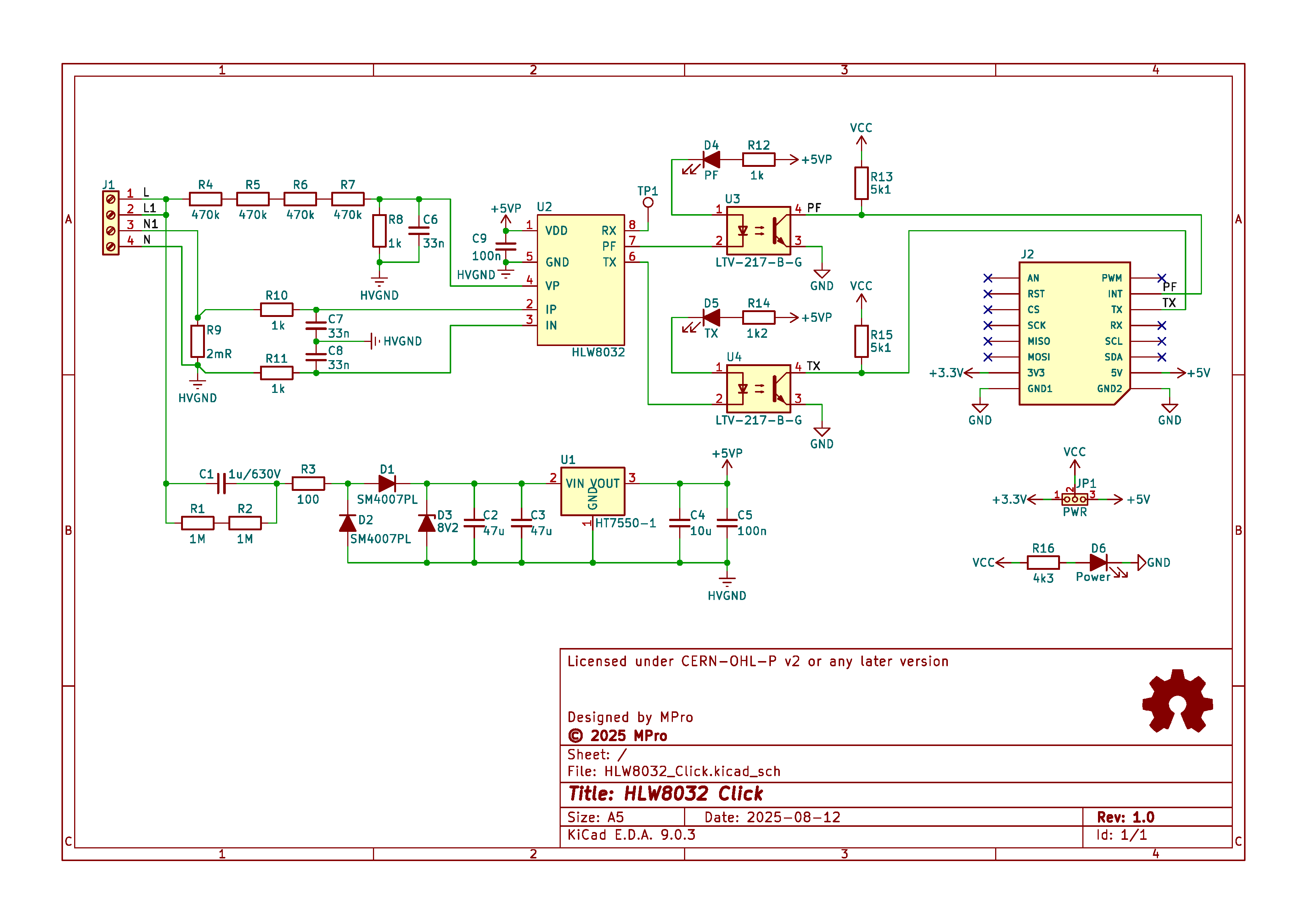
  • Energy Metering IC: HLW8032 for precise measurement of voltage (VP), current (IP/IN), and power.
  • Input Connections: 4-pin screw terminal for line (L), neutral (N), and load connections.
  • Shunt Resistor: 2 mΩ for current sensing, rated for high power dissipation.
  • mikroBUS™ Compatibility: Standard mikroBUS™ PCB form factor.
  • Ground Separation: High-voltage ground (HVGND) isolated from low-voltage ground (GND) for safety.

The board supports UART communication at 4800 baud for serial data output, providing registers for power, voltage, current, and energy accumulation.


Schematic diagram

wiring diagram

Visual simulation of a transformerless power supply.

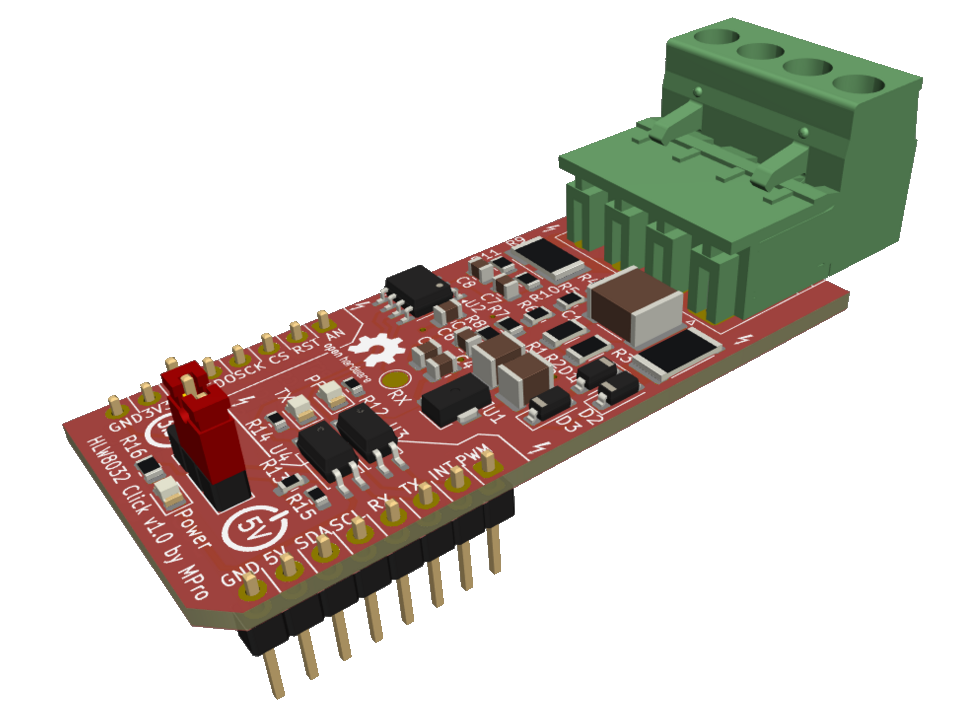
Module visualisation

(click on the image to see the 3D model)

LoRa Click

Assembly

Interactive BOM and placement

Production files

Production files can be found here.


Usage Guide

  • Connection:
    • Connect AC line to J1 (L/N) and load to L1/N1.
    • Plug into mikroBUS™ socket on a host board (e.g., MCU development kit).
    • Power via +5V/+3.3V pins.
  • Communication:
    • UART (TX/RX at 4800 baud, 8N1): Read 24-byte data frames for measurements.
    • PF Pin: Pulse output proportional to active electric energy.
  • Software:
    • Use MikroE libraries or custom code to parse HLW8032 registers.
    • Example: Voltage = (Register Value) * Calibration Factor.
  • Calibration: Adjust via software for shunt and divider ratios.
  • Safety: ** Handle high-voltage sections with care; ensure proper isolation **.

Reporting bugs

Create an issue on GitHub


License

Copyright © 2025 Michal Protasowicki

This project is released under CERN Open Hardware Licence Version 2 - Permissive.

License: CERN-OHL-P-2.0


Support

If You find my projects interesting and You wanted to support my work, You can give me a cup of coffee or a keg of beer :)

PayPal Direct     ko-fi     Coinbase

Parts

25
QtyValueFootprintReferences
3100kfootprints:R_0805_2012MetricR2, R3, R4
3100nfootprints:C_0805_2012MetricC4, C5, C7
210ufootprints:C_0805_2012MetricC3, C6
220pFfootprints:C_0805_2012MetricC1, C2
110kfootprints:R_0805_2012MetricR5
1120footprints:R_0805_2012MetricR6
112MHzfootprints:Crystal_SMD_3225-4Pin_3.2x2.5mmY1
12k2footprints:R_0805_2012MetricR1
1CANfootprints:DG250-3.5-03P-11-00AHJ1
1CAN Click v1.0 by MProfootprints:mikroBUS_module_MJ2
1COS1042T/3Package_SO:SOIC-8_3.9x4.9mm_P1.27mmU2
1Logo_Open_Hardware_Smallfootprints:OSHW-Logo2_7.3x6mm_SilkScreenLOGO1
1MCP2515-xSTfootprints:TSSOP-20_4.4x6.5mm_P0.65mmU1
1PWRfootprints:PinHeader_1x03_P2.54mm_VerticalJP1
1Powerfootprints:LED_0805_2012MetricD1
1TERM.footprints:PinHeader_1x02_P2.54mm_VerticalJP2

The 22 most common of 25 parts.

More from michpro/mikroBUS

11
  • 2 layers25.4 × 57.2 mmOpenTherm Click, the printed circuit board in 3D

    OpenTherm Click

    michpro/mikroBUS

    Collection of add-on boards in mikroBUS™ standard

    58 parts5CERN-OHL-P-2.0
  • 2 layers96.5 × 81.3 mmBluePill base, the printed circuit board in 3D

    BluePill base

    michpro/mikroBUS

    Collection of add-on boards in mikroBUS™ standard

    48 parts5CERN-OHL-P-2.0
  • 2 layers25.4 × 57.2 mmHLW8032 Click, the printed circuit board in 3D

    HLW8032 Click

    michpro/mikroBUS

    Collection of add-on boards in mikroBUS™ standard

    45 parts5CERN-OHL-P-2.0
  • 2 layers25.4 × 42.9 mmLIN Click, the printed circuit board in 3D

    LIN Click

    michpro/mikroBUS

    Collection of add-on boards in mikroBUS™ standard

    34 parts5CERN-OHL-P-2.0
  • 2 layers25.4 × 57.2 mmLoRa Click, the printed circuit board in 3D

    LoRa Click

    michpro/mikroBUS

    Collection of add-on boards in mikroBUS™ standard

    26 parts5CERN-OHL-P-2.0
  • 2 layers25.4 × 57.2 mmSCT-013 UI Click, the printed circuit board in 3D

    SCT-013 UI Click

    michpro/mikroBUS

    Collection of add-on boards in mikroBUS™ standard

    25 parts5CERN-OHL-P-2.0
  • 2 layers68.6 × 53.3 mmArduino UNO click shield, the printed circuit board in 3D

    Arduino UNO click shield

    michpro/mikroBUS

    Collection of add-on boards in mikroBUS™ standard

    24 parts5CERN-OHL-P-2.0
  • 2 layers25.4 × 42.9 mmRS485 Click, the printed circuit board in 3D

    RS485 Click

    michpro/mikroBUS

    Collection of add-on boards in mikroBUS™ standard

    23 parts5CERN-OHL-P-2.0
  • 2 layers25.4 × 42.9 mmI2C 1-Wire Click, the printed circuit board in 3D

    I2C 1-Wire Click

    michpro/mikroBUS

    Collection of add-on boards in mikroBUS™ standard

    19 parts5CERN-OHL-P-2.0
  • 2 layers25.4 × 28.6 mmI2C EEPROM Click, the printed circuit board in 3D

    I2C EEPROM Click

    michpro/mikroBUS

    Collection of add-on boards in mikroBUS™ standard

    19 parts5CERN-OHL-P-2.0
  • 2 layers25.4 × 42.9 mmETH W5500 mini Click, the printed circuit board in 3D

    ETH W5500 mini Click

    michpro/mikroBUS

    Collection of add-on boards in mikroBUS™ standard

    8 parts5CERN-OHL-P-2.0

Similar boards

  • 2 layers159.5 × 30 mmType f, the printed circuit board in 3D

    Type f

    google/mozc-devices

    Circuit diagrams and firmware source code for Gboard DIY keyboards

    25 parts3kApache-2.0
  • 2 layers113.5 × 95.1 mmSweep high, the printed circuit board in 3D

    Sweep high

    davidphilipbarr/Sweep

    Sweep - a small promicro based keyboard inspired by the Ferris.

    25 parts2.1k
  • 2 layers58.4 × 114.3 mmPicoPedal, the printed circuit board in 3D

    PicoPedal

    hackclub/OnBoard

    💡 Join 1,000 teenagers and make your first PCB with a $100 grant!

    25 parts915
  • 2 layers54 × 15 mmXyp gpib, the printed circuit board in 3D

    Xyp gpib

    xyphro/UsbGpib

    Versatile, cheap and portable USB to GPIB converter (USBTMC class based)

    25 parts690MIT
  • 2 layers50 × 76 mmVoron 0, the printed circuit board in 3D

    Voron 0

    dennisss/dacha

    Monorepo for awesome tools/projects/libraries

    25 parts397Apache-2.0
  • 2 layers237.5 × 102.9 mmStorage, the printed circuit board in 3D

    Storage

    jes/scamp-cpu

    A homebrew 16-bit CPU with a homebrew Unix-like-ish operating system.

    25 parts301Unlicense
  • 2 layers43.3 × 21 mmNanoS3 Carrier, the printed circuit board in 3D

    NanoS3 Carrier

    UnexpectedMaker/esp32s3

    Assorted files for my ESP32-S3 development boards

    25 parts296

Questions

How big is the CAN Click PCB?

It measures 25.4 × 42.9 mm and has 2 copper layers, 1.6 mm thick.

What parts does the CAN Click use?

25 parts, built around the COS1042T/3. The full list of its parts is on this page, with links to each part's symbol and footprint where PCBKit's library has them.

Where can I download the CAN Click KiCad files?

From the michpro/mikroBUS repository on GitHub, at the commit this page was made from: the board is CAN_Click/CAN_Click.kicad_pcb and its schematic Arduino_UNO_click_shield/Arduino_UNO_click_shield.kicad_sch. PCBKit opens the board in the browser, with nothing to install.

Can I use the CAN Click design in my own project?

Its repository publishes it under the CERN-OHL-P-2.0 licence: you may reuse it on that licence's terms (keep the author's notice, and for a copyleft licence share your changes alike).