2 layers40.9 × 85 mm
Studio mic
Spirit532/studio_mic
A simple, easy to build preamplifier for any true condenser capsule, to make a condenser microphone
63 parts150MIT

 mgoetze06/fotobooth
Fotobooth as a python script running on a raspberry pi, controlling a dslr through gphoto2
Pi extension is an open-source printed circuit board by mgoetze06, from the mgoetze06/fotobooth repository on GitHub. It is a 2-layer board of 65 × 56 mm with 10 parts on 63 nets, routed with 18 tracks and 0 vias.
It is built around the M2.5. Its parts include 3 diodes and 2 connectors.
Fotobooth is a python script running on a raspberry pi, controlling a Canon DSLR 1000D through gphoto2. Users can trigger the camera through a footswitch.


Files for the background lights and nerdfacts sign can be found here.


Raspberry PI wlan interface is used to serve as a local Access Point. This wlan interface is used to access a local webserver running Flask and SocketIO. The main script fotobooth.py launches the seperate .py script fotobooth_webserver.py in a subprocess. This is a WIP as the better approach is to use a standard apache-webserver with a WSGI for this. Anyway the locally hosted website is used to interact with the server/fotobooth without the need of a keyboard.
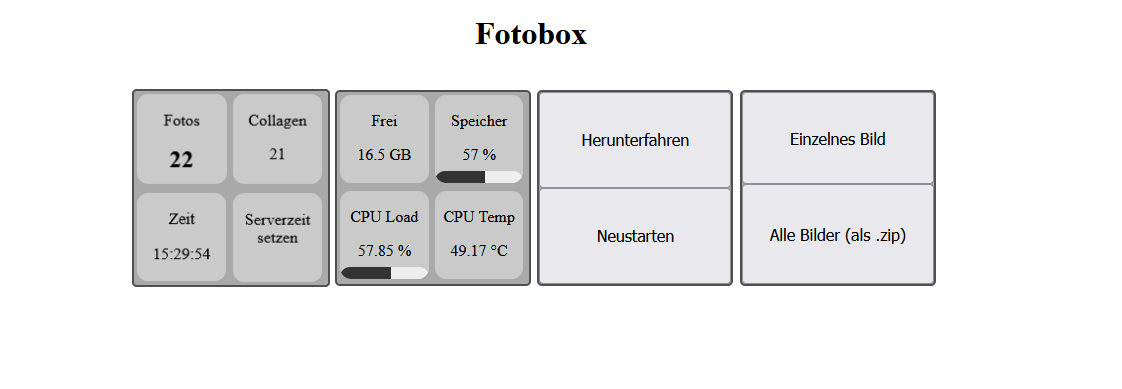
currently implemented:
The fotobooth was part of an educational project at the Leipzig University of Applied Sciences (HTWK Leipzig). The folder cvml contains all scripts and notebooks developed during the project. The whole project relies heavily on opencv for python.
The cvml-project consists of two seperate parts:
The project uses the mediapipe framework from google to detect hand landmarks on an image. It returns an 1x21x2 Array containing the position of finger joints and finger tips in the image.

The landmarks that were detected by mediapipe are processed by a tensorflow lite model to recognize the gestures "thumbs up" and "thumbs down". The model was found on the blog:
https://techvidvan.com/tutorials/hand-gesture-recognition-tensorflow-opencv/
and was converted from saved_model.pb to handgestures.tflite using the Tensorflow Model Converter:
https://www.tensorflow.org/lite/models/convert/convert_models#python_api


To postprocess the images taken in the fotobooth a cascade classifier was used to detect faces in images.
face_cas = cv2.CascadeClassifier(cv2.data.haarcascades + 'haarcascade_frontalface_default.xml')
While giving acceptable results on normal images without any accessories, the results with people wearing big glasses were upgradable. Therefore a custom cascade classifier was trained to detect the "Big Glasses" in images. The application to train the classifier is:
The following image of big glasses was detected with big_glasses_classifier_5.
sample resolution 150x150
max_scale = 1.2
min_neigh = 5

| Qty | Value | Footprint | References |
|---|---|---|---|
| 4 | M2.5 | MountingHole:MountingHole_2.7mm_M2.5 | MK1, MK2, MK3, MK4 |
| 3 | LED | LED_THT:LED_D4.0mm | D1, D2, D3 |
| 1 | Conn_01x10_Male | TerminalBlock:TerminalBlock_bornier-6_P5.08mm | J1 |
| 1 | Conn_02x20_Odd_Even | Connector_PinSocket_2.54mm:PinSocket_2x20_P2.54mm_Vertical | P1 |
| 1 | OLED-128O064D | Display:OLED-128O064D | DS1 |
Spirit532/studio_mic
A simple, easy to build preamplifier for any true condenser capsule, to make a condenser microphone


gmcn42/clumsyMIDI
A THT-only Raspberry Pi expansion board containing a MIDI interface, DAC, and OLED display

DvidMakesThings/HW_PDNode-600-Pro
The PDNode-600 is a professional-grade, 600W USB Power Delivery Unit designed specifically for compact 10-inch rack systems, targeting embedded developers, homelab enthusiasts, test benches, and smart infrastructure.


Zebra-Rodeo/marelleo
Une boîte qui raconte une histoire quand on pose une figurine dessus. Boîtier, carte, micrologiciel et doc pour la refaire.

dsanchezseco/punk75
Ortholinear keyboard with 75 keys and all components through hole
It measures 65 × 56 mm and has 2 copper layers, 1.6 mm thick.
10 parts, built around the M2.5. The full list of its parts is on this page, with links to each part's symbol and footprint where PCBKit's library has them.
From the mgoetze06/fotobooth repository on GitHub, at the commit this page was made from: the board is cad/kicad/pi_extension_test/pi_extension.kicad_pcb and its schematic cad/kicad/pi_extension_test/pi_extension.kicad_sch. PCBKit opens the board in the browser, with nothing to install.
Its repository states no licence, so its author keeps all rights: ask mgoetze06 before reusing the design.