2 layers144.6 × 92.5 mm

 MaxKiv/kibo1
My custom Piantor + Corne inspired keyboard
Max is an open-source printed circuit board by MaxKiv, from the MaxKiv/kibo repository on GitHub, published under the GPL-3.0 licence. It is a 2-layer board of 144.6 × 92.5 mm with 40 parts on 33 nets, routed with 352 tracks and 47 vias.
Its parts include 21 switches, 2 resistors, 2 connectors and 1 IC. It belongs with the keyboards and input boards and the RP2040 boards of this library.
An awesome custom split keyboard, at least I think so 😉. Made by Max Kivits and Timon Borg, the KiBo!
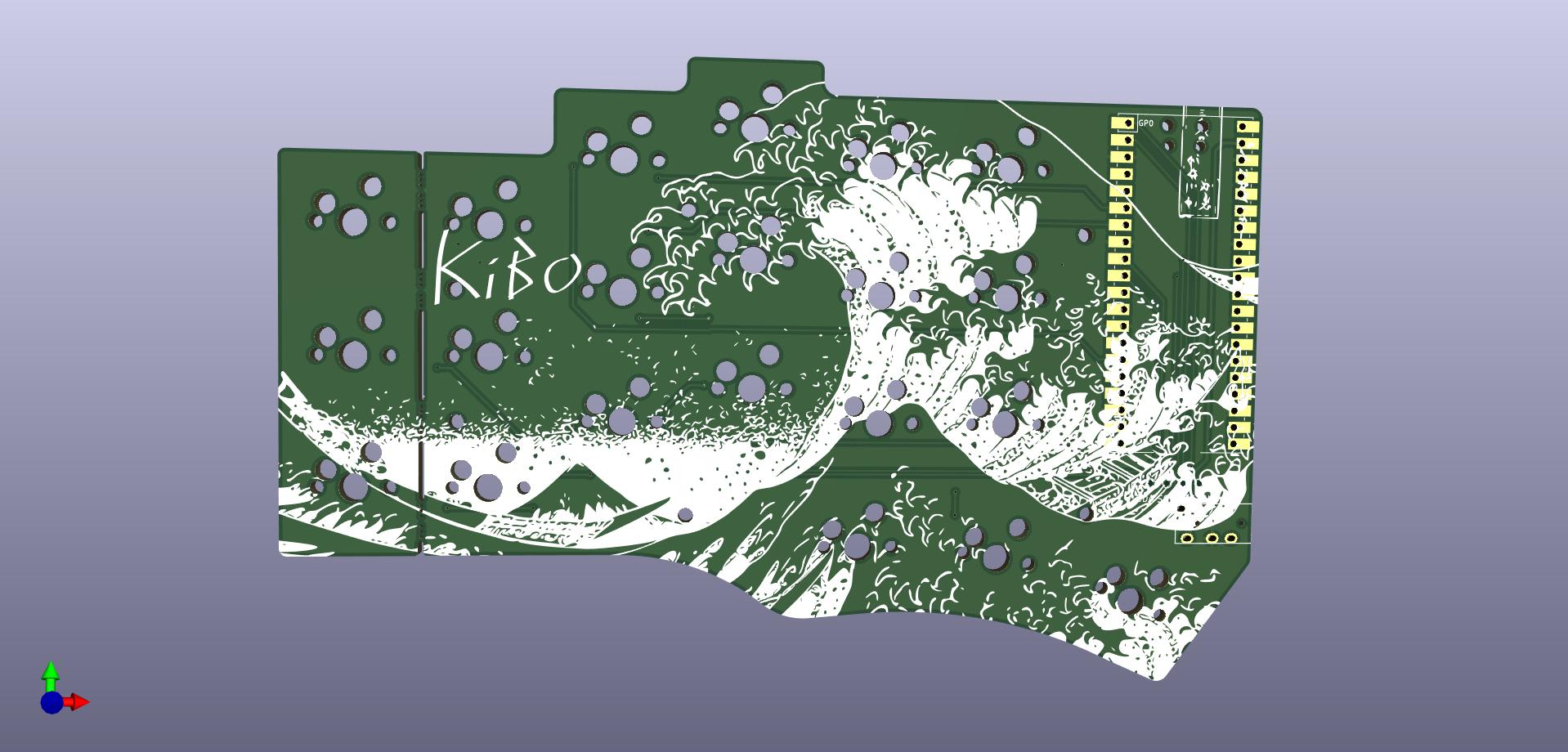
This keyboard is loosely based on the Piantor and Cantor keyboards. It's a 42-key diodeless non-flippable cherry-mx hotswapable mechanical split keyboard with aggressive column staggering. It's powered by 2 RP2040, completely overkill! I redesigned the PCB to use cherry-mx style hotswap switches and adjusted the margins so it fits my hands better. The pcb features an artsy silklayer, because why not?
The casing is designed by Timon Borg, a god amongst fusion360 users!
KiBo uses the amazing qmk firmware to become a keyboard.

| Quantity | Item | Notes |
|---|---|---|
| 1 | KiBo PCB (Left) | |
| 1 | KiBo PCB (Right) | |
| 2 | RP2040 breakout boards (such as Raspberry Pi Pico or WeAct RP2040) | |
| 42 (or 36) | cherry-mx style switches of your favorite flavor | |
| 42 (or 36) | cherry-mx style keycaps of your favorite variety | |
| 2 | TRRS jack (PJ-320A) | |
| 1 | 3.5mm TRRS cable | TRS cable cannot be used |
| 42 (or 36) | cherry-mx style hotswap sockets | Optional, you can solder the switches directly if you do not use hotswap sockets |
| 4 | Pin headers (20p) or sockets | Only required for boards without castellated holes |
| 2 | 10kΩ 1206 (3216M) SMD resistor | Only required if you do not want to use SPLIT_USB DETECT, and for boards without a built in VBUS_SENSE circuit |
| 2 | 5.6kΩ 1206 (3216M) SMD resistor | Only required if you do not want to use SPLIT_USB DETECT, and for boards without a built in VBUS_SENSE circuit |
| 1 | KiBo Case (Left) | 3D print your own |
| 1 | KiBo Case (Right) | 3D print your own |
| Qty | Value | Footprint | References |
|---|---|---|---|
| 21 | KEYSW | max:CherryMX_Hotswap | K00, K02, K2, K03, K04, K05, K10, K11, K12, K13, K14, K15, K20, K21, K22, K23 +5 |
| 6 | MountingHole | beekeeb_lib:MountingHole_2.2mm_M2-8mm | H1, H2, H3, H4, H4, H4 |
| 4 | MountingHole | beekeeb_lib:mousebites_3 | MB3, MB4, MB4, MB4 |
| 2 | Val** | max:kibo | Ref**, Ref** |
| 1 | 10k | Resistor_SMD:R_1206_3216Metric_Pad1.30x1.75mm_HandSolder | R2 |
| 1 | 5k6 | Resistor_SMD:R_1206_3216Metric_Pad1.30x1.75mm_HandSolder | R1 |
| 1 | OLED | max:OLED_v2 | J2 |
| 1 | Pico | RPi_Pico:RPi_Pico_SMD_TH | U2 |
| 1 | TRRS | Keebio-Parts:TRRS-PJ-320A | J1 |
| 1 | Val** | max:freya_small | Ref** |
| 1 | Val** | max:wave_back | Ref** |
It measures 144.6 × 92.5 mm and has 2 copper layers, 1.6 mm thick.
40 parts. The full list of its parts is on this page, with links to each part's symbol and footprint where PCBKit's library has them.
From the MaxKiv/kibo repository on GitHub, at the commit this page was made from: the board is pcb/right/max.kicad_pcb and its schematic pcb/left/keyboard_pcb.kicad_sch. PCBKit opens the board in the browser, with nothing to install.
Its repository publishes it under the GPL-3.0 licence: you may reuse it on that licence's terms (keep the author's notice, and for a copyleft licence share your changes alike).


hackclub/OnBoard
💡 Join 1,000 teenagers and make your first PCB with a $100 grant!

Chrismettal/EleLab_v2
Cheap DIY lab system for hobbyists and the tinkering folk

Chrismettal/flipper-zero-backpacks
Backpack-style addon boards for the Flipper Zero!


ohmtech-rdi/eurorack-blocks
Software to Hardware Prototyping for Eurorack using C++, Max/Gen~ or Faust
