2 layers18.5 × 11.1 mm
Switch
byrantech/laptop
anyon_e, a highly integrated, high end, open source laptop. Attempt the impossible.
6 parts4.3kMIT

 MaxFoerster-Dev/Buzzard-01
A small model-rocket designed by myself
Buzzard Avionics is an open-source printed circuit board by MaxFoerster-Dev, from the MaxFoerster-Dev/Buzzard-01 repository on GitHub. It is a 2-layer board of 115.5 × 30 mm with 6 parts on 36 nets, routed with 47 tracks and 0 vias.
Its parts include 1 connector and 1 switch. It belongs with the RP2040 boards of this library.

I watched a couple of BPS.space YouTube videos and thought it's not gonna be that hard...
I remembered a c't magazine article about the program OpenRocket and I tried it. My final rocket was this:
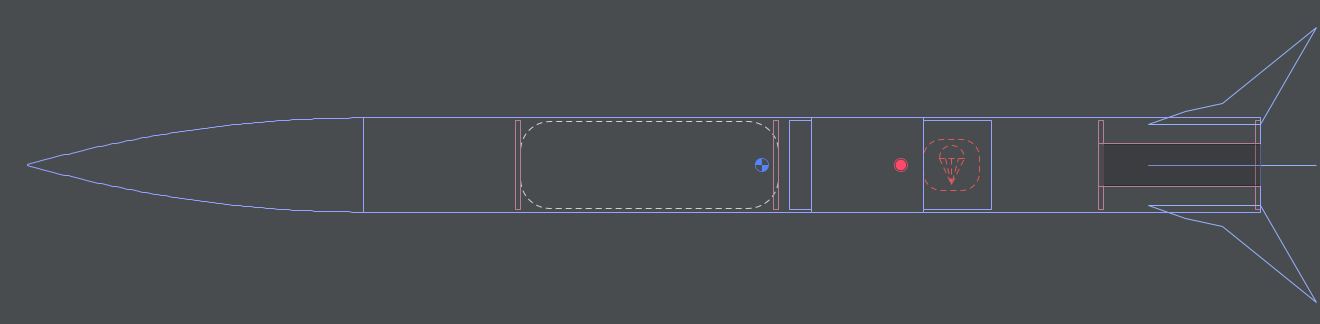
Although it sounds like overkill, to put a flight computer on to the first ever build rocket, I did it.
Since I was familiar with KiCad I choose to design the flight computer with KiCad.
I came up with this design, featuring up to 3 sensors, a Raspberry Pi Pico and a place for the battery and an ON/OFF switch:
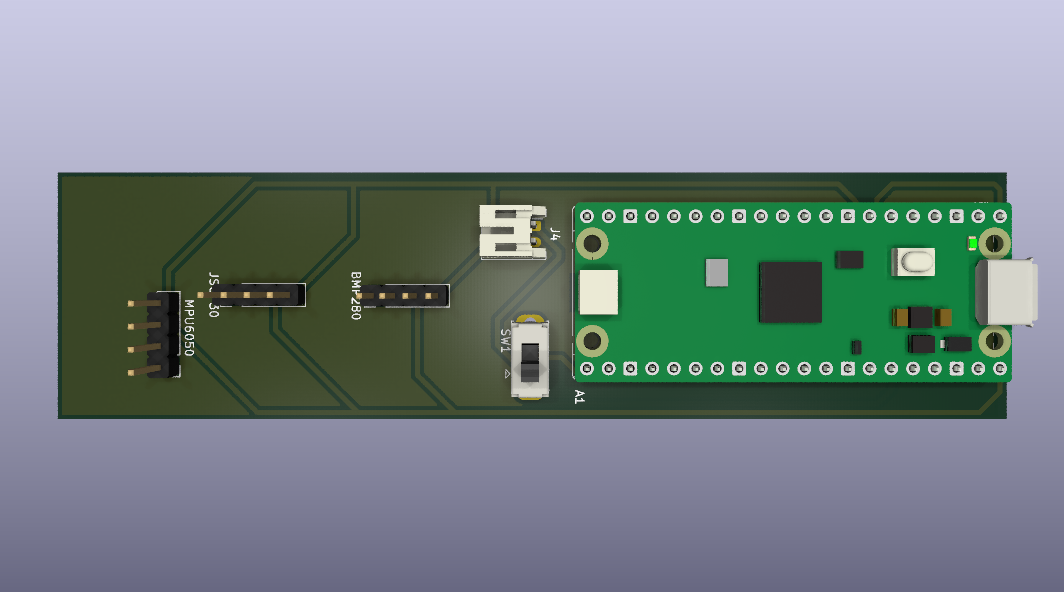
The next step is writing the flight software. I will probably use MicroPython to read the sensor data and control the rocket.
Open these files with OpenRocket to view or modify the rocket design and simulations.
Ctrl+O (or Cmd+O on Mac), navigate to the file, and open it.These files contain the schematics and PCB layout for the custom flight computer.
File > Open Project, and select the project file in this directory.These files contain the 3D-printable components of the rocket (like the nose cone or fins) and 3D renders of the electronics.
.obj files directly into your preferred 3D printing slicer (e.g., Cura, PrusaSlicer) or a CAD program (e.g., Blender, FreeCAD) for modifications.| Qty | Value | Footprint | References |
|---|---|---|---|
| 3 | Conn_01x04_Pin | Connector_PinHeader_2.54mm:PinHeader_1x04_P2.54mm_Vertical | BMP280, JSGP30, MPU6050 |
| 1 | Conn_01x02_Socket | Connector_JST:JST_PH_S2B-PH-K_1x02_P2.00mm_Horizontal | J4 |
| 1 | RaspberryPi_Pico | Module:RaspberryPi_Pico_Common_THT | A1 |
| 1 | SW_SPDT | Button_Switch_THT:SW_Slide_SPDT_Straight_CK_OS102011MS2Q | SW1 |
It measures 115.5 × 30 mm and has 2 copper layers, 1.6 mm thick.
6 parts. The full list of its parts is on this page, with links to each part's symbol and footprint where PCBKit's library has them.
From the MaxFoerster-Dev/Buzzard-01 repository on GitHub, at the commit this page was made from: the board is Buzzard-Avionics.kicad_pcb and its schematic Buzzard-Avionics.kicad_sch. PCBKit opens the board in the browser, with nothing to install.
Its repository states no licence, so its author keeps all rights: ask MaxFoerster-Dev before reusing the design.
byrantech/laptop
anyon_e, a highly integrated, high end, open source laptop. Attempt the impossible.


Jcparkyn/dpoint
Open-source digital stylus using camera tracking and inertial measurements

VoronDesign/Voron-Hardware
Cool Hardware designed by the Voron Design group

hoglet67/RGBtoHDMI
Bare-metal Raspberry Pi project that provides pixel-perfect sampling of Retro Computer RGB/YUV video and conversion to HDMI

hackclub/OnBoard
💡 Join 1,000 teenagers and make your first PCB with a $100 grant!

Luos-io/luos_engine
Open-source and real-time orchestrator for cyber-physical-systems, to easily design, test and deploy embedded applications and digital twins.
