4 layers79 × 79 mm
Minuet
brown-studios/minuet
Minuet upgrades your MAXXAIR Maxxfan with a brushless DC motor, home automation features, and accessories.
103 parts67MIT

 mairas/pi-super-ups2
Power Monitor for Raspberry Pi and SignalK
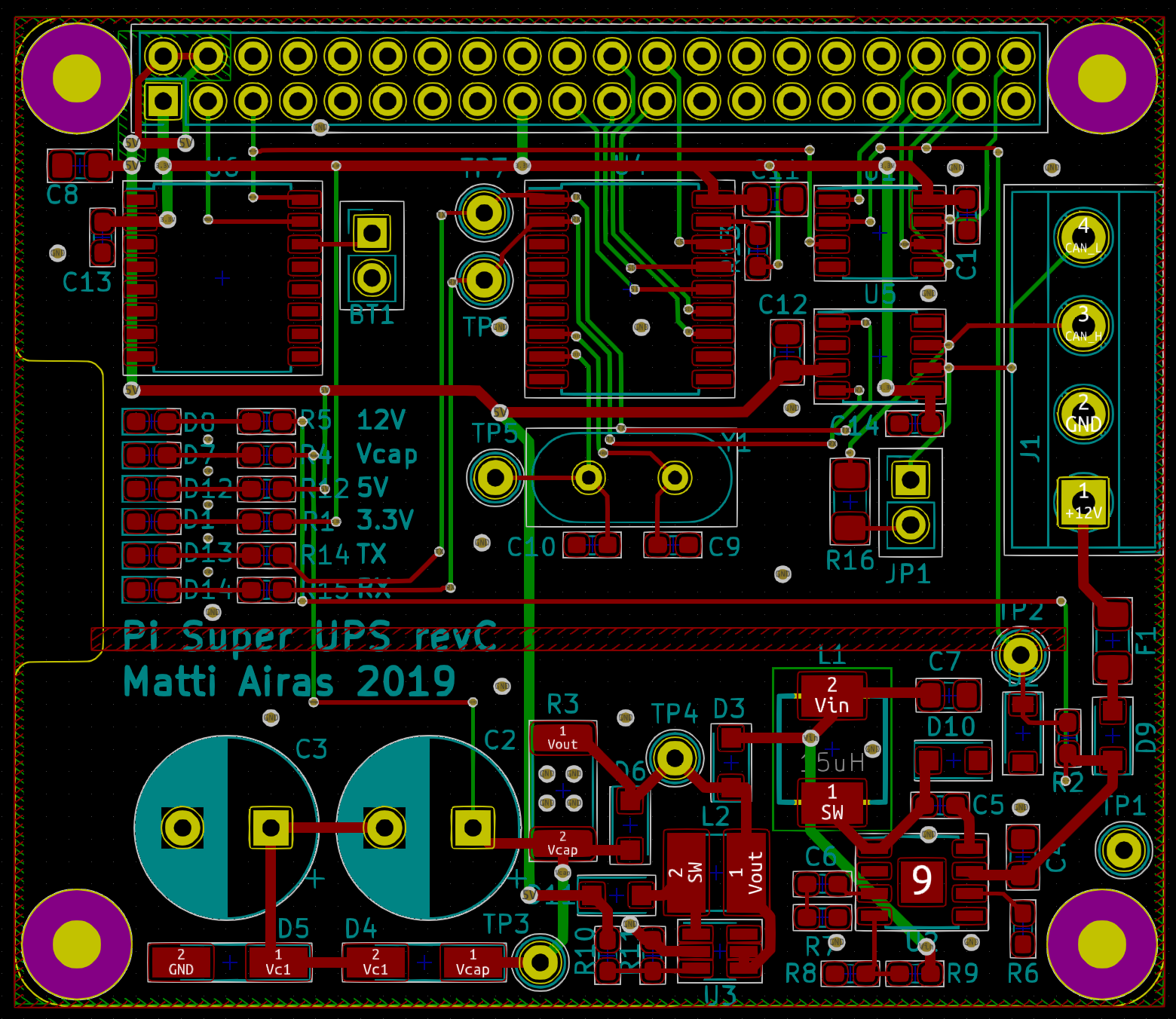
Pi supercap ups is an open-source printed circuit board by mairas, from the mairas/pi-super-ups repository on GitHub, published under the BSD-3-Clause licence. It is a 2-layer board of 65 × 56 mm with 92 parts on 60 nets, routed with 885 tracks and 502 vias.
It is built around the ATTINY841-SSU, MP1584EN and MT9700, with the DS3231MZ/V+, TPS61022 and DS34W among its other parts. Its parts include 31 resistors, 23 capacitors, 8 ICs, 8 diodes and 5 connectors. It belongs with the power boards and the AVR (ATmega, ATtiny) boards of this library.


TODO: Explain design goals
TODO: Explain features
The KiCad design files are in the hardware subdirectory. They are still
untested and no suitability for any purpose is claimed.
The hardware needs some ATTiny13a code to correctly control the wakeup pin (GPIO3) state. This is still to be written!
pi-super-ups is a simple power monitor for Raspberry Pi. It
monitors a defined GPIO pin on the Raspberry Pi. If the pin goes
high for ten seconds, a shutdown is triggered. Using GPIO 3 is highly
recommended because that allows for automatic restarting when power
is restored (pulling GPIO 3 low powers on the device if it is powered
off).
The main use case for the script is to have the board powered via a couple of super-capacitors. In the case power for the board is disconnected, the supercaps are able to supply sufficient power that the device is able to shut itself down in a controlled fashion.
A sample circuit fulfilling the purpose is presented in the circuit
subdirectory.
The monitor script can be installed by issueing the following command
in the src subdirectory:
sudo python3 setup.py installAt this point, you
should already be able to run the script. However, since calling
poweroff requires elevated privileges, it is done using sudo.
Give your preferred user permissions to call poweroff without a
password by running sudo visudo and adding the following line:
pi ALL = NOPASSWD: /sbin/poweroffFinally, to run the script automatically as a service, copy
sk_power_monitor.service to /etc/systemd/system.
To configure the monitor behavior, directly edit the script file.
| Qty | Value | Footprint | References |
|---|---|---|---|
| 10 | 100nF | Capacitor_SMD:C_0603_1608Metric_Pad1.05x0.95mm_HandSolder | C2, C3, C4, C5, C9, C10, C11, C14, C18, C27 |
| 8 | 10k | Resistor_SMD:R_0603_1608Metric_Pad1.05x0.95mm_HandSolder | R2, R7, R19, R21, R24, R25, R29, R30 |
| 5 | 47uF 10V | Capacitor_SMD:C_0805_2012Metric_Pad1.15x1.40mm_HandSolder | C1, C6, C16, C17, C19 |
| 4 | RPi_Hat:RPi_Hat_Mounting_Hole | , , , | |
| 4 | 0 | Resistor_SMD:R_0603_1608Metric_Pad1.05x0.95mm_HandSolder | R4, R5, R6, R8 |
| 4 | 10uF 10V | Capacitor_SMD:C_0603_1608Metric_Pad1.05x0.95mm_HandSolder | C20, C21, C22, C23 |
| 3 | 100k | Resistor_SMD:R_0603_1608Metric_Pad1.05x0.95mm_HandSolder | R20, R22, R27 |
| 3 | RLED | LED_SMD:LED_0603_1608Metric_Pad1.05x0.95mm_HandSolder | D3, D5, D11 |
| 2 | 1.5k | Resistor_SMD:R_0603_1608Metric_Pad1.05x0.95mm_HandSolder | R9, R10 |
| 2 | 120R | Resistor_SMD:R_1206_3216Metric_Pad1.42x1.75mm_HandSolder | R11, R31 |
| 2 | 4.53k | Resistor_SMD:R_0603_1608Metric_Pad1.05x0.95mm_HandSolder | R18, R23 |
| 2 | DS34W | Diode_SMD:D_SOD-123F | D2, D12 |
| 2 | MCP25625T-E_ML | custom:QFN65P600X600X100-29M-D | IC1, IC2 |
| 2 | MT9700 | Package_TO_SOT_SMD:SOT-23-5_HandSoldering | U6, U7 |
| 2 | Term | Connector_PinHeader_2.54mm:PinHeader_1x02_P2.54mm_Vertical | JP1, JP2 |
| 1 | +12V_prot | TestPoint:TestPoint_Keystone_5000-5004_Miniature | TP1 |
| 1 | 100n | Capacitor_SMD:C_0603_1608Metric_Pad1.05x0.95mm_HandSolder | C8 |
| 1 | 10uF 50V | Capacitor_SMD:C_1206_3216Metric_Pad1.42x1.75mm_HandSolder | C13 |
| 1 | 150pF | Capacitor_SMD:C_0603_1608Metric_Pad1.05x0.95mm_HandSolder | C15 |
| 1 | 1A | Fuse:Fuse_1206_3216Metric_Pad1.42x1.75mm_HandSolder | F1 |
| 1 | 1uH | Inductor_SMD:L_Abracon_ASPI-0630LR | L2 |
| 1 | 2.2k | Resistor_SMD:R_0603_1608Metric_Pad1.05x0.95mm_HandSolder | R3 |
| 1 | 200k | Resistor_SMD:R_0603_1608Metric_Pad1.05x0.95mm_HandSolder | R12 |
| 1 | 220p | Capacitor_SMD:C_0603_1608Metric_Pad1.05x0.95mm_HandSolder | C7 |
| 1 | 330k | Resistor_SMD:R_0603_1608Metric_Pad1.05x0.95mm_HandSolder | R16 |
| 1 | 4.7k | Resistor_SMD:R_0603_1608Metric_Pad1.05x0.95mm_HandSolder | R1 |
| 1 | 4.7uH 3.5A | Inductor_SMD:L_Abracon_ASPI-0630LR | L1 |
| 1 | 40.2k | Resistor_SMD:R_0603_1608Metric_Pad1.05x0.95mm_HandSolder | R15 |
| 1 | 43k | Resistor_SMD:R_0603_1608Metric_Pad1.05x0.95mm_HandSolder | R17 |
| 1 | 54.9k | Resistor_SMD:R_0603_1608Metric_Pad1.05x0.95mm_HandSolder | R13 |
| 1 | 68k | Resistor_SMD:R_0603_1608Metric_Pad1.05x0.95mm_HandSolder | R26 |
| 1 | 7.5k | Resistor_SMD:R_0603_1608Metric_Pad1.05x0.95mm_HandSolder | R28 |
| 1 | 93k | Resistor_SMD:R_0603_1608Metric_Pad1.05x0.95mm_HandSolder | R14 |
| 1 | ATtiny841-SSU | Package_SO:SOIC-14_3.9x8.7mm_P1.27mm | U1 |
| 1 | BAT54C | Package_TO_SOT_SMD:SOT-23 | D4 |
| 1 | CR1220 3V | custom:BatteryHolder_Linx_BAT-HLD-012-SMT | BT1 |
| 1 | Conn_02x07_Counter_Clockwise | custom:PinHeader_2x07_P2.54mm_Vertical_CounterClockwise | J3 |
| 1 | DS3231MZ | Package_SO:SOIC-8_3.9x4.9mm_P1.27mm | U4 |
| 1 | GLED | LED_SMD:LED_0603_1608Metric_Pad1.05x0.95mm_HandSolder | D7 |
| 1 | GND | TestPoint:TestPoint_Keystone_5000-5004_Miniature | TP2 |
| 1 | MP1584EN | Package_SO:SOIC-8-1EP_3.9x4.9mm_P1.27mm_EP2.35x2.35mm | U5 |
| 1 | OSC | TestPoint:TestPoint_Keystone_5000-5004_Miniature | TP5 |
| 1 | Raspberry_Pi_2_3 | Connector_PinHeader_2.54mm:PinHeader_2x20_P2.54mm_Vertical | J2 |
| 1 | S3D8.000000B20F30T | Oscillator:Oscillator_SMD_Abracon_ASE-4Pin_3.2x2.5mm | X1 |
| 1 | SMF16CA | Diode_SMD:D_SOD-123F | D1 |
| 1 | SW_SPST | Connector_PinHeader_2.54mm:PinHeader_1x02_P2.54mm_Vertical | SW1 |
| 1 | Screw_Terminal_01x02 | custom:TerminalBlock_WJ15EDGRC-3.81-2P | J4 |
| 1 | Screw_Terminal_01x03 | custom:TerminalBlock_WJ15EDGRC-3.81-3P | J5 |
| 1 | Screw_Terminal_01x04 | custom:TerminalBlock_WJ15EDGRC-3.81-4P | J1 |
| 1 | TPS61022 | custom:TPS61022RWUR | U2 |
| 1 | Vbuck | TestPoint:TestPoint_Keystone_5000-5004_Miniature | TP8 |
| 1 | Vcap | TestPoint:TestPoint_Keystone_5000-5004_Miniature | TP3 |
brown-studios/minuet
Minuet upgrades your MAXXAIR Maxxfan with a brushless DC motor, home automation features, and accessories.

fulgidus/hardware
Learning KiCad takes time, and pollutes with weird and incomplete projects. Here they are...


rh1tech/frank-lab
FRANK Board Laboratory (work-in-progress board prototopyes)

It measures 65 × 56 mm and has 2 copper layers, 1.6 mm thick.
92 parts, built around the ATTINY841-SSU, MP1584EN, MT9700 and DS3231MZ/V+. The full list of its parts is on this page, with links to each part's symbol and footprint where PCBKit's library has them.
From the mairas/pi-super-ups repository on GitHub, at the commit this page was made from: the board is hardware/pi-supercap-ups.kicad_pcb. PCBKit opens the board in the browser, with nothing to install.
Its repository publishes it under the BSD-3-Clause licence: you may reuse it on that licence's terms (keep the author's notice, and for a copyleft licence share your changes alike).