

4 layers
Ohmbedded RP2040-PCB Template
hlord2000/Ohmbedded-RP2040-PCB-Template
An RP2040-based keyboard PCB KiCAD Template Project
43 parts26CERN-OHL-P-2.0

 LordsBoards/Koneko40Stagger3
stagger_pcb
Koneko40Stagger is an open-source printed circuit board by LordsBoards, from the LordsBoards/Koneko40Stagger repository on GitHub. It is a 4-layer board of 227.1 × 75.5 mm with 134 parts on 99 nets, routed with 766 tracks and 102 vias.
It is built around the RP2040 and ZD25D40CNJGR. Its parts include 59 switches, 43 diodes, 16 capacitors, 6 resistors and 3 ICs. It belongs with the RP2040 boards of this library.
This GitHub project provides guidance on integrating microcontrollers into keyboard PCBs. It focuses on the RP2040 microcontroller from the Raspberry Pi foundation, which offers several features such as a dual-core Arm Cortex-M0+ processor, multiple communication interfaces, and QMK/Via/Vial support.
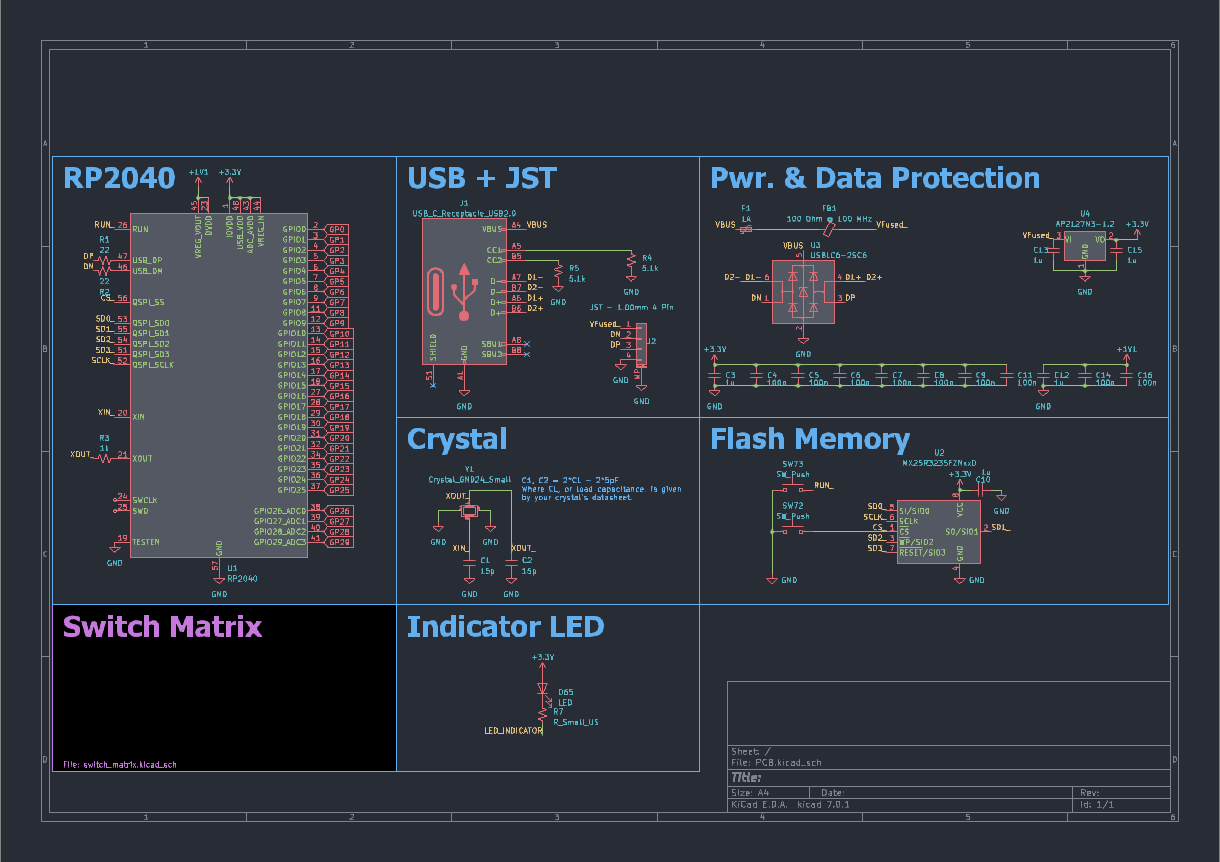
Before proceeding with board layout, it is important to understand the steps involved in schematic capture. The README provides an overview of the RP2040 microcontroller, including its integrated 3.3V->1.1V regulator, pin connections like TESTEN and RUN_, and the need for additional components such as decoupling capacitors.
The RP2040 is powered through USB and features a built-in USB bootloader for easy programming. The README mentions the use of a 3.3V fixed regulator, USBLC6 ESD protection IC, PTC resettable fuse, and a ferrite bead for EMI suppression.
The project includes information about the USB-C port, its orientation detection pins (CC1/CC2), and the 5.1k resistors used for USB power delivery. Additionally, a JST connector is introduced for use with a Unified Daughter Board.
A crystal is employed to provide accurate timing for USB functionality. The README also covers the connections to the RP2040's external flash, including buttons for forcing the ROM bootloader and resetting the microcontroller.
An indicator LED example for caps lock indication is given, along with considerations for selecting an appropriate LED resistor value. The README highlights the use of diodes in the switch matrix to prevent "ghosting" and enable n-key rollover.
| Qty | Value | Footprint | References |
|---|---|---|---|
| 44 | MX_SW_solder | marbastlib-mx:SW_MX_1u | SW1, SW2, SW10, SW11, SW12, SW14, SW15, SW16, SW17, SW18, SW19, SW20, SW21, SW22, SW25, SW26 +28 |
| 43 | D_Small | Diode_SMD:D_SOD-123 | D1, D2, D10, D11, D12, D13, D14, D15, D16, D17, D18, D19, D20, D21, D22, D23 +27 |
| 10 | 100n | Capacitor_SMD:C_0402_1005Metric | C2, C3, C4, C5, C6, C7, C8, C9, C10, C12 |
| 4 | 1u | Capacitor_SMD:C_0402_1005Metric | C1, C11, C15, C16 |
| 3 | 100k | Resistor_SMD:R_0402_1005Metric | R3, R5, R6 |
| 2 | 15p | Capacitor_SMD:C_0402_1005Metric | C13, C14 |
| 2 | 22R 0402 | Resistor_SMD:R_0402_1005Metric | R1, R2 |
| 2 | Jumper_2_Open | Connector_PinHeader_1.27mm:PinHeader_1x02_P1.27mm_Vertical | JP1, JP2 |
| 2 | MX_SW_solder | marbastlib-mx:SW_MX_1.75u | SW23, SW24 |
| 2 | MX_SW_solder | marbastlib-mx:SW_MX_1.25u | SW13, SW34 |
| 2 | MX_SW_solder | marbastlib-mx:SW_MX_1.5u | SW37, SW49 |
| 2 | MX_stab | marbastlib-mx:STAB_MX_P_3u | S3, S40 |
| 2 | MX_stab | marbastlib-mx:STAB_MX_P_2.25u | S4, S35 |
| 2 | PMOS | Package_TO_SOT_SMD:SOT-323_SC-70 | Q2, Q3 |
| 2 | ROT_SKYLOONG_HS | PCM_marbastlib-various:ROT_SKYLOONG_HS-Switch | SW43, SW44 |
| 1 | 12 MHz | Crystal:Crystal_SMD_2520-4Pin_2.5x2.0mm | Y1 |
| 1 | 1k 0402 | Resistor_SMD:R_0402_1005Metric | R4 |
| 1 | 3.3V Fixed Regulator | Package_TO_SOT_SMD:TSOT-23 | U3 |
| 1 | Conn_01x04_MountingPin | Connector_JST:JST_SH_SM04B-SRSS-TB_1x04-1MP_P1.00mm_Horizontal | J1 |
| 1 | MX_stab | marbastlib-mx:STAB_MX_P_10u | S2 |
| 1 | MX_stab | marbastlib-mx:STAB_MX_P_7u | S1 |
| 1 | MX_stab | marbastlib-mx:STAB_MX_P_2.75u | S41 |
| 1 | RP2040 | Package_DFN_QFN:QFN-56-1EP_7x7mm_P0.4mm_EP3.2x3.2mm | U2 |
| 1 | TC2030_SWD | Connector:Tag-Connect_TC2030-IDC-NL_2x03_P1.27mm_Vertical | J2 |
| 1 | ZD25D40CNJGR | USON8:USON-8_1.5x1.5mm_P0.45mm | U1 |
hlord2000/Ohmbedded-RP2040-PCB-Template
An RP2040-based keyboard PCB KiCAD Template Project

SeebM/Amperkatana-RP2040-PCB
An RP2040-based Ampersand replacement PCB with Katana stagger


Fr4nkFletcher/ESP32-Marauder-Cheap-Yellow-Display
ESP32Marauder Cheap Yellow Display


shanteacontrols/OpenDeck
A platform for building interactive control and sensing devices using MIDI and OSC built with Zephyr RTOS.

It measures 227.1 × 75.5 mm and has 4 copper layers, 1.6 mm thick.
134 parts, built around the RP2040 and ZD25D40CNJGR. The full list of its parts is on this page, with links to each part's symbol and footprint where PCBKit's library has them.
From the LordsBoards/Koneko40Stagger repository on GitHub, at the commit this page was made from: the board is Koneko40Stagger.kicad_pcb and its schematic Koneko40Stagger.kicad_sch. PCBKit opens the board in the browser, with nothing to install.
Its repository states no licence, so its author keeps all rights: ask LordsBoards before reusing the design.