
2 layers333.4 × 149.9 mm
 linklayer/BLEKey268
A Bluetooth Low Energy device for interfacing with Wiegand
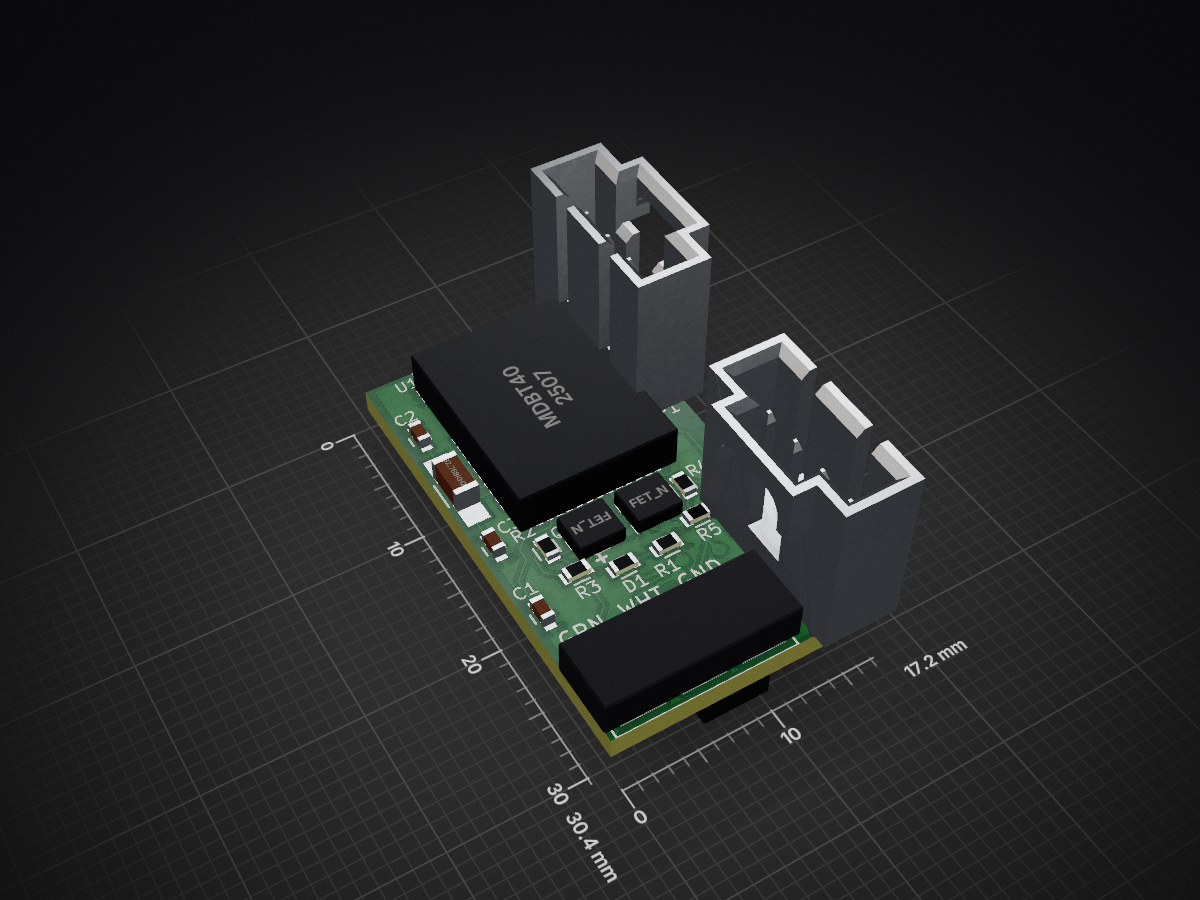
Weigand is an open-source printed circuit board by linklayer, from the linklayer/BLEKey repository on GitHub. It is a 2-layer board of 17.2 × 30.4 mm with 17 parts on 40 nets, routed with 163 tracks and 16 vias.
It is built around the CR2032. Its parts include 5 resistors, 3 capacitors, 2 transistors, 2 connectors and 1 IC.
by Mark Baseggio and Eric Evenchick
BLEKey is a tool designed to demonstrate the risks of using the Wiegand protocol.
Here's a video of us talking about the BLEKey at Blackhat USA 2015.
You can get BLEKey here: http://store.cantact.io/products/blekey-1?variant=18261748871 ANY OTHER STORE/SITE IS UNOFFICIAL
git clone https://github.com/linklayer/BLEKey.gitMakefile.posix file in the BLEKey/gcc/ directory and make sure the path to the downloaded ARM toolchain is correct.BLEKey/gcc directory and run makeIf you have a Segger hooked up to the board you can also run:
make erase to erase the nrfmake flash-sd to flash the soft devicemake flash to flash the compiled hexWe've included a file in the /firmware folder called super.hex. This firmware has a bootloader included that allows the BLEKey to be flashed from a cell phone by shorting the first and last pins of the P2 port, and inserting a battery. The firmware update has been tested on the Android platform using the Nordic Master Control Panel tool.
We've created a video to demonstrate the process.
To flash the softdevice and BLEKey firmware from the CLI you can use JLinkExe which is provided in the Segger Software
The BLEKey requires a softdevice (for BLE) and the blekey firmware. These can be flashed using the commands below:
$ /usr/bin/JLinkExe -device nrf51822_xxaa -if swd -speed 4000

J-Link>loadbin s110_nrf51822_7.0.0_softdevice.bin 0
J-Link>loadbin blekey_s110_xxaa.hex 0x16000
J-Link>r
J-Link>g
Erasing:
J-Link>w4 4001e504 2
J-Link>w4 4001e50c 1
If you prefer a GUI you can always use rknrfgo
The cheatsheet above is ripped from Nordic's blog
Use tools from Nordic.
| Service | Characteristic | Function |
|---|---|---|
| 0xABCD | 0xAAAA | Read Last Cards |
| 0xABCD | 0xBBBB | Replay Card |
| 0xABCD | 0xCCCC | Send Data (Data) |
| 0xABCD | 0xDDDD | Send Data (Length) |
There is a BLEKey client in the client/ directory of the git repo. See readme.md and requirements.txt for more information on its use.
A client is planned. Until then download any BLE utility that can read/write BLE characteristics. See below for more information on specific characteristics.
Find your Bluetooth device with hcitool dev scan for BLEKey with hcitool -i <dev> lescan
Start an interactive connection to BLEKey
Last three Wiegand cards are stored in the 0x000b handle. Currently to cause BLEKey to send out the last read card on the Wiegand lines write to 0x000d
[blark@archvm blekey]$ sudo gatttool -t random -b D4:34:E8:CA:6F:6A -I
[D4:34:E8:CA:6F:6A][LE]> connect
Attempting to connect to D4:34:E8:CA:6F:6A
Connection successful
[D4:34:E8:CA:6F:6A][LE]> characteristics
handle: 0x0002, char properties: 0x0a, char value handle: 0x0003, uuid: 00002a00-0000-1000-8000-00805f9b34fb
handle: 0x0004, char properties: 0x02, char value handle: 0x0005, uuid: 00002a01-0000-1000-8000-00805f9b34fb
handle: 0x0006, char properties: 0x02, char value handle: 0x0007, uuid: 00002a04-0000-1000-8000-00805f9b34fb
handle: 0x000a, char properties: 0x02, char value handle: 0x000b, uuid: 0000aaaa-0000-1000-8000-00805f9b34fb
handle: 0x000c, char properties: 0x08, char value handle: 0x000d, uuid: 0000bbbb-0000-1000-8000-00805f9b34fb
handle: 0x000e, char properties: 0x08, char value handle: 0x000f, uuid: 0000cccc-0000-1000-8000-00805f9b34fb
handle: 0x0010, char properties: 0x0a, char value handle: 0x0011, uuid: 0000dddd-0000-1000-8000-00805f9b34fb
handle: 0x0013, char properties: 0x12, char value handle: 0x0014, uuid: 00002a19-0000-1000-8000-00805f9b34fb
handle: 0x0017, char properties: 0x02, char value handle: 0x0018, uuid: 00002a29-0000-1000-8000-00805f9b34fb
[D4:34:E8:CA:6F:6A][LE]> char-write-req d 01
Characteristic value was written successfully
[D4:34:E8:CA:6F:6A][LE]> char-read-hnd b
Characteristic value/descriptor: 22 bd 58 60 7c 26 00 24 47 60 85 08 37 00 24 47 60 85 08 37 00 00
[D4:34:E8:CA:6F:6A][LE]>
You can also just use gatttool from the command line to yell BLEKey to send Wiegand data (replace with the address of your device):
sudo gatttool -t random -b D4:34:E8:CA:6F:6A --char-write-req -a 0x000d -n 01| Pin | Function |
|---|---|
| 0 | Data 0 in |
| 1 | Data 1 in |
| 2 | Data 0 ctl |
| 3 | Data 1 ctl |
| 9 | Serial |
| 11 | Serial |
| 26 | Xtal 1 |
| 27 | Xtal 2 |
| 28 | GPIO |
| 29 | GPIO |
| 35 | DIO |
| 36 | CLK |
Pinouts are identical to Acamas unless otherwise noted.
| Pin | Function |
|---|---|
| 0 | Data 0 in |
| 7 | Data 1 in |
| 8 | GPIO |
| 20 | LED0 |
| Pin | Function |
|---|---|
| 0 | Vcc |
| 1 | DIO |
| 2 | CLK |
| 3 | Gnd |
| Pin | Function |
|---|---|
| 0 | GPIO (Tx) |
| 1 | DATA0 |
| 2 | DATA1 |
| 3 | Gnd |
| Qty | Value | Footprint | References |
|---|---|---|---|
| 5 | R | Resistors_SMD:R_0603 | R1, R2, R3, R4, R5 |
| 2 | 12pF | Capacitors_SMD:C_0603 | C2, C3 |
| 2 | CONN_01X04 | Pin_Headers:Pin_Header_Straight_1x04 | P1, P2 |
| 2 | FET_N | new_wieg:SOT-23-FET | Q1, Q2 |
| 1 | 100nF | Capacitors_SMD:C_0603 | C1 |
| 1 | 32.768kHz | Capacitors_SMD:C_1206_HandSoldering | X1 |
| 1 | CR2032 | new_wieg:BU1632SM-JJ-GTR | BATT1 |
| 1 | LED | Resistors_SMD:R_0603 | D1 |
| 1 | MDBT40 | new_wieg:MDBT40 | U1 |
| 1 | WIEGAND | new_wieg:IDC3POS | K1 |
It measures 17.2 × 30.4 mm and has 2 copper layers, 1.6 mm thick.
17 parts, built around the CR2032. The full list of its parts is on this page, with links to each part's symbol and footprint where PCBKit's library has them.
From the linklayer/BLEKey repository on GitHub, at the commit this page was made from: the board is hardware/weigand.kicad_pcb. PCBKit opens the board in the browser, with nothing to install.
Its repository states no licence, so its author keeps all rights: ask linklayer before reusing the design.


skiselev/zeta_sbc
Zeta SBC is an Zilog Z80 based single board computer. It is inspired by Ampro Little Board Z80 and N8VEM project. Zeta SBC is software compatible with RomWBW Firmware
