2 layers97.4 × 36.8 mm

 LeKaZeD/ha-box
Application for a custom Home Assistant box.
Haboxesp is an open-source printed circuit board by LeKaZeD, from the LeKaZeD/ha-box repository on GitHub, published under the Apache-2.0 licence. It is a 2-layer board of 57 × 78 mm with 64 parts on 63 nets, routed with 444 tracks and 123 vias.
It is built around the 74LVC1G66GW, RT9193-33GB and MBR0530, with the M2.5, AO3400A and SI1308EDL among its other parts. Its parts include 20 capacitors, 15 resistors, 4 diodes, 4 connectors and 3 ICs.


HA Box is an open-source, modular home automation hub built around a Raspberry Pi 5 and Home Assistant OS. It integrates the main smart home protocols (Zigbee, Thread, 433 MHz) into a single 3D-printed enclosure, with a custom ESP32 interface board providing a local E-Paper display, touch, environmental sensing, and physical controls.
HA Box is composed of four independent layers that work together:
+---------------------------------------------------------------+
|  3D-printed enclosure  (modular, FDM-printable, upgradeable)  |
|                                                               |
|  +---------------------------+   +-------------------------+  |
|  |  Raspberry Pi 5 stack     |   |  haboxesp PCB + ESP32   |  |
|  |  - Pi 5                   |   |  - E-Paper display      |  |
|  |  - M.2 SSD hat            |   |  - Touch (FT6336U)      |  |
|  |  - HDMI/USB-C extension   |   |  - BME280 sensor        |  |
|  |  - Sonoff Dongle Plus E   |   |  - Temp sensor TMP102   |  |
|  |    (Zigbee + Thread)      |   |  - Fan (PWM)            |  |
|  |  - CC1101 module (planned)|   |  - Buzzer               |  |
|  |    (433 MHz, SPI)         |   |  - Power button + J2    |  |
|  |                           |   |                         |  |
|  |  [ Home Assistant OS ]    |   |                         |  |
|  |  [ HA Box App (py) ]   <--+---+--> UART                 |  |
|  +---------------------------+   +-------------------------+  |
+---------------------------------------------------------------+| Layer | Description | Location |
|---|---|---|
| Hardware | Pi 5 stack, haboxesp PCB, Sonoff dongle, connectors | hardware/ |
| 3D enclosure | Modular, printable enclosure for all components | hardware/3D plan/ |
| ESP32 firmware | Drives display, sensors, touch, fan, buzzer | ha-box-esp/ |
| HA App | Python app: UART bridge to HA API and Supervisor | ha-box/ |
| HA integration | Custom component: groups all HA Box entities in the device registry | ha-integration/ |
| Component | Description | Protocol |
|---|---|---|
| Raspberry Pi 5 | Main compute unit, runs Home Assistant OS | — |
| M.2 SSD hat | NVMe storage via PCIe | PCIe |
| HDMI + USB-C extension | Rear panel port routing | — |
| Sonoff Zigbee 3.0 USB Dongle Plus E | Zigbee and Thread coordinator | USB |
| CC1101 module | 433 MHz radio (planned) | SPI |
The haboxesp is a custom PCB designed for this project. It hosts an ESP32 module and provides connectors for all user-facing peripherals. The ESP32 communicates with the Pi exclusively over UART.
| Component | Model | Interface |
|---|---|---|
| E-Paper display | GDEY037T03-FT21 (3.7", 240×416) | SPI |
| Touch controller | FT6336U (integrated in display) | I2C |
| Environmental sensor | BME280 (temperature, humidity, pressure) | I2C |
| Case temperature | Additional sensor | I2C / analog |
| Fan | 5V PWM | PWM |
| Buzzer | Haptic feedback | GPIO |
| Power button | Wake + shutdown trigger | GPIO |
| J2 connector | Raspberry Pi J2 header (power control) | — |
PCB design files (KiCad) and manufacturing exports are in hardware/haboxesp/.
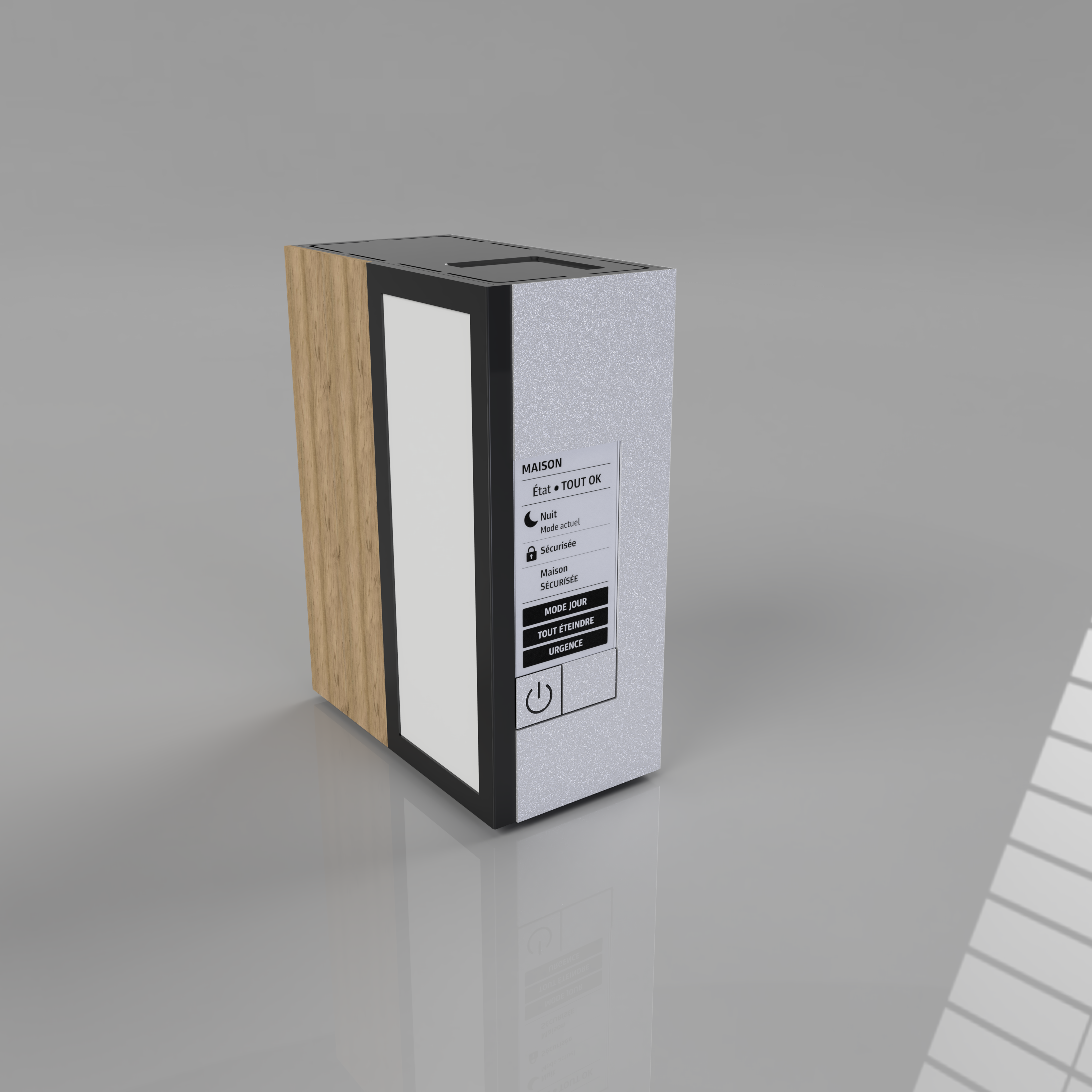
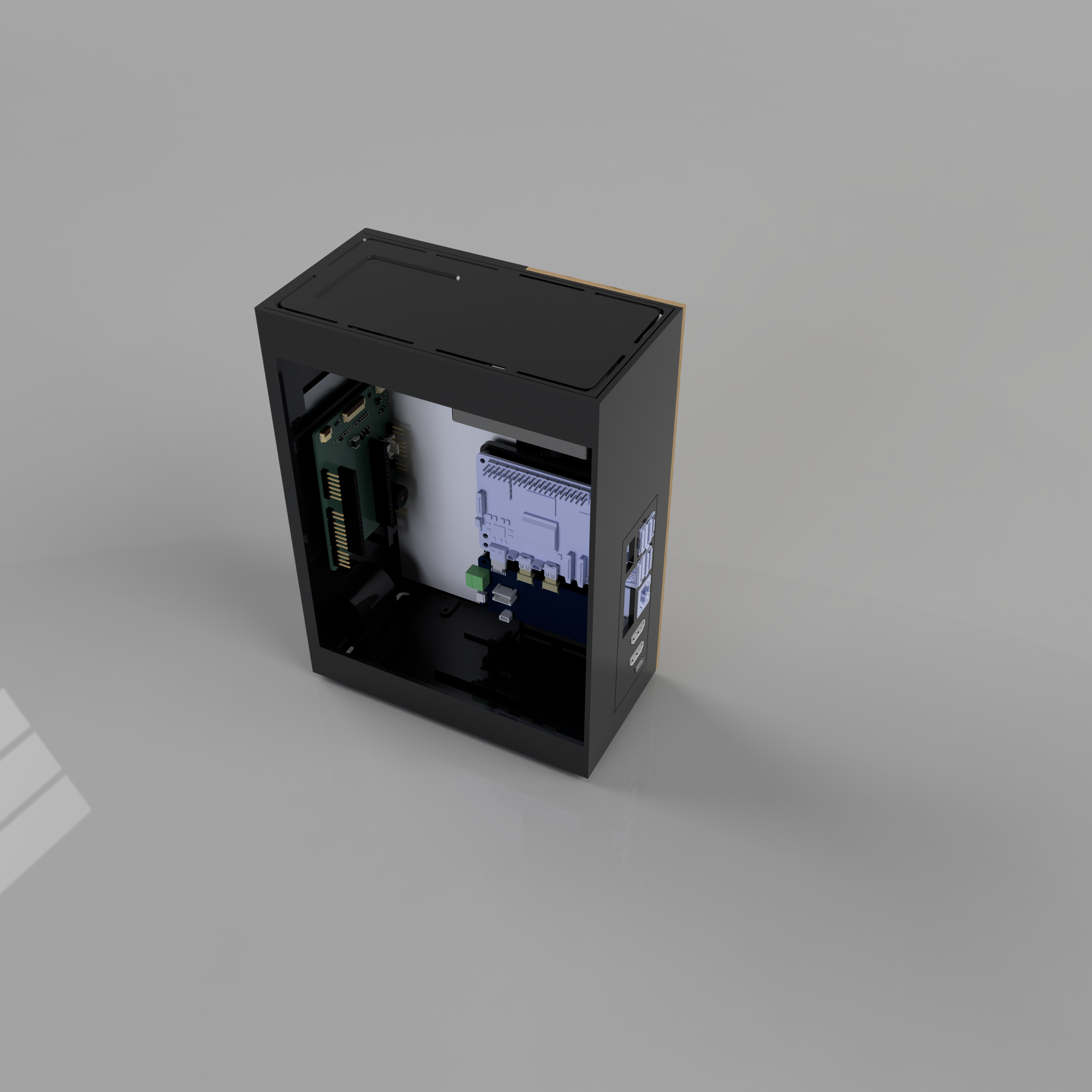
The enclosure is designed in Fusion 360, modular and FDM-printable. Each part can be reprinted independently to accommodate hardware upgrades.
Printable parts (STL): Box, Top, Backplate, Support, Pied, Button.
 |  |
Fusion 360 source and STEP files: hardware/3D plan/Fusion/.
The ESP32 firmware (ha-box-esp-fw/) is a C++ application that:
See ha-box-esp-fw/ESPHOMEASSISTANT/ARCHITECTURE.md and docs/ESP32_RASP_COM.md for the firmware architecture and UART protocol.
The HA Box App (ha-box/) is a Home Assistant OS Supervisor App written in Python. It runs inside a Docker container on the Pi and acts as a bridge between the ESP32 (UART) and Home Assistant (HTTP API + Supervisor API).
It does not access display, sensors, or actuators directly. All peripherals are on the ESP32 side; the App communicates over UART0 and controls two Pi GPIOs (IO0 + EN) for OTA firmware updates.
Edit /mnt/boot/config.txt physically (keyboard + screen on the Pi, or SD card / NVMe mounted on a computer). See docs/HARDWARE.md for Pi 4 vs Pi 5 differences and SPI (CC1101) setup. Reboot after: ha host reboot.
Add this repository to your Home Assistant Apps:

Or manually: Settings → App → App Store → ⋮ → Repositories → add the URL.
Install HA Box.
Install the HA Box custom integration: copy ha-integration/custom_components/ha_box/ to your HA config/custom_components/ folder, then restart Home Assistant. This creates the HA Box device in the device registry.
Configure options according to your hardware (see below).
Start the App.
Configure options in the App UI or directly in YAML. Restart the App to apply changes.
general:
  log_level: "info"                         # debug | info | warning | error | critical
  lang: "auto"                              # auto | fr | en

weather:
  weather_entity: "weather.forecast_home"   # HA weather entity
  update_interval: 300                      # seconds (10–3600)

bme280:
  enabled: true
  address: "auto"                           # auto | 0x76 | 0x77
  update_interval: 30                       # seconds

fan:
  enabled: false
  min_temp: 28                              # °C — fan starts
  max_temp: 60                              # °C — fan at full speed

ota:
  io0_gpio: 23                              # Pi BCM GPIO → ESP32 IO0
  en_gpio: 24                               # Pi BCM GPIO → ESP32 EN

daynight:
update_interval: 60 # seconds between sun.sun polls (10–3600)Language is auto-detected from the Home Assistant Core configuration (/api/config → language), with fallback to the container environment (LANG) and then English.
Fan and OTA options are sent to the ESP32 on every App startup and persisted in NVS — restart the App to apply changes.
| Feature | Interface | Status |
|---|---|---|
| E-Paper display (Home, Loading, Settings pages) | SPI (ESP32) | Implemented |
| Touch navigation | I2C (ESP32) | Implemented |
| BME280 (temp, humidity, pressure) → HA entities | UART (ESP32 → Pi) | Implemented |
| TMP102 case temperature → HA entity | UART (ESP32 → Pi) | Implemented |
| Fan control (PWM, temperature-based, configurable) | PWM (ESP32) | Implemented |
| Power button (wake, soft shutdown, hard J2 stop) | UART + J2 (ESP32 ↔ Pi) | Implemented |
| Weather + clock display | UART (Pi → ESP32) | Implemented |
| HA status icons (Core, Supervisor, Net, Zigbee, Thread, Matter, External) | UART (Pi → ESP32) | Implemented |
| OTA firmware update (auto version check + flash over UART0) | UART0 + GPIO | Implemented |
| Boot failure recovery (blind OTA flash on ROM boot errors) | UART0 + GPIO | Implemented |
| Day/Night mode sync (sun.sun + manual override, HA event + binary sensor) | UART (Pi ↔ ESP32) | Implemented |
| HA Box integration (device registry, grouped entities) | HA custom component | In progress |
| CC1101 433 MHz | SPI (Pi) | Planned |
The long-term vision is a custom carrier board built around a Raspberry Pi Compute Module, integrating the Pi, ESP32, radio modules, and all connectors on a single PCB. This would replace the current assembly of off-the-shelf boards and the haboxesp PCB with a more compact, reliable, and user-friendly product.
Early design work is in hardware/cm5/.
ha-box/
├── hardware/
│   ├── haboxesp/          KiCad PCB project (haboxesp V0.1)
│   ├── 3D plan/           Fusion 360 enclosure + STL parts
│   └── cm5/               Compute Module carrier board (early stage)
├── ha-box-esp/         ESP32 firmware (C++)
├── ha-box/                HA App (Python)
│   ├── rootfs/            App runtime files
│   ├── config.yaml        App manifest
│   └── translations/      UI translations (en, fr)
├── ha-integration/        HA custom integration (device registry, grouped entities)
│   └── custom_components/
│       └── ha_box/
├── docs/                  Technical documentation
└── README.md| Document | Description |
|---|---|
| docs/ARCHITECTURE.md | App technical architecture |
| docs/HARDWARE.md | Hardware specifications (haboxesp PCB + ESP32) |
| docs/ESP32_RASP_COM.md | UART protocol (Pi ↔ ESP32) |
| docs/FEATURES_STATUS.md | Feature status and timing reference |
| docs/TECH_STACK.md | Libraries and technical stack |
| docs/I18N.md | Multilingual support |
| ROADMAP.md | Current status and future plans |
| CONTRIBUTING.md | Contribution guide |
| ha-box/SECURITY.md | Security policy |
| TESTING.md | Development and testing guide |
Contributions are welcome. See CONTRIBUTING.md to get started.
Apache License 2.0. See LICENSE.
Project started January 17, 2026
| Qty | Value | Footprint | References |
|---|---|---|---|
| 8 | 4.7uF/25V | Capacitor_SMD:C_0603_1608Metric | C2, C4, C7, C8, C9, C12, C14, C15 |
| 7 | 10k | Resistor_SMD:R_0603_1608Metric | R4, R8, R10, R11, R13, R14, R18 |
| 5 | 1uF/50V | Capacitor_SMD:C_0603_1608Metric | C1, C6, C10, C11, C13 |
| 4 | 100nF | Capacitor_SMD:C_0603_1608Metric | C16, C17, C19, C20 |
| 4 | Conn_01x02_Pin | Connector_PinHeader_2.54mm:PinHeader_1x02_P2.54mm_Vertical | J1, J2, J5, J6 |
| 3 | MBR0530 | Diode_SMD:D_SOD-123 | D1, D2, D3 |
| 2 | 0R | Resistor_SMD:R_0603_1608Metric | R12, R15 |
| 2 | 220 | Resistor_SMD:R_0603_1608Metric | R6, R16 |
| 2 | Conn_01x06_Pin | Connector_PinHeader_2.54mm:PinHeader_1x06_P2.54mm_Vertical | J_NFC1, J4 |
| 2 | Conn_01x19_Socket | Connector_PinSocket_2.54mm:PinSocket_1x19_P2.54mm_Vertical | Jesp1, Jesp2 |
| 2 | M2.5 | MountingHole:MountingHole_2.7mm_M2.5_Pad_Via | MH1, MH2 |
| 1 | 0.47 | Resistor_SMD:R_0603_1608Metric | R3 |
| 1 | 100k | Resistor_SMD:R_0603_1608Metric | R1 |
| 1 | 100uF | Capacitor_SMD:CP_Elec_6.3x5.4 | C18 |
| 1 | 10uF | Capacitor_SMD:C_0603_1608Metric | C3 |
| 1 | 1M | Resistor_SMD:R_0603_1608Metric | R2 |
| 1 | 22nF/50V | Capacitor_SMD:C_0603_1608Metric | C5 |
| 1 | 47 uH 500mA(Max) | Inductor_SMD:L_1812_4532Metric | L1 |
| 1 | 5 | Resistor_SMD:R_0603_1608Metric | R7 |
| 1 | 74LVC1G66 | Package_TO_SOT_SMD:SOT-353_SC-70-5 | U2 |
| 1 | AO3400A | Package_TO_SOT_SMD:SOT-23 | Q2 |
| 1 | Buzzer | Buzzer_Beeper:Buzzer_12x9.5RM7.6 | BZ1 |
| 1 | Conn_01x04_Pin | Connector_PinHeader_2.54mm:PinHeader_1x04_P2.54mm_Vertical | J_BME1 |
| 1 | FPC24-EP (0.5mm) | Connector_FFC-FPC:Hirose_FH12-24S-0.5SH_1x24-1MP_P0.50mm_Horizontal | J_EP1 |
| 1 | FPC6-FL | Connector_FFC-FPC:Hirose_FH12-6S-0.5SH_1x06-1MP_P0.50mm_Horizontal | J_FL1 |
| 1 | FPC6-TP | Connector_FFC-FPC:Hirose_FH12-6S-0.5SH_1x06-1MP_P0.50mm_Horizontal | J_TP1 |
| 1 | Fan_SYS_4pin | Connector:FanPinHeader_1x04_P2.54mm_Vertical | M1 |
| 1 | GND | TestPoint:TestPoint_Pad_D2.0mm | GND1 |
| 1 | LED | LED_SMD:LED_0603_1608Metric | D4 |
| 1 | PREVGH | TestPoint:TestPoint_Pad_D2.0mm | PREVGH1 |
| 1 | PREVGL | TestPoint:TestPoint_Pad_D2.0mm | PREVGL1 |
| 1 | RT9193-33GB | RT9193-33GB:SOT-23-5_RIT | U1 |
| 1 | Si1308EDL | Package_TO_SOT_SMD:SOT-323_SC-70 | Q1 |
| 1 | TMP102xxDRL | Package_TO_SOT_SMD:SOT-563 | U3 |

xmyoot/cellular-epaper-esp32s3-sim7600
Low-Power Cellular ePaper Device with ESP32-S3 and SIM7600 LTE Cat-1

solderable/storm-tracker-hardware
Open-source-ready Storm Tracker hardware design, documentation, BOM, and manufacturing package


TheEinfachFelix/CampPhone
Warum habe ich mich dagegen entschieden, das Sim Modul selber zu implementieren? Ich habe kein Chip gefunden, der günstiger als das fertige Modul war, und ein Datenblatt in Englischer Sprache hat.

AeroX2/aerox2.github.io
One repository and npm installation builds the workshop at jamesridey.dev and the professional site at cv.jamesridey.dev.


Dheemanth0207/Electronic-Conference-Badge
This project investigates the design and development of a smart, energy-efficient electronic conference badge intended to replace traditional printed name tags used at events and meetings.
It measures 57 × 78 mm and has 2 copper layers, 1.6 mm thick.
64 parts, built around the 74LVC1G66GW, RT9193-33GB, MBR0530 and M2.5. The full list of its parts is on this page, with links to each part's symbol and footprint where PCBKit's library has them.
From the LeKaZeD/ha-box repository on GitHub, at the commit this page was made from: the board is hardware/haboxesp/haboxesp.kicad_pcb and its schematic hardware/cm5/RP-008099-DD-1-CM5 IO Board/CM5IO.kicad_sch. PCBKit opens the board in the browser, with nothing to install.
Its repository publishes it under the Apache-2.0 licence: you may reuse it on that licence's terms (keep the author's notice, and for a copyleft licence share your changes alike).