

4 layers70 × 80 mm

 kbob/LED-Cube51
Blinky in 3D!
Power Board is an open-source printed circuit board by kbob, from the kbob/LED-Cube repository on GitHub. It is a 2-layer board of 74 × 74 mm with 20 parts on 9 nets, routed with 19 tracks and 0 vias.
It is built around the 30R400UMR and MF-MSMF250/16X-2. Its parts include 7 connectors and 7 fuses.
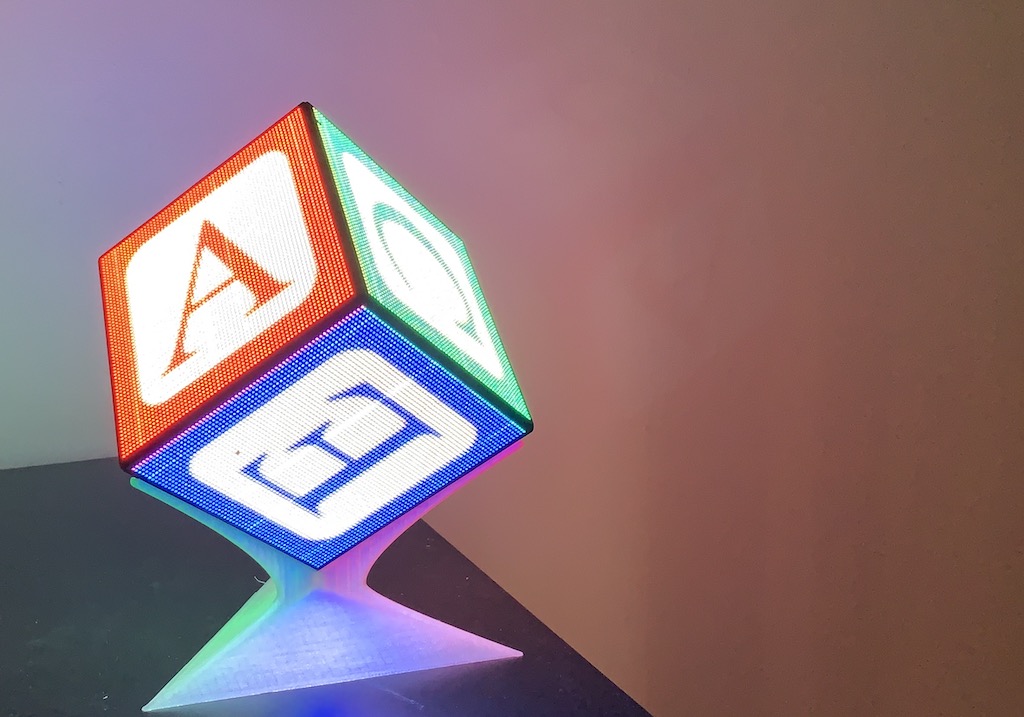
A cube made of RGB LED panels.
I saw Zaurak's and Polyfloyd's LED cubes, and decided I wanted to make one too. This one is smaller with denser LEDs. (2mm pitch instead of 2.5mm)
The cube's faces are six LED panels from Aliexpress. Each panel has 64×64 RGB leds and is driven by the HUB75 protocol.
The chassis is a combination of 3D printed PLA, machine screws, and magnets. The electronics can be installed and removed without tools.
The electronics consist of a Raspberry Pi connected via USB to an iCEBreaker FPGA dev board, HUB75 PMOD interface, and the panels.
Power is provided by an eight pack of 18650 batteries and a custom power supply. The power board also has an inertial measurement unit (IMU), battery level monitoring, and soft power controls.
I also have two different display stands that prop the cube up on one corner. One stand disassembles for easy transport; the other, shown above, is more stable and has a (bulky) carrying case. All this is 3D printed.
Mechanical/ CAD files, STL files, and parts lists. The two display stands are here too.
Power Board/ KiCAD files and BOM for the custom power board.
Wiring/ Notes on the wiring harness.
Linux/ Notes on configuring Linux on the Raspberry Pi.
There are several different software options. I outlined them in this 'blog post. None of them are in this repository. I couldn't even begin to write a comprehensive installation guide for them all.
The gateware is based on tnt's excellent
ice40-playground.
But I have my own fork here.
My cube uses the topic-cube branch. I haven't checked whether everything
in that branch has made it back upstream.
My cube has a Raspberry Pi 3 Model A+. (What a mouthful!) Shortly after I built it, the Raspberry Pi foundation announced the Raspberry Pi 4. Its GPU is much better, and I really want to get it into my cube. But of course it's a different size; I have to redesign part of the chassis to make it fit.
I am using Broadcom's proprietary OpenGL. I want to get the open source Mesa GL running, but haven't figured out the magic yet. (It's complicated because I refuse to install an X11 server; I only want offscreen rendering.)
Update 2019-09-22: Good news! 1BitSquared now has the correct LED panels in stock. Get the ICN2037 variant.
The Aliexpress vendors do not ship a single version of the HUB75 panels. Instead, you get whatever vendors happen to be available surplus. Each version has different driver chips, timing requirements, mechanical layout, even power voltage requirements. So today the panels on the cube are irreplaceable. If one dies, I'll have no cube.
Esden is working on getting a reliable source for LED panels.
Follow him on twitter (@esden)
to stay up to date.
| Qty | Value | Footprint | References |
|---|---|---|---|
| 6 | JST B2PS-VH | Connector_JST:JST_VH_B2PS-VH_1x02_P3.96mm_Horizontal | J2, J3, J4, J5, J6, J7 |
| 4 | 30R400UMR | Power Board:LittelFuse 30R400U | F2, F4, F5, F6 |
| 2 | 30R400UMR | Power Board:LittelFuse 30R400U reverse | F3, F7 |
| 1 | +5V | MountingHole:MountingHole_3mm_Pad | H1 |
| 1 | Conn_01x02 | Connector_PinSocket_2.54mm:PinSocket_1x02_P2.54mm_Horizontal | J1 |
| 1 | GND | MountingHole:MountingHole_3mm_Pad | H2 |
| 1 | MF-MSMF250/16X-2 | Power Board:Bourns MF-MSMF Style 2 | F1 |
The 16 most common of 20 parts.


Andreuxxx1977/esp32-p4
An open-hardware, actively cooled ESP32-P4 board for heavy multimedia work: a 2-lane MIPI camera, a 2-lane MIPI display, USB 2.0 High-Speed, 10/100 Ethernet, UHS-I microSD, 32 MB flash and 32 MB PSRAM.


atopile/atopile
Design circuit boards with code! ✨ Get software-like design reuse 🚀, validation, version control and collaboration in hardware; starting with electronics ⚡️

davidphilipbarr/Sweep
Sweep - a small promicro based keyboard inspired by the Ferris.
It measures 74 × 74 mm and has 2 copper layers, 1.6 mm thick.
20 parts, built around the 30R400UMR and MF-MSMF250/16X-2. The full list of its parts is on this page, with links to each part's symbol and footprint where PCBKit's library has them.
From the kbob/LED-Cube repository on GitHub, at the commit this page was made from: the board is Power Board/v0.1/Power Board.kicad_pcb. PCBKit opens the board in the browser, with nothing to install.
Its repository states no licence, so its author keeps all rights: ask kbob before reusing the design.