2 layers18.5 × 11.1 mm
Switch
byrantech/laptop
anyon_e, a highly integrated, high end, open source laptop. Attempt the impossible.
6 parts4.3kMIT

 jculley01/MuseumMate2
MuseumMate is an advanced indoor navigation and exhibit interaction system, designed to enrich museum visits. Upon entering a museum, visitors receive a handheld device, the TourTag, which detects Ultra-wideband (UWB)…
UWB PCB is an open-source printed circuit board by jculley01, from the jculley01/MuseumMate repository on GitHub. It is a 2-layer board of 73.4 × 97.7 mm with 6 parts on 35 nets, routed with 107 tracks and 9 vias.
Its parts include 3 connectors and 2 resistors. It belongs with the radio and wireless boards and the ESP32 boards of this library.
MuseumMate is an advanced indoor navigation and exhibit interaction system, designed to enrich museum visits. Upon entering a museum, visitors receive a handheld device, the TourTag, which detects Ultra-wideband (UWB) signals from beacons placed throughout the premises. This device transmits signal strengths to a server to pinpoint the visitor's location, facilitating precise navigation through a user-friendly web application. Additionally, RFID tags on exhibits interact with the TourTags, allowing visitors to automatically access rich multimedia content about the exhibits they are near, thus enhancing their educational and interactive experience in the museum. This system seamlessly integrates efficient navigation with engaging exhibit exploration, revolutionizing the traditional museum visit.
MuseumMate utilizes a blend of Ultra-Wideband (UWB) and Radio Frequency Identification (RFID) technologies to streamline visitor flow and provide immersive educational content. The system's core components include:
These beacons are utilized with trilateration to provide location accuracy within 10 centimeters , facilitating real-time, room-by-room navigation and helping to manage museum traffic by suggesting alternative routes to avoid congestion.
Attached to each exhibit, these tags work in tandem with TourTags—portable user devices that visitors carry. When a visitor approaches an exhibit, the TourTag scans the RFID tag to fetch multimedia content related to the exhibit.
This custom-designed portable device features a compact PCB that includes all necessary hardware ports and connects to visitors' phones via a MagSafe-compatible enclosure, enhancing portability and ease of use.
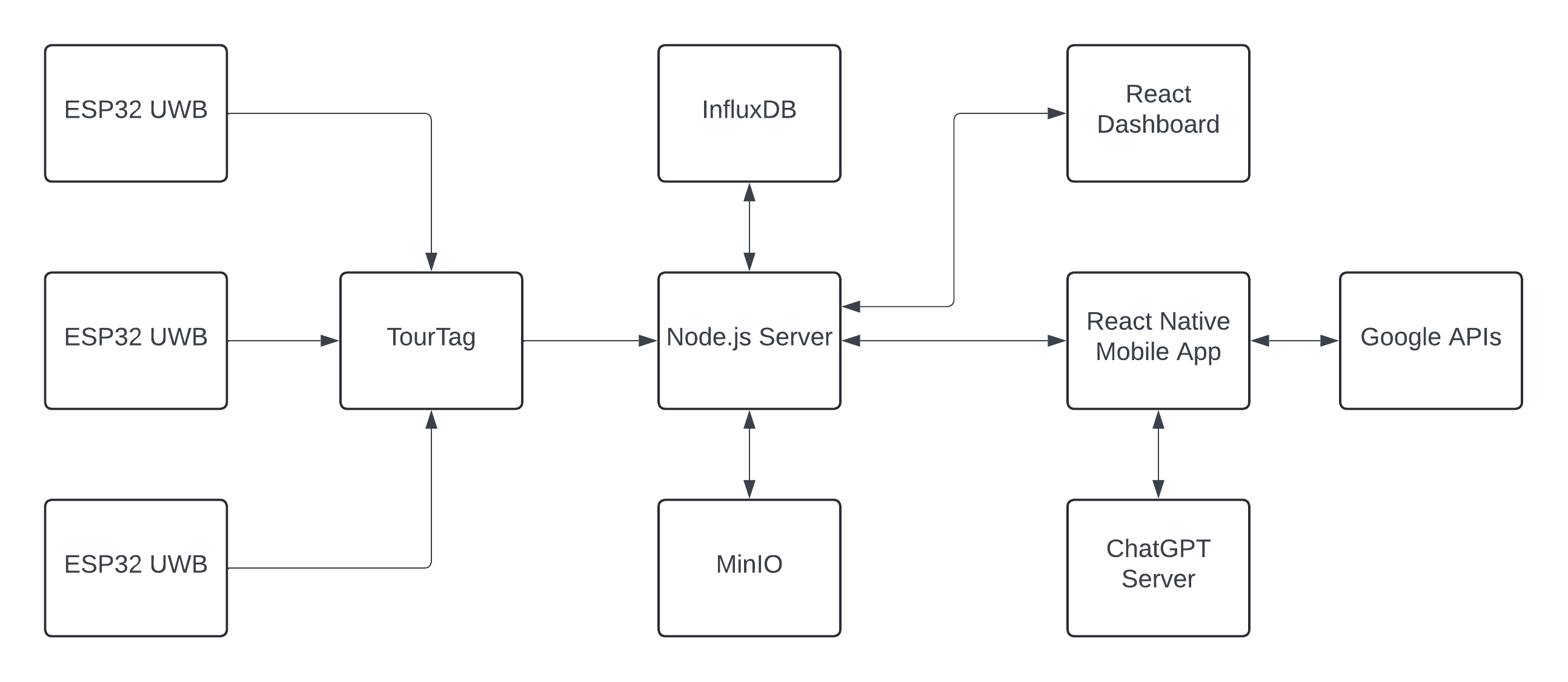
In a museum, UWB (Ultra-Wideband) beacons are strategically positioned across various locations to ensure comprehensive coverage. These beacons constantly transmit signals that are picked up by a device known as the TourTag. This device collects a substantial number of signal readings, which are then sent to a Node.js server via UDP for processing. Upon receiving the data, the server updates the distance measurements from the corresponding beacons and employs trilateration with the three nearest beacons to compute the x,y coordinates of the TourTag. This location data is used to determine the specific room within the museum where the user is located. For visitors using the mobile app who wish to know their current location, the app queries a REST API endpoint. This endpoint responds with the room location based on the latest coordinates calculated for their TourTag. To facilitate efficient navigation through the museum, the server utilizes Dijkstra's algorithm for point-to-point routing and the Traveling Salesperson Problem (TSP) algorithm for routing through multiple nodes. The museum's layout is represented as a weighted adjacency graph, where the weights are calculated based on the Euclidean distances between rooms. Additionally, the graph dynamically adjusts by incorporating the current occupancy percentage of each room. This feature ensures that the routing suggestions can help visitors avoid crowded areas, thereby optimizing the flow of museum traffic and enhancing the visitor experience.
In the museum, each piece of artwork or exhibit is equipped with a unique RFID tag placed in its vicinity. Visitors interact with these RFID tags using their TourTag, a device that attaches to their smartphone via MagSafe. When a visitor taps their TourTag against an RFID tag, the action triggers the transmission of the RFID data to the Node.js server via UDP. This data includes the specific RFID that was tapped and identifies which TourTag was used. To notify the visitor's mobile app of the interaction, the server utilizes a WebSocket connection. This real-time communication channel informs the app about the specific RFID interaction triggered by the user. Following this notification, the mobile app makes a request to a REST API endpoint on the server. This API endpoint is responsible for retrieving multimedia content related to the RFID tag from MinIO, a high-performance object storage service. The server queries MinIO, obtains the multimedia files associated with the RFID, and generates URLs for these resources. It then sends these URLs back to the mobile app, allowing the app to display relevant multimedia content directly to the visitor. This seamless integration of RFID technology, mobile connectivity, and real-time data handling enhances the visitor's experience by providing instant access to rich multimedia content related to each exhibit they explore.
InfluxDB, a specialized time series database, plays a crucial role in managing and storing all system metrics gathered from the hardware and the analytics data displayed on the dashboard. Each TourTag device communicates with the server via UDP, transmitting key information such as connection status, battery status, and battery level. The server processes and stores these metrics in InfluxDB. Additionally, the server captures and logs visitor data for dashboard insights, including room occupancy and duration of stay. These metrics are derived from internal server processes and subsequently stored in InfluxDB. Another important metric, exhibit ratings, is also stored in InfluxDB. Visitors can rate exhibits by scanning an RFID tag with their TourTag and submitting a 0-5 star review through a REST API endpoint, which the server then records in the database. This comprehensive data collection and storage system enables real-time monitoring and analytics to enhance visitor experience and operational efficiency.
/MuseumMate_Beacon directory.MuseumMate_Beacon.ino in the IDE.BEACON_ID in line 36 to the correct value.tx_resp_msg in line 38 to match the BEACON_ID./MuseumMate_TourTag directory.common_definition.h and modify USERID on line 5 to the correct value.MuseumMateWifi.h, update SSID, EAP_ANONYMOUS_IDENTITY, EAP_IDENTITY, EAP_PASSWORD, EAP_USERNAME, and HOST (server IP address) as necessary from lines 11 to 20.MuseumMateWifi.cpp, replace test_root_ca on line 11 with your institution's certificates if not on BU campus.MuseumMate_TourTag.ino to your ESP32 UWB DW3000 board, then monitor the serial output to confirm the firmware is running correctly.Clone the repository to your local machine, download dependencies, and run on port 3000:
git clone https://github.com/jculley01/MuseumMate.git
cd MuseumMate
cd code
cd server
npm install
node index.jsgit clone (https://github.com/jculley01/MuseumMate)
cd code
cd front-endnpm installnpx expo starteas configure
eas build --platform ios
eas build -p android --profile previewgit clone https://github.com/jculley01/MuseumMate.git
cd MuseumMate
cd code
cd GPT
go mod tidy
go run main.gogit clone https://github.com/jculley01/MuseumMate.git
cd code
cd dashboard
cd my-appnpm installnpm startThis will run the code in development mode. Open http://localhost:3001 to view in browser.
connectionStatususerID: Identifies the user.online: Binary value (1 for online, 0 for offline or asleep).connectionServer to log the active connection status of user devices.batteryStatususerID: Identifies the user associated with the update.charging: Indicates if the device is charging (1) or not (0).done: Indicates if charging is complete (1) or not (0).status: Describes the charging state (e.g., charging, not charging, charging done, error).batteryStatusServer.batteryLeveluserID: Links to the specific user.level: Represents the battery level as a percentage from 0 to 100.batteryLevelServer and monitored in real-time.room_accessroomID: Identifier for the accessed room.count: Incremental counter, generally set to 1, to record accesses./path/:userID endpoint and during POST requests to /tsp-path.roomOccupancyroomName: Identifier for the room.count: Current number of users in the room.roomStayDurationuserID: Identifies the user.roomName: Specifies the room.duration: Time (in seconds) spent by the user in the room.updateUserRoomDurations function.exhibitRatingexhibit: Name of the exhibit being rated.rating: Rating given by a user, scaled from 0 to 5./api/exhibit-rating.GET /api/active-users: Returns the number of currently active users. GET /api/total-users: Provides the total number of users within the last 24 hours. GET /api/room-occupancies: Fetches the current occupancy of each room. GET /api/exhibit-ratings: Retrieves ratings for each exhibit from the last year.
GET /location/:userID: Returns the current location of a specific user. GET /path/:userID: Provides the shortest path to a specified end node for a user. POST /tsp-path: Calculates and returns the shortest path visiting specified nodes.
GET /rfid/:bucketName: Lists all objects within a specified bucket in Minio storage.
| Qty | Value | Footprint | References |
|---|---|---|---|
| 2 | 10K | Resistor_SMD:R_1206_3216Metric | R1, R2 |
| 1 | ESP32 UWB | ESP32:ESP_UWB_Final | J1 |
| 1 | LOGO | LOGO | G*** |
| 1 | RC522 Connector | ESP32:RC522_Module | J2 |
| 1 | USB Li-Ion Charger | ESP32:Li-Ion_Charger | J3 |
It measures 73.4 × 97.7 mm and has 2 copper layers, 1.6 mm thick.
6 parts. The full list of its parts is on this page, with links to each part's symbol and footprint where PCBKit's library has them.
From the jculley01/MuseumMate repository on GitHub, at the commit this page was made from: the board is hardware/PCB_KiCAD/UWB_PCB/UWB_PCB.kicad_pcb and its schematic hardware/PCB_KiCAD/UWB_PCB/UWB_PCB.kicad_sch. PCBKit opens the board in the browser, with nothing to install.
Its repository states no licence, so its author keeps all rights: ask jculley01 before reusing the design.
byrantech/laptop
anyon_e, a highly integrated, high end, open source laptop. Attempt the impossible.


Jcparkyn/dpoint
Open-source digital stylus using camera tracking and inertial measurements

VoronDesign/Voron-Hardware
Cool Hardware designed by the Voron Design group

hoglet67/RGBtoHDMI
Bare-metal Raspberry Pi project that provides pixel-perfect sampling of Retro Computer RGB/YUV video and conversion to HDMI

hackclub/OnBoard
💡 Join 1,000 teenagers and make your first PCB with a $100 grant!

Luos-io/luos_engine
Open-source and real-time orchestrator for cyber-physical-systems, to easily design, test and deploy embedded applications and digital twins.
