2 layers139.7 × 88.9 mm

 jasperhax0r/Kaypro10Keyboard
Mechanical keyboard that fits the originals board layout, uses pi-pico as the controller.
KayproKeyboard is an open-source printed circuit board by jasperhax0r, from the jasperhax0r/Kaypro10Keyboard repository on GitHub, published under the MIT licence. It is a 2-layer board of 427.9 × 155 mm with 163 parts on 131 nets, routed with 1,258 tracks and 79 vias.
Its parts include 78 diodes, 70 switches, 3 connectors, 2 capacitors and 2 resistors. It belongs with the keyboards and input boards and the RP2040 boards of this library.
A modern replacement keyboard for the Kaypro 10 that fits the original case, using Cherry MX-style switches and a Raspberry Pi Pico running MicroPython to emulate the original 300 baud serial keyboard interface.
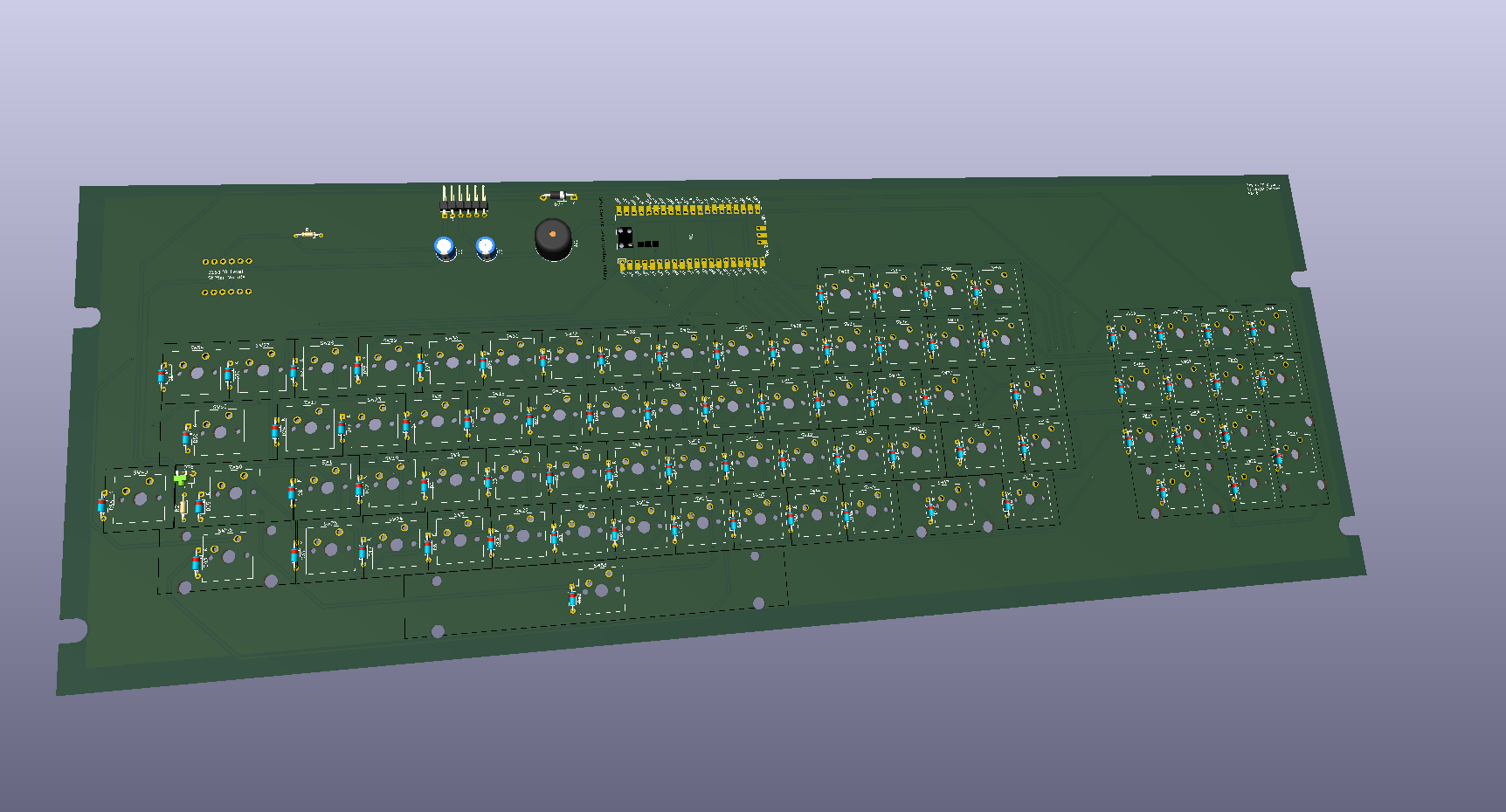
KiCad 3D render of the PCB
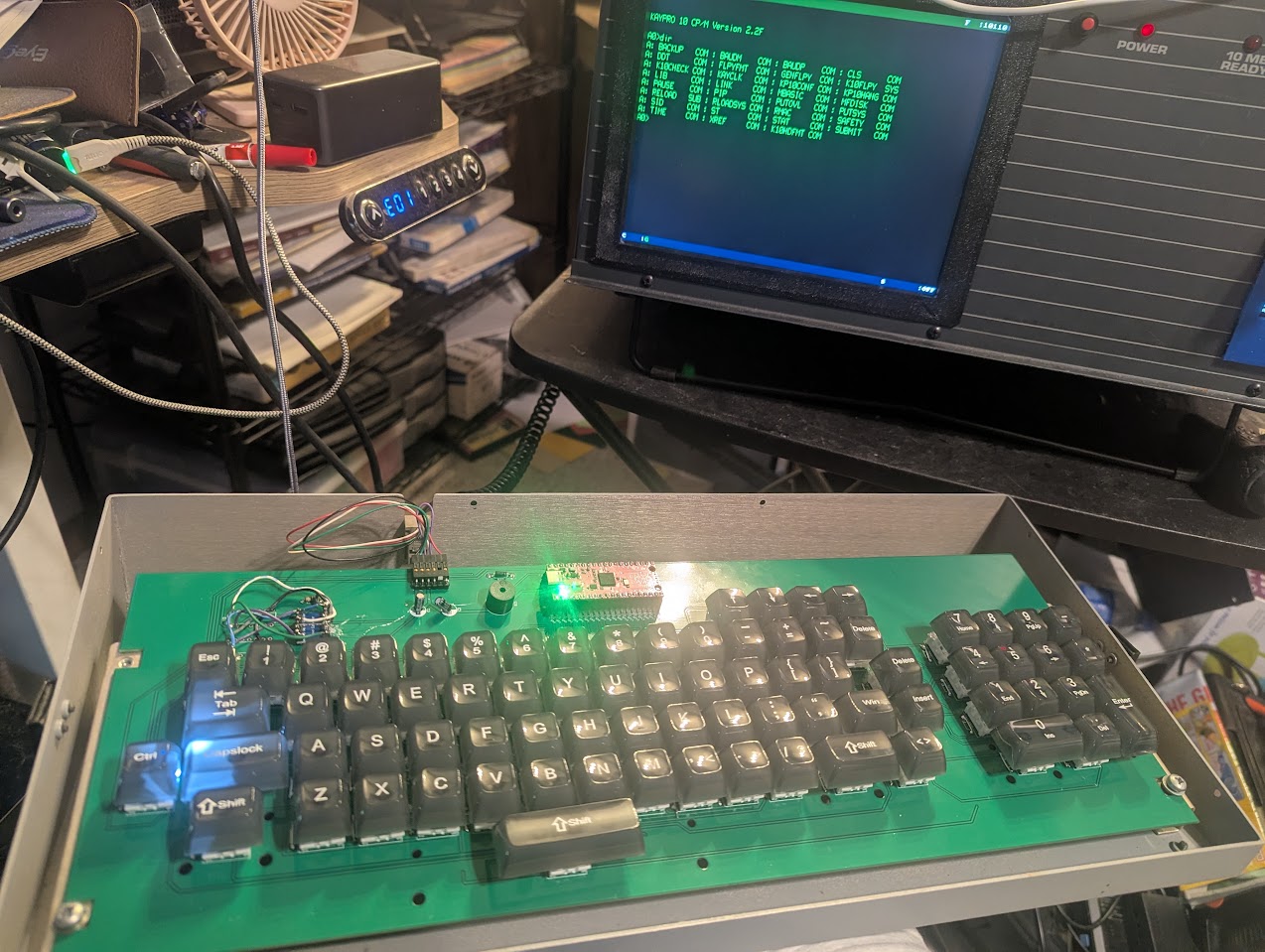
Prototype board installed and working
The original Kaypro 10 keyboard is increasingly difficult to find in working condition. This project provides a drop-in replacement that:
All files are in the root of the repository.
| File | Description |
|---|---|
*.kicad_pro, *.kicad_sch, *.kicad_pcb, etc. | KiCad 10 schematic and PCB design files |
KayproKeyboard.zip | Generated Gerber/manufacturing files, ready to send to a PCB fab |
KayproKeyboard.png | KiCad 3D render of the board |
keyboard support.stl | 3D printable switch support plate |
main.py | MicroPython firmware for the Raspberry Pi Pico |
PXL_20260531_222427528.jpg | Photo of the working prototype |
| Qty | Component | Notes |
|---|---|---|
| 76 | 1N4148 diode | One per switch, for key matrix decoding |
| 76 | Cherry MX-style switches | One per key position |
| — | PCB-mount stabilizers | Required for larger keys (spacebar, shift, enter, etc.) — quantity depends on layout |
| 1 | Waveshare BS138 4-channel bidirectional level shifter module | 3.3V ↔ 5V logic level conversion |
| 1 | Passive buzzer/speaker | Key click feedback |
| 1 | LED (single, any color) | Status indicator |
| 1 | 330Ω resistor | LED current limiting |
| 1 | 47kΩ resistor | Pull-up/pull-down for serial line |
| 1 | Protection diode | 5V input protection for the Pico |
| 1 | Raspberry Pi Pico | Main controller (standard Pico, not Pico W) |
| 1 | 6-pin horizontal header | Serial interface connector to Kaypro mainboard |
Note: Use 1N4148 diodes (or equivalent) for the key matrix. One diode is required per switch to prevent ghosting.
The file KayproKeyboard.zip contains all Gerber files needed for fabrication. It can be uploaded directly to most PCB manufacturers (JLCPCB, PCBWay, OSHPark, etc.) without modification.
Recommended specs:
Because this design does not use a metal switch plate, a 3D printed support structure (keyboard support.stl) is included to provide rigidity and hold the switches in alignment during soldering and use.
Print in PLA or PETG at 0.2mm layer height with at least 20% infill. No supports should be needed.
The Pico runs MicroPython. Copy main.py to the Pico's root filesystem and it will start automatically on boot.
RPI-RP2).mpremote to copy main.py to the Pico:
mpremote cp main.py :main.pyThe firmware reads the key matrix, debounces inputs, and outputs the correct character codes over the serial interface at 300 baud to match the Kaypro's original keyboard protocol.
The keyboard connects to the Kaypro 10 mainboard via a 6-pin horizontal header. Pinout, numbered left to right:
| Pin | Signal | Description |
|---|---|---|
| 1 | 5V | Power from Kaypro mainboard |
| 2 | TX | Serial data out — keyboard → Kaypro, 300 baud |
| 3 | GND | Ground |
| 4 | GND | Ground |
| 5 | — | Missing/keyed pin (no connection) |
| 6 | RX | Serial data in — Kaypro → keyboard, 300 baud |
⚠️ Important: This pinout was determined from an 1983-spec Kaypro 10. It may not be universal across all Kaypro models or revisions. Verify against your own machine before connecting. The protection diode on the 5V input and the BS138 level shifter are strongly recommended to avoid damaging the Pico.
The BS138 level shifter module handles 3.3V Pico ↔ 5V Kaypro logic translation on the TX and RX lines.
Schematics and PCB layout were created in KiCad 10. The KiCad project files are in the root directory and can be opened and modified freely.
This project is open source. Schematics, PCB files, firmware, and mechanical files are provided as-is for personal and educational use.
Contributions, improvements, and ports to other Kaypro models are welcome — open a PR or issue!
| Qty | Value | Footprint | References |
|---|---|---|---|
| 76 | 1N4148 | Diode_THT:D_DO-35_SOD27_P7.62mm_Horizontal | D1, D2, D10, D11, D12, D13, D14, D15, D16, D17, D18, D19, D20, D21, D22, D23 +60 |
| 2 | C_Polarized_US | Capacitor_THT:CP_Radial_D6.3mm_P2.50mm | C1, C2 |
| 2 | Conn_01x06 | PCM_SparkFun-Connector:1x06_P2.54mm | J2, J3 |
| 1 | '_Key | Button_Switch_Keyboard:SW_Cherry_MX_1.00u_PCB | SW41 |
| 1 | ,_Key | Button_Switch_Keyboard:SW_Cherry_MX_1.00u_PCB | SW43 |
| 1 | -_Key | Button_Switch_Keyboard:SW_Cherry_MX_1.00u_PCB | SW37 |
| 1 | ._Key | Button_Switch_Keyboard:SW_Cherry_MX_1.00u_PCB | SW44 |
| 1 | /_Key | Button_Switch_Keyboard:SW_Cherry_MX_1.00u_PCB | SW45 |
| 1 | 0_Key | Button_Switch_Keyboard:SW_Cherry_MX_1.00u_PCB | SW36 |
| 1 | 1N5817 | Diode_THT:D_DO-41_SOD81_P10.16mm_Horizontal | D77 |
| 1 | 1_Key | Button_Switch_Keyboard:SW_Cherry_MX_1.00u_PCB | SW27 |
| 1 | 2_Key | Button_Switch_Keyboard:SW_Cherry_MX_1.00u_PCB | SW28 |
| 1 | 330 | Resistor_THT:R_Axial_DIN0204_L3.6mm_D1.6mm_P7.62mm_Horizontal | R2 |
| 1 | 3_Key | Button_Switch_Keyboard:SW_Cherry_MX_1.00u_PCB | SW29 |
| 1 | 4.7K | Resistor_THT:R_Axial_DIN0204_L3.6mm_D1.6mm_P7.62mm_Horizontal | R1 |
| 1 | 4_Key | Button_Switch_Keyboard:SW_Cherry_MX_1.00u_PCB | SW30 |
| 1 | 5_Key | Button_Switch_Keyboard:SW_Cherry_MX_1.00u_PCB | SW31 |
| 1 | 6_Key | Button_Switch_Keyboard:SW_Cherry_MX_1.00u_PCB | SW32 |
| 1 | 7_Key | Button_Switch_Keyboard:SW_Cherry_MX_1.00u_PCB | SW33 |
| 1 | 8_Key | Button_Switch_Keyboard:SW_Cherry_MX_1.00u_PCB | SW34 |
| 1 | 9_Key | Button_Switch_Keyboard:SW_Cherry_MX_1.00u_PCB | SW35 |
| 1 | ;_Key | Button_Switch_Keyboard:SW_Cherry_MX_1.00u_PCB | SW40 |
| 1 | =_Key | Button_Switch_Keyboard:SW_Cherry_MX_1.00u_PCB | SW38 |
| 1 | A_Key | Button_Switch_Keyboard:SW_Cherry_MX_1.00u_PCB | SW1 |
| 1 | BACKSPACE_Key | Button_Switch_Keyboard:SW_Cherry_MX_1.00u_PCB | SW52 |
| 1 | B_Key | Button_Switch_Keyboard:SW_Cherry_MX_1.00u_PCB | SW2 |
| 1 | Buzzer | Buzzer_Beeper:Buzzer_12x9.5RM7.6 | BZ1 |
| 1 | CAPSLED | LED_THT:LED_D1.8mm_W1.8mm_H2.4mm_Horizontal_O1.27mm_Z4.9mm | D76 |
| 1 | CAPS_Key | Button_Switch_Keyboard:SW_Cherry_MX_1.75u_PCB | SW50 |
| 1 | CTRL_Key | Button_Switch_Keyboard:SW_Cherry_MX_1.00u_PCB | SW49 |
| 1 | C_Key | Button_Switch_Keyboard:SW_Cherry_MX_1.00u_PCB | SW3 |
| 1 | Conn_01x06_Pin | Connector_PinHeader_2.54mm:PinHeader_1x06_P2.54mm_Horizontal | J1 |
| 1 | DEL_Key | Button_Switch_Keyboard:SW_Cherry_MX_1.00u_PCB | SW51 |
| 1 | DOWN_Key | Button_Switch_Keyboard:SW_Cherry_MX_1.00u_PCB | SW59 |
| 1 | D_Key | Button_Switch_Keyboard:SW_Cherry_MX_1.00u_PCB | SW4 |
| 1 | ESC_Key | Button_Switch_Keyboard:SW_Cherry_MX_1.00u_PCB | SW54 |
| 1 | E_Key | Button_Switch_Keyboard:SW_Cherry_MX_1.00u_PCB | SW5 |
| 1 | F_Key | Button_Switch_Keyboard:SW_Cherry_MX_1.00u_PCB | SW6 |
| 1 | G_Key | Button_Switch_Keyboard:SW_Cherry_MX_1.00u_PCB | SW7 |
| 1 | H_Key | Button_Switch_Keyboard:SW_Cherry_MX_1.00u_PCB | SW8 |
| 1 | I_Key | Button_Switch_Keyboard:SW_Cherry_MX_1.00u_PCB | SW9 |
| 1 | J_Key | Button_Switch_Keyboard:SW_Cherry_MX_1.00u_PCB | SW10 |
| 1 | K_Key | Button_Switch_Keyboard:SW_Cherry_MX_1.00u_PCB | SW11 |
| 1 | LEFT_Key | Button_Switch_Keyboard:SW_Cherry_MX_1.00u_PCB | SW60 |
| 1 | LINEFEED_Key | Button_Switch_Keyboard:SW_Cherry_MX_1.00u_PCB | SW57 |
| 1 | LSHIFT_Key | Button_Switch_Keyboard:SW_Cherry_MX_2.00u_PCB | SW46 |
| 1 | L_Key | Button_Switch_Keyboard:SW_Cherry_MX_1.00u_PCB | SW12 |
| 1 | M_Key | Button_Switch_Keyboard:SW_Cherry_MX_1.00u_PCB | SW13 |
| 1 | NUM,_Key | Button_Switch_Keyboard:SW_Cherry_MX_1.00u_PCB | SW75 |
| 1 | NUM-_Key | Button_Switch_Keyboard:SW_Cherry_MX_1.00u_PCB | SW74 |
| 1 | NUM._Key | Button_Switch_Keyboard:SW_Cherry_MX_1.00u_PCB | SW72 |
| 1 | NUM0_Key | Button_Switch_Keyboard:SW_Cherry_MX_2.00u_PCB | SW62 |
| 1 | NUM1_Key | Button_Switch_Keyboard:SW_Cherry_MX_1.00u_PCB | SW63 |
| 1 | NUM2_Key | Button_Switch_Keyboard:SW_Cherry_MX_1.00u_PCB | SW64 |
| 1 | NUM3_Key | Button_Switch_Keyboard:SW_Cherry_MX_1.00u_PCB | SW65 |
| 1 | NUM4_Key | Button_Switch_Keyboard:SW_Cherry_MX_1.00u_PCB | SW66 |
| 1 | NUM5_Key | Button_Switch_Keyboard:SW_Cherry_MX_1.00u_PCB | SW67 |
| 1 | NUM6_Key | Button_Switch_Keyboard:SW_Cherry_MX_1.00u_PCB | SW68 |
| 1 | NUM7_Key | Button_Switch_Keyboard:SW_Cherry_MX_1.00u_PCB | SW69 |
| 1 | NUM8_Key | Button_Switch_Keyboard:SW_Cherry_MX_1.00u_PCB | SW70 |
| 1 | NUM9_Key | Button_Switch_Keyboard:SW_Cherry_MX_1.00u_PCB | SW71 |
| 1 | NUMENTER_Key | Button_Switch_Keyboard:SW_Cherry_MX_2.00u_Vertical_PCB | SW73 |
| 1 | N_Key | Button_Switch_Keyboard:SW_Cherry_MX_1.00u_PCB | SW14 |
| 1 | O_Key | Button_Switch_Keyboard:SW_Cherry_MX_1.00u_PCB | SW15 |
| 1 | P_Key | Button_Switch_Keyboard:SW_Cherry_MX_1.00u_PCB | SW16 |
| 1 | Pico | MCU_RaspberryPi_and_Boards:RPi_Pico_SMD_TH | U1 |
| 1 | Q_Key | Button_Switch_Keyboard:SW_Cherry_MX_1.00u_PCB | SW17 |
| 1 | RETURN_Key | Button_Switch_Keyboard:SW_Cherry_MX_1.50u_PCB | SW56 |
| 1 | RIGHT_Key | Button_Switch_Keyboard:SW_Cherry_MX_1.00u_PCB | SW61 |
| 1 | RSHIFT_Key | Button_Switch_Keyboard:SW_Cherry_MX_2.00u_PCB | SW47 |
| 1 | R_Key | Button_Switch_Keyboard:SW_Cherry_MX_1.00u_PCB | SW18 |
| 1 | SPACE_Key | Button_Switch_Keyboard:SW_Cherry_MX_6.25u_PCB | SW53 |
| 1 | S_Key | Button_Switch_Keyboard:SW_Cherry_MX_1.00u_PCB | SW19 |
| 1 | TAB_Key | Button_Switch_Keyboard:SW_Cherry_MX_1.75u_PCB | SW55 |
| 1 | T_Key | Button_Switch_Keyboard:SW_Cherry_MX_1.00u_PCB | SW20 |
| 1 | UP_Key | Button_Switch_Keyboard:SW_Cherry_MX_1.00u_PCB | SW58 |
| 1 | U_Key | Button_Switch_Keyboard:SW_Cherry_MX_1.00u_PCB | SW21 |
| 1 | V_Key | Button_Switch_Keyboard:SW_Cherry_MX_1.00u_PCB | SW22 |
| 1 | W_Key | Button_Switch_Keyboard:SW_Cherry_MX_1.00u_PCB | SW23 |
| 1 | X_Key | Button_Switch_Keyboard:SW_Cherry_MX_1.00u_PCB | SW24 |
The 157 most common of 163 parts.

squarewavedot/ledcubeelectronics
LEDCube battery and masterboard electronics

01binary/str1ker
A human-scale mech integrated with Robot Operating System


westfoxtrot/ccd60
ccd60 is a generic 60% PCB used for Cable Car Designs keyboard designs.

Testbild-synth/super-sweet-16
Deluxe 16-step knob-per-function sequencer Module for eurorack


hungrygeek/HSKB
Open-source HHKB-layout MX custom keyboard — KiCad PCB, case STL, QMK/VIA firmware. Personal iteration of the HSKB (Happy Sabi Keyboard).
It measures 427.9 × 155 mm and has 2 copper layers, 1.6 mm thick.
163 parts. The full list of its parts is on this page, with links to each part's symbol and footprint where PCBKit's library has them.
From the jasperhax0r/Kaypro10Keyboard repository on GitHub, at the commit this page was made from: the board is KayproKeyboard.kicad_pcb and its schematic KayproKeyboard.kicad_sch. PCBKit opens the board in the browser, with nothing to install.
Its repository publishes it under the MIT licence: you may reuse it on that licence's terms (keep the author's notice, and for a copyleft licence share your changes alike).