6 layers152.4 × 121.9 mm
ROSE PILK v1
Thornbots/Electrical
Here is where we store all relevant files for the Electrical team. In here you will store all of the KiCad files that you produce through out the year.
132 parts

 jankae/LibreCAL140
4 port eCal module
LibreCAL is an open-source printed circuit board by jankae, from the jankae/LibreCAL repository on GitHub, published under the GPL-3.0 licence. It is a 4-layer board of 55 × 73.5 mm with 132 parts on 124 nets, routed with 1,199 tracks and 1,196 vias.
It is built around the RP2040, W25Q128JVSIQ and W25Q16JVSNIQ, with the PE426462A-X, IP4234CZ6 and MIC5528-3.3YMT-TR among its other parts. Its parts include 50 capacitors, 36 resistors, 11 diodes, 9 ICs and 6 connectors. It belongs with the radio and wireless boards and the RP2040 boards of this library.



4-port, 9kHz to 6GHz eCal module for VNAs
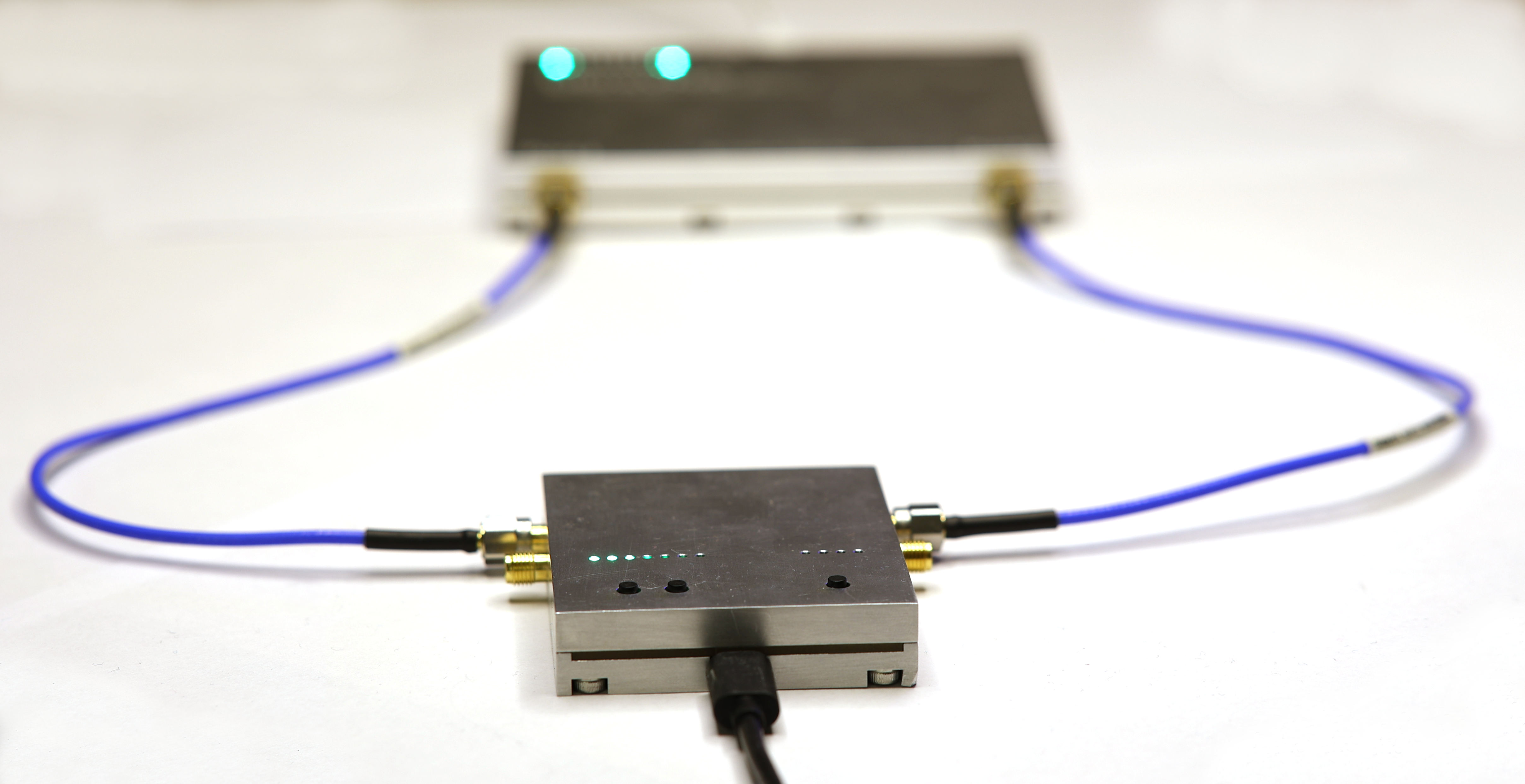
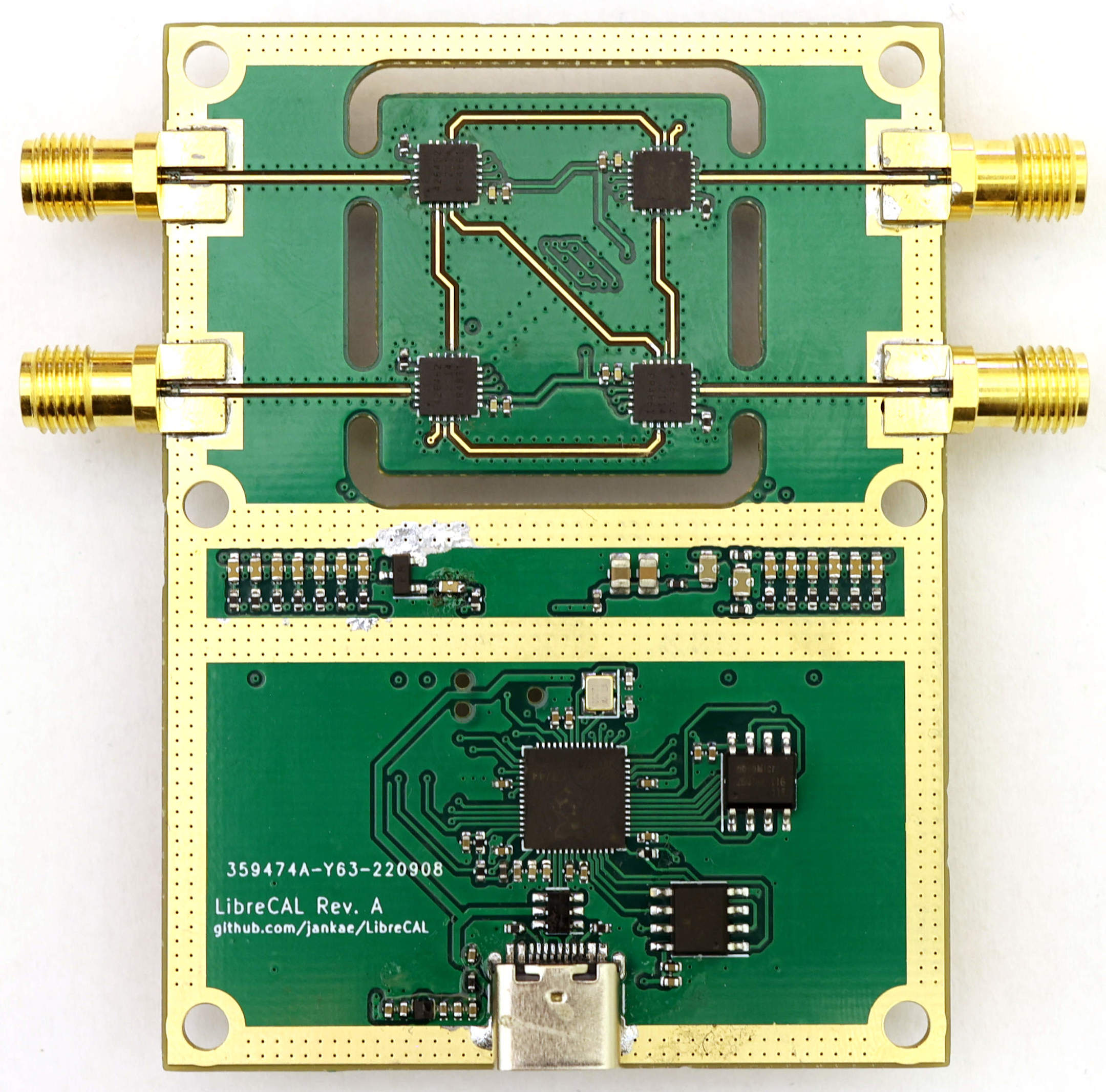
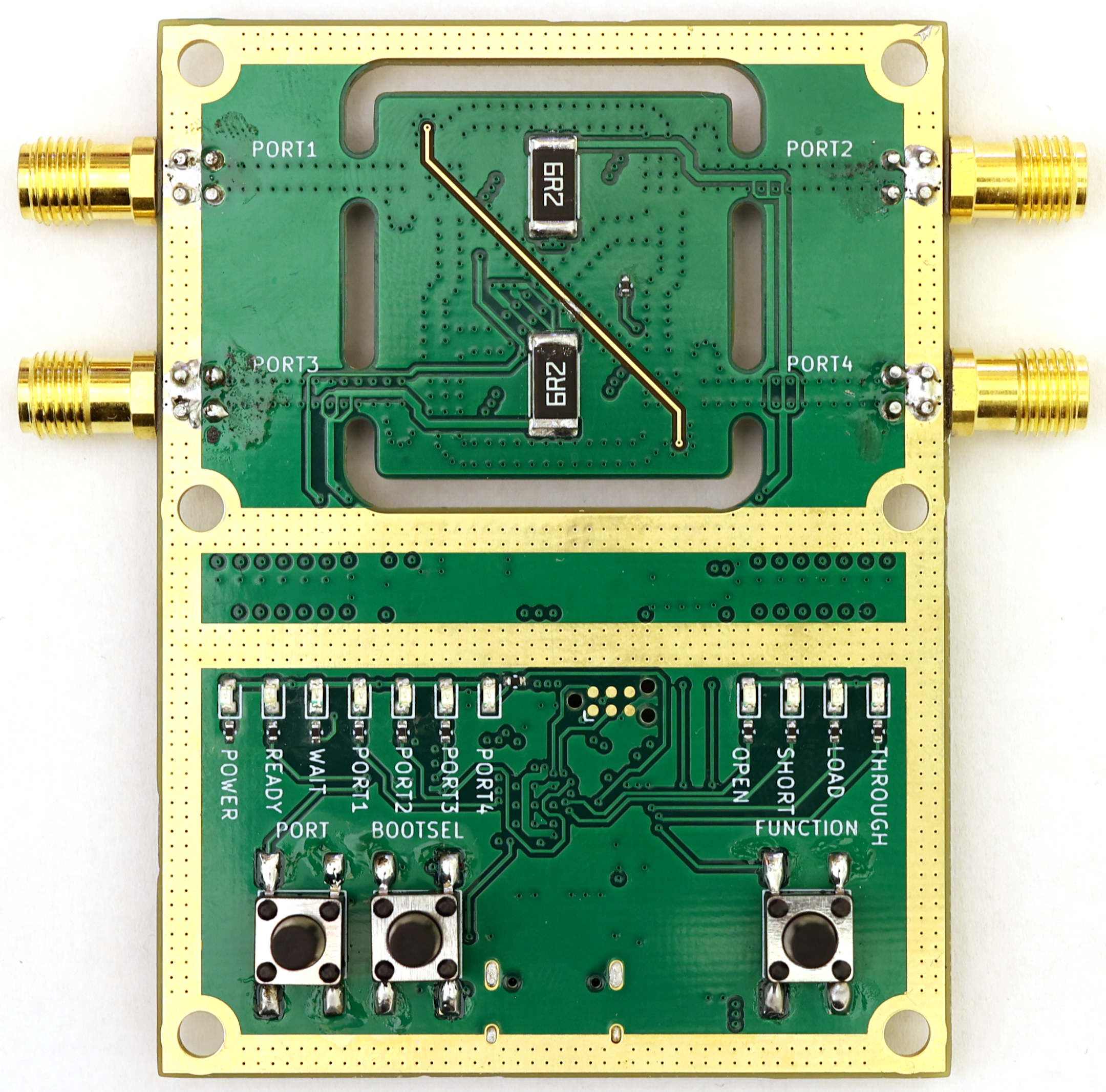
All of the following steps are only required if you plan to use the LibreCAL-GUI. If you plan to control the LibreCAL manually with the buttons, through a script or the LibreVNA-GUI, there is no need to download the LibreCAL-GUI (but you should still install the udev rule on Linux systems).
sudo apt install libqt6widgets6 libqt6charts6 libqt6svg6wget https://raw.githubusercontent.com/jankae/LibreCAL/main/Software/52-LibreCAL.rules
sudo cp 52-LibreCAL.rules /etc/udev/rules.dsudo udevadm control --reload-rules
sudo udevadm triggercd $UNPACKED_ZIP_FOLDER$
./LibreCAL-GUIlatest in the name.13.7 in the name./Applications folder.The LibreCAL is just a switch-matrix with additional options to terminate each port into an open, short or 50 Ohm connection:
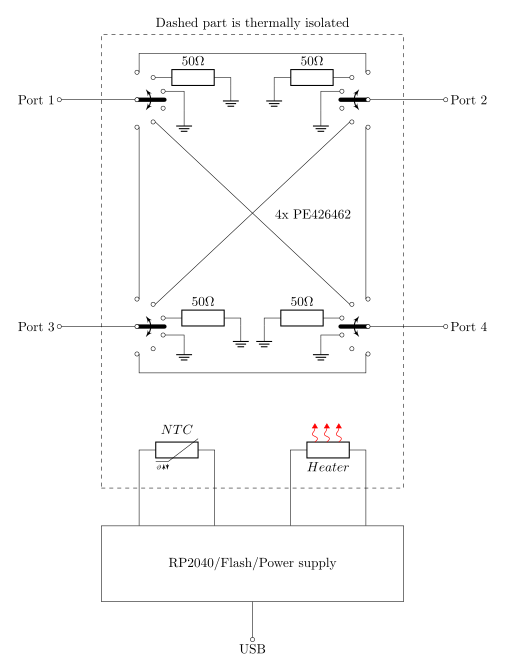
While the blockdiagram is small and simple, the tricky part of any eCal module is repeatability. The LibreCAL contains an integrated heater and temperature sensor to keep the critical parts at a constant temperature during operation. Furthermore, high quality SMA connectors are used to ensure good return loss.
The coefficients of the calibration standards are stored in standard touchstone format on the device. They must be measured and written once after assembling the PCB and housing.
| Qty | Value | Footprint | References |
|---|---|---|---|
| 17 | 100n | Capacitor_SMD:C_0402_1005Metric | C3, C4, C5, C6, C11, C14, C15, C16, C17, C18, C19, C20, C22, C26, C30, C31 +1 |
| 14 | NFM18CC223R1C3D | LibreCAL:NFM18CC | C34, C35, C36, C37, C38, C39, C40, C41, C42, C43, C44, C45, C48, C50 |
| 13 | 47k | Resistor_SMD:R_0402_1005Metric | R10, R11, R25, R26, R27, R28, R29, R30, R31, R32, R33, R34, R35 |
| 11 | 330 | Resistor_SMD:R_0402_1005Metric | R14, R15, R16, R17, R18, R19, R20, R21, R22, R23, R24 |
| 10 | Green | LED_SMD:LED_0603_1608Metric | D1, D2, D4, D5, D6, D7, D8, D9, D10, D11 |
| 9 | 2u2 | Capacitor_SMD:C_0402_1005Metric | C10, C21, C23, C24, C25, C27, C28, C29, C32 |
| 6 | MountingHole_Pad | MountingHole:MountingHole_3.2mm_M3_ISO14580_Pad_TopBottom | H1, H2, H3, H4, H5, H6 |
| 4 | 10n | Capacitor_SMD:C_0402_1005Metric | C1, C2, C7, C8 |
| 4 | 901-10510-2 | LibreCAL:901-10510-2 | J1, J2, J3, J4 |
| 4 | CH0402-50RGFTA | Resistor_SMD:R_0402_1005Metric | R1, R2, R3, R4 |
| 4 | MMZ1005S121CTD25 | Inductor_SMD:L_0402_1005Metric | FB1, FB2, FB5, FB6 |
| 4 | PE426462 | Package_DFN_QFN:QFN-24-1EP_4x4mm_P0.5mm_EP2.7x2.7mm | U1, U2, U3, U4 |
| 2 | 10k | Resistor_SMD:R_0402_1005Metric | R12, R13 |
| 2 | 12p | Capacitor_SMD:C_0402_1005Metric | C12, C13 |
| 2 | 22u | Capacitor_SMD:C_0805_2012Metric | C46, C47 |
| 2 | 5k1 | Resistor_SMD:R_0402_1005Metric | R5, R6 |
| 2 | 6R2 | Resistor_SMD:R_2512_6332Metric | R8, R9 |
| 2 | MMZ1005A222ET000 | Inductor_SMD:L_0402_1005Metric | FB3, FB4 |
| 2 | NFM21PC475B1A3D | LibreCAL:NFM21PC | C33, C49 |
| 2 | TL3301CF160QG | LibreCAL:TL3301C-J | SW2, SW3 |
| 1 | 100 | Resistor_SMD:R_0402_1005Metric | R36 |
| 1 | 1k | Resistor_SMD:R_0402_1005Metric | R7 |
| 1 | Bottom Cover | LibreCAL:BottomCover | COVER2 |
| 1 | ECS-120-8-36-CKM-TR3 | Crystal:Crystal_SMD_2520-4Pin_2.5x2.0mm | Y1 |
| 1 | ERT-J0ER103J | Resistor_SMD:R_0402_1005Metric | TH1 |
| 1 | IP4234CZ6 | Package_TO_SOT_SMD:SOT-23-6 | U6 |
| 1 | IRLML2060 | Package_TO_SOT_SMD:SOT-23 | Q1 |
| 1 | MIC5528-3.3YMT-TR | LibreCAL:DFN-6-1EP_1.2x1.2mm_P0.4mm_EP0.3x0.94mm | U9 |
| 1 | RP2040 | LibreCAL:RP2040 | U7 |
| 1 | Red | LED_SMD:LED_0603_1608Metric | D3 |
| 1 | TC2030-ARM | Connector:Tag-Connect_TC2030-IDC-NL_2x03_P1.27mm_Vertical | J6 |
| 1 | TL3301NF160QG | LibreCAL:TL3301N-J | SW1 |
| 1 | Top Cover | LibreCAL:TopCover | COVER1 |
| 1 | USB_C_Receptacle_USB2.0 | Connector_USB:USB_C_Receptacle_HRO_TYPE-C-31-M-12 | J5 |
| 1 | W25Q128JVSIQ | Package_SO:SOIC-8_5.23x5.23mm_P1.27mm | U8 |
| 1 | W25Q16JVSNIQ | Package_SO:SOIC-8_3.9x4.9mm_P1.27mm | U5 |
It measures 55 × 73.5 mm and has 4 copper layers, 1.56 mm thick.
132 parts, built around the RP2040, W25Q128JVSIQ, W25Q16JVSNIQ and PE426462A-X. The full list of its parts is on this page, with links to each part's symbol and footprint where PCBKit's library has them.
From the jankae/LibreCAL repository on GitHub, at the commit this page was made from: the board is Hardware/LibreCAL/LibreCAL.kicad_pcb and its schematic Hardware/LibreCAL/LibreCAL.kicad_sch. PCBKit opens the board in the browser, with nothing to install.
Its repository publishes it under the GPL-3.0 licence: you may reuse it on that licence's terms (keep the author's notice, and for a copyleft licence share your changes alike).
Thornbots/Electrical
Here is where we store all relevant files for the Electrical team. In here you will store all of the KiCad files that you produce through out the year.


chinawrj/FarmMesh-Node
Developing an integrated hardware and software solution for farm-wide Mesh networking: RP2350B/ESP32-C5 nodes, firmware, network protocols, and Wi-Fi/BLE sensor access.


jackw01/scanlight
A better light source for scanning color negative film

Rack-Robotics/Powercore-V2.0
Open-Source wire EDM power supply by Rack Robotics, Inc.

homelith/pico-disp-ident
Custom firmware to make some RP2040 board working as DVI display tester & identifier