2 layers30 × 90 mm

 jalikins/STM32_bazel_development
This repository contains a hermetic Bazel build configuration for STM32 microcontrollers (specifically targeting the STM32G4 series).
Stm32g441kbt6 development is an open-source printed circuit board by jalikins, from the jalikins/STM32_bazel_development repository on GitHub, published under the MIT licence. It is a 2-layer board of 64.7 × 35.3 mm with 57 parts on 66 nets, routed with 897 tracks and 112 vias.
It is built around the STM32G441KBT6, RMCF0603FT1K00 and CL31A226KAHNNNE, with the CML0603C0G300JT50V, 0ZCH0050FF2G and B1701TW--20P000314U1930 among its other parts. Its parts include 14 capacitors, 9 resistors, 8 diodes, 3 ICs and 2 connectors. It belongs with the STM32 boards of this library.


This repository contains a hermetic Bazel build configuration for STM32 microcontrollers (specifically targeting the STM32G4 series). It handles toolchain management, HAL dependencies, and provides convenient commands for building, flashing, and debugging firmware.
Download the following
sudo apt install openocdspecific targets, you can use:
bazel build --config=m4 //mkiii/software/lv/throttle:throttle.elfThis creates the .elf file inside the bazel-bin directory.
specific target using ST-Link run:
bazel run --config=m4 //mkiii/software/lv/throttle:throttle_flashusing OpenOCD's debugging tool run:
bazel run -c dbg --config=m4 //mkiii/software/lv/throttle:throttle_debugv
OpenOCD and GDB are the primary tools and can be used together for debugging STM32 applications. OpenOCD provides the interface to the hardware, while GDB is used to inspect and control the execution of the program.
The debug screen should look like this:
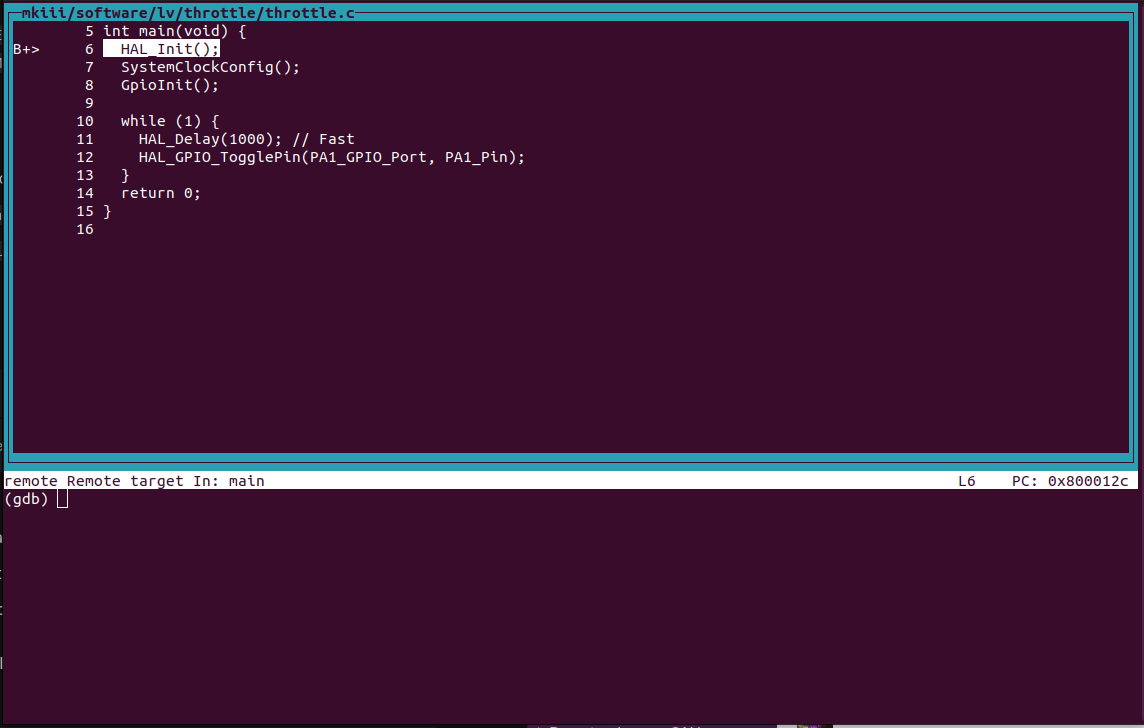
After the debug session is started, you can use GDB commands to control the execution of your program, set breakpoints, and inspect variables.
Here are some common GDB commands:
break <function> or b <function>: Set a breakpoint at the specified function.continue or c: Resume program execution until the next breakpoint.next or n: Execute the next line of code, stepping over functions.step or s: Execute the next line of code, stepping into functions.finish or fin: Continue execution until the current function returns.print <variable>: Print the value of the specified variable.display <var>: Automatically display the value of a variable each time the program stops.undisplay <id_number>: Stop displaying the value of a variable.p/x <variable>: Print the value of a variable in hexadecimal format.info locals: Print the values of all local variables in the current stack frame.set <var> <variable_name> = <value>: force the value of a variable.If you want to detach from the chip and leave the OpenOCD session, you can use the detach command in GDB. Then type exit to close the GDB session.
| Qty | Value | Footprint | References |
|---|---|---|---|
| 8 | R_1K | OEM:R_0603 | R2, R3, R4, R5, R6, R7, R8, R9 |
| 5 | C_0.1uF | OEM:C_0603 | C1, C2, C5, C6, C11 |
| 2 | C_10uF | OEM:C_0603 | C8, C12 |
| 2 | C_22uF | Capacitor_SMD:C_1206_3216Metric | C9, C10 |
| 2 | C_30pF | OEM:C_0603 | C13, C14 |
| 2 | F_500mA_16V | OEM:Fuse_1210 | F1, F2 |
| 1 | 3V3 | OEM:Test_Point_SMD | TP1 |
| 1 | 3V3 POWER | OEM:CHIPLED_0805 | D1 |
| 1 | 5V | OEM:Test_Point_SMD | TP2 |
| 1 | 5V POWER | OEM:CHIPLED_0805 | D2 |
| 1 | AP63203WU-7 | stm32g441kbt6:AP63203WU-7_DIO | U3 |
| 1 | CONN_pcie_x1 | OEM:pcie_x1 | J1 |
| 1 | C_10nF | OEM:C_0603 | C3 |
| 1 | C_1uF | OEM:C_0603 | C4 |
| 1 | C_4.7uF | OEM:C_0603 | C7 |
| 1 | EXT_SIG_1 | OEM:Test_Point_SMD | TP3 |
| 1 | EXT_SIG_2 | OEM:Test_Point_SMD | TP4 |
| 1 | EXT_SIG_3 | OEM:Test_Point_SMD | TP5 |
| 1 | EXT_SIG_4 | OEM:Test_Point_SMD | TP6 |
| 1 | EXT_SIG_5 | OEM:Test_Point_SMD | TP7 |
| 1 | EXT_SIG_6 | OEM:Test_Point_SMD | TP8 |
| 1 | EXT_SIG_7 | OEM:Test_Point_SMD | TP9 |
| 1 | EXT_SIG_8 | OEM:Test_Point_SMD | TP10 |
| 1 | EXT_SIG_9 | OEM:Test_Point_SMD | TP11 |
| 1 | G*** | kibuzzard-68A78CB4 | kibuzzard-68A78CB4 |
| 1 | G*** | kibuzzard-68A62DAB | kibuzzard-68A62DAB |
| 1 | G*** | kibuzzard-68A62DD1 | kibuzzard-68A62DD1 |
| 1 | GND | OEM:Test_Point_SMD | TP12 |
| 1 | HEARTBEAT | OEM:CHIPLED_0805 | D3 |
| 1 | INTERRUPT TEST SWITCH | OEM:SW_B3U-1000P_4.2x1.7mm | SW1 |
| 1 | INTERRUPT_TEST_HW | OEM:CHIPLED_0805 | D6 |
| 1 | INTERRUPT_TEST_SW | OEM:CHIPLED_0805 | D7 |
| 1 | L_3.9uH | stm32g441kbt6:IND_BOURNS_SRR5018 | L1 |
| 1 | MCP2561-E_SN | stm32g441kbt6:SOIC127P600X175-8N | U2 |
| 1 | NRST | OEM:CHIPLED_0805 | D4 |
| 1 | PWM_TEST | OEM:CHIPLED_0805 | D8 |
| 1 | Programming_Pin_Header | stm32g441kbt6:Programming_Pin_Header_Keyed | J2 |
| 1 | R_120 | OEM:R_0603 | R1 |
| 1 | STM32G441KBT6 | stm32g441kbt6:STM32G441KBT6 | U1 |
| 1 | SWDIO | OEM:CHIPLED_0805 | D5 |
| 1 | X_Crystal_16MHz_18pF | OEM:Crystal_TXC7M | Y1 |
The 56 most common of 57 parts.


arvindsa/xmas-tree-earring
A pair of wireless, synchronized LED earrings with nRF52 MCUs running deterministic animation patterns.

OpenParol/OpenParol-Board
Open-source project for a 6-DOF robotic arm controller


zeugmaster/nucula-board
Nucula Board: an ESP32-C3 hardware prototype with USB-C, PN7160 NFC, OLED and detachable keyboard. KiCad sources and manufacturing files.

It measures 64.7 × 35.3 mm and has 2 copper layers, 1.6 mm thick.
57 parts, built around the STM32G441KBT6, RMCF0603FT1K00, CL31A226KAHNNNE and CML0603C0G300JT50V. The full list of its parts is on this page, with links to each part's symbol and footprint where PCBKit's library has them.
From the jalikins/STM32_bazel_development repository on GitHub, at the commit this page was made from: the board is vehicle/mkiii/hardware/example/stm32_g4_dev_board/stm32g441kbt6 development.kicad_pcb and its schematic vehicle/mkiii/hardware/example/stm32_g4_dev_board/stm32g441kbt6 development.kicad_sch. PCBKit opens the board in the browser, with nothing to install.
Its repository publishes it under the MIT licence: you may reuse it on that licence's terms (keep the author's notice, and for a copyleft licence share your changes alike).