2 layers89 × 92.5 mm
Kabot
kabot-io/kabot-hardware
Hardware source and production files to recreate Kabot robot in physical world
149 parts

 hyduez/sch
Super Cool Hub
Sch is an open-source printed circuit board by hyduez, from the hyduez/sch repository on GitHub. It is a 2-layer board of 81.1 × 75.6 mm with 22 parts on 64 nets, routed with 227 tracks and 36 vias.
It is built around the ESP32-S3-WROOM-1-N8, AMS1117-3.3 and CH334F. Its parts include 6 capacitors, 5 connectors, 4 resistors, 3 ICs and 3 diodes. It belongs with the ESP32 boards of this library.


This project implements a budget and cool USB Hub thanks to the OTG USB feature that ESP32 S2/S3 brings on! On BOM.md u can find each component with its own link to Aliexpress/Mouser. Due to expensive carriers fees and the niche market of Ecuador, it could be more than 20$ USD. The only firmware u are gonna need, is based on the brain of this PCB; if u want to do something when a state is detected, change the switch to flash the ESP32 and start coding. Anyways, this project aimed to be more; include OLED displays with tact buttons and commands to toggle data traveling, power on ports and show stats on the displays.
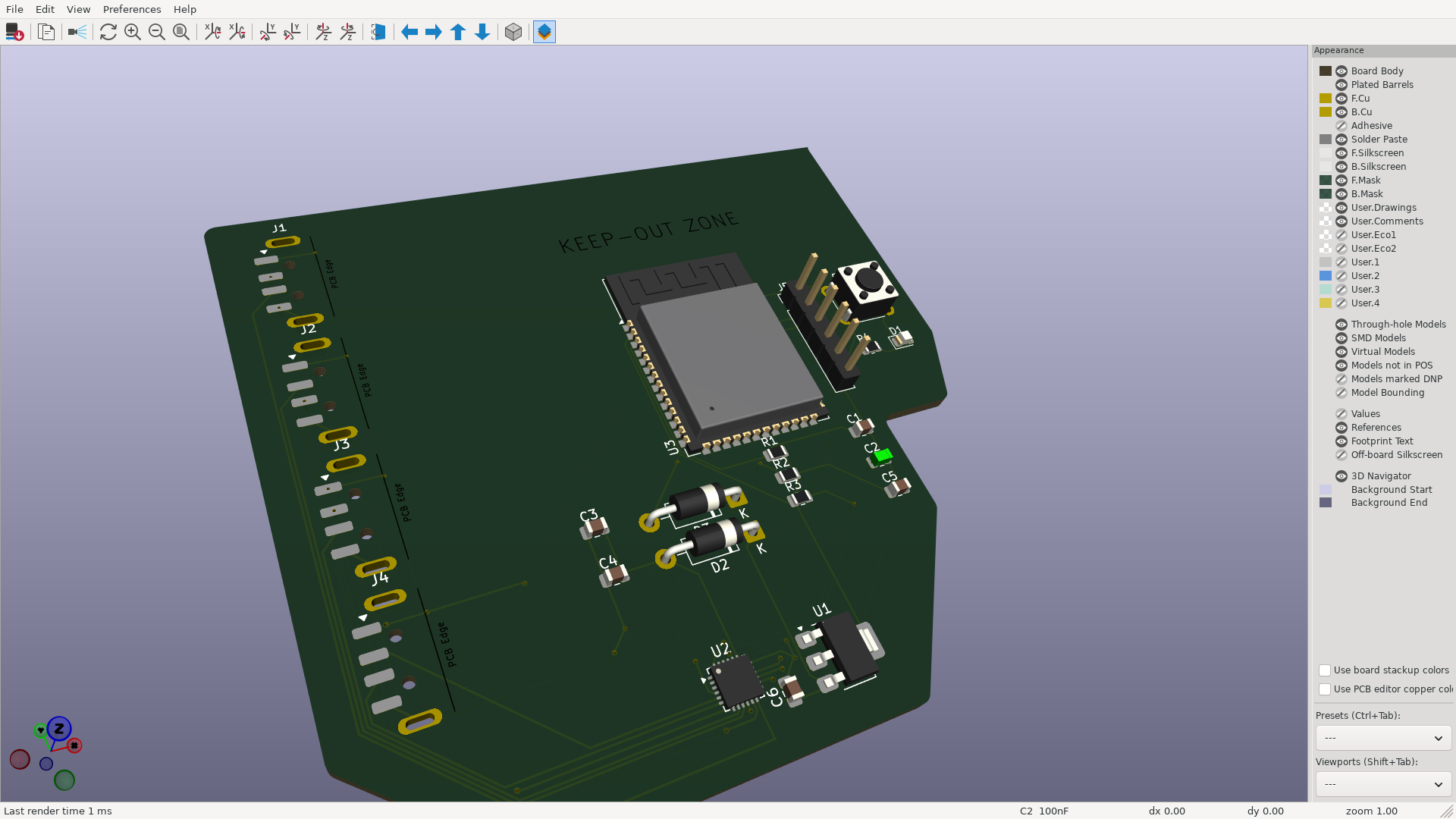
Here is the schematic:
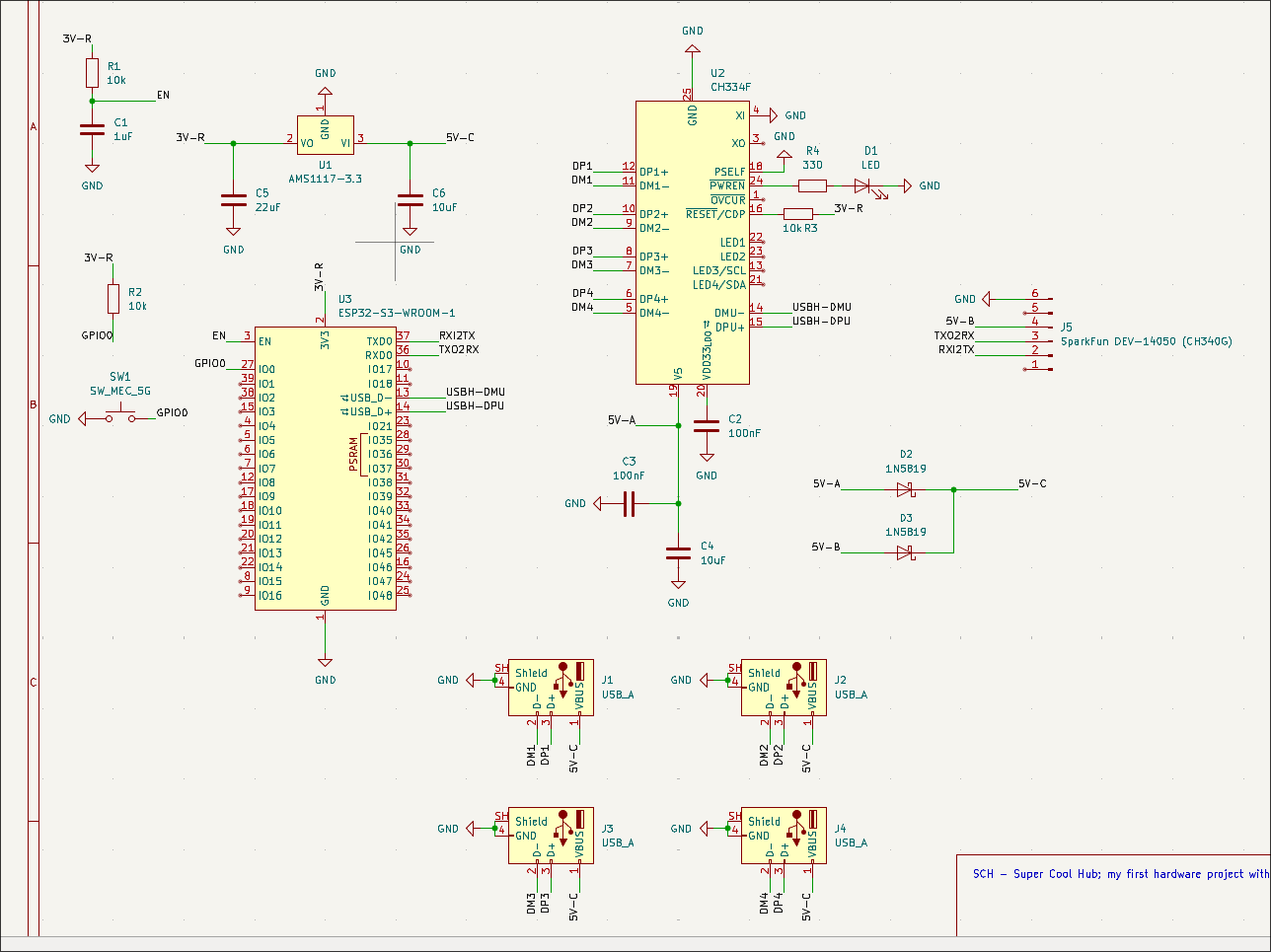
You can see a lot of stuff that maybe u dont know where to start. But, as always, start where the power arises. Focus on the CH334F, it's the Mini Hub with 4 ports and another one for the host to manage, in this case, ESP32 S3 WROOM. It provides almost all the energy on the PCB, we are interesed on the 5V-A net label; it's gonna be merged with another line, 5V-B from SparkFun DEV-14050 (based on CH340G), this last one serve as auxiliar line, if u need more power available. Merged, they produce 5V-C, who is in charge of the USBs VBUS and ESP32 S3 WROOM power.
[!IMPORTANT] Notice that this schematic is working with an ESP32 S3 WROOM, that's the reason why there's an AMS1117-3.3 that decrease the voltage from 5V to 3.3V; that's not neccesary with ESP32 S3 Devkit, since it brings its own regulator.
[!TIP] Machine-readable fabrication outputs (Gerbers, drill, BOM CSV, pick and place, DRC/ERC) live in
fabrication/, along with a parts cross-check against the BOM below. Before ordering, note that the PCB uses the bare CH334F QFN-24 and the bare ESP32-S3-WROOM-1 module, not the Adafruit breakout / devkit listed inBOM.md.
The idea is that u'd add another coproccesor and create an useful artcraft hardware made by your hands, something to be proud. It's cool. You're not flexing something u bought on a minimarket, it's something u built and that's what matters.
This is my first Hardware project strictly speaking. Instead of following guides, tutorials, projects pre-made; I decided to try it on my own. And here is how I got it: first, u need theory. It migh sounds cliche, but it's neccesary; u cannot start a journey without knowning how to start. Second, u must put into practice, and expand upon, what you DON'T KNOW; u might understand the fundamentals, but u cannot stop there, u've to be willing to try new and unfamiliar things. It seems too hard to make it? That doesn't matter, u're way ahead of it and u MUST be.
I started the last week without knowning even what a SMD, THT or SMT was, but that wasn't excuse to try in 2 days something REALLY cool, while managing a presencial event. I've already a sort of ideas that I wanted to do these 10 weeks, but I'm gonna stay to the most approachable and tuff thing to do. Between a lot of references, I've taken notice of this resource; and this image was an amazing motivation to design and build it.

| Part | What it's for | Qty | Unit | Total | Vendor |
|---|---|---|---|---|---|
| ESP32-S3 Devkit | USB OTG and logic (more uses with the displays) | 1 | $2.38 | $2.38 | Aliexpress |
| Adafruit CH334F 5999 Mini Hub USB 4 Ports | USB Host and other ports, provides 5V to them | 1 | $4.55 | $4.55 | Aliexpress |
| AMS1117-3.3 | Convert 5V to 3.3V (it shouldn't be neccesary because devkit editions use to bring their own regulators) | 1 | $2.07 | $2.07 | Aliexpress |
| Resistors (10k) | Electronics | 1 | $0.78 | $0.78 | Aliexpress |
| Capacitor (1uf) | Electronics | 1 | $0.82 | $0.82 | Aliexpress |
| Capacitor (10uf) | Electronics | 1 | $0.68 | $0.68 | Aliexpress |
| Led Diode | Misc | 1 | $1.97 | $1.97 | Aliexpress |
| CH340G USB-C Female 3.3V & 5V | Auxiliar energy source | 1 | $1.85 | $1.85 | Aliexpress |
| 1N5819 Diodes Schottky | Power muxer between CH334F and CH340G 5V | 1 | $1.07 | $1.07 | Aliexpress |
| Capacitor (100nf) (KGM05AR51A104KN) | Electronics | 2 | $0.32 | $0.64 | Mouser |
| Tactil Button 4.3 | Switch for the ESP32 | 1 | $0.79 | $0.79 | Aliexpress |
| Hook-up Wires | To connect everything | 1 | $3.71 | $3.71 | Aliexpress |
| USB-A Dip Connector 2.54mm | That's kinda obvious. | 1 | $2.31 | $2.31 | Aliexpress |
| Parts subtotal | — | — | — | $23.62 | — |
| Tax & shipping | — | — | — | $20.00 | — |
| Total | — | — | — | $43.62 | — |
And also the following data sheets:
and even more, but they are missed.
I have to be honest, it was kinda messy, but it was part of my learning and I'm okay with it :p I designed it more than three times in a row just to make it look prettier and logic, not only wiring for the sake of doing it. I learnt a lot of things and I'm feeling more conformtable using KiCAD (schematic, pcb desing) and I hope I'm gonna do the same with the CAD week! I'm gonna take a look to the guide of this week, I hope to see a tutorial on OpenShape.
I also hope to build this project on week 6 and bring it to live, wait some updates on it anyways on the next days/weeks/months. I'm so excited to keep learning and participating on Half Life!! :)
Everything a fab house or an assembly service needs is generated from the KiCad
project and checked in under fabrication/:
| What | File |
|---|---|
| Gerbers + drill (upload this to the PCB house) | fabrication/sch-gerbers.zip |
| Plain Gerbers (X2, 9 layers) | fabrication/gerbers/ |
| Drill files (Excellon, mm, PTH/NPTH split) + maps | fabrication/drill/ |
| Bill of materials (CSV, grouped by value) | fabrication/bom/sch-bom.csv |
| Pick and place / centroid (CSV, mm) | fabrication/pick-and-place/ |
| DRC + ERC + board stats | fabrication/reports/ |
| Schematic & PCB PDFs | fabrication/plots/ |
The board is 2 layers, 1.6 mm, 81.1 x 75.6 mm, with 22 footprints (18 SMD, 4
THT), all placed on the front side, so it can be assembled with a single-side
stencil. BOM.md is the shopping list from Half Life with vendor
links; the CSV in fabrication/bom/ is the machine-readable version generated
from the schematic, so the two are worth cross-checking before ordering.
| Qty | Value | Footprint | References |
|---|---|---|---|
| 4 | USB_A | Connector_USB:USB_A_Connfly_DS1098_Horizontal | J1, J2, J3, J4 |
| 3 | 10k | Resistor_SMD:R_0805_2012Metric | R1, R2, R3 |
| 2 | 100nF | Capacitor_SMD:C_0805_2012Metric | C2, C3 |
| 2 | 10uF | Capacitor_SMD:C_0805_2012Metric | C4, C6 |
| 2 | 1N5819 | Diode_THT:D_DO-41_SOD81_P10.16mm_Horizontal | D2, D3 |
| 1 | 1uF | Capacitor_SMD:C_0805_2012Metric | C1 |
| 1 | 22uF | Capacitor_SMD:C_0805_2012Metric | C5 |
| 1 | 330 | Resistor_SMD:R_0805_2012Metric | R4 |
| 1 | AMS1117-3.3 | Package_TO_SOT_SMD:SOT-223-3_TabPin2 | U1 |
| 1 | CH334F | Package_DFN_QFN:QFN-24-1EP_4x4mm_P0.5mm_EP2.7x2.7mm | U2 |
| 1 | ESP32-S3-WROOM-1 | RF_Module:ESP32-S3-WROOM-1 | U3 |
| 1 | LED | LED_SMD:LED_0805_2012Metric | D1 |
| 1 | SW_MEC_5G | Button_Switch_THT:SW_PUSH_6mm | SW1 |
| 1 | SparkFun DEV-14050 (CH340G) | Connector_PinHeader_2.54mm:PinHeader_1x06_P2.54mm_Vertical | J5 |
It measures 81.1 × 75.6 mm and has 2 copper layers, 1.6 mm thick.
22 parts, built around the ESP32-S3-WROOM-1-N8, AMS1117-3.3 and CH334F. The full list of its parts is on this page, with links to each part's symbol and footprint where PCBKit's library has them.
From the hyduez/sch repository on GitHub, at the commit this page was made from: the board is sch.kicad_pcb and its schematic sch.kicad_sch. PCBKit opens the board in the browser, with nothing to install.
Its repository states no licence, so its author keeps all rights: ask hyduez before reusing the design.
kabot-io/kabot-hardware
Hardware source and production files to recreate Kabot robot in physical world

byrantech/laptop
anyon_e, a highly integrated, high end, open source laptop. Attempt the impossible.

LeoDJ/FW-EC-DongleHiderPlus
Framework Expansion Card that includes a USB hub to hide a bare dongle inside and still have a USB-A port externally

i2cjak/Framework_Expansion_Cards
In which i2cjak creates a new expansion card design every day until he is given a NICE Framework laptop


rh1tech/frank-lab
FRANK Board Laboratory (work-in-progress board prototopyes)

cr1tbit/lichtenprog
USB-to-UART / (esp8266 / esp32) programmer with 3.3v supply

H3wastooshort/the_extender
it extends your phones storage, battery life, and audio interfaces