2 layers40 × 89.5 mm
Mono
jmcpheron/pico-quorum
Several people, several keys, one Safe. Hardware approvals for Safe multisig wallets.
89 partsMIT

 hazy2go/gb-link-usb2
Game Boy (DMG) link port to USB-C PC adapter: printer emulation, PC link, online link play. Sister project of the WiFi Game Boy cart.
Gb link usb is an open-source printed circuit board by hazy2go, from the hazy2go/gb-link-usb repository on GitHub. It is a 2-layer board of 34.2 × 63.7 mm with 59 parts on 68 nets, routed with 400 tracks and 70 vias.
It is built around the RP2350A, W25Q128JVSIQ and SN74LVC1T45DBVRE4, with the TPD4E05U06DQAR, USBLC6-2SC6 and SKRPABE010 among its other parts. Its parts include 27 capacitors, 17 resistors, 8 ICs, 2 connectors and 2 switches. It belongs with the radio and wireless and retro computing and games boards and the RP2350 boards of this library.


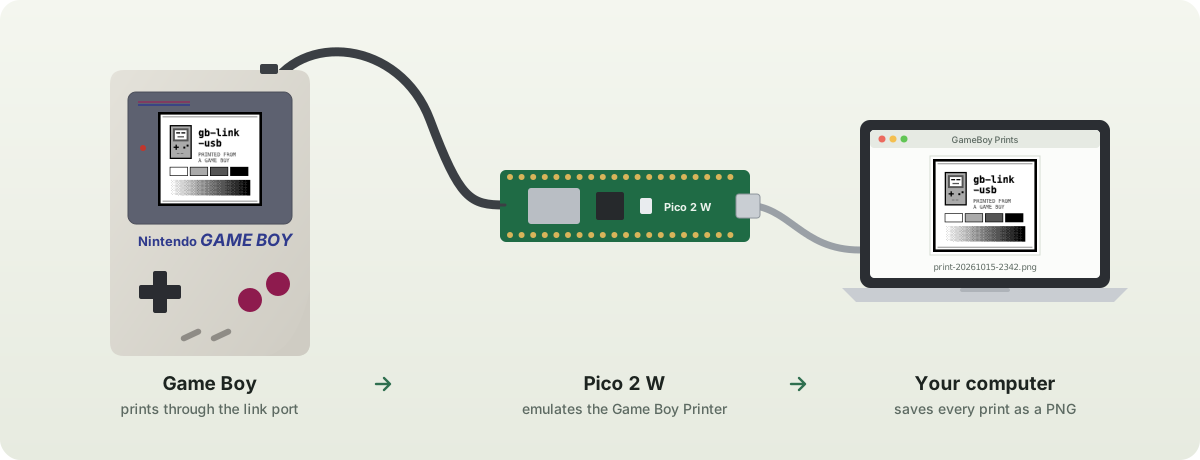
Connect a Game Boy's link port to your computer over USB.
Print from a real Game Boy straight to PNG, or watch live crypto prices from SODAX on it,
with a Raspberry Pi Pico 2 W and one cut link cable.






Quick start · Printing · SODAX · Troubleshooting · How it works · Roadmap
Pictures/GameBoy Prints, with a sound. Any computer with Chrome or Edge can use the web page instead.| Part | Notes | |
|---|---|---|
| 1 | Raspberry Pi Pico 2 W (or 2 WH) | Must be a Pico 2. An original Pico (RP2040) is not 5 V tolerant and needs a level shifter. |
| 2 | Game Boy link cable you can cut | Built and tested with a DMG-04. You keep one plug end. |
| 3 | Breadboard and jumper wires | Or solder the four wires straight to the Pico. |
| 4 | Multimeter with continuity beep | To find which wire is which: colours are not standard. |
| 5 | Mac with Node.js, or any computer with Chrome/Edge | For saving the prints. |
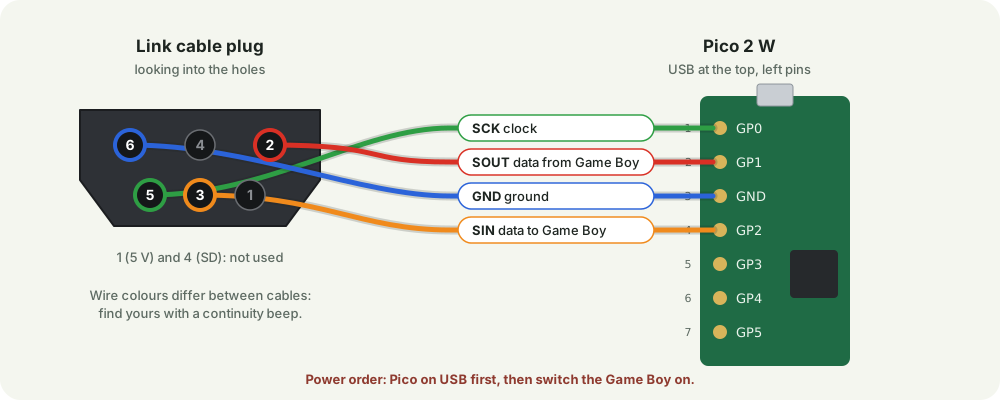
Cut the link cable, keep one plug with some cable attached, and strip the wire ends. With the multimeter in beep mode, put a paperclip in one plug hole and touch each wire until it beeps.
| Plug pin | Signal | Pico pin |
|---|---|---|
| 5 | SCK, clock | 1 (GP0) |
| 2 | SOUT, data from the Game Boy | 2 (GP1) |
| 6 | GND | 3 (GND) |
| 3 | SIN, data to the Game Boy | 4 (GP2) |
Pins 1 (5 V) and 4 (SD) are usually not in the cable and are not needed. Leave the bare shield unconnected and taped.
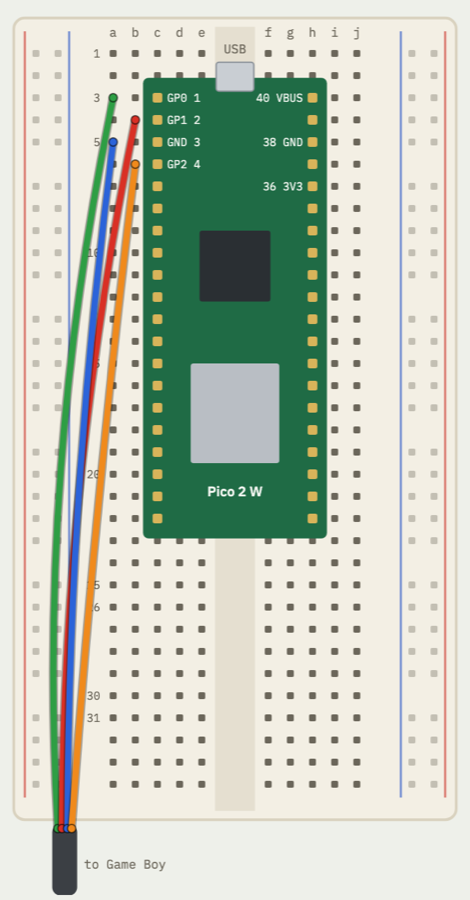 |
Press the Pico into the middle of the breadboard, USB end up. Each cable wire goes into a free hole in the same row as its Pico pin, on the left side of the gap. Nothing else is connected: no level shifter, no power wires. Hole-by-hole drawing: interactive wiring page. Power order matters. Plug the Pico into USB before switching the Game Boy on, and switch the Game Boy off before unplugging the Pico. The RP2350 tolerates 5 V on its pins only while it is powered. |
gb_link_usb.uf2 from Releases, or build it yourself.gb_link_usb.uf2 onto the drive. The Pico restarts as a Game Boy Printer.GB Printer.command. The first time, macOS may block it: right-click it → Open → Open.Pico connected, then print from the game.Every print is saved in Pictures → GameBoy Prints, at original size and at 4×, with a sound. Unplugging and replugging the Pico is fine. Leave the window open while you print.
Open https://hazy2go.github.io/gb-link-usb/ in Chrome or Edge, click Connect Pico, and print. Prints appear on the page with a PNG download link. Nothing to install.
To run it locally instead: cd web && python3 -m http.server 8000, then open http://localhost:8000.
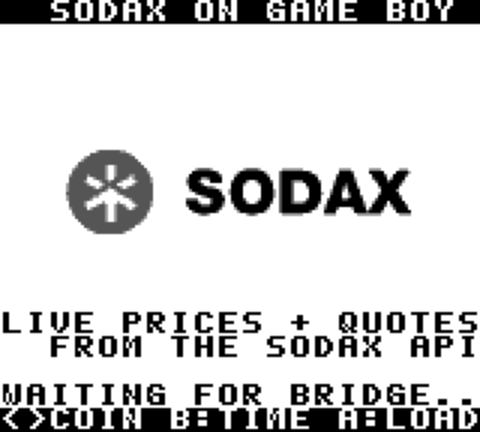
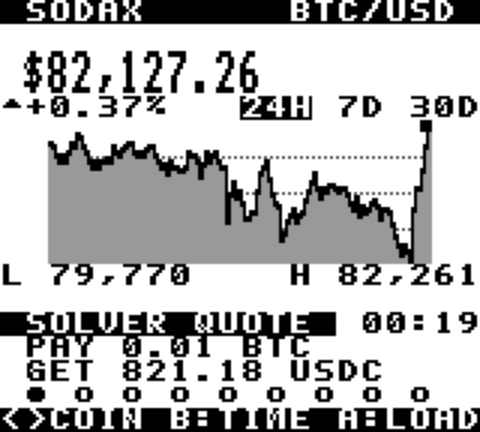
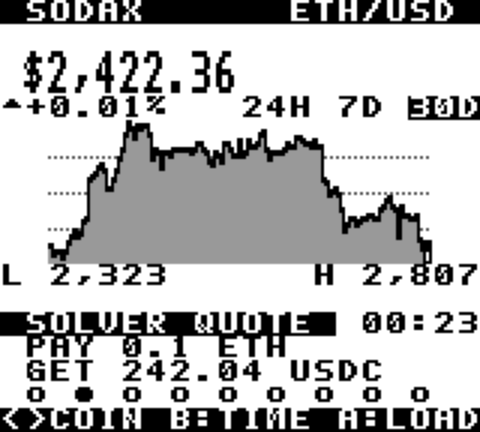
Emulator screenshots with live data. Tested on a real DMG.
Live prices, a 24H / 7D / 30D chart and a real swap quote from the SODAX solver for 9 coins (BTC, ETH, SOL, SODA, SUI, HYPE, AVAX, XLM, POL), on an original Game Boy.
sodax.gb (from Releases) on a flash cart such as an EverDrive.SODAX Bridge.command (or run node tools/sodax-bridge.mjs). Close the print tool first: one program uses the Pico at a time.sodax.gb.| Button | Action |
|---|---|
| ◄ ► (or ▲ ▼) | previous / next coin |
| B | time range: 24H, 7D, 30D |
| A or Start | load fresh data now (it also refreshes every 30 s) |
Prices come from the SODAX oracle (/oracle/candles), quotes from the SODAX solver (/intent/quote), no API key needed. How the Game Boy, the Pico's bridge mode and the PC talk: docs/SODAX.md.
| Problem | What to check |
|---|---|
| The game reports a printer error | Wiring: beep each plug pin to its Pico pin. If your colours were mapped wrong, swap the two data wires (plug pins 2 and 3). Power order: Pico first. |
Stuck on Waiting for the Pico... | Is the printer firmware on the Pico? It should appear as Pico by Raspberry Pi. Try another USB cable, some are charge-only. |
| A print did not save | See gbprint.log in the prints folder. Raw data of every session is kept in raw/; node tools/render.mjs <file> turns it into PNGs. |
| SODAX screen stays on "waiting" | Is the bridge window open and saying "bridge mode on"? Is the Pico on firmware v0.2.0 or newer? Press A to request a screen. |
| The web page cannot connect | Use Chrome or Edge on a desktop (Safari and Firefox have no Web Serial). Close the Mac tool first: only one program can use the Pico at a time. |
Game Boy link port ──► Pico 2 W ──────────────────────────────────────► computer
 5 V, clocked serial    PIO follows the Game Boy's clock (glitch filter)    gbprint.mjs or the web page
                        core 1: answers like a Game Boy Printer             decodes packets → PNG
                        core 0: streams every byte over USB serial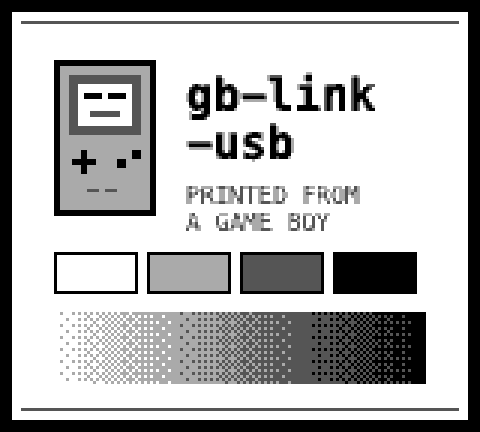
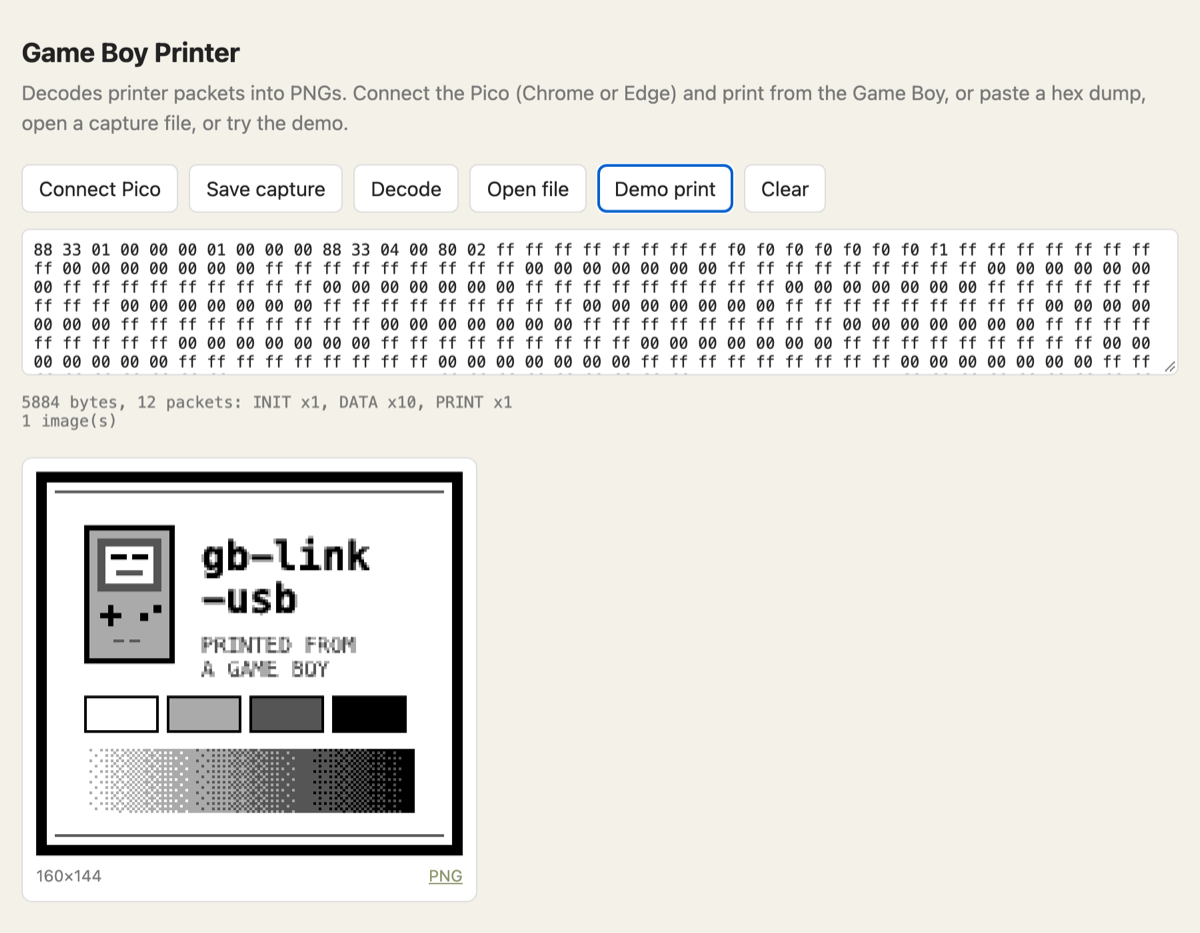
firmware/src/printer.c replies 0x00 to every byte, then the printer ID 0x81 and a status byte, and walks through the same status sequence as a real printer (busy while "printing", then ready). Replies are queued two bytes ahead, matching how the PIO loads them.web/gbprinter.js parses packets, checks checksums, expands compressed data, turns 2-bit tiles into pixels and applies the print palette. The same file runs in the browser and in the Mac tool.Right: a test image sent through the full printer protocol and decoded by that code.
firmware/         Pico 2 W firmware (C, Pico SDK): PIO link, printer emulator, USB serial
  test/           host tests for the printer state machine
  firstlight/     patch used to run stacksmashing's firmware for the first wiring test
web/              decoder library + web page (Web Serial)
tools/            gbprint.mjs (Mac print tool), sodax-bridge.mjs + sodax.mjs (SODAX data),
                  render.mjs, printcap.py, linktest.py
rom/              Game Boy ROMs (RGBDS): sodax.gb, linktest.gb, printtest.gb; mkfont.py makes the font
hw/              own PCB (KiCad, rev A ready to order), case, scripted build + checks
sim/link/        ngspice simulation of the link lines
docs/             PROTOCOL.md, PLAN.md, PCB.md, LOGBOOK.md, breadboard drawing, images
GB Printer.command    double-click launcher for the Mac print tool
SODAX Bridge.command double-click launcher for SODAX on the Game Boy# firmware (needs the Arm GNU toolchain and Pico SDK 2.3.1; PICO_SDK_PATH set)
cmake -S firmware -B firmware/build -G Ninja && ninja -C firmware/build # → firmware/build/gb_link_usb.uf2
# tests
make -C firmware/test # printer state machine (host, with sanitizers)
cd web && npm test # decoder
# Game Boy ROMs (RGBDS)
make -C rom
node tools/sodax-bridge.mjs --dry # print live SODAX screens without hardwarerom/printtest.gb makes the Game Boy act like a printing game and shows on screen what the printer answers (… 81 00 is correct). rom/linktest.gb echoes bytes for testing the link in the other direction. Details: firmware/README.md.
Sister project: WiFi Game Boy Cartridge.
MIT. Exception: firmware/firstlight/ patches GPL-3.0 code and is GPL-3.0.
| Qty | Value | Footprint | References |
|---|---|---|---|
| 11 | 100n | RPI_COMPILED:generic_capc1005x50 | C2, C8, C10, C11, C12, C13, C14, C15, C16, C17, C18 |
| 6 | 100n | Capacitor_SMD:C_0402_1005Metric | C101, C102, C103, C104, C105, C106 |
| 3 | 100k | Resistor_SMD:R_0402_1005Metric | R103, R107, R108 |
| 3 | 10u | RPI_COMPILED:generic_capc2012x125 | C1, C5, C19 |
| 3 | 1k | RPI_COMPILED:generic_resc1005x35 | R2, R4, R6 |
| 3 | SN74LVC1T45DBVR | Package_TO_SOT_SMD:SOT-23-6 | U102, U103, U104 |
| 2 | 100p | Capacitor_SMD:C_0402_1005Metric | C107, C108 |
| 2 | 15p | RPI_COMPILED:generic_capc1005x50 | C3, C4 |
| 2 | 220 | Resistor_SMD:R_0402_1005Metric | R104, R105 |
| 2 | 27 | RPI_COMPILED:generic_resc1005x35 | R7, R8 |
| 2 | 4.7u | RPI_COMPILED:generic_capc1005x50_wide | C6, C7 |
| 2 | 5.1k | Resistor_SMD:R_0402_1005Metric | R101, R102 |
| 2 | SKRPABE010 | RPI_COMPILED:wurthelek_434133025816 | SW1, SW2 |
| 1 | 0 | RPI_COMPILED:generic_resc1005x35 | R10 |
| 1 | 100 | Resistor_SMD:R_0402_1005Metric | R109 |
| 1 | 10k | RPI_COMPILED:generic_resc1005x35 | R1 |
| 1 | 1k | Resistor_SMD:R_0402_1005Metric | R106 |
| 1 | 33 | RPI_COMPILED:generic_resc1005x35 | R3 |
| 1 | 4.7u | RPI_COMPILED:generic_capc1005x50 | C9 |
| 1 | ABM8-272-T3 | RPI_COMPILED:generic_xtalcc320x250x80-4 | X1 |
| 1 | AOTA-B201610S3R3-101-T | RPI_COMPILED:abracon_aota-b201610s3r3-101-t | L1 |
| 1 | Link cable | Connector_Wire:SolderWire-0.15sqmm_1x05_P4mm_D0.5mm_OD1.5mm_Relief | J102 |
| 1 | NCP1117ST33T3G | RPI_COMPILED:onsemi_ncp1117st33t3g | U2 |
| 1 | RP2350A | RPI_COMPILED:rpi_rp2350a_vias | U1 |
| 1 | TPD4E05U06DQAR | Package_SON:USON-10_2.5x1.0mm_P0.5mm | U105 |
| 1 | TYPE-C-31-M-12 | gb-link-usb:USB_C_Receptacle_HRO_TYPE-C-31-M-12_Flush | J101 |
| 1 | USBLC6-2SC6 | Package_TO_SOT_SMD:SOT-23-6 | U101 |
| 1 | W25Q128JVSIQ | RPI_COMPILED:generic_soic127p790x195-8 | U3 |
| 1 | green | LED_SMD:LED_0805_2012Metric | D101 |
jmcpheron/pico-quorum
Several people, several keys, one Safe. Hardware approvals for Safe multisig wallets.

embeddedos-org/eCAD-Hardware-Products
Hardware designs + EE docs + Board datasheets of Multiple products

sequoia-hope/ultraroute
PCB autorouting experiments around copperroute: route jobs, leaderboards, board morphing

ratmuds/spark
The PCB files for this project. The gerber and other PCBA files are in the production folder.


MeesCode/gameboy-pcb
custom gameboy-esque pcb running an stm32 and my own tiny game engine

BILLEE-BroncoSTAR/billee-hardware-2027
Hardware and firmware Repository for BILLEE URC 2027
It measures 34.2 × 63.7 mm and has 2 copper layers, 1.6 mm thick.
59 parts, built around the RP2350A, W25Q128JVSIQ, SN74LVC1T45DBVRE4 and TPD4E05U06DQAR. The full list of its parts is on this page, with links to each part's symbol and footprint where PCBKit's library has them.
From the hazy2go/gb-link-usb repository on GitHub, at the commit this page was made from: the board is hw/rev-a/gb-link-usb.kicad_pcb and its schematic hw/reference/RPI-RP2350A-MINIMAL_R4-S1_public/RPI-RP2350A-MINIMAL_R4-S1.kicad_sch. PCBKit opens the board in the browser, with nothing to install.
Its repository states no licence, so its author keeps all rights: ask hazy2go before reusing the design.