2 layers60 × 30 mm
Controller
google/mozc-devices
Circuit diagrams and firmware source code for Gboard DIY keyboards
11 parts3kApache-2.0

 ghemyn/PicoGameConsole7
Primitive game console made with Raspberry Pi Pico, ST7735 LCD display, joystick module and 2 tact switches.
PicoGameConsole is an open-source printed circuit board by ghemyn, from the ghemyn/PicoGameConsole repository on GitHub, published under the MIT licence. It is a 2-layer board of 154 × 40 mm with 11 parts on 42 nets, routed with 109 tracks and 6 vias.
Its parts include 2 resistors, 2 switches, 1 capacitor, 1 IC and 1 diode. It belongs with the lEDs and displays boards and the RP2040 boards of this library.
My own game console powered by Raspberry Pi Pico and ST7735 LCD display.
The console framework is made to be elegant, readable and as performant as possible. It is written in C++ only for some convenience features and most of it is almost pure embedded-style C. Thanks to the functional and modular code structure it is easy to port it for other platforms.
You can make your own game just by declaring a new GameInfo inside games_list.hpp file and defining its functions inside other .cpp file. (Look at other example games provided in the repository)
The new improved version of the "Shamino Console" now features a custom PCB. This greatly improves the general quality of the console. It just looks and feels better now :)
There will be a 3D printed casing for it soon.
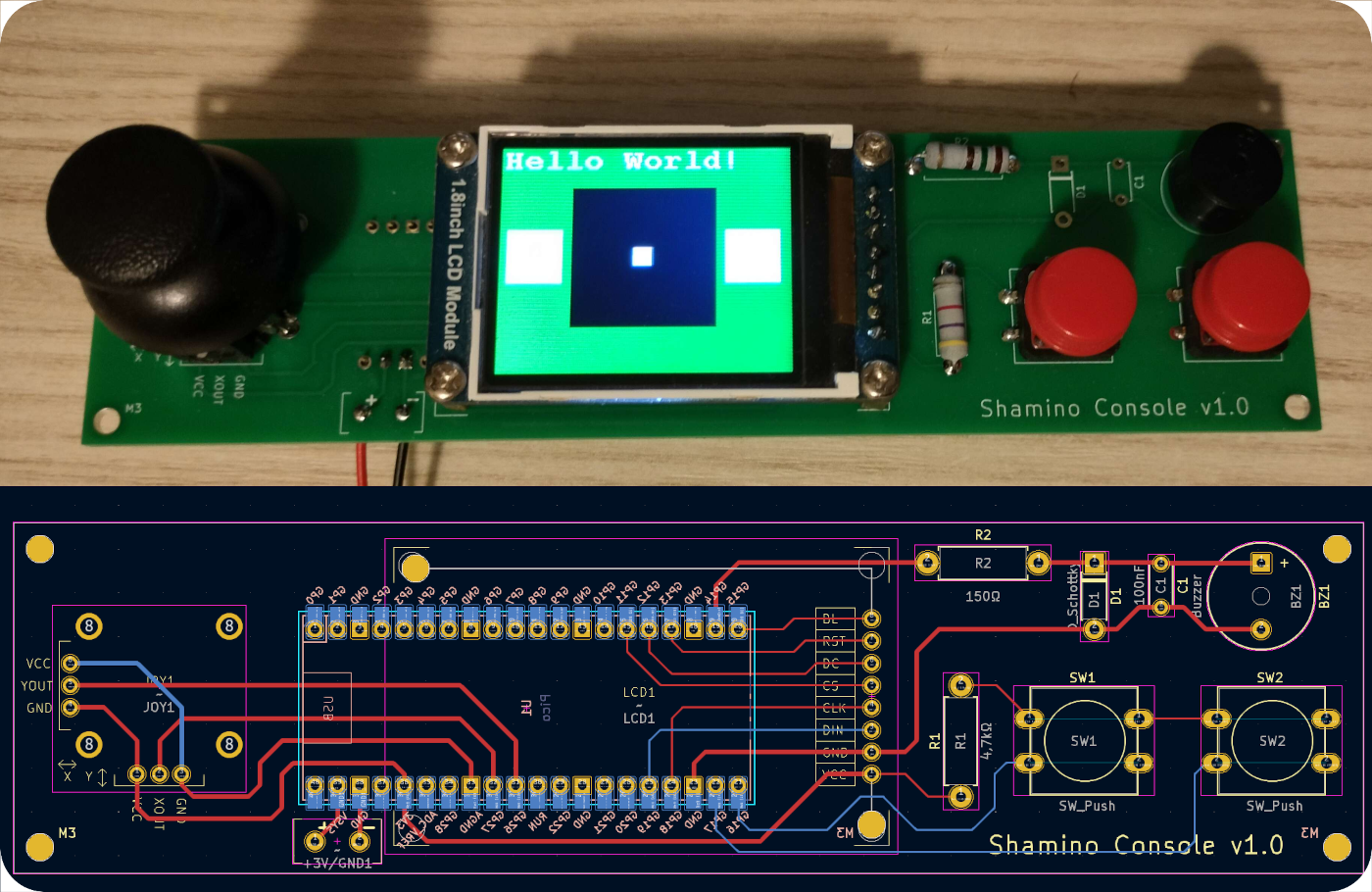
To see the old version, look inside the /old_design directory.
~47Ω Resistor
~4,7kΩ Resistor
(Optional) 2x 5mm M3 Screw to mount the LCD
4x 10mm M3 Screws to mount the PCB to the 3D printed casing.
Battery Holder for 2x AA batteries with a power switch (3x AA batteries will work fine too)
PICO_SDK_PATH enviromental variable)PICO_TOOLCHAIN_PATH enviromental variable)mkdir build && cd buildcmake -G "MinGW Makefiles" ..make or mingw32-makeGameOnConsole.uf2 file to your PicoOn Windows you can use the run.bat script (You will most likely need to specify the target drive which is your Pico)
| Qty | Value | Footprint | References |
|---|---|---|---|
| 2 | SW_Push | Button_Switch_THT:SW_PUSH-12mm | SW1, SW2 |
| 1 | 100nF | Capacitor_THT:C_Disc_D5.0mm_W2.5mm_P5.00mm | C1 |
| 1 | 4,7kΩ | Resistor_THT:R_Axial_DIN0411_L9.9mm_D3.6mm_P12.70mm_Horizontal | R1 |
| 1 | 47Ω | Resistor_THT:R_Axial_DIN0411_L9.9mm_D3.6mm_P12.70mm_Horizontal | R2 |
| 1 | Buzzer | Buzzer_Beeper:Buzzer_12x9.5RM7.6 | BZ1 |
| 1 | D_Schottky | Diode_THT:D_DO-41_SOD81_P7.62mm_Horizontal | D1 |
| 1 | Pico | Raspberry Pi Pico:RPi_Pico_SMD_TH | U1 |
| 1 | ~ | Power:PowerPins | +3V/GND1 |
| 1 | ~ | ThumbJoystick:Thumb Joystick | JOY1 |
| 1 | ~ | 1.8inchLCD:1.8Inch_ST7735 | LCD1 |
It measures 154 × 40 mm and has 2 copper layers, 1.6 mm thick.
11 parts. The full list of its parts is on this page, with links to each part's symbol and footprint where PCBKit's library has them.
From the ghemyn/PicoGameConsole repository on GitHub, at the commit this page was made from: the board is pcb/pico_game_console/pico_game_console.kicad_pcb and its schematic pcb/pico_game_console/pico_game_console.kicad_sch. PCBKit opens the board in the browser, with nothing to install.
Its repository publishes it under the MIT licence: you may reuse it on that licence's terms (keep the author's notice, and for a copyleft licence share your changes alike).
google/mozc-devices
Circuit diagrams and firmware source code for Gboard DIY keyboards


FrameworkComputer/ExpansionCards
Reference designs and documentation to create Expansion Cards for the Framework Laptop

hoglet67/RGBtoHDMI
Bare-metal Raspberry Pi project that provides pixel-perfect sampling of Retro Computer RGB/YUV video and conversion to HDMI

hackclub/OnBoard
💡 Join 1,000 teenagers and make your first PCB with a $100 grant!


tardate/LittleArduinoProjects
a collection of "Little Electronic & Arduino Projects", most involving electronics or an Arduino in one way or another!

basilfx/TRADFRI-Hacking
Hacking IKEA TRÅDFRI products, such as light bulbs, window blinds and other accessories.