4 layers
Soccer bottom
class-ab/open-soccer
Mindstormers' open soccer repo. contains code, pcbs, elec, diagrams, etc...
76 parts2

 frfrh/Hellboard2
This is a Macro board based on RP2040-zero and Micropython, meant for ordering Stratagems for Helldivers 2 by registering as a HID-Keyboard.
Hellboard is an open-source printed circuit board by frfrh, from the frfrh/Hellboard repository on GitHub, published under the GPL-2.0 licence. It is a 2-layer board of 116.6 × 40 mm with 32 parts on 33 nets, routed with 333 tracks and 83 vias.
It is built around the RP2040-ZERO, AO3400A and M93C66-WMN6P. Its parts include 8 capacitors, 8 diodes, 2 resistors, 1 IC and 1 transistor. It belongs with the RP2040 boards of this library.


This is a Macro board based on RP2040-zero and Micropython, meant for ordering Stratagems for Helldivers 2 by registering as a HID-Keyboard.
The Hellboard Companion is a Windows app that puts your stratagems on the Hellboard automatically. It watches the Helldivers 2 loadout screen, recognizes the four stratagems you pick and the optional mission stratagems, and sends them to the board as soon as you press Ready. You don't have to configure any buttons by hand. The app also configures the board and installs firmware updates, so you need nothing else to use the Hellboard.
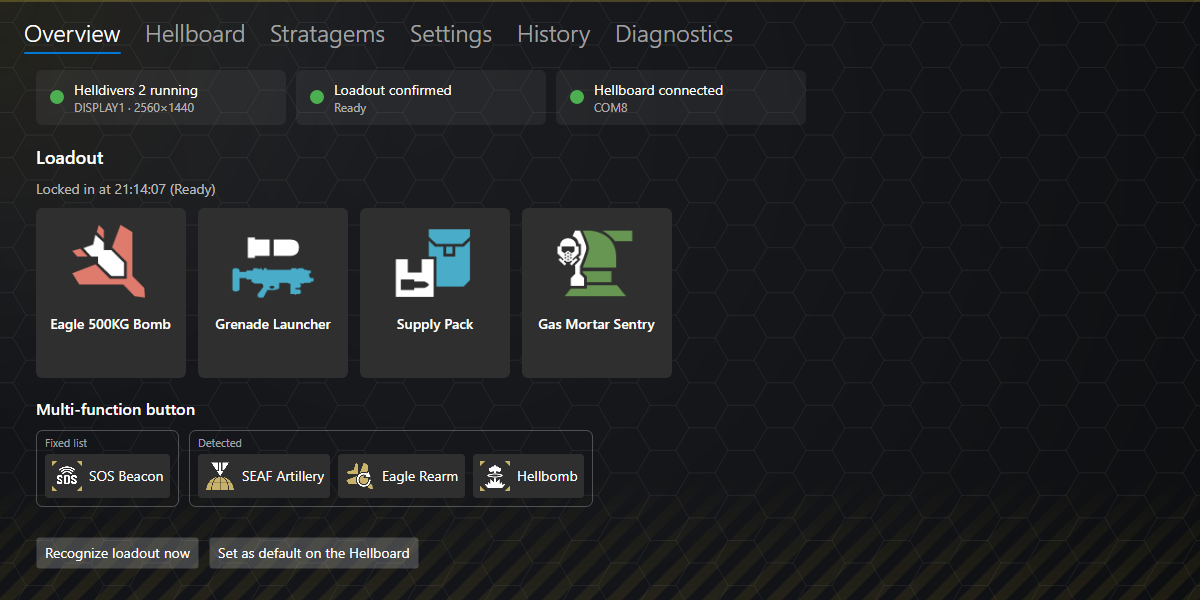
Download it from the releases. More details: Software/README.md.
The game draws three stratagems differently from the icon set the Companion compares with, so they are reported as not recognized at first:
Teach the Companion how they look in your game – it takes about a minute and is needed only once:
From now on they are recognized and shown with their in-game picture. The pictures stay on your PC; the Stratagems tab lists them (Only with reference) and can remove them. The same works for any other stratagem that is not recognized, e.g. after a game update changed an icon.
Contains the firmware to be loaded into the RP2040 and the Micropython project files.
Contains the 3D files for the case and the button caps.
Contains the project files for the PCB and the gerber files to order one. Project is based on KiCad 8.0.2.
Contains the Hellboard Companion (C#/.NET, Windows): loadout recognition, transfer to the board, board configuration and firmware updates.
The board is configured in Firmware/config.json; the stratagems and their input codes come from doc/stratagems.json, the single list used by the firmware and the Companion software (format: doc/stratagems.md).
fixed, loadout, multiFunction: stratagems of the buttons 1_1/1_2, row 2 and the multi-function button 1_3 (cycled with 1_4), by their id.modifierKey: HID usage id of the stratagem key (scancodes, e.g. 6 = C, 224 = left Ctrl). modifierToggle: true presses it once to open the menu, false keeps it pressed while the code is entered.directionKeys: arrows or wasd; menuDelayMs, keyPressMs, keyReleaseMs: wait for the stratagem menu, how long each arrow is held, pause between arrows (ms); brightness: LED brightness (0-255).screenSaverSeconds: display off after this time without a button press (0 = off); scrollText: off, long (long names scroll back and forth) or loop (they run continuously).transferFeedback: how a received loadout or a save is confirmed – hellpodHorizontal (default: a Hellpod animation flying in from the right), hellpodVertical (falling from the top) or flash (all LEDs flash white). Errors always flash red.Upload the changed config.json to the board (see Setup). With the Hellboard Companion, all of this is set on its Hellboard tab instead, and the loadout is taken from the game automatically.
You can use the gerber files in PCB/gerber to order your own PCBs or order it directly from https://aisler.net/p/AHPZGPKK.
You will also need the following parts:
| Part | Amount | Link |
|---|---|---|
| RP2040-Zero | 1 | link |
| 0,96" OLED Display 128x64 | 1 | link (the 26.7mm variant, blue PCB) |
| Kailh boxed switches | 8 | link |
| Kailh hot-swap socket | 8 | link |
| WS2812b-2020 LED | 8 | link |
| N-Channel MOSFET1 | 1 | |
| 10K 0805 resistor1 | 2 | |
| M93C86-WMN6P EEPROM2 | 1 | link |
| Button caps3 | 8 | link |
You can find icons for the buttons here.
Boot) and connect the Board to a PC.RPI-RP2.Firmware/manifest.json lists every file and its name on the board (all files go into the board's root directory, including the stratagem list doc/stratagems.json).
Software/, recommended): connect the board, open the Hellboard tab and choose Update Hellboard firmware. Later updates work the same way.Software folder run dotnet run tools/hellboard-upload/hellboard-upload.cs. It finds the board, installs and verifies all files and restarts the board – see Software/tools/hellboard-upload.Upload current file to Pico).Firmware/config.json (before uploading): buttons 1_1/1_2, the loadout (row 2) and the multi-function list, referenced by their id in doc/stratagems.json; modifierKey is the HID usage id of your stratagem key. With the Hellboard Companion (Software/), the loadout is set automatically from the game.I got them by desoldering them from a level shifter I had lying around. link ↩ ↩2
The EEPROM is optional and currently not used: the configuration is stored in the RP2040's own flash (config.json). ↩
I used the button caps from here but replaced the internals with the ones from Hardware/Kailh-Cap.stl as the original ones are not translucent. Any button caps compatible with Kailh boxed switches should do. ↩
| Qty | Value | Footprint | References |
|---|---|---|---|
| 9 | TestPoint | TestPoint:TestPoint_Pad_D1.5mm | TP1, TP2, TP3, TP4, TP5, TP6, TP7, TP8, TP9 |
| 8 | 4µ7 | Capacitor_SMD:C_0805_2012Metric_Pad1.18x1.45mm_HandSolder | C1, C2, C3, C4, C5, C6, C7, C8 |
| 4 | WS2812_Switch | Kailh_hotswap_led:Kailh_socket_MX_WS2812B_RL | D1, D2, D3, D4 |
| 4 | WS2812_Switch | Kailh_hotswap_led:Kailh_socket_MX_WS2812B_LR | D5, D6, D7, D8 |
| 2 | 10k | LED_SMD:LED_0805_2012Metric_Pad1.15x1.40mm_HandSolder | R1, R2 |
| 1 | AO3400A | Package_TO_SOT_SMD:SOT-23 | Q1 |
| 1 | M93C66-WMN6P | footprints_M93C66-WMN6P:SO-8_STM | CR1 |
| 1 | OLED-128x64 | display:OLED-128x64 | J1 |
| 1 | SolderJumper_2_Open | Jumper:SolderJumper-2_P1.3mm_Open_TrianglePad1.0x1.5mm | JP1 |
| 1 | rp2040-zero | mcu:rp2040-zero-smd | U1 |
It measures 116.6 × 40 mm and has 2 copper layers, 1.6 mm thick.
32 parts, built around the RP2040-ZERO, AO3400A and M93C66-WMN6P. The full list of its parts is on this page, with links to each part's symbol and footprint where PCBKit's library has them.
From the frfrh/Hellboard repository on GitHub, at the commit this page was made from: the board is PCB/Hellboard.kicad_pcb and its schematic PCB/Hellboard.kicad_sch. PCBKit opens the board in the browser, with nothing to install.
Its repository publishes it under the GPL-2.0 licence: you may reuse it on that licence's terms (keep the author's notice, and for a copyleft licence share your changes alike).
class-ab/open-soccer
Mindstormers' open soccer repo. contains code, pcbs, elec, diagrams, etc...


beekeeb/zerosprey42
Zerosprey42 Keyboard is a wired, beginner friendly, choc hotswap, MonoBlockSplit (Unibody), column-staggered, DIY mechanical keyboard.


ravinrabbid/DonCon2040
RP2040 based firmware and hardware for DIY Taiko no Tatsujin Drum Controllers