2 layers278.3 × 81.9 mm

 flora495/Sherie
Sherie is an open-source printed circuit board by flora495, from the flora495/Sherie repository on GitHub. It is a 2-layer board of 278.3 × 81.9 mm with 122 parts on 91 nets, routed with 758 tracks and 220 vias.
It is built around the ATMEGA32U4-AU, TPD4E05U06DQAR and ESD5Z5V0, with the GZ2012D601TF, SMD0805-050-16V and TYPE-C-31-M-12 among its other parts. Its parts include 48 diodes, 47 switches, 7 capacitors, 7 resistors and 2 ICs. It belongs with the AVR (ATmega, ATtiny) boards of this library.


Sherieはオーソリニアな40%キーボードです。
ほとんどの部品は実装済みです。 リセットスイッチとキーソケットだけはんだ付けしてください。 そのあと組み立ててください。
QMK toolboxを使って.hexファイルをキーボードに書き込んでください。QMK MSYSやpromicro web updaterでは書き込めない可能性があります。
viaのキーマップを書き込んだ上で jsonファイルは以下を読み込ませることで、via/remapを使用することができます。 qmk_firmware\sherie\keymaps\via\sherie.json
cd
cd /c/Users/F/qmk_firmware/keyboards/sherie
コンパイル
qmk compile -kb sherie -km default
qmk compile -kb sherie -km via
フラッシュ(フラッシュはQMK toolboxを使うことを推奨します)
qmk flash -kb sherie -km default
USBとかの周りはGNDベタにしたほうがいいかも。 udb-sのPCBを参照。
[1]https://note.com/copkbd/n/n587afde1812e
ATMEGA32U4直付の手順は以下を参照します。 [2]https://wiki.ai03.com/books/pcb-design/chapter/pcb-designer-guide
[3]https://taro-hayashi.github.io/LetsMakeaKeypadWithAtmega32u2/
typeC周りの回路 [4]https://github.com/Unified-Daughterboard/UDB-S
静電気対策(特に金属ケースの場合は参照) [5]https://gist.github.com/s-show/286ffb1f5d9c886b514ff7a37e6d8d37
ベタGNDとか [6]https://taro-hayashi.github.io/LetsMakeaKeypadWithAtmega32u2/
[7]https://qiita.com/Sugimoto_Yuuki/items/860ca6a57c2501f1cbab
[8]https://docs.qmk.fm/driver_installation_zadig
QMK MSYSでflashできない場合 以下のようなエラーが出てflashに失敗する場合があります。
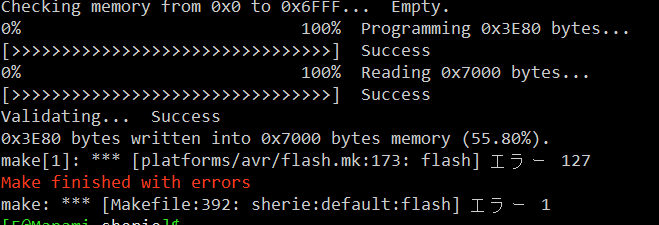
これは実はエラーができても書き込み自体はできているっぽいです。
エラーなく書き込みたい場合は、QMK Toolboxを使って書き込みます。
エラーの原因はよくわからないが、おそらくポートのデバイスではなくてUSBデバイスとして認識しているのが原因。
おそらくですが、USBのドライバーが原因でした。[7]を参照し、ドライバーをWinUSBに書き換えます。こうするとQMK toolboxでエラーなしで読み込むことができるようになりました。
ただし、winUSBにするとQMK MSYSではflashできないぽいです。
ちなみにドライバーを変えるとシリアルポートで認識するようにもでるようにもできるっぽいです。
ただ、[8]によると、atmega32uの推奨driverはwinUSBなので、大人しく従う方がいいと思います。
| Qty | Value | Footprint | References |
|---|---|---|---|
| 47 | D | kbd_Parts:Diode_TH_SMD_without_holes | D1, D2, D10, D11, D12, D13, D14, D15, D16, D17, D18, D19, D20, D21, D22, D23 +31 |
| 34 | SW_PUSH | kbd_SW:CherryMX_Hotswap_1u | SW2, SW10, SW11, SW12, SW15, SW16, SW17, SW18, SW19, SW20, SW21, SW22, SW23, SW24, SW25, SW28 +18 |
| 6 | SW_PUSH | kbd_SW:CherryMX_Hotswap_1.75u | SW1, SW13, SW14, SW26, SW27, SW39 |
| 4 | SW_PUSH | kbd_SW:CherryMX_Hotswap_1.5u | SW40, SW41, SW45, SW47 |
| 3 | 0.1uF | Capacitor_SMD:C_0805_2012Metric | C2, C3, C4 |
| 2 | 10k | Resistor_SMD:R_0805_2012Metric | R1, R4 |
| 2 | 22 | Resistor_SMD:R_0805_2012Metric | R2, R3 |
| 2 | 22pF | Capacitor_SMD:C_0805_2012Metric | C6, C7 |
| 2 | 5.1k | Resistor_SMD:R_0805_2012Metric | R5, R6 |
| 2 | SW_PUSH | kbd_SW:CherryMX_Hotswap_1.25u | SW42, SW44 |
| 1 | 10uF | Capacitor_SMD:C_0805_2012Metric | C5 |
| 1 | 16MHz | Crystal:Crystal_SMD_3225-4Pin_3.2x2.5mm | Y1 |
| 1 | 1k | Resistor_SMD:R_0805_2012Metric | R7 |
| 1 | 1uF | Capacitor_SMD:C_0805_2012Metric | C1 |
| 1 | ATmega32U4-A | Package_QFP:TQFP-44_10x10mm_P0.8mm | U1 |
| 1 | ESD5Z5V0 | Diode_SMD:D_SOD-523 | ESDD0 |
| 1 | GZ2012D601TF | Inductor_SMD:L_0805_2012Metric | FB1 |
| 1 | Green | my_footprints:LED0805-RD_GREEN | LED1 |
| 1 | LOGO | LOGO | G*** |
| 1 | RESET_SW | my_footprints:SMD_reset | RESET0 |
| 1 | SMD0805-050-16V | Fuse:Fuse_1206_3216Metric | F1 |
| 1 | SW_PUSH | kbd_SW:CherryMX_Hotswap_2.75u | SW43 |
| 1 | TPD4E05U06DQAR | acheron_Components:USON-10_2.5x1.0mm_P0.5mm | U2 |
| 1 | TYPE-C-31-M-12 | locallib:HRO-TYPE-C-31-M-12-Assembly | J1 |
The 118 most common of 122 parts.

Unified-Daughterboard/UDB-S
Narrow variant unified daughterboards for custom keyboard designers and users

jemmec/legshark
An open source 60% (15 by 5) ortholinear keyboard designed with both flexability and familiarity in mind.


It measures 278.3 × 81.9 mm and has 2 copper layers, 1.6 mm thick.
122 parts, built around the ATMEGA32U4-AU, TPD4E05U06DQAR, ESD5Z5V0 and GZ2012D601TF. The full list of its parts is on this page, with links to each part's symbol and footprint where PCBKit's library has them.
From the flora495/Sherie repository on GitHub, at the commit this page was made from: the board is Kicad/Sherie-main/Sherie.kicad_pcb and its schematic Kicad/Sherie-bottom/Sherie-bottom.kicad_sch. PCBKit opens the board in the browser, with nothing to install.
Its repository states no licence, so its author keeps all rights: ask flora495 before reusing the design.