2 layers70 × 100 mm
 etherkit/OpenBeacon37
500 mW Si5351C-based MEPT Transmitter
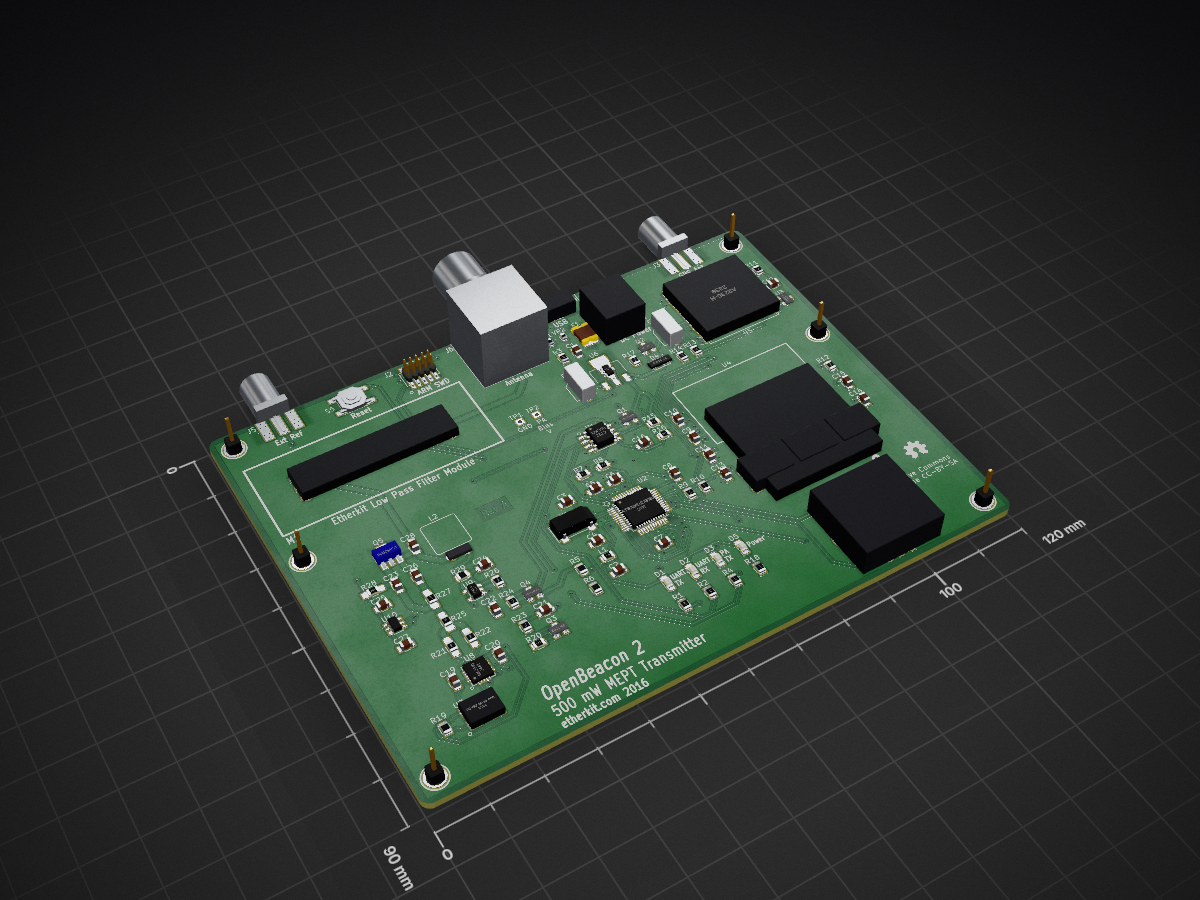
OpenBeacon2 is an open-source printed circuit board by etherkit, from the etherkit/OpenBeacon3 repository on GitHub, published under the GPL-3.0 licence. It is a 2-layer board of 120 × 90 mm with 105 parts on 115 nets, routed with 763 tracks and 103 vias.
It is built around the ATSAMD21G18A-AU, A2235-H and LM358, with the MAX809S, SI5351C-B-GM and ZLDO1117G33TA among its other parts. Its parts include 29 resistors, 28 capacitors, 10 ICs, 6 connectors and 5 diodes. It belongs with the SAM D and SAM boards of this library.


500 mW Si5351C-based MEPT Transmitter
Line 1: GPS status (internal or external antenna, number of satellites fixed), UTC time, transmission mode
Line 2: Frequency
Line 3: PA current, input voltage
Line 4: Message buffer contents
Line 5: Button functions
D1 (red)
Transmit
UART TX (during firmware loading)
D2 (green)
UART RX (during firmware loading)
D3 (blue)
PA enabled
D5 (yellow)
Power
Tuning
Turn S4 rotary encoder to tune
Tuning Rate
Depress rotary encoder shaft momentarily to step through tuning rates. An underline cursor will indicate which frequency digit is being changed.
Change Band or Mode
Hold rotary encoder shaft in for 1 second to access the band and mode change menu. Turn the rotary encoder to cycle between selections. Press button S1 to change the band selection or press button S2 to change the mode selection. Press button S3 to exit this menu.
Configuration Menu (S1)
Not yet implemented
Start/Stop (S2)
Press button to immediately start a transmission if the transmitter is currently idle, or immediately stop a transmission if one is currently active.
TX Enb/TX Dis (S3)
Press button to toggle the state of recurring transmissions.
When using the CW, QRSS, DFCW, and Hell modes, five different message buffers are available for transmission. Message Buffer 0 is a special case and consists solely of the value set in the callsign configuration variable. Message Buffers 1 through 4 can be set to any 40 character (consisting of letters, numbers, or characters /, =, and ?) user message via the configuration system. OpenBeacon 2 can be set transmit the contents of any of the five message buffers during a transmit period.
In WSPR mode, OpenBeacon 2 uses the callsign specified in the callsign configuration variable, the current Maidenhead grid square as determined from GPS (or the default value placed in the grid configuration variable if the GPS does not have a location fix), and the power level specified in the dbm configuration variable.
The configuration for OpenBeacon 2 is loaded via the included USB-UART bridge. To send configuration data, send OpenBeacon 2 a string consisting of the character 'W', followed by a JSON string setting the desired conifiguration variables, followed by a '@' termination character. For example:
W{"callsign":"W1AW","default_buffer":2,"msg_mem_2":"HELLO WORLD"}@Here is the list of available configuration variables:
Install these library from the indicated locations before attempting to compile and upload your own firmware.
Connect OpenBeacon 2 to your PC via USB. In the Arduino IDE, select board type Arduino/Genuino Zero (Native USB Port) and the correct virtual serial port. Sketches can be uploaded to OpenBeacon 2 as if it were a standard Arduino Zero (although a custom hardware configuration is coming soon).
| Qty | Value | Footprint | References |
|---|---|---|---|
| 10 | 100n | EtherkitKicadLibrary:C_0805 | C5, C7, C8, C11, C12, C13, C19, C20, C22, C27 |
| 6 | P*** | EtherkitKicadLibrary:MOUNTINGHOLE-4MM | 1PIN, 1PIN, 1PIN, 1PIN, 1PIN, 1PIN |
| 5 | 10n | EtherkitKicadLibrary:C_0805 | C16, C21, C23, C26, C28 |
| 5 | 1u | EtherkitKicadLibrary:C_0805 | C6, C9, C10, C24, C25 |
| 5 | 330 | EtherkitKicadLibrary:R_0805 | R1, R2, R4, R8, R18 |
| 3 | 100k | EtherkitKicadLibrary:R_0805 | R15, R16, R17 |
| 3 | 18 | EtherkitKicadLibrary:R_0805_HandSoldering | R21, R22, R25 |
| 3 | 22k | EtherkitKicadLibrary:R_0805 | R20, R23, R24 |
| 3 | Reset | EtherkitKicadLibrary:Omron_B3F-1052 | S1, S2, S3 |
| 2 | 10k | EtherkitKicadLibrary:R_0805 | R7, R11 |
| 2 | 10u | EtherkitKicadLibrary:CAP-ELEC-5MM | C17, C18 |
| 2 | 2.2k | EtherkitKicadLibrary:R_0805 | R13, R14 |
| 2 | 4.7k | EtherkitKicadLibrary:R_0805 | R9, R10 |
| 2 | 4.7u | EtherkitKicadLibrary:C_0805 | C2, C14 |
| 2 | 6.8 | EtherkitKicadLibrary:C_0805 | C3, C4 |
| 2 | CG0603MLC-05E | EtherkitKicadLibrary:R_0603 | VR1, VR2 |
| 2 | IRLML9301 | EtherkitKicadLibrary:SOT23-2N7002 | Q1, Q2 |
| 2 | SMA-F | EtherkitKicadLibrary:SMA-ENDLAUNCH | J3, J5 |
| 1 | 0 | EtherkitKicadLibrary:R_0805 | R19 |
| 1 | 0.5 1% | EtherkitKicadLibrary:R_0805 | R29 |
| 1 | 10 | EtherkitKicadLibrary:R_0805 | R26 |
| 1 | 10uH | EtherkitKicadLibrary:R_0805 | L1 |
| 1 | 1M | EtherkitKicadLibrary:R_0805 | R3 |
| 1 | 2.1mm Barrel Jack | EtherkitKicadLibrary:DCPOWER-KOBICONN-163-7620-E | J4 |
| 1 | 2.2u | EtherkitKicadLibrary:C_0805 | C15 |
| 1 | 22k 1% | EtherkitKicadLibrary:R_0805 | R5 |
| 1 | 2N7002 | EtherkitKicadLibrary:SOT23-2N7002 | Q3 |
| 1 | 3.3k | EtherkitKicadLibrary:R_0805_HandSoldering | R27 |
| 1 | 390k | EtherkitKicadLibrary:R_0805 | R12 |
| 1 | 4.7k 1% | EtherkitKicadLibrary:R_0805 | R6 |
| 1 | 4.7n | EtherkitKicadLibrary:C_0805 | C1 |
| 1 | 56 | EtherkitKicadLibrary:R_0805_HandSoldering | R28 |
| 1 | A2235-H | EtherkitKicadLibrary:A2235-H | U5 |
| 1 | ABS25-32.768KHz-6-1-T | EtherkitKicadLibrary:Abracon_ABS25 | X1 |
| 1 | ARM_SWD | EtherkitKicadLibrary:FCI_20021121-00010C4LF | J2 |
| 1 | ATSAMD21G18A | EtherkitKicadLibrary:TQFP-48_7x7mm_Pitch0.5mm | U2 |
| 1 | BIAS V | Measurement_Points:Measurement_Point_Square-TH_Small | TP2 |
| 1 | BNC | EtherkitKicadLibrary:BNC-AMPHENOL-31-5431-10RFX | J6 |
| 1 | BZV55-B15 | EtherkitKicadLibrary:SOD80 | D4 |
| 1 | Blue | EtherkitKicadLibrary:Lite-On_LTST-C170 | D3 |
| 1 | ENCODER-SW | EtherkitKicadLibrary:Bournes_PEC12R-4225F-S0024 | S4 |
| 1 | ER-OLED0.96-1W | EtherkitKicadLibrary:EastRising_ER-OLED0.96-1W-Thru | U4 |
| 1 | Etherkit Low Pass Filter Module | EtherkitKicadLibrary:LPFModule | M1 |
| 1 | FB2402-61 5T | EtherkitKicadLibrary:BN2402-H | L2 |
| 1 | FOX924B-25.000 | EtherkitKicadLibrary:Fox_924B | U7 |
| 1 | GND | Measurement_Points:Measurement_Point_Square-TH_Small | TP1 |
| 1 | Green LED | EtherkitKicadLibrary:Lite-On_LTST-C170 | D5 |
| 1 | INA193 | EtherkitKicadLibrary:SOT23-5 | U9 |
| 1 | LM358 | EtherkitKicadLibrary:SOIC-8_3.9x4.9mm_Pitch1.27mm | U1 |
| 1 | LOGO | EtherkitKicadLibrary:OSHWLogo4mm | G*** |
| 1 | MAX809 | EtherkitKicadLibrary:SOT23-MAX809 | U3 |
| 1 | MCP4725A1T-E/CH | EtherkitKicadLibrary:SOT23-6 | U10 |
| 1 | MF-MSMF050-2 | EtherkitKicadLibrary:Bournes_MF-MSMF050-2 | F1 |
| 1 | MMBT4403 | EtherkitKicadLibrary:SOT23-MMBT440X | Q4 |
| 1 | RD00HVS1 | EtherkitKicadLibrary:RD00HVS1 | Q5 |
| 1 | Red | EtherkitKicadLibrary:Lite-On_LTST-C170 | D1 |
| 1 | Reset | EtherkitKicadLibrary:Alps_SKQGAKE010 | S5 |
| 1 | Si5351C | EtherkitKicadLibrary:QFN-20-1EP_4x4mm_Pitch0.5mm | U8 |
| 1 | USB Micro | EtherkitKicadLibrary:FCI_10118194-0001LF | J1 |
| 1 | Val** | EtherkitKicadLibrary:EtherkitLogoSmall | Ref** |
| 1 | Yellow | EtherkitKicadLibrary:Lite-On_LTST-C170 | D2 |
| 1 | ZLDO1117G33TA | EtherkitKicadLibrary:SOT-223-3 | U6 |
It measures 120 × 90 mm and has 2 copper layers, 1.6 mm thick.
105 parts, built around the ATSAMD21G18A-AU, A2235-H, LM358 and MAX809S. The full list of its parts is on this page, with links to each part's symbol and footprint where PCBKit's library has them.
From the etherkit/OpenBeacon3 repository on GitHub, at the commit this page was made from: the board is pcb/OpenBeacon2.kicad_pcb. PCBKit opens the board in the browser, with nothing to install.
Its repository publishes it under the GPL-3.0 licence: you may reuse it on that licence's terms (keep the author's notice, and for a copyleft licence share your changes alike).


calebmarting/os2026-badge
Schematics and firmware for the Open Sauce 2026 Badge and SAOs
