
4 layers37.6 × 39.4 mm
Layouts
eigenlucy/spacebridgehabpcb
High Altitude Balloon Tracker, Telemetry, and Sensor Board
52 parts11

High Altitude Balloon Tracker, Telemetry, and Sensor Board
Cutoff is an open-source printed circuit board by eigenlucy, from the eigenlucy/spacebridgehabpcb repository on GitHub. It is a 2-layer board with 11 parts on 10 nets.
Its parts include 4 resistors, 3 transistors, 2 connectors, 1 capacitor and 1 diode. It belongs with the radio and wireless boards and the ESP32 boards of this library.
High Altitude Balloon (HAB) PCB Tracker with cutdown mechanism, GPS, environmental monitoring, LoRa telemetry and particle detection capabilities.
Created by Lucy Moglia eigenlucy@proton.me
The SpaceBridge HAB PCB is a comprehensive tracking and instrumentation system for high altitude balloon experiments. It integrates multiple subsystems including power management, telemetry, GPS tracking, environmental monitoring, and a particle counter based on CERN open source hardware.
| Module | Source File | PCB Layout | Description |
|---|---|---|---|
| Mainboard | mainboard.ato | layouts/default/default.kicad_pcb | Final PCB incorporating all submodules |
| MicroMPPT | micromppt/elec/src/micromppt.ato | micromppt/elec/layout/default/micromppt.kicad_pcb | 5W MPPT battery charger with embedded set point adjustment algorithm |
| Particle Counter | particle_counter.ato | layouts/particle-counter/particle-counter.kicad_pcb | Alpha particle detector based on CERN open source hardware kit |
| Cutoff Mechanism | cutoff.ato | layouts/cutoff/cutoff.kicad_pcb | Balloon cutoff circuit using lithium hybrid supercapacitor discharging through nichrome wire |
| BQ24045DSQR BMS | bq24045dsqr/elec/src/bq24045dsqr.ato | bq24045dsqr/elec/layout/default/bq24045dsqr.kicad_pcb | 5V 1A single cell LiPo/Li-ion charger + BMS |
| TPS63020DSJR | ~/.ato/modules/tps63020dsjr/elec/src/tps63020dsjr.ato | ~/.ato/modules/tps63020dsjr/elec/layout/tps63020dsjr.kicad_pcb | 1.8V-5.5V In/Out 4A boost-buck converter (5V from Vbat) |
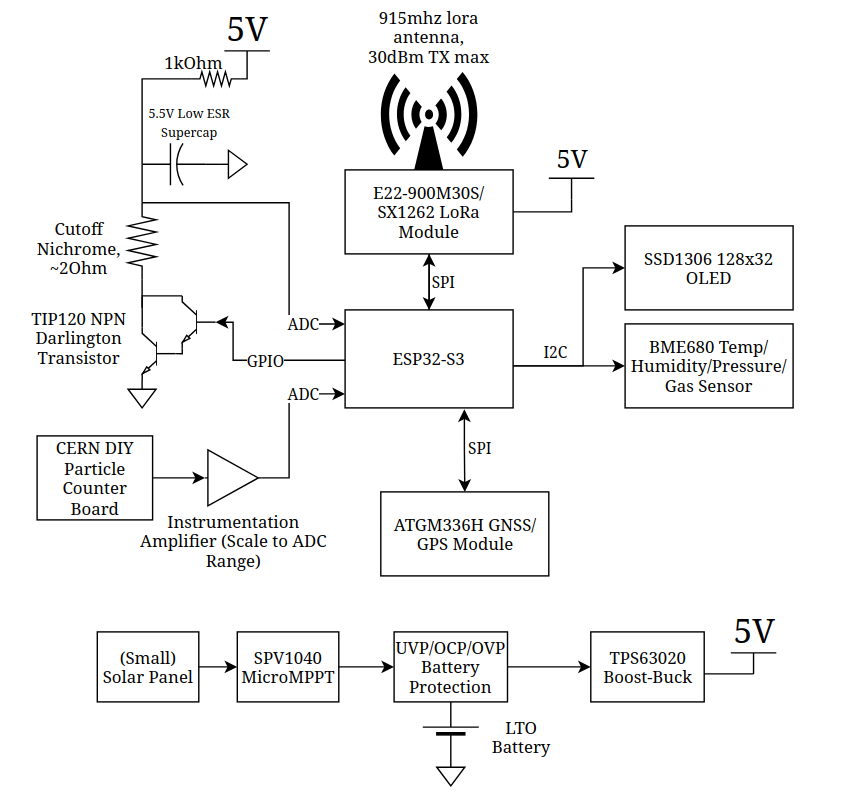
graph TD
    %% Power System
    Solar["Solar Panel"] --> MPPT["SPV1040 MicroMPPT"]
    MPPT --> BattProt["UVP/OCP/OVP Battery Protection"]
    BattProt --- Battery["LTO Battery"]
    BattProt --> BoostBuck["TPS63020 Boost-Buck"]
    BoostBuck --> Power5V["5V Power Rail"]

    %% ESP32 Microcontroller (Central)
    ESP32["ESP32-S3"]

    %% 5V Devices
    Power5V --> LoRa["E22-900M30S/SX1262 LoRa Module"]
    Power5V --> ParticleCounter["CERN DIY Particle Counter"]
    Power5V --> CutoffSystem["Cutoff System"]

    %% Cutoff System Components
    CutoffSystem --> Supercap["3.5V Low ESR Supercap"]
    CutoffSystem --> Nichrome["Nichrome Wire ~20Ω"]
    CutoffSystem --> TIP120["TIP120 NPN Darlington"]

    %% I2C Devices (3.3V)
    ESP32 -- I2C/IO6+IO7 --> OLED["SSD1306 128x32 OLED"]
ESP32 -- I2C/IO6+IO7 --> BME680["BME680 Sensor"]Clone the required submodules
git submodule update --init --recursiveBuild the project to select components based on JLCPCB availability
ato build -t allComplete/review the layout with KiCad Standalone PCB editor
Gerbers/PCBA files are generated through an Actions run on a commit
Install uv
Install KiCad with your preferred package manager (apt for Debian, pacman for Arch, etc.)
Install atopile as a tool with uv (Python 3.13.2 recommended):
uv tool install atopileAlternative installation method:
rm uv.lockuv sync --devuv builduv tool install atopile-0.3.XX-cp313-cp313-linux-_x86_64.whlfish_add_path /home/user/.local/share/uv/tools/atopile/Check your version:
ato --versionConfigure the atopile plugin:
ato configurebrew install --cask kicadbrew install atopile/tap/atopileato configureInstall the atopile extension into Cursor or Visual Studio Code.
| Qty | Value | Footprint | References |
|---|---|---|---|
| 3 | 10kΩ ±1% 62.5mW | atopile:R0402-56259e | R2, R3, R4 |
| 2 | atopile:SOT-23-3_L2.9-W1.3-P1.90-LS2.4-BR-688f29 | Q1, Q3 | |
| 2 | atopile:CONN-TH_XH-2A-b4a6f6 | CN1, CN2 | |
| 1 | atopile:DFN-8_L3.3-W3.3-P0.65-BL-2-bd6bc9 | Q2 | |
| 1 | atopile:SMA_L4.3-W2.6-LS5.2-RD-e14692 | D1 | |
| 1 | atopile:CAP-TH_BD8.0-P3.50-D0.6-FD_1-b17e9d | C1 | |
| 1 | 10kΩ ±1% 125mW | atopile:R0805-c79e8b | R1 |
eigenlucy/spacebridgehabpcb
High Altitude Balloon Tracker, Telemetry, and Sensor Board

eigenlucy/spacebridgehabpcb
High Altitude Balloon Tracker, Telemetry, and Sensor Board

google/mozc-devices
Circuit diagrams and firmware source code for Gboard DIY keyboards


FrameworkComputer/ExpansionCards
Reference designs and documentation to create Expansion Cards for the Framework Laptop

hoglet67/RGBtoHDMI
Bare-metal Raspberry Pi project that provides pixel-perfect sampling of Retro Computer RGB/YUV video and conversion to HDMI

hackclub/OnBoard
💡 Join 1,000 teenagers and make your first PCB with a $100 grant!


tardate/LittleArduinoProjects
a collection of "Little Electronic & Arduino Projects", most involving electronics or an Arduino in one way or another!

basilfx/TRADFRI-Hacking
Hacking IKEA TRÅDFRI products, such as light bulbs, window blinds and other accessories.
11 parts. The full list of its parts is on this page, with links to each part's symbol and footprint where PCBKit's library has them.
From the eigenlucy/spacebridgehabpcb repository on GitHub, at the commit this page was made from: the board is layouts/cutoff/cutoff.kicad_pcb and its schematic ams1117-33/elec/layout/default/ams1117-33.kicad_sch. PCBKit opens the board in the browser, with nothing to install.
Its repository states no licence, so its author keeps all rights: ask eigenlucy before reusing the design.