Skip to the content
PCBKitNew board
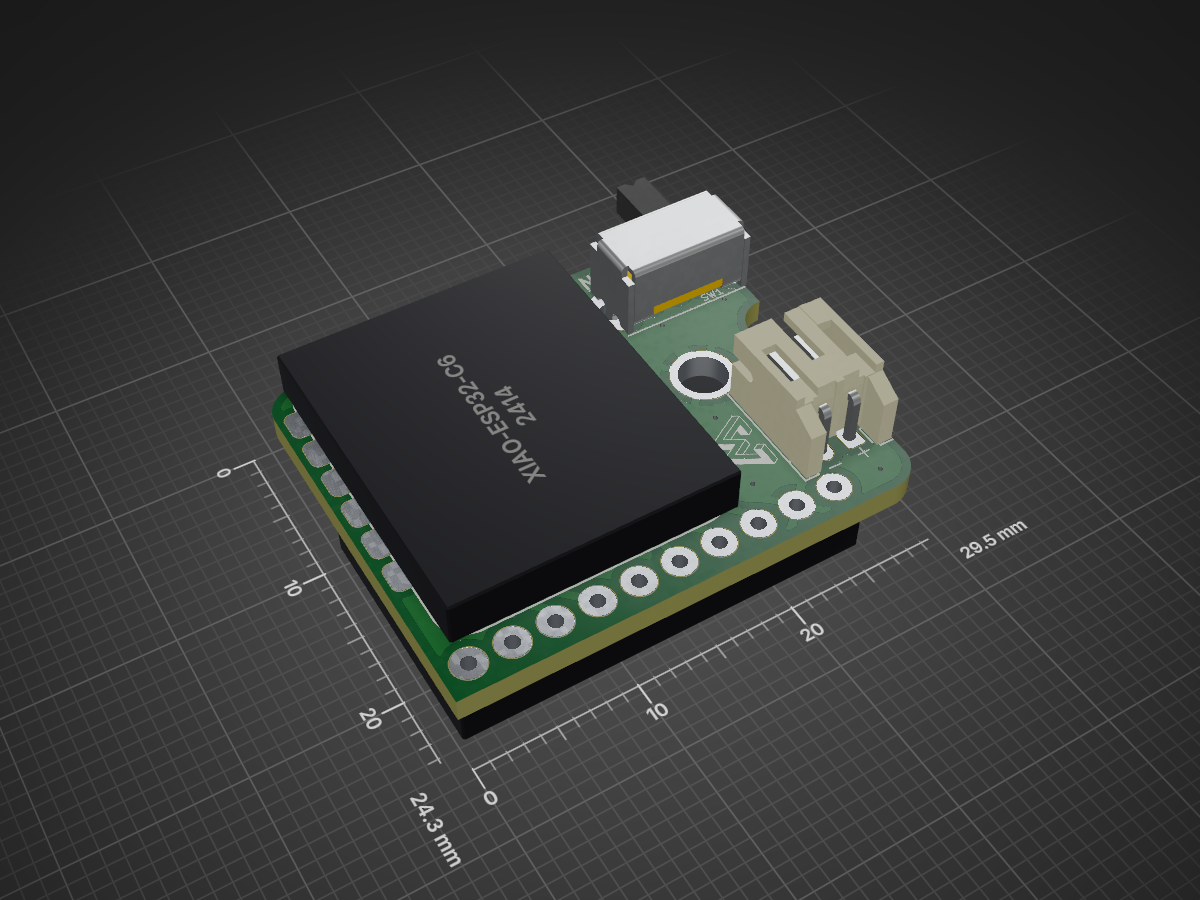
2 layers29.5 × 24.3 mmEidon tracker, the printed circuit board in 3D

Wearable battery powered IMU to Bluetooth module.

Size
29.5 × 24.3 mm
Copper layers
2
Thickness
1.6 mm
Parts
11
Nets
18
Pads
58
Tracks, vias
116, 15
Pours
1
Routed
Yes
KiCad
KiCad 9.0 (file 20241229)
Created
14 Apr 2025
Updated
10 Mar 2026

Overview

Eidon tracker is an open-source printed circuit board by Eidon-AI, from the Eidon-AI/eidon-tracker repository on GitHub. It is a 2-layer board of 29.5 × 24.3 mm with 11 parts on 18 nets, routed with 116 tracks and 15 vias.

Its parts include 3 resistors, 2 ICs, 2 switches and 1 diode. It belongs with the radio and wireless and sensors and measurement boards and the ESP32 and RISC-V boards of this library.

README

README.md

Eidon Tracker

A complete Bluetooth IMU tracking system featuring custom hardware, 3D printed enclosure, and web-based applications. The Eidon Tracker transmits real-time quaternion orientation data over Bluetooth HID, making it perfect for motion capture, gaming, and interactive applications.
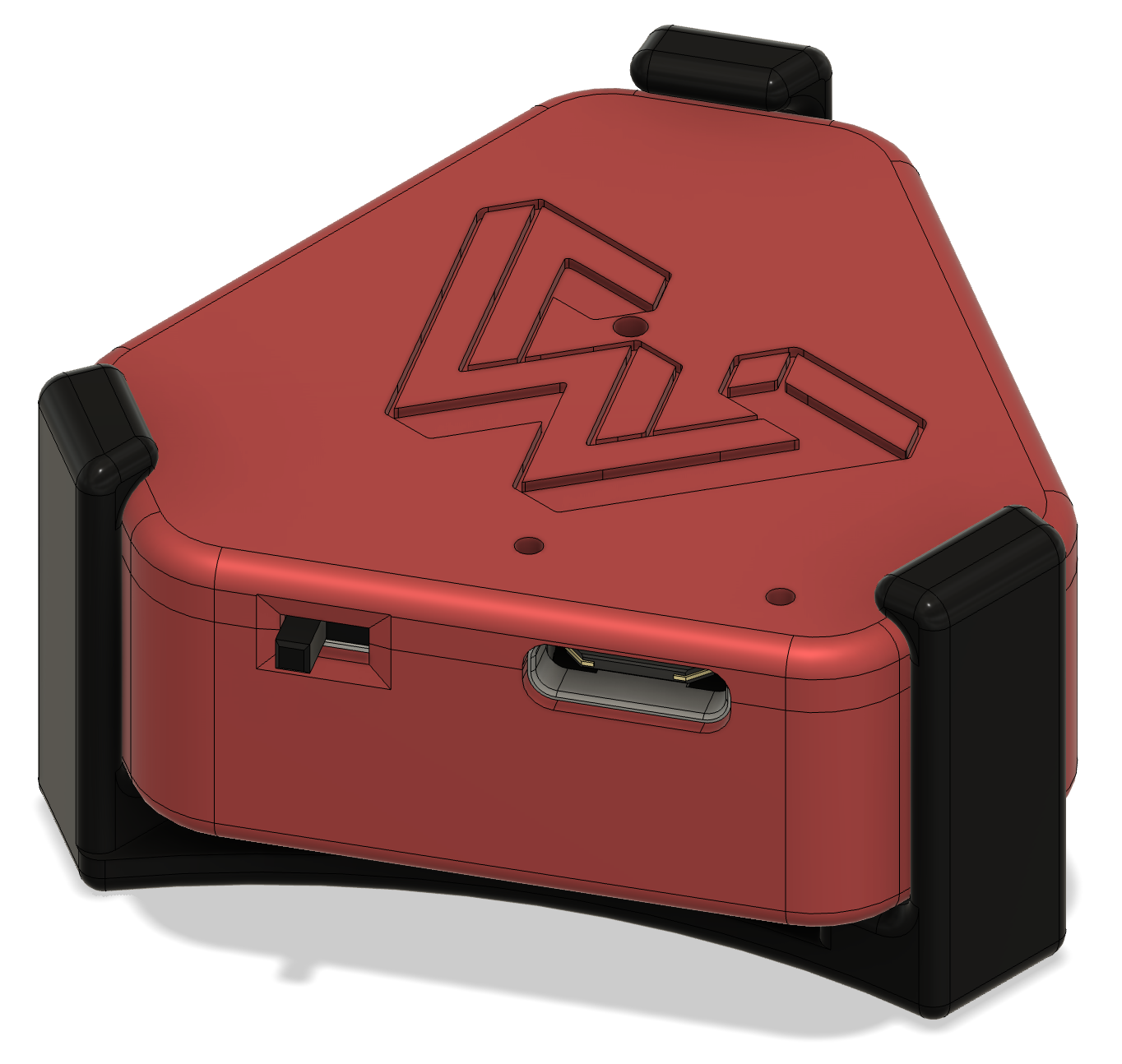
Eidon Tracker - Closed

Features

  • High-precision IMU tracking with BNO085 9-DOF sensor
  • Bluetooth HID device - appears as standard input device
  • Real-time quaternion data streaming at 1000Hz
  • Custom 3D printed enclosure with integrated switches
  • Web-based applications for visualization and interaction
  • Battery monitoring with charging status
  • Device color customization via HID feature reports

Bill of Materials (BOM)

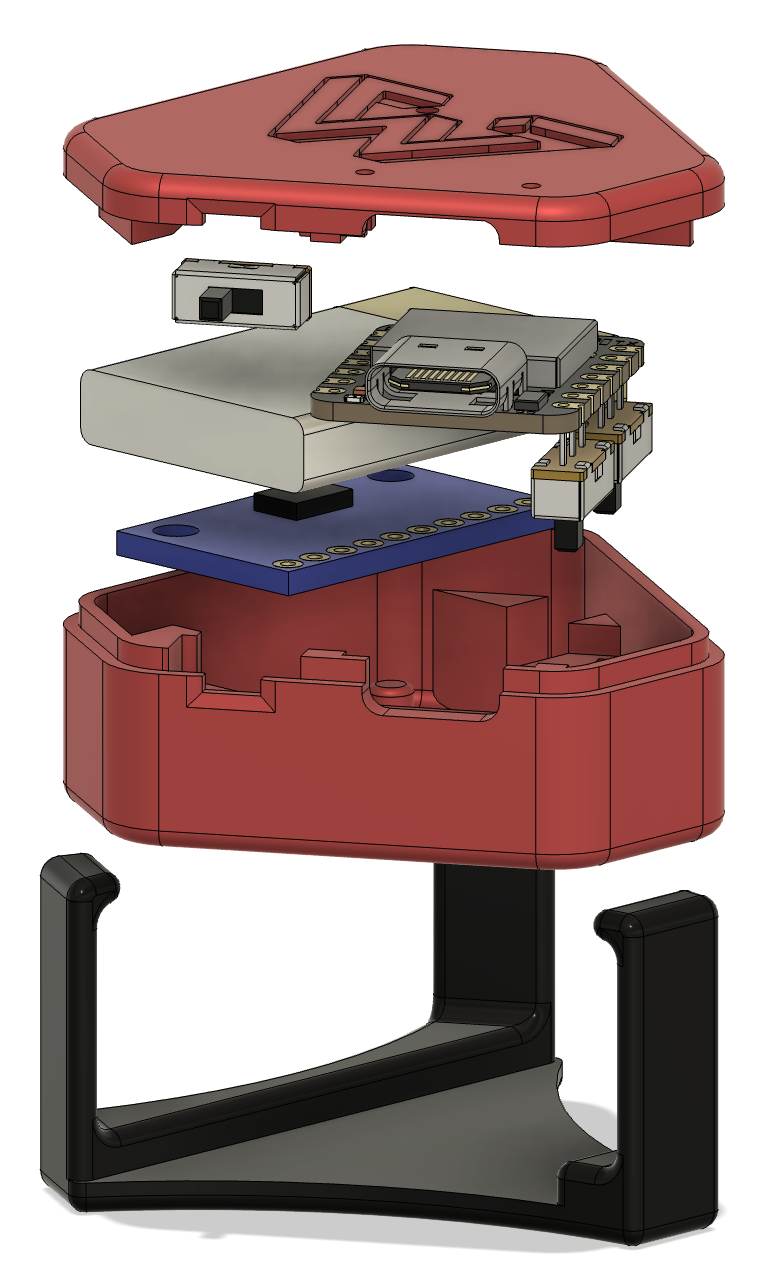
Eidon Tracker - Open

Required Components

ComponentQuantityDescriptionPurchase Link
Seeed XIAO nRF52840 Sense1Main microcontroller with built-in BLEAmazon
BNO085 IMU Breakout19-DOF Absolute Orientation SensorAmazon
LiPo Battery (3.7V)1250mAh recommendedAmazon
Toggle Switches (6mm)2For power and position configAmazon
30 AWG Wires4x ~5cmFemale-to-female, ~20cmAmazon

3D Printing Materials

MaterialQuantityDescription
PLA Filament~50gFor enclosure parts
Support MaterialAs neededIf printing with overhangs

Tools Required

  • 3D Printer
  • Soldering iron and solder
  • Small screwdriver
  • Wire strippers

Estimated Total Cost: $80-120 USD

Hardware Setup

Wiring Diagram

Connect the BNO085 to the XIAO nRF52840 Sense:

BNO085 PinXIAO PinFunction
VIN3V3Power (3.3V)
GNDGNDGround
SDAD9IMU I2C Data
SCLD10IMU I2C Clock
INTD8IMU Interrupt (optional)

Switch Connections

SwitchOutput PinInput PinFunction
Left/RightD5D6Horizontal orientation
Upper/LowerD0D1Vertical orientation

3D Printing

Print the following files from the cad/ directory:

  1. eidon-tracker-base.stl - Main enclosure base
  2. eidon-tracker-top.stl - Enclosure lid
  3. eidon-tracker-mount.stl - Optional mounting bracket

Print Settings:

  • Layer Height: 0.2mm
  • Infill: 20%
  • Support: Yes (for overhangs)
  • Material: PLA

Software Setup

PlatformIO Installation

  1. Install Visual Studio Code
  2. Install the PlatformIO IDE extension

Building and Uploading Firmware

  1. Clone this repository:

    bash
    git clone https://github.com/yourusername/eidon-tracker.git
    cd eidon-tracker
  2. Open the project in VSCode with PlatformIO

  3. Connect your XIAO nRF52840 Sense via USB

  4. Build and upload:

    bash
    pio run --target upload

Dependencies

The following libraries are automatically managed by PlatformIO:

  • Adafruit BNO08x (v1.2.3+) - IMU sensor driver
  • Adafruit BluefruitLE nRF52 - Bluetooth functionality
  • Arduino Framework - Core functionality

Web Applications

The web/ directory contains the main interactive application:

3D Orientation Visualizer (index.html)

  • Real-time 3D visualization of tracker orientation and movement
  • Multiple camera angles and viewing modes
  • Bluetooth HID integration for seamless device connectivity
  • Calibration status monitoring and quaternion data display

Running Web Applications

Simply open web/index.html directly in your web browser:

  1. Navigate to the web/ directory in your file explorer
  2. Double-click index.html to open it in your default browser
  3. Or right-click and "Open with" your preferred browser (Chrome/Edge recommended for Web Bluetooth support)
  4. Connect to your Eidon Tracker via Bluetooth

HID Reports

The Eidon Tracker implements a custom HID device with multiple report types for data exchange:

Input Report (Report ID: 1)

Size: 9 bytes total

  • Quaternion Data (8 bytes): Four 16-bit values representing orientation
    • w component (bytes 0-1): Scalar part of quaternion
    • x component (bytes 2-3): X-axis rotation
    • y component (bytes 4-5): Y-axis rotation
    • z component (bytes 6-7): Z-axis rotation
  • Switch States (1 byte): Two button states plus padding
    • Bit 0: Left/Right switch state
    • Bit 1: Upper/Lower switch state
    • Bits 2-7: Reserved (padding)

Output Report (Report ID: 1)

Size: 1 byte

  • Vendor Command: Custom command byte for device control
    • Used for device configuration and special commands
    • Values defined in firmware for various operations

Feature Report (Report ID: 1)

Size: 3 bytes

  • RGB Color Settings: Device LED color configuration
    • Byte 0: Red component (0-255)
    • Byte 1: Green component (0-255)
    • Byte 2: Blue component (0-255)
    • Colors are stored in device flash memory
    • Allows customization of device LED color

HID Usage Pages

  • Primary: Sensor Page (0x20) - Orientation Usage (0x80)
  • Secondary: Button Page (0x09) - Button 1-2
  • Vendor: Custom Page (0xFF00) - Vendor-specific features

Usage

Initial Setup

  1. Power on the device - LED will indicate status
  2. Pair via Bluetooth - Device appears as "Eidon Tracker XXXX"
  3. Calibrate IMU - Wave device in figure-8 pattern until calibrated
  4. Open web application of choice
  5. Connect to device in web browser

Calibration Process

The BNO085 sensor requires calibration for optimal performance:

  1. Gyroscope: Keep device stationary for 2-3 seconds
  2. Accelerometer: Slowly rotate through all orientations
  3. Magnetometer: Move device in figure-8 pattern away from magnetic interference
  4. Monitor calibration status in web application or serial output

LED Status Indicators

LED StateMeaning
Solid BlueConnected and ready
Blinking BlueAdvertising/pairing mode
RedLow battery or error
GreenCharging

Development

Project Structure

text
eidon-tracker/
├── firmware/               # PlatformIO firmware project
│   ├── src/main.cpp       # Main firmware source
│   ├── platformio.ini     # PlatformIO configuration
│   └── lib/               # Custom libraries
├── web/                   # Web applications
│   ├── index.html         # 3D orientation visualizer
│   └── script.js          # Shared JavaScript libraries
├── cad/                   # 3D printing files
│   ├── eidon-tracker.f3d  # Fusion 360 source
│   ├── *.stl              # STL files for printing
│   └── *.gcode            # Pre-sliced files
├── images/                # Product photos
└── README.md              # This file

Firmware Development

The firmware is built on the Arduino framework with PlatformIO. Key components:

  • HID Report Descriptor: Custom HID device with quaternion data
  • Bluetooth Stack: Adafruit Bluefruit nRF52 library
  • IMU Driver: Adafruit BNO08x library
  • Battery Management: Built-in XIAO charging and monitoring

Adding New Web Applications

  1. Create new HTML file in web/ directory
  2. Include script.js for Bluetooth connectivity
  3. Implement HID report parsing for quaternion data
  4. Add visualization or interaction logic

Troubleshooting

Connection Issues

  • Device not found: Ensure Bluetooth is enabled and device is in pairing mode
  • Connection drops: Check battery level and distance from host device
  • Web Bluetooth not supported: Use Chrome/Edge on desktop or Android

Calibration Problems

  • Poor tracking accuracy: Ensure proper IMU calibration
  • Drift over time: Recalibrate magnetometer away from metal objects
  • Erratic behavior: Check wiring connections and power supply

Build Issues

  • Platform not found: Ensure Seeed nRF52 platform is properly installed
  • Library conflicts: Clean build environment with pio run --target clean
  • Upload fails: Double-tap reset button to enter DFU mode

Contributing

  1. Fork the repository
  2. Create a feature branch
  3. Make your changes
  4. Test thoroughly
  5. Submit a pull request

License

This project is open source and available under the MIT License. See LICENSE file for details.

Acknowledgments

  • Seeed Studio for the excellent XIAO nRF52840 Sense board
  • Adafruit for comprehensive sensor libraries and breakout boards
  • PlatformIO for the excellent development environment

Parts

11
QtyValueFootprintReferences
2220kResistor_SMD:R_0805_2012MetricR1, R2
2LOGOLOGOG1, G1
11kResistor_SMD:R_0805_2012MetricR3
1BatteryConnector_JST:JST_PH_S2B-PH-K_1x02_P2.00mm_HorizontalBT1
1GY-BNO085eidon-tracker:GY-BNO085U2
1LEDLED_SMD:LED_0805_2012MetricD1
1SW_PushButton_Switch_SMD:SW_Push_SPST_NO_Alps_SKRKSW2
1SW_SPDTeidon-tracker:SW_Slide_SPDT_Angled_CK_OS102011MA1QSW1
1XIAO-ESP32-C6eidon-tracker:XIAO-ESP32-C6U1

Questions

How big is the Eidon tracker PCB?

It measures 29.5 × 24.3 mm and has 2 copper layers, 1.6 mm thick.

What parts does the Eidon tracker use?

11 parts. The full list of its parts is on this page, with links to each part's symbol and footprint where PCBKit's library has them.

Where can I download the Eidon tracker KiCad files?

From the Eidon-AI/eidon-tracker repository on GitHub, at the commit this page was made from: the board is pcb/eidon-tracker-v3/eidon-tracker.kicad_pcb and its schematic pcb/eidon-tracker-v3/eidon-tracker.kicad_sch. PCBKit opens the board in the browser, with nothing to install.

Can I use the Eidon tracker design in my own project?

Its repository states no licence, so its author keeps all rights: ask Eidon-AI before reusing the design.

More from Eidon-AI/eidon-tracker

1
  • 2 layers29.5 × 24.3 mmEidon tracker, the printed circuit board in 3D

    Eidon tracker

    Eidon-AI/eidon-tracker

    Wearable battery powered IMU to Bluetooth module.

    19 parts20

Similar boards

  • 2 layers60 × 30 mmController, the printed circuit board in 3D

    Controller

    google/mozc-devices

    Circuit diagrams and firmware source code for Gboard DIY keyboards

    11 parts3kApache-2.0
  • 2 layers103 × 30.5 mmTS Front Endcap, the printed circuit board in 3D

    TS Front Endcap

    EEVengers/ThunderScope

    ThunderScope GitHub Repo

    11 parts1.3kMIT
  • 2 layers26 × 30 mmExpansion Card, the printed circuit board in 3D

    Expansion Card

    FrameworkComputer/ExpansionCards

    Reference designs and documentation to create Expansion Cards for the Framework Laptop

    11 parts1.1kCC-BY-4.0
  • 2 layers53.9 × 23.2 mmBuffer, the printed circuit board in 3D

    Buffer

    hoglet67/RGBtoHDMI

    Bare-metal Raspberry Pi project that provides pixel-perfect sampling of Retro Computer RGB/YUV video and conversion to HDMI

    11 parts1kGPL-3.0
  • 2 layers10 × 20 mm2 connector Sensor Board, the printed circuit board in 3D

    2 connector Sensor Board

    hackclub/OnBoard

    💡 Join 1,000 teenagers and make your first PCB with a $100 grant!

    11 parts915
  • 2 layersFet module, the printed circuit board in 3D

    Fet module

    ByteWelder/Decktility

    A handheld PC

    11 parts855CC-BY-SA-4.0
  • 2 layers47 × 33 mmSevensegment led display module, the printed circuit board in 3D

    Sevensegment led display module

    tardate/LittleArduinoProjects

    a collection of "Little Electronic & Arduino Projects", most involving electronics or an Arduino in one way or another!

    11 parts803MIT
  • 2 layers42.5 × 36.8 mmDevboard, the printed circuit board in 3D

    Devboard

    basilfx/TRADFRI-Hacking

    Hacking IKEA TRÅDFRI products, such as light bulbs, window blinds and other accessories.

    11 parts743CC-BY-4.0