
2 layers189.5 × 204.9 mm
SmartSpin2k Panelized
doudar/SmartSpin2k
Transform your spin bike into a Smart Trainer!
749 parts292GPL-2.0

 ehorvat1/NES-MEP-Reader16
ESP32 compatible firmware to read, interpret and publish data from NES (formerly Echelon) electrical meters using MEP port
NES MEP EHo is an open-source printed circuit board by ehorvat1, from the ehorvat1/NES-MEP-Reader repository on GitHub, published under the AGPL-3.0 licence. It is a 2-layer board of 95.5 × 100 mm with 15 parts on 56 nets, routed with 155 tracks and 0 vias.
It is built around the MAX3232ID. Its parts include 5 capacitors, 4 connectors, 2 ICs and 1 diode. It belongs with the retro computing and games and home automation and IoT boards and the ESP32 boards of this library.
Now based on amsreader-firmware Rev, 2.2.17. (from 5th Mai 2023)
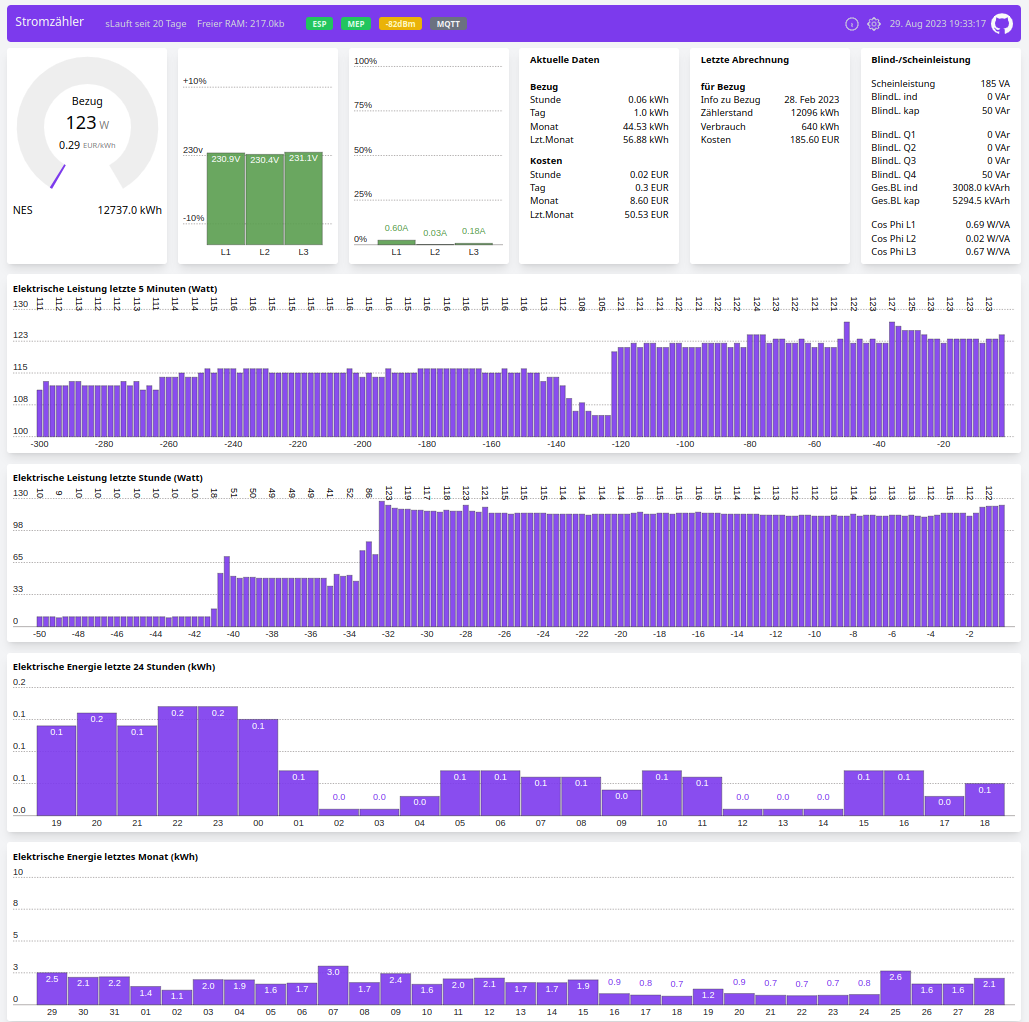
So it features: WebUI with new design. WebUI componenst are now selectable in config page. WebUI works also offline (in AP mode) now. Fixed cost / kWh .Last Month info.
From my side:
Rel. 2.2: Fallback to Wifi AP can make AP button obsolete. 1hour plot. Additional Meter Info on status page.
Rel. 2.3: Data fetch from meter and Web Interface now on 2 second base. New 5 minute plot.
Rel. 2.4: Frequency Indicator, Power Factors and Reactive Data including their MQTT Topics (for Raw MQTT and HomeAssistant)
Rel. 2.5: Added a fixed price per kWh for export. User can enter now a "last" counter value and a text comment for this value - idea is to enter here the last kWh from the last energy bill. A price is calculated from this "last" counter to the actual kWh counter to get an idea of costs since last energy bill. More info on minute & hour plot. Version is shown now in Status page.
Rel. 2.6: MQTT works now for "HomeAssistant" payload. Only check for 25 Data points from BT28 (was 54)
current repo. state: pre 2.7: Fix table read BT23 for Gen4 meters....thanks to makerspace-reinach.ch .
Fixed clearing of MEP error indication in header line. Fixed communication recovery and debug message if zero bytes are received.
12 Aprl 2024, Fixed reading from table BT23 resulting in wrong "Export Reactive Arh L1L2L3"....thanks to Hubert
24 Mai 2024, Only as compiled firmware in ESP32-binaries section: A version on "steroids" reading MEP port every second. Short tests did show no problems, but (as for whole project): use at own risk
Please Note: For MQTT I could only test payloads "raw (2 Sek.)", "raw (10 Sek.)" and "HomeAssistant" .
This code is designed to decode data from NES (Networked Energy Services) electric smart meters which are installed in some countries in Europe (eg. Denmark and Austria, Switzerland).
The data is presented in a graphical web interface and can also send the data to a MQTT broker which makes it suitable for home automation project.
This project is basically merging 2 other project into one:
The data from NES (Echelon) smart meters is derived using the smart meters MEP (Multipurpose Expansion Port) which is using a bi-directional serial communication link. The communication is individually secured by a secret key called "MEP Basic Key" which the relevant electrical supply company (the one which own the smart meters) has to release to the customer. (In Austria this is supported by law.)
The AP SSID and password are also shown on serial connected terminal right after booting ESP32.
The option on configuration page in section Wifi called: "Start a Wifi AP on home Wifi connection problem" will enable this: If the configured Wifi (should be your home Wifi) can not be reached within app. 2 minutes the ESP32 will swap to Wifi AP mode and will present a AP named "Stromzaehler-abcd" with password mentioned in above pt. 2.
Software will try to re-connect to the configured Wifi if no client is connected to this AP for 90 seconds. So if one is connected to AP Wifi the device will stay in AP mode. Please mind that most devices will do a automatic reconnect to the AP Wifi if the Wifi connection "Stromzaehler-abcd" was once used. This could prevent the ESP32 from automatically reconnecting to defined STA Wifi.
"AP" button still is an option to swap between configured WLAN and an Wifi Access point called "Stromzaehler-abcd". The AP button must be pressed longer than 5 seconds to swap Wifi mode.
For hardware please check repository Hardware and also the development done by Dabbler group at www.dabbler.dk
Publish topic + "/meter/mep_data_ready"
Publish topic + "/meter/mep_alivecounter"
Publish topic + "/meter/manufacturer"
Publish topic + "/meter/model"
Publish topic + "/meter/serialnumber"
Publish topic + "/meter/firmwareversion"
Publish topic + "/meter/hardwareversion"
Publish topic + "/meter/clock"
Publish topic + "/meter/import/active"
Publish topic + "/meter/import/active/accumulated"
Publish topic + "/meter/export/active"
Publish topic + "/meter/export/active/accumulated"
Publish topic + "/meter/import/reactive"
Publish topic + "/meter/export/reactive"
Publish topic + "/meter/import/reactive/accumulated"
Publish topic + "/meter/export/reactive/accumulated"
Publish topic + "/meter/l1/voltage"
Publish topic + "/meter/l2/voltage"
Publish topic + "/meter/l3/voltage"
Publish topic + "/meter/l1/current"
Publish topic + "/meter/l2/current"
Publish topic + "/meter/l3/current"
Publish topic + "/meter/l1/powerfactor"
Publish topic + "/meter/l2/powerfactor"
Publish topic + "/meter/l3/powerfactor"
Publish topic + "/meter/appowerVA"
Publish topic + "/meter/frequency"
Publish topic + "/meter/reactivepower_Q1"
Publish topic + "/meter/reactivepower_Q2"
Publish topic + "/meter/reactivepower_Q3"
Publish topic + "/meter/reactivepower_Q4"
Publish topic + "/realtime/import/hour"
Publish topic + "/realtime/import/day"
Publish topic + "/realtime/import/month"
Publish topic + "/realtime/export/hour"
Publish topic + "/realtime/export/day"
Publish topic + "/realtime/export/month"
Publish topic + "/realtime/import/cost_kwh"
Publish topic + "/realtime/import/last_counter_value"
Publish topic + "/realtime/import/last_counter_info"
Publish topic + "/realtime/import/last_counter_diff"
Publish topic + "/realtime/import/last_counter_costs"
Publish topic + "/realtime/export/refund_kwh"
Publish topic + "/realtime/export/last_counter_value"
Publish topic + "/realtime/export/last_counter_info"
Publish topic + "/realtime/export/last_counter_diff"
Publish topic + "/realtime/export/last_counter_refund"
So for example, if you set the "Publish topic" in MQTT configuration to "smartmeter" the actual power used is published with full topic: smartmeter/meter/import/active (Topics are case sensitive !)
The web interface is very similar to original "amsreader-firmware". I have added a 60 Minute plot, and translated to German language.
The help icons on the configuration page are linked to original "amsreader-firmware" site. Serial Port and RTS Pin are described also on config page.
To build this project, you need PlatformIO installed.
It is recommended to use Visual Studio Code with the PlatformIO plugin for development.
For development purposes, copy the platformio-user.ini-example to platformio-user.ini and customize to your preference. The code will adapt to the platform and board set in your profile.
| Qty | Value | Footprint | References |
|---|---|---|---|
| 5 | 100nF | Capacitor_THT:C_Rect_L7.0mm_W3.5mm_P5.00mm | C1, C2, C3, C4, C5 |
| 2 | , | ||
| 2 | Conn_02x03 | Connector_IDC:IDC-Header_2x03_P2.54mm_Vertical | J2, J4 |
| 1 | 1N4148 | Diode_THT:D_DO-35_SOD27_P7.62mm_Horizontal | D1 |
| 1 | Conn_01x02_Male | Connector_PinHeader_2.54mm:PinHeader_1x02_P2.54mm_Vertical | J3 |
| 1 | Conn_01x06_Male | Connector_Wire:SolderWire-1sqmm_1x06_P5.4mm_D1.4mm_OD2.7mm | J1 |
| 1 | ESP32_D1_Mini Module | ESP32_MC_Module:ESP32_D1_mini | U1 |
| 1 | MAX3232 | Package_DIP:DIP-16_W7.62mm_Socket | U2 |
| 1 | StepDownModule-LM2596 | ESP32_MC_Module:DCDC-StepDown-LM2596-THT | PS1 |
It measures 95.5 × 100 mm and has 2 copper layers, 1.6 mm thick.
15 parts, built around the MAX3232ID. The full list of its parts is on this page, with links to each part's symbol and footprint where PCBKit's library has them.
From the ehorvat1/NES-MEP-Reader repository on GitHub, at the commit this page was made from: the board is Hardware/KiCAD/NES-MEP-EHo.kicad_pcb and its schematic Hardware/KiCAD/NES-MEP-EHo.kicad_sch. PCBKit opens the board in the browser, with nothing to install.
Its repository publishes it under the AGPL-3.0 licence: you may reuse it on that licence's terms (keep the author's notice, and for a copyleft licence share your changes alike).
doudar/SmartSpin2k
Transform your spin bike into a Smart Trainer!


zephray/ELTerm
ANSI/VT100-compatible serial terminal built with Raspberry Pi Pico and EL640.480-AM/AG screen


Tjeerdie/SPECTRE
Speeduino compatible engine control unit (ECU) based around black STM32F407VET6 board.

scrapcomputing/ThrottleBlaster
A Turbo circuit with a MHz display that can slow down the CPU speed

cole8888/SRNE-Solar-Charge-Controller-Monitor
Read data from SRNE solar charge controllers.
