2 layers84 × 90 mm
Dsp amp 2to4
kurozz/dsp_amp_2to4
Amplifier with DSP based on TPA3116D2 and ADAU1701 with 4 outputs and stereo input.
193 parts3

 Edgeberry/Edgeberry-Baseboard12
Edgeberry Base Board for Raspberry Pi model B
Edgeberry is an open-source printed circuit board by Edgeberry, from the Edgeberry/Edgeberry-Baseboard repository on GitHub, published under the CERN-OHL-W-2.0 licence. It is a 2-layer board of 135 × 90 mm with 57 parts on 43 nets, routed with 303 tracks and 97 vias.
It is built around the LM2596S-5.0, 24LC256-I/P and BC547, with the SS54 among its other parts. Its parts include 10 resistors, 4 connectors, 3 diodes, 3 transistors and 2 capacitors. It belongs with the home automation and IoT boards of this library.


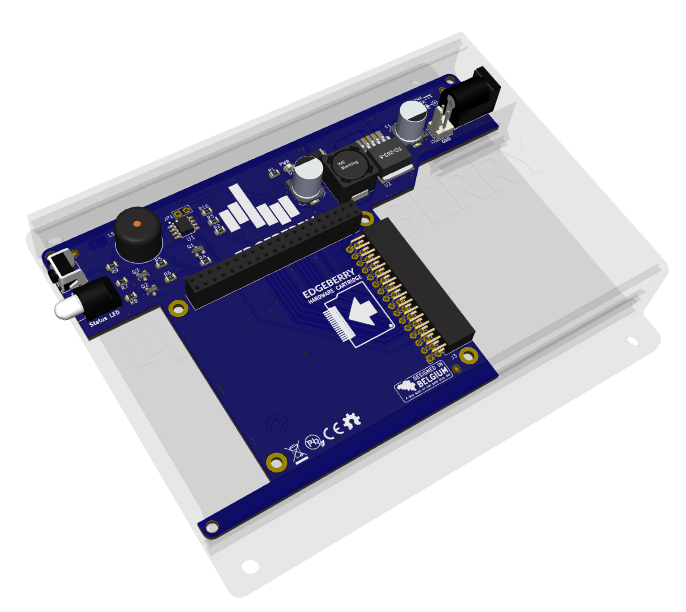
The Edgeberry Base Board provides essential additional functionality for deploying the Raspberry Pi Model B as an IoT edge device in a real-world environment.
For using your Edgeberry hardware with the Edgeberry ecosystem (e.g. the Edgeberry Dashboard), you'll need to install the Edgeberry Device Software. Follow these installation steps. If you have different plans with this board, this software is not required for correct operation of any of its hardware components.
[!important] When you purchased the Edgeberry Hardware, the manufacturer has written the EEPROM. If you are the manufacturer, or you're hacking your Edgeberry board, then continue with the following steps.
write protection jumper (JP1) on the Edgeberry Hardware to enable writing the EEPROMeepmake $ ./eepmake eeprom_settings.txt edgeberry.eepeepflash.sh $ sudo ./eepflash -w -t=24c256 -f=edgeberry.eepreboot the device and check the device tree for your hat's settings $ cat /proc/device-tree/hat/vendor)Copyright© 2024 Sanne 'SpuQ' Santens. This project is released under the CERN OHL-W license. The Rules & Guidelines apply to the usage of the Edgeberry™ brand.
If you'd like to contribute to this project, please follow these guidelines:
main.| Qty | Value | Footprint | References |
|---|---|---|---|
| 14 | LOGO | LOGO | G***, G***, G***, G***, G***, G***, G***, G***, G***, G***, G***, G***, G***, G*** |
| 4 | 10k | Resistor_SMD:R_0805_2012Metric | R2, R3, R9, R10 |
| 3 | 270R | Resistor_SMD:R_0805_2012Metric | R1, R7, R8 |
| 3 | 3k3 | Resistor_SMD:R_0805_2012Metric | R4, R5, R6 |
| 3 | BC547 | TO_SOT_Packages_SMD:SOT-23 | Q1, Q2, Q3 |
| 2 | 330uF | Capacitors_SMD:c_elec_8x10 | C1, C2 |
| 1 | 12Vin | Connector_BarrelJack:BarrelJack_Horizontal | P1 |
| 1 | 24LC256 | emcosys:SOIC_8 | U1 |
| 1 | 33uH | Inductors:SELF-WE-PD-XXL | L1 |
| 1 | Buzzer | Buzzers_Beepers:Buzzer_12x9.5RM7.6 | LS1 |
| 1 | Edgeberry Cartridge Connector | Connector_PinSocket_2.54mm:PinSocket_2x16_P2.54mm_Horizontal | J3 |
| 1 | Jumper_2_Open | Connector_PinHeader_2.54mm:PinHeader_1x02_P2.54mm_Vertical | JP1 |
| 1 | LED | LED_SMD:LED_0805_2012Metric | D3 |
| 1 | LM2596S-5.0 | Package_TO_SOT_SMD:TO-263-5_TabPin3 | U2 |
| 1 | LOGO | emcosys:SpuQ_5mm_copper | G*** |
| 1 | Led_x2 | emcosys:bicolor_LED_right_angle | D1 |
| 1 | Molex_KK_1x02_P2.54mm | Connector_Molex:Molex_KK-254_AE-6410-02A_1x02_P2.54mm_Vertical | J1 |
| 1 | Raspberry_Pi_2_3 | Connector_PinSocket_2.54mm:PinSocket_2x20_P2.54mm_Vertical | J2 |
| 1 | SS54 | Diode_SMD:D_SMA | D2 |
| 1 | SW_PUSH | emcosys:tactile_switch_vertical | SW1 |
The 43 most common of 57 parts.
It measures 135 × 90 mm and has 2 copper layers, 1.6 mm thick.
57 parts, built around the LM2596S-5.0, 24LC256-I/P, BC547 and SS54. The full list of its parts is on this page, with links to each part's symbol and footprint where PCBKit's library has them.
From the Edgeberry/Edgeberry-Baseboard repository on GitHub, at the commit this page was made from: the board is Edgeberry.kicad_pcb and its schematic Edgeberry.kicad_sch. PCBKit opens the board in the browser, with nothing to install.
Its repository publishes it under the CERN-OHL-W-2.0 licence: you may reuse it on that licence's terms (keep the author's notice, and for a copyleft licence share your changes alike).
kurozz/dsp_amp_2to4
Amplifier with DSP based on TPA3116D2 and ADAU1701 with 4 outputs and stereo input.


Aassimrepo/4S-BMS-Proteus-KiCad
Simulation and PCB design of a 4S Battery Management System using Proteus, Arduino and KiCad.

mikenorgate/3d-printer-power-hat
A Raspberry PI HAT for controlling power to your 3D printer

renatorgr/Boards
Hardware and firmware for the AgOpenGPS AiO v4.5 autosteer boards: Teensy 4.1 firmware with its own web page (GPS, IMU, autosteer), a XIAO ESP32 Wi-Fi status page, XIAO adapter boards, and an Arduino Nano sprayer…


jad-jkh/Smart-Table-Solutions
Sample files from Jad Haddad's Smart Table Solutions including: KiCad PCB files (schematic, layout, and 3D view) and screenshots, along with embedded C code for motor control