2 layers181.4 × 179.8 mm
Rubber duckey
ajvizganapathy-pixel/FlipperZero-DIY-STM32WB55-NucleusDark
DIY Flipper Zero clone using STM32WB55CGU6 — KiCad PCB, Momentum firmware, 200+ apps, BadUSB scripts, wiring diagrams
37 parts10

 dmarcr1997/COR-SAT
COR-SAT turns natural-language mission requests into tested Python mission packages for a Raspberry Pi satellite payload.
Sat ir link is an open-source printed circuit board by dmarcr1997, from the dmarcr1997/COR-SAT repository on GitHub, published under the MIT licence. It is a 2-layer board of 62 × 82 mm with 21 parts on 11 nets, routed with 69 tracks and 0 vias.
It is built around the TSAL6200 and TSOP38238. Its parts include 5 resistors, 4 capacitors, 3 connectors, 1 diode and 1 transistor.


COR-SAT turns natural-language mission requests into tested Python mission packages for a Raspberry Pi satellite payload. It combines AI-assisted generation, deterministic evaluation, a supervised runtime, a Python hardware SDK, a Rust HAL, camera capture, and prototype infrared communications hardware.
Experimental project. Generated missions are limited to the capabilities and checks documented below.
flowchart LR
    A[Mission request] --> B[Typed requirements]
    B --> C[Minimal generator]
    C --> D{Evaluator}
    D -->|Pass| H[Mission package]
    D -->|Fail| E[Robust generator]
    E --> D
    D -->|Both fail| F[Repair once]
    F --> D
    H --> I[Runner]
    I --> J[Python SDK]
    J --> K[Rust HAL]
    K --> L[Pi camera]

    M[IR breadboard] -. prototype .-> N[KiCad PCB]
Model calls return text only and never write project files. The controller validates requirements, evaluates behavior, writes the package, derives manifest.json, and validates the final package against the runner schema.
| Area | Status |
|---|---|
| Camera mission generation | Working |
| Timed capture and heartbeats | Working |
| Shutdown handling | Working |
| Sparse Lucas-Kanade optical flow | Working |
| Mission supervision and logs | Working on Linux and Raspberry Pi OS |
| IR communications hardware | Breadboard and KiCad prototype |
| IR communications mission API | Not implemented |
| IMU and actuator support | Not implemented |
| Path | Purpose |
|---|---|
agents/ | Parse, generate, evaluate, repair, and package missions |
runner/ | Validate, launch, supervise, stop, and inspect missions |
sdk/ | Python client for the satellite HAL |
hal/ | Rust HTTP service for camera and system access |
missions/ | Reviewed mission packages |
runtime/ | Mission state, heartbeat data, and logs |
schematics/ | KiCad project, schematic PDF, PCB, and STEP models |
demo/ | Offline HTML presentation with embedded media |
tests/ | Unit and acceptance tests |
qwen3:4b-instructrpicam-stillMission generation and tests can run without camera hardware. Physical mission execution and runner supervision are intended for Linux or the Raspberry Pi.
git clone https://github.com/dmarcr1997/COR-SAT.git
cd COR-SAT
python -m venv .venv
Activate the environment:
| Platform | Command |
|---|---|
| Linux or Raspberry Pi | source .venv/bin/activate |
| Windows PowerShell | .\.venv\Scripts\Activate.ps1 |
Commands below use python. On Raspberry Pi OS, use python3 if python is not available.
Install the SDK and generation dependencies:
python -m pip install --upgrade pip
python -m pip install -e . ollama requests
For missions that calculate optical flow:
python -m pip install opencv-python numpyPull the model used by the generator:
ollama pull qwen3:4b-instructStart Ollama if it is not already running:
ollama serveThe generator expects Ollama on its default local endpoint and uses qwen3:4b-instruct. The model is configured in agents/generator.py. There is currently no project CLI flag for changing the model or Ollama host.
python -m unittest discover -s tests -v
cargo test --manifest-path hal/Cargo.toml
The Python suite mocks model calls, camera hardware, time delays, and OpenCV behavior. It does not require Ollama or a connected camera. The Cargo command tests the Rust HAL.
python -m agents.cli "Capture seven images at three-second intervals and send a heartbeat before every capture." --candidate demoGenerated files:
agents/candidates/demo/
|-- manifest.json
`-- mission.py
Use a new candidate name for each run. Existing candidate directories are not overwritten.
Capture one image.
Capture five images at two-second intervals.
Capture twenty images and calculate sparse optical flow in four groups.
Capture seven images, heartbeat before each capture, and handle shutdown signals.
Requests for communications, IMU, or actuator behavior are rejected before generation.
Install the camera module and use a current Raspberry Pi OS release. Raspberry Pi OS includes the standard rpicam-* tools. See the official camera setup guide.
Install Rust with rustup, then select an edition 2024-compatible toolchain:
curl --proto '=https' --tlsv1.2 -sSf https://sh.rustup.rs | sh
source "$HOME/.cargo/env"
rustup update stable
rustc --version
Rust 1.85 or newer is required.
Confirm that the camera stack can see the sensor:
rpicam-still --list-camerasThe current HAL uses the Raspberry Pi 5 IMX219 NoIR tuning file. Confirm it exists:
test -f /usr/share/libcamera/ipa/rpi/pisp/imx219_noir.jsonEarlier Raspberry Pi models store tuning files under /usr/share/libcamera/ipa/rpi/vc4/. Update the HAL tuning path before building if you use one of those models.
Build the HAL:
cargo build --release --manifest-path hal/Cargo.tomlStart the HAL from the repository root:
cargo run --release --manifest-path hal/Cargo.tomlThe service listens on 0.0.0.0:3000. The Python SDK connects to http://localhost:3000 by default, so the runner and HAL should run on the same Pi unless the client configuration is changed.
curl http://localhost:3000/v1/system/health
curl http://localhost:3000/v1/system/status
curl http://localhost:3000/v1/system/capabilities
curl -X POST http://localhost:3000/v1/camera/capture
Camera captures are written to hal/caps/ when the HAL is started from the repository root.
Run the included camera mission:
python -m runner.cli supervise periodic-cameraRun a generated candidate:
python -m runner.cli supervise demo --candidatesupervise monitors the process, checks heartbeats, and restarts one unexpected failure. Use start when supervision is not needed.
supervise stays in the foreground. Open a second terminal to inspect status or logs, or to stop the mission.
| Action | Command |
|---|---|
| Start reviewed mission | python -m runner.cli start periodic-camera |
| Supervise reviewed mission | python -m runner.cli supervise periodic-camera |
| Start candidate | python -m runner.cli start demo --candidate |
| Supervise candidate | python -m runner.cli supervise demo --candidate |
| Show status | python -m runner.cli status demo |
| Show logs | python -m runner.cli logs demo --lines 100 |
| Stop mission | python -m runner.cli stop demo |
Runtime artifacts:
runtime/<mission-name>/
|-- heartbeat.json
|-- mission.log
`-- state.json
Mission-generated files are stored beside the mission code:
| Mission type | Output directory |
|---|---|
| Reviewed | missions/<name>/outputs/ |
| Candidate | agents/candidates/<name>/outputs/ |
Optical-flow missions write JPEG results to that outputs/ directory.
Every candidate must pass:
If both generated candidates fail, the highest-scoring failure is repaired once and evaluated again. A failed repair stops the pipeline without creating a package.
The camera payload is connected through the Rust HAL. The infrared link is a separate hardware prototype and is not yet exposed through the SDK or mission generator.
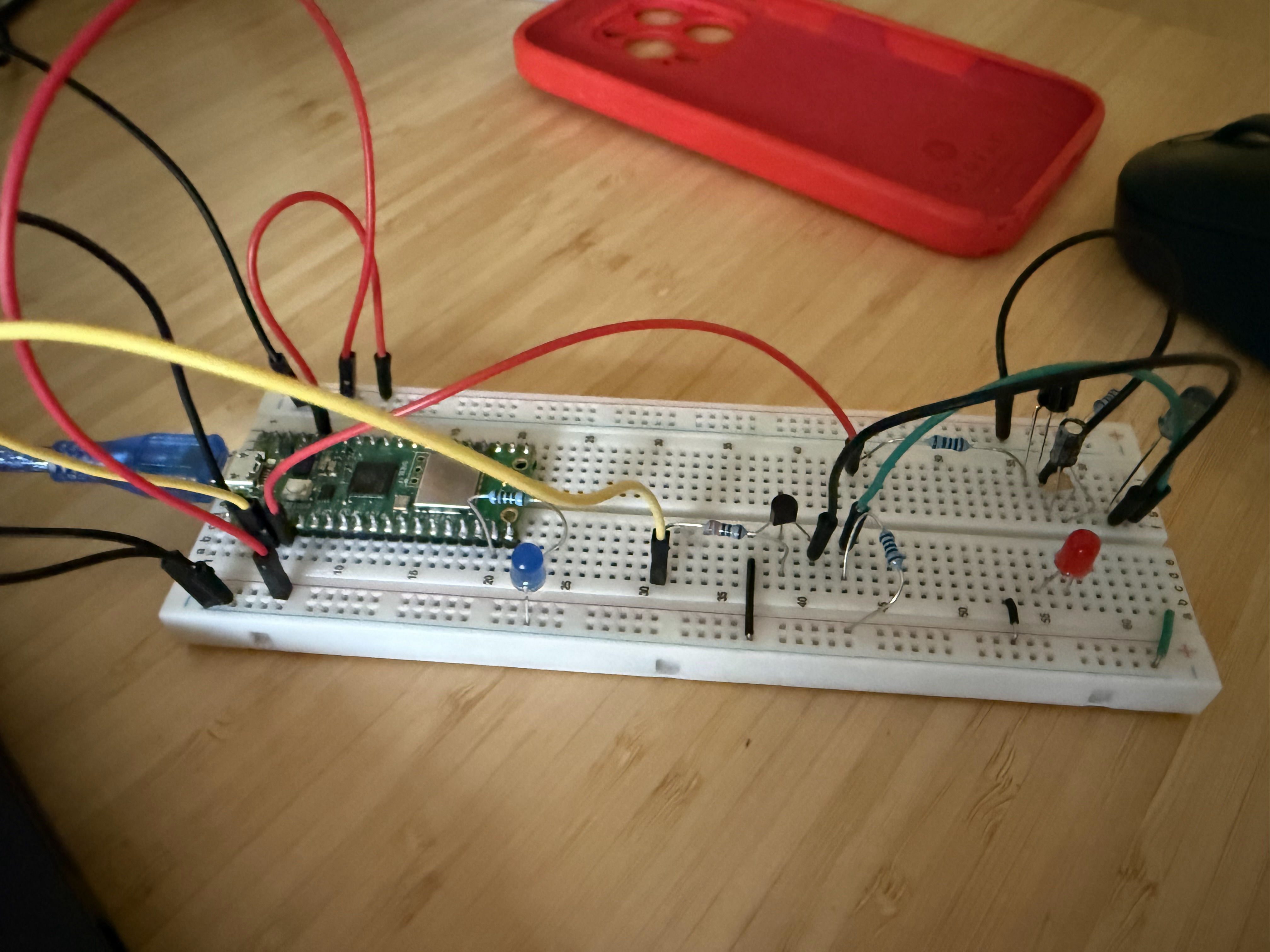
| Artifact | Link |
|---|---|
| KiCad project | sat_ir_link.kicad_pro |
| PCB layout | sat_ir_link.kicad_pcb |
| Schematic | sat_ir_link.kicad_sch |
| Schematic PDF | sat_ir_link.pdf |
| Board STEP model | v23d-print-board.step |
Open demo/index.html in a browser. The presentation works offline and includes keyboard navigation, speaker notes, the software demonstration, and project hardware images.
| Key | Action |
|---|---|
| Left or Right arrow | Change slide |
N | Toggle speaker notes |
F | Toggle fullscreen |
| Problem | Check |
|---|---|
| Ollama connection fails | Run ollama serve and confirm the model is pulled |
| Candidate already exists | Choose a new value for --candidate |
| HAL reports an unhealthy camera | Run rpicam-still --list-cameras |
| Camera capture fails | Confirm rpicam-still and the IMX219 NoIR tuning file are installed |
| Mission cannot reach HAL | Confirm the HAL is running on port 3000 on the same host |
| Supervision or stop fails on Windows | Run the mission runtime on Linux or Raspberry Pi OS |
| Optical-flow mission fails at runtime | Install opencv-python and numpy in the mission environment |
| Qty | Value | Footprint | References |
|---|---|---|---|
| 7 | TestPoint | TestPoint:TestPoint_THTPad_D4.0mm_Drill2.0mm | TP1, TP2, TP3, TP4, TP5, TP6, TP7 |
| 2 | 100nF | Capacitor_THT:C_Disc_D5.0mm_W2.5mm_P5.00mm | C1, C3 |
| 2 | 1kΩ | Resistor_THT:R_Axial_DIN0207_L6.3mm_D2.5mm_P10.16mm_Horizontal | R2, R5 |
| 1 | 100Ω | Resistor_THT:R_Axial_DIN0207_L6.3mm_D2.5mm_P10.16mm_Horizontal | R4 |
| 1 | 10kΩ | Resistor_THT:R_Axial_DIN0207_L6.3mm_D2.5mm_P10.16mm_Horizontal | R3 |
| 1 | 10µF | Capacitor_THT:CP_Radial_D5.0mm_P2.00mm | C2 |
| 1 | 2N2222 | Package_TO_SOT_THT:TO-92_Inline | Q1 |
| 1 | 4.7µF | Capacitor_THT:CP_Radial_D5.0mm_P2.00mm | C4 |
| 1 | 68Ω | Resistor_THT:R_Axial_DIN0207_L6.3mm_D2.5mm_P10.16mm_Horizontal | R1 |
| 1 | RX Connector | Connector:FanPinHeader_1x03_P2.54mm_Vertical | J2 |
| 1 | TSAL6200 | LED_THT:LED_D5.0mm | D1 |
| 1 | TSOP38238 | Connector:FanPinHeader_1x03_P2.54mm_Vertical | J3 |
| 1 | TX Connector | Connector:FanPinHeader_1x03_P2.54mm_Vertical | J1 |
It measures 62 × 82 mm and has 2 copper layers, 1.6 mm thick.
21 parts, built around the TSAL6200 and TSOP38238. The full list of its parts is on this page, with links to each part's symbol and footprint where PCBKit's library has them.
From the dmarcr1997/COR-SAT repository on GitHub, at the commit this page was made from: the board is schematics/sat_ir_link/sat_ir_link.kicad_pcb and its schematic schematics/sat_ir_link/sat_ir_link.kicad_sch. PCBKit opens the board in the browser, with nothing to install.
Its repository publishes it under the MIT licence: you may reuse it on that licence's terms (keep the author's notice, and for a copyleft licence share your changes alike).
ajvizganapathy-pixel/FlipperZero-DIY-STM32WB55-NucleusDark
DIY Flipper Zero clone using STM32WB55CGU6 — KiCad PCB, Momentum firmware, 200+ apps, BadUSB scripts, wiring diagrams


AskAlice/home-automation-pcbs
Daily Kimi-generated home automation PCB designs with KiCad sources, 3D models, and rendered documentation

bikeNomad/micropython-tv-b-gone
A MicroPython version of the classic TV-B-Gone tool with new code database

maehw/DiyIrTower
Do-it-yourself infrared serial communication tower (compatible with LEGO IR serial tower)


cedric-dufour/LIRC-HighPowerSerialTransceiver
LIRC High-Power Serial Transceiver [CC-BY]

Samuel-Malaj/PicoCalc-Open-Source-Student-Scientific-Calculator
Open source scientific calculator built on Raspberry Pi Pico W — custom PCB, WiFi messaging, IR projector control and games.