
2 layers68 × 40 mm
Stm32-io extend
hardenedlinux/cheap-pcb
Cheap PCB: Better understanding the current status of hardware supply chain
44 parts170CC0-1.0

CI workflow that flashes a STM32F103 board I designed on KiCad and runs Pytest-based HITL validation.
STM32 is an open-source printed circuit board by coreyjharrington-sys, from the coreyjharrington-sys/STM32DevBoardTestingProject repository on GitHub, published under the MIT licence. It is a 2-layer board of 41 × 31 mm with 34 parts on 46 nets, routed with 214 tracks and 26 vias.
It is built around the STM32F103C8T6 and AMS1117-3.3. Its parts include 13 capacitors, 5 resistors, 4 connectors, 2 ICs and 1 diode. It belongs with the STM32 boards of this library.


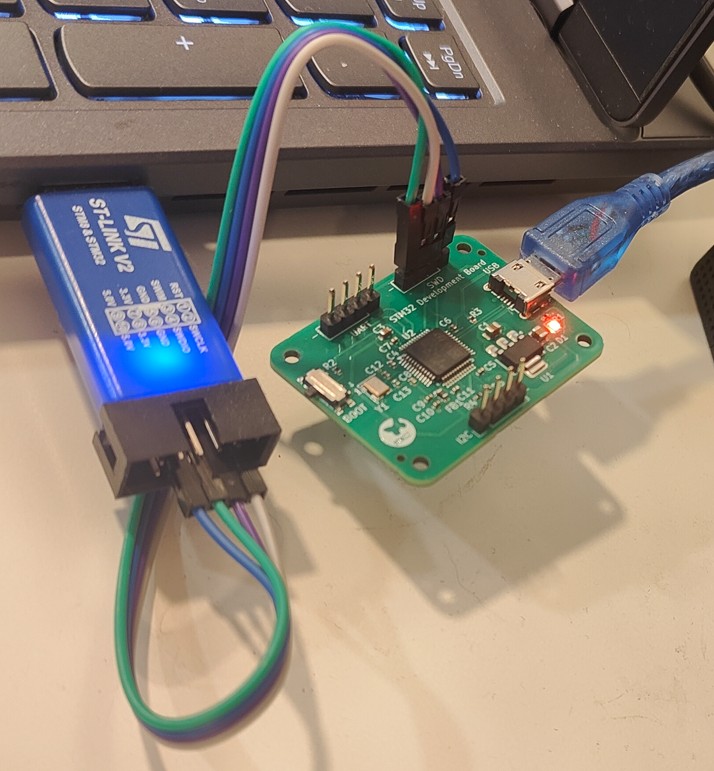
A combined hardware + firmware + automated test demonstration project
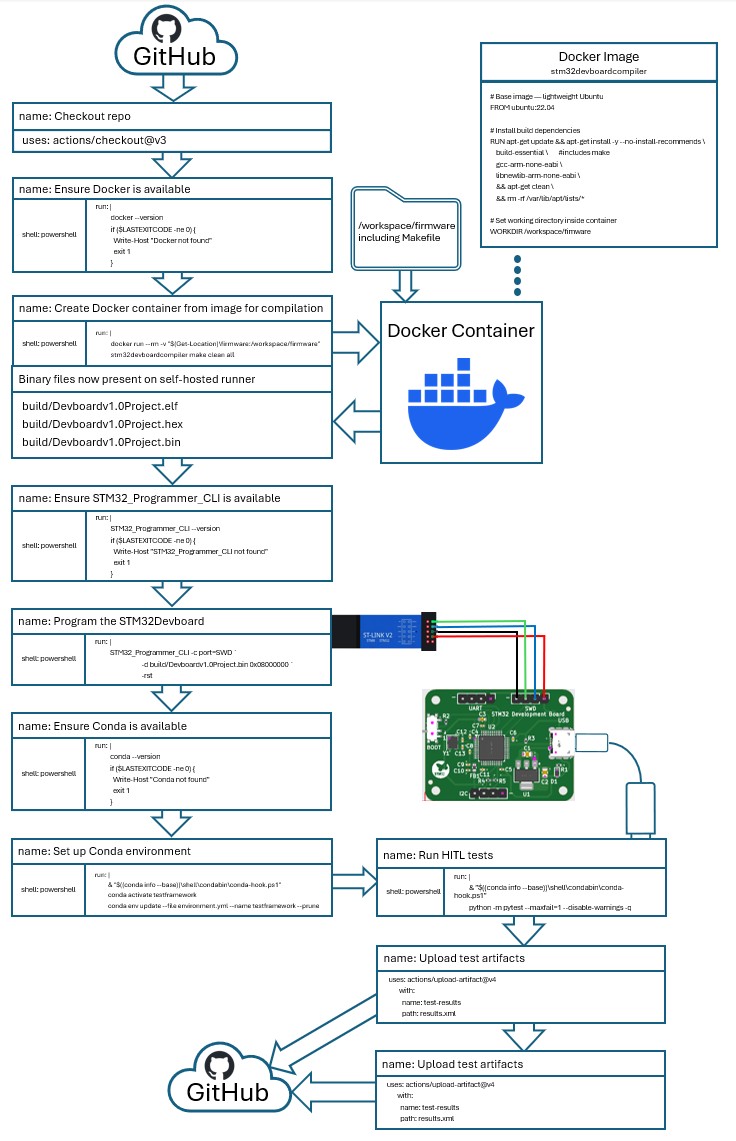
This project demonstrates a Hardware-In-The-Loop (HITL)-style automated test pipeline using a custom STM32F103C8T6 development board that I designed in KiCad, combined with firmware validation using Pytest and GitHub Actions.
When code is pushed or a pull request is opened, the CI workflow automatically:
This pipeline simulates a professional HITL test system, showing how real hardware can be validated automatically using continuous integration.
Test_Serial/
│
├── firmware/              # Embedded C firmware for STM32F103C8T6
│   ├── src/
│   ├── include/
│   └── (build artifacts ignored via .gitignore)
│
├── tests/                 # Pytest functional tests for HITL validation
│   ├── test_commands.py
│   ├── test_math_ops.py
│   ├── dut_config.json    # PID/VID → auto-detect COM port
│   └── helpers/
│
├── hardware/              # Full KiCad project for the custom STM32 board
│   ├── *.kicad_pro
│   ├── *.kicad_sch
│   ├── *.kicad_pcb
│   ├── symbols/
│   └── footprints/
│
├── scripts/               # Optional Python helper scripts
│
├── requirements.txt       # Python dependencies for Pytest HITL tests
├── .gitignore
└── README.md
The KiCad project is intentionally included to showcase the board design to recruiters/employers.
Only temporary, generated, and fabrication files are ignored via .gitignore.
The DUT is a custom development board designed in KiCad. The design includes:
The PCB and schematic files are included so reviewers can inspect routing, component selection, layout style, and design organization.
This hardware is used directly in the HITL CI workflow.
Note: If you wish to run this demo yourself a Blue Pill Developement board can be sustituted.
Note: Credit to Phil's Lab for board design tutorial https://www.youtube.com/watch?v=aVUqaB0IMh4
The embedded firmware is intentionally minimal and built for testing. It implements a UART command interface supporting:
A command/response handshake
Four arithmetic operations:
A small set of additional commands used by the test suite
This makes the board ideal for CI-driven firmware verification.
Note: If running this demo use ST-LINK V2 Programmer for flashing the board.
📦 Dependencies 🛠 Development Dependencies These are tools used during development and design, not required on the CI runner itself:
🖥️ Runner Dependencies These must be installed and available on the self‑hosted runner before the HITL workflow can execute:
All commands should return valid version information. If any fail, install or update the missing dependency before running the workflow
🐍 Python Dependencies (via Conda) The Python environment is defined in environment.yml and updated in CI with: conda env update --file environment.yml --name testframework --prune
Key libraries include:
After flashing the firmware, GitHub Actions triggers Pytest to validate real hardware behavior:
A Python script scans the system’s USB devices
It loads the dut_config.json file to locate the board based on:
The test suite opens the serial port and sends each supported command
Responses are parsed and validated
Example Pytest coverage:
Test artifacts (logs, HTML output, temp files) are fully ignored via .gitignore.
A Docker container is provided for reproducible STM32F103 firmware builds. It includes the ARM toolchain and necessary libraries.
Build the Docker image once:
docker build -t stm32devboardcompiler .Compile firmware from your local source by mounting the repo:
docker run --rm -v ${PWD}:/workspace -w /workspace/firmware stm32devboardcompiler make allTo clean and rebuild:
docker run --rm -v ${PWD}:/workspace -w /workspace/firmware stm32devboardcompiler make clean allNotes:
Our CI/CD pipeline is defined in .github/workflows/*.yml files using GitHub Actions syntax.
Each workflow specifies triggers under the on: key and jobs under the jobs: key.
The workflow runs automatically on:
mainThe hitl-test job runs on a self‑hosted runner (with STM32 hardware attached) and performs:
This setup provides a fully automated feedback loop:
🐍 Python Environment This CI workflow uses Conda to manage dependencies reproducibly.
Update the environment locally with: conda env update --file environment.yml --name testframework --prune
Activate the environment: conda activate testframework
Run tests: python -m pytest --maxfail=1 --disable-warnings -q
Key libraries include:
dut_config.json)This file determines which device to test against:
{
    "pid": "0x1234",
    "vid": "0x5678",
    "baudrate": 115200
}
Pytest uses these identifiers to automatically determine the correct COM port.
This avoids any hard-coding and ensures the CI system always targets the correct board.
This project is licensed under the MIT General Public License (GPL).
See the LICENSE file for details.
| Qty | Value | Footprint | References |
|---|---|---|---|
| 5 | 100n | Capacitor_SMD:C_0402_1005Metric | C4, C5, C6, C7, C11 |
| 4 | 1.5k | Resistor_SMD:R_0402_1005Metric | R1, R3, R4, R5 |
| 4 | MountingHole | MountingHole:MountingHole_2.2mm_M2 | H1, H2, H3, H4 |
| 3 | Conn_01x04_Pin | Connector_PinHeader_2.54mm:PinHeader_1x04_P2.54mm_Vertical | J2, J3, J4 |
| 2 | 10p | Capacitor_SMD:C_0402_1005Metric | C12, C13 |
| 2 | 1u | Capacitor_SMD:C_0402_1005Metric | C9, C10 |
| 2 | 22u | Capacitor_SMD:C_0805_2012Metric | C1, C2 |
| 1 | 10k | Resistor_SMD:R_0402_1005Metric | R2 |
| 1 | 10n | Capacitor_SMD:C_0402_1005Metric | C8 |
| 1 | 10u | Capacitor_SMD:C_0603_1608Metric | C3 |
| 1 | 120R | Inductor_SMD:L_0603_1608Metric | FB1 |
| 1 | 16MHz | Crystal:Crystal_SMD_3225-4Pin_3.2x2.5mm | Y1 |
| 1 | AMS1117-3.3 | Package_TO_SOT_SMD:SOT-223-3_TabPin2 | U1 |
| 1 | LOGO | LOGO | G*** |
| 1 | Red | LED_SMD:LED_0603_1608Metric | D1 |
| 1 | STM32F103C8T6 | Package_QFP:LQFP-48_7x7mm_P0.5mm | U2 |
| 1 | SW_SPDT | Button_Switch_SMD:SW_SPDT_PCM12 | SW1 |
| 1 | USB_B_Micro | Connector_USB:USB_Micro-B_Wuerth_629105150521 | J1 |
The 33 most common of 34 parts.
It measures 41 × 31 mm and has 2 copper layers, 1.6 mm thick.
34 parts, built around the STM32F103C8T6 and AMS1117-3.3. The full list of its parts is on this page, with links to each part's symbol and footprint where PCBKit's library has them.
From the coreyjharrington-sys/STM32DevBoardTestingProject repository on GitHub, at the commit this page was made from: the board is hardware/STM32.kicad_pcb and its schematic hardware/STM32.kicad_sch. PCBKit opens the board in the browser, with nothing to install.
Its repository publishes it under the MIT licence: you may reuse it on that licence's terms (keep the author's notice, and for a copyleft licence share your changes alike).
hardenedlinux/cheap-pcb
Cheap PCB: Better understanding the current status of hardware supply chain

milar111/HEAT
An open-source STM32 SMD assembly station for precision soldering. Uses a custom Smart Pulse & Coast algorithm to drive 400W mains heaters via SSR. Features OLED UI, NTC feedback, and safety cooling.


minhle4397/Line-Follower-Robot-v2
Improved Hardware and Firmware for Line Follower Robot

mupfdev/TrackMAG
An open hardware development board primarily intended for the development of accessible input devices.

RaduAndre/DeskMixer
DeskMixer is a software that allows control of application volumes with real sliders, and action mapping on buttons using arduino like platforms. The project was inspired originally by deej.

abda-s/STM32-Phill-s-Lab-PCB-Course
A beginner-friendly introduction to STM32 hardware design and KiCad
