

2 layers72 × 60 mm
Jewelled lc1 chargerProgrammer
matthiasnowak/jewelled
This is a panel meant for production of the Earrings, allowing for 2 Earrings per panel.
119 parts3

 colincreasman/fortemis1
The Fortemis Keyboard (Forager+Ferris Sweep+Totem)
Fortemis left is an open-source printed circuit board by colincreasman, from the colincreasman/fortemis repository on GitHub. It is a 2-layer board of 145.3 × 119.5 mm with 26 parts on 24 nets, routed with 445 tracks and 178 vias.
It is built around the SMTSO2020MTJ and MSK12C02. It belongs with the keyboards and input boards and the nRF52 and nRF5x boards of this library.
ZMK config for the Fortemis keyboard (Forager+Totem+FerrisSweep)
Fortemis is designed from scratch with Ergogen, KiCad and a Forager-style enclosed case. It has the Ferris Sweep's column stagger, TOTEM's column splay, and three thumb keys per half on the Totemist's thumb arc, 15 mm farther out than the Totemist's. None has been built yet, so nothing has been tried on hardware.
ergogen/: the Ergogen layout config, footprints and build toolspcb/: KiCad 10 projects for both halves (routed); pcb/fab/: Gerber zips to order, and BOM and
placement files for PCB assemblycase/: STL files to print, a top and a base for each half, in two styles: the Forager-style
enclosed case and the Totemist-style sandwich case,
whose rim comes up to the keycap tops (compare them)Rebuild the PCBs from ergogen/config.yaml (needs node, KiCad 10 and Java 25+):
python3 ergogen/tools/pcb.py build   # Ergogen -> pcb/*.kicad_pcb
python3 ergogen/tools/pcb.py route   # Freerouting + GND pours, then DRC (re-routed until clean)
python3 ergogen/tools/pcb.py drc     # DRC summary only
python3 ergogen/tools/pcb.py fab     # Gerbers + drill -> pcb/fab/*.zip, BOM + placement CSVs
Rebuild the cases from the PCBs (needs KiCad 10 and pip install -r ergogen/tools/requirements.txt):
python3 ergogen/tools/case.py            # enclosed case: case/enclosed/*.stl and docs/img/case.png
python3 ergogen/tools/case_sandwich.py   # sandwich case: case/sandwich/*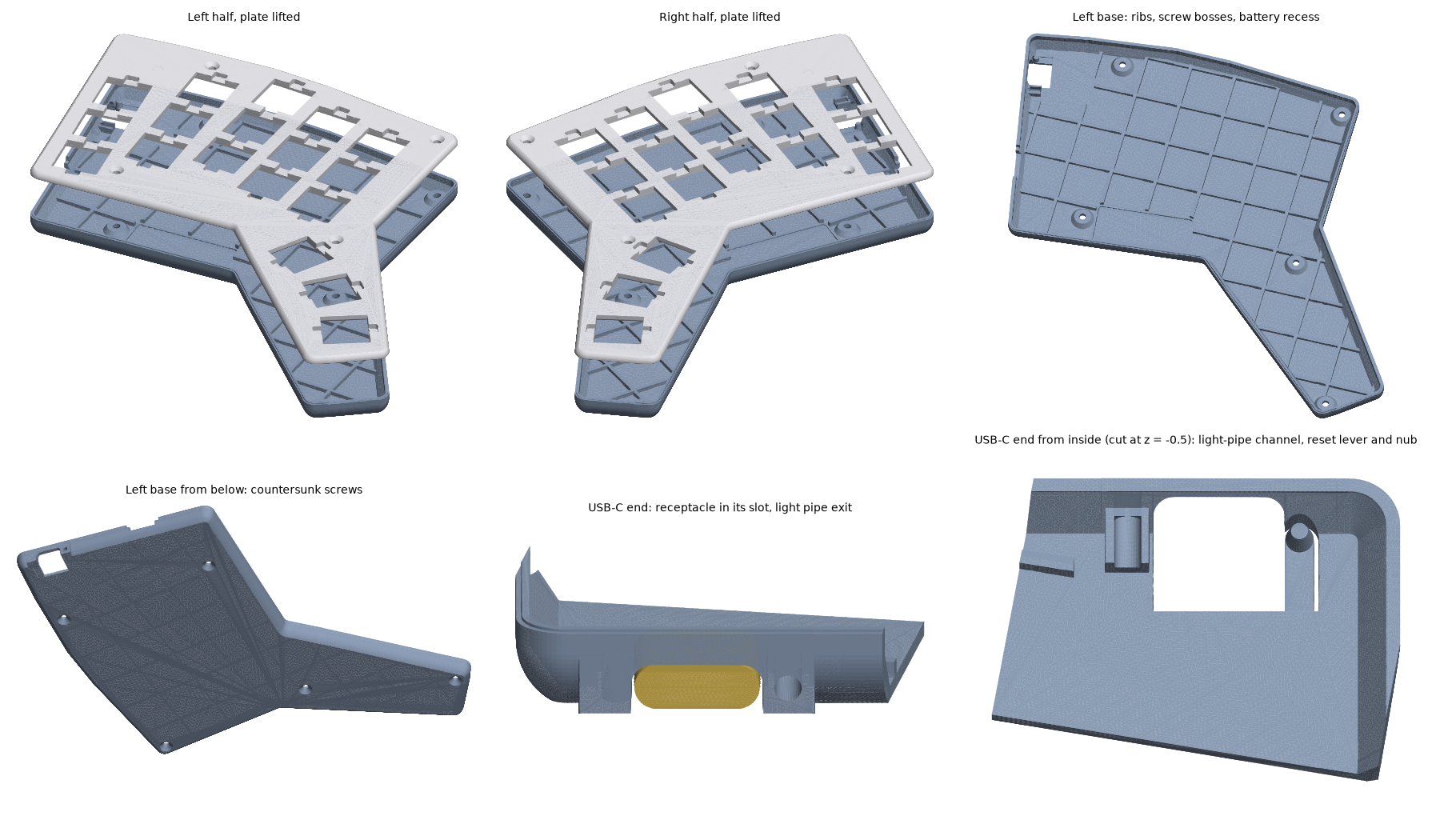
This repository is also the keyboard's ZMK module and config, on ZMK v0.3.0.
boards/shields/fortemis/: the shield: pins, keymap and the key layout ZMK Studio drawsbuild.yaml: the firmware images to build; config/west.yml: ZMK and module versionsThe keymap (boards/shields/fortemis/fortemis.keymap) is the owner's Forager keymap: QWERTY with
home-row mods and four layers. The near and far thumbs keep the Forager thumbs' keys, and the new
tuck thumbs are Esc (tap) / media layer (hold) on the left and Delete on the right.
Holding both near thumbs (Enter + Backspace) gives the maintenance layer:
| Key | Does |
|---|---|
| Q or P, held 2 s | Reboots that half into its bootloader |
| T, held 2 s | Reboots the central (the left half, or the dongle in dongle mode) into its bootloader |
| A S D F G | Bluetooth profiles 0 to 4 |
| W | Clears the current Bluetooth profile |
| U | Unlocks ZMK Studio |
Push to GitHub: the Build ZMK firmware action builds every image, and the run's firmware
artifact holds the .uf2 files. Or build them locally with Docker:
ergogen/tools/zmk_build.sh # every image in build.yaml -> firmware/*.uf2The pin lists and Studio's key layout in the shield are generated from the PCBs, so re-run this
after changing a PCB (needs KiCad 10 and pip install -r ergogen/tools/requirements.txt):
python3 ergogen/tools/zmk.py           # update the shield from pcb/*.kicad_pcb
python3 ergogen/tools/zmk.py --check # only check; fails if the shield and the PCBs differXIAO-SENSE)..uf2 file onto the drive. The half restarts with the new firmware.| File | Flash to | Mode |
|---|---|---|
fortemis_left rgbled_adapter-seeeduino_xiao_ble-zmk.uf2 | left half | standalone |
fortemis_right rgbled_adapter-seeeduino_xiao_ble-zmk.uf2 | right half | both (the right half is a peripheral either way) |
fortemis_left_dongle_mode.uf2 | left half | dongle |
fortemis_dongle.uf2 | dongle | dongle |
settings_reset-seeeduino_xiao_ble-zmk.uf2 | either half | clears the half's Bluetooth pairings |
settings_reset_dongle.uf2 | dongle | clears the dongle's Bluetooth pairings |
In standalone mode the left half is the central: pair the computer with Fortemis. If the halves don't connect to each other, flash the settings reset to both, then the firmware again.
The first time a half runs the firmware, it restarts once by itself. Two of the XIAO Plus's pads (D14 and D15) are the chip's NFC antenna pins, and the firmware turns NFC off so that they work as key inputs. That setting is stored in the chip, so it survives later flashing.
The keyboard can also run through PandaKB's ZMK dongle (a nice!nano v2 with a 1.3" OLED), as the Forager does. The dongle becomes the central and both halves its peripherals: plug it into a computer and the keyboard works as a USB keyboard, with no Bluetooth pairing on that computer. ZMK fixes each part's role at build time, so switching modes means reflashing.
| Qty | Value | Footprint | References |
|---|---|---|---|
| 18 | ceoloide:switch_choc_v1_v2 | S1, S2, S3, S4, S5, S6, S7, S10, S11, S12, S13, S14, S15, S16, S17, S18 +2 | |
| 5 | SMTSO2020MTJ | fortemis:nut_smd_m2 | NUT1, NUT2, NUT3, NUT4, NUT5 |
| 1 | LiPo 301230 | fortemis:battery_lipo_pads | BT1 |
| 1 | MSK12C02 | fortemis:power_switch_msk12c02_side | PWR1 |
| 1 | XIAO nRF52840 Plus | fortemis:mcu_xiao_nrf52840_plus | MCU1 |
It measures 145.3 × 119.5 mm and has 2 copper layers, 1.6 mm thick.
26 parts, built around the SMTSO2020MTJ and MSK12C02. The full list of its parts is on this page, with links to each part's symbol and footprint where PCBKit's library has them.
From the colincreasman/fortemis repository on GitHub, at the commit this page was made from: the board is pcb/fortemis_left.kicad_pcb. PCBKit opens the board in the browser, with nothing to install.
Its repository states no licence, so its author keeps all rights: ask colincreasman before reusing the design.
matthiasnowak/jewelled
This is a panel meant for production of the Earrings, allowing for 2 Earrings per panel.


ozkan/Cockpit-Keyboard
A hot swap system column staggered mechanical keyboard, running QMK Firmware on Pro Micro controllers.

schuay/cirrus40
A 40% split mechanical keyboard with a focus on usable rotary encoders

Ardakilic/woodpecker-keyboard
5 row ortholinear keyboard, based on Lumberelite and Lumberjack

AndreiVladescu/LibrePLC32
The goal of the project is to create a compact, hackable, and well-documented PLC platform for industrial automation experiments, prototyping, education, and open hardware development.

neuman/gripster
thumbdeck — wireless split thumb keyboard (nRF52840 + ZMK, BLE split, i8+-inspired). Layout converged & graded PASS.

Markuselectronics/Raspberry-Pi-Pico-LAN-Tester
Portable Raspberry Pi Pico LAN tester with W5500 Ethernet, OLED display and battery charging.