
4 layers234 × 84 mm
Main panel
google/mozc-devices
Circuit diagrams and firmware source code for Gboard DIY keyboards
234 parts3kApache-2.0

 bbarni2020/Barni-keyboard
Barni Keyboard is a cool custom keyboard with 106 keys and colorful lights for each key. It has a small OLED screen that shows the time and other info, plus a rotary knob to easily scroll through menus.
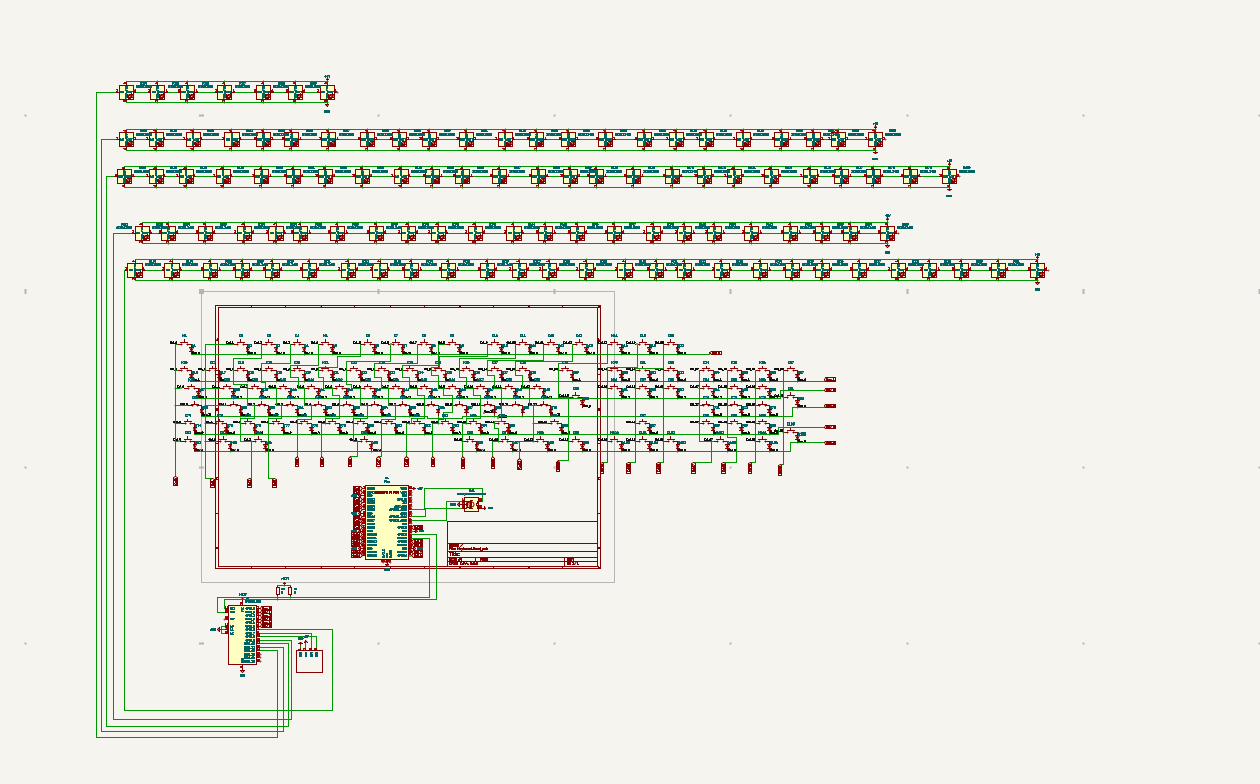
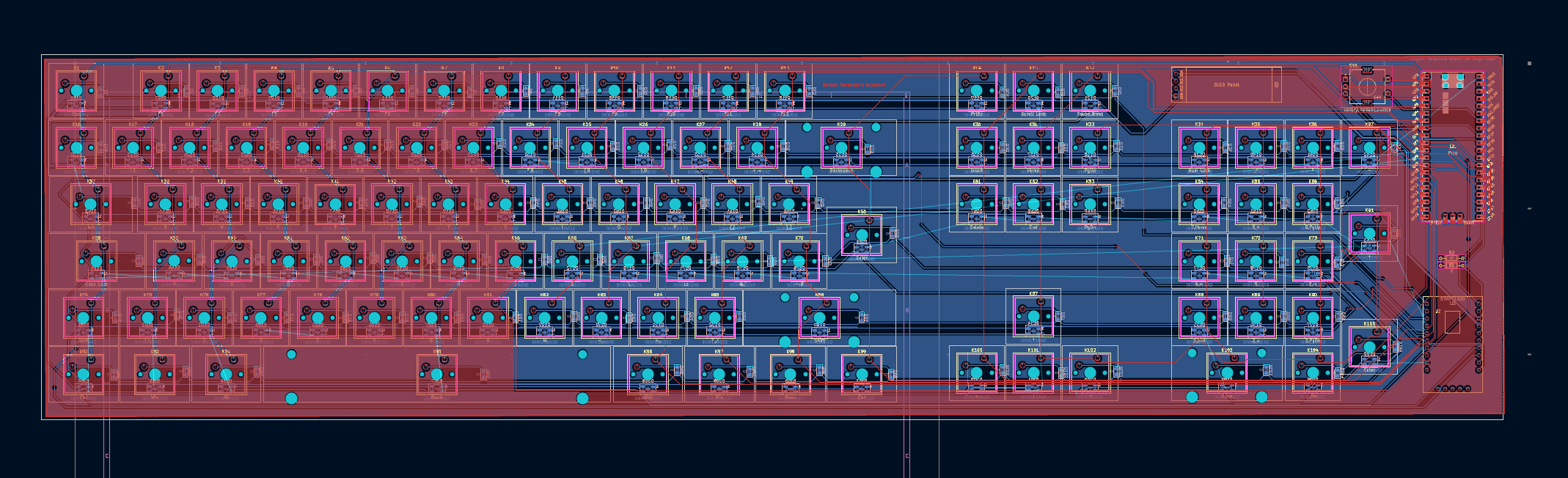
Keyboard is an open-source printed circuit board by bbarni2020, from the bbarni2020/Barni-keyboard repository on GitHub. It is a 2-layer board of 502.5 × 125.5 mm with 321 parts on 264 nets, routed with 1,503 tracks and 24 vias.
It is built around the SK6812MINI-E. Its parts include 210 diodes, 78 switches, 2 resistors and 1 IC. It belongs with the keyboards and input boards and the RP2040 boards of this library.
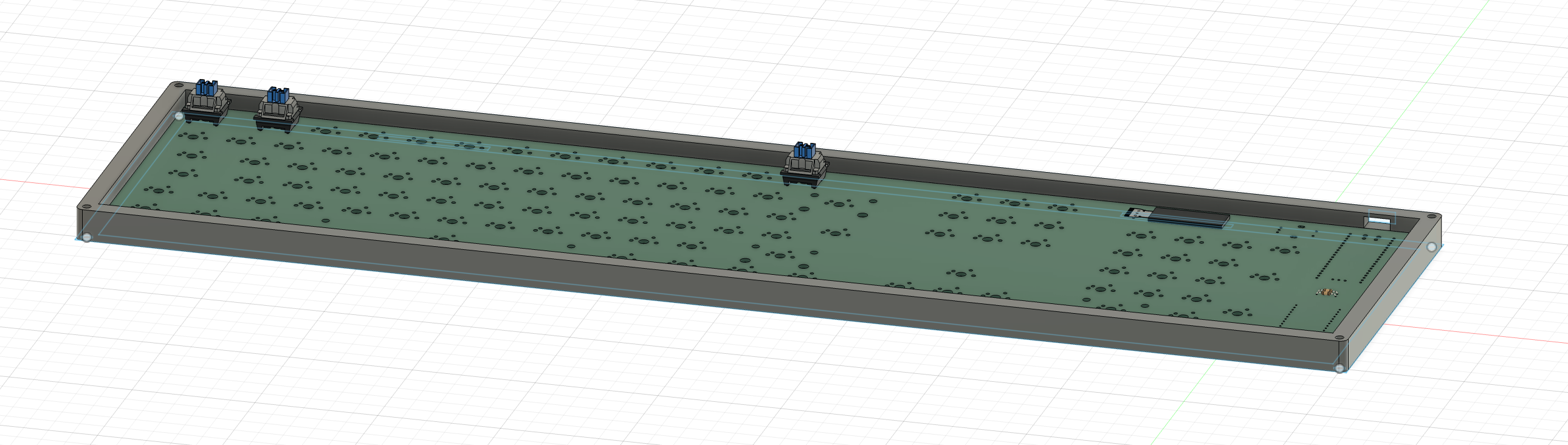
Barni Keyboard is a cool custom keyboard with 106 keys and colorful lights for each key. It has a small OLED screen that shows the time and other info, plus a rotary knob to easily scroll through menus. This keyboard is perfect for gamers, coders, or anyone looking for a unique and fun typing experience.
106 Key switches (Gateron Clear Switches, ~$0.50 each) --> Total: ~$53.00
105 Diodes (1N4148 SMD, ~$0.10 each) --> Total: ~$10.50
105 LEDs (SK6812MINI for per-key lighting, ~$0.50 each) --> Total: ~$52.50
Keycap set (YMDK White Backlit 108 Keycaps(Cherry Profile Double Shot Shine Through/108 TKL 61 Using), ~$23.00 total) --> Total: ~$23.00
Stabilizers (Durock V2, high-quality for smooth feel, ~$20.00 total) --> Total: ~$20.00
Fasteners (screws, nuts, etc., assorted) --> Total: ~$8.00
Misc Electronics (resistors, Kailh hotswap sockets, etc., ~$15.00 total) --> Total: ~$15.00
Raspberry Pi Pico (official board, ~$4.00 each) --> Total: ~$4.00
OLED Display (0.96" module, ~$3.00 each) --> Total: ~$3.00
IO Expander (STMPE1600, for extended I/O, ~$3.00 each) --> Total: ~$3.00
Rotary Encoder (Alps EC11, ~$1.00 each) --> Total: ~$1.00
PCB --> Total: $110.00 (I checked on a locak manufacturer)
3D print (no price, included)
Total $302.00
| Qty | Value | Footprint | References |
|---|---|---|---|
| 105 | D | Diode_SMD:D_0805_2012Metric_Pad1.15x1.40mm_HandSolder | D1, D10, D11, D12, D13, D14, D15, D16, D17, D18, D100, D101, D102, D103, D104, D105 +89 |
| 105 | SK6812MINI | LED_SMD:LED_SK6812MINI_PLCC4_3.5x3.5mm_P1.75mm | D106, D107, D108, D109, D110, D111, D112, D113, D114, D115, D116, D117, D118, D119, D120, D121 +89 |
| 2 | Ctrl | Button_Switch_Keyboard:SW_Cherry_MX_1.25u_PCB | K92, K99 |
| 2 | R | Resistor_THT:R_Axial_DIN0204_L3.6mm_D1.6mm_P7.62mm_Horizontal | R1, R2 |
| 2 | Win | Button_Switch_Keyboard:SW_Cherry_MX_1.25u_PCB | K93, K97 |
| 1 | !,1 | Button_Switch_Keyboard:SW_Cherry_MX_1.00u_PCB | K17 |
| 1 | ",2 | Button_Switch_Keyboard:SW_Cherry_MX_1.00u_PCB | K18 |
| 1 | $,4 | Button_Switch_Keyboard:SW_Cherry_MX_1.00u_PCB | K20 |
| 1 | %,5 | Button_Switch_Keyboard:SW_Cherry_MX_1.00u_PCB | K21 |
| 1 | &,7 | Button_Switch_Keyboard:SW_Cherry_MX_1.00u_PCB | K23 |
| 1 | (,9 | Button_Switch_Keyboard:SW_Cherry_MX_1.00u_PCB | K25 |
| 1 | ),0 | Button_Switch_Keyboard:SW_Cherry_MX_1.00u_PCB | K26 |
| 1 | * | Button_Switch_Keyboard:SW_Cherry_MX_1.00u_PCB | K36 |
| 1 | *,8 | Button_Switch_Keyboard:SW_Cherry_MX_1.00u_PCB | K24 |
| 1 | + | Button_Switch_Keyboard:SW_Cherry_MX_1.00u_PCB | K91 |
| 1 | +,= | Button_Switch_Keyboard:SW_Cherry_MX_1.00u_PCB | K28 |
| 1 | - | Button_Switch_Keyboard:SW_Cherry_MX_1.00u_PCB | K57 |
| 1 | .,Del | Button_Switch_Keyboard:SW_Cherry_MX_1.00u_PCB | K104 |
| 1 | / | Button_Switch_Keyboard:SW_Cherry_MX_1.00u_PCB | K35 |
| 1 | 0,Ins | Button_Switch_Keyboard:SW_Cherry_MX_2.00u_PCB | K103 |
| 1 | 1,End | Button_Switch_Keyboard:SW_Cherry_MX_1.00u_PCB | K88 |
| 1 | 2,↓ | Button_Switch_Keyboard:SW_Cherry_MX_1.00u_PCB | K89 |
| 1 | 3,PgDn | Button_Switch_Keyboard:SW_Cherry_MX_1.00u_PCB | K90 |
| 1 | 4,← | Button_Switch_Keyboard:SW_Cherry_MX_1.00u_PCB | K71 |
| 1 | 5 | Button_Switch_Keyboard:SW_Cherry_MX_1.00u_PCB | K72 |
| 1 | 6,→ | Button_Switch_Keyboard:SW_Cherry_MX_1.00u_PCB | K73 |
| 1 | 7,Home | Button_Switch_Keyboard:SW_Cherry_MX_1.00u_PCB | K54 |
| 1 | 8,↑ | Button_Switch_Keyboard:SW_Cherry_MX_1.00u_PCB | K55 |
| 1 | 9,PgUp | Button_Switch_Keyboard:SW_Cherry_MX_1.00u_PCB | K56 |
| 1 | :,; | Button_Switch_Keyboard:SW_Cherry_MX_1.00u_PCB | K68 |
| 1 | <,, | Button_Switch_Keyboard:SW_Cherry_MX_1.00u_PCB | K83 |
| 1 | >,. | Button_Switch_Keyboard:SW_Cherry_MX_1.00u_PCB | K84 |
| 1 | ?,/ | Button_Switch_Keyboard:SW_Cherry_MX_1.00u_PCB | K85 |
| 1 | @,' | Button_Switch_Keyboard:SW_Cherry_MX_1.00u_PCB | K69 |
| 1 | A | Button_Switch_Keyboard:SW_Cherry_MX_1.00u_PCB | K59 |
| 1 | Alt | Button_Switch_Keyboard:SW_Cherry_MX_1.25u_PCB | K94 |
| 1 | AltGr | Button_Switch_Keyboard:SW_Cherry_MX_1.25u_PCB | K96 |
| 1 | B | Button_Switch_Keyboard:SW_Cherry_MX_1.00u_PCB | K80 |
| 1 | Backspace | Button_Switch_Keyboard:SW_Cherry_MX_2.00u_PCB | K29 |
| 1 | Blank | Button_Switch_Keyboard:SW_Cherry_MX_6.25u_PCB | K95 |
| 1 | C | Button_Switch_Keyboard:SW_Cherry_MX_1.00u_PCB | K78 |
| 1 | Caps Lock | Button_Switch_Keyboard:SW_Cherry_MX_1.75u_PCB | K58 |
| 1 | D | Button_Switch_Keyboard:SW_Cherry_MX_1.00u_PCB | K61 |
| 1 | Delete | Button_Switch_Keyboard:SW_Cherry_MX_1.00u_PCB | K51 |
| 1 | E | Button_Switch_Keyboard:SW_Cherry_MX_1.00u_PCB | K40 |
| 1 | End | Button_Switch_Keyboard:SW_Cherry_MX_1.00u_PCB | K52 |
| 1 | Enter | Button_Switch_Keyboard:SW_Cherry_MX_1.25u_PCB | K50 |
| 1 | Enter | Button_Switch_Keyboard:SW_Cherry_MX_1.00u_PCB | K105 |
| 1 | Esc | Button_Switch_Keyboard:SW_Cherry_MX_1.00u_PCB | K1 |
| 1 | F | Button_Switch_Keyboard:SW_Cherry_MX_1.00u_PCB | K62 |
| 1 | F1 | Button_Switch_Keyboard:SW_Cherry_MX_1.00u_PCB | K2 |
| 1 | F10 | Button_Switch_Keyboard:SW_Cherry_MX_1.00u_PCB | K11 |
| 1 | F11 | Button_Switch_Keyboard:SW_Cherry_MX_1.00u_PCB | K12 |
| 1 | F12 | Button_Switch_Keyboard:SW_Cherry_MX_1.00u_PCB | K13 |
| 1 | F2 | Button_Switch_Keyboard:SW_Cherry_MX_1.00u_PCB | K3 |
| 1 | F3 | Button_Switch_Keyboard:SW_Cherry_MX_1.00u_PCB | K4 |
| 1 | F4 | Button_Switch_Keyboard:SW_Cherry_MX_1.00u_PCB | K5 |
| 1 | F5 | Button_Switch_Keyboard:SW_Cherry_MX_1.00u_PCB | K6 |
| 1 | F6 | Button_Switch_Keyboard:SW_Cherry_MX_1.00u_PCB | K7 |
| 1 | F7 | Button_Switch_Keyboard:SW_Cherry_MX_1.00u_PCB | K8 |
| 1 | F8 | Button_Switch_Keyboard:SW_Cherry_MX_1.00u_PCB | K9 |
| 1 | F9 | Button_Switch_Keyboard:SW_Cherry_MX_1.00u_PCB | K10 |
| 1 | G | Button_Switch_Keyboard:SW_Cherry_MX_1.00u_PCB | K63 |
| 1 | H | Button_Switch_Keyboard:SW_Cherry_MX_1.00u_PCB | K64 |
| 1 | Home | Button_Switch_Keyboard:SW_Cherry_MX_1.00u_PCB | K31 |
| 1 | I | Button_Switch_Keyboard:SW_Cherry_MX_1.00u_PCB | K45 |
| 1 | Insert | Button_Switch_Keyboard:SW_Cherry_MX_1.00u_PCB | K30 |
| 1 | J | Button_Switch_Keyboard:SW_Cherry_MX_1.00u_PCB | K65 |
| 1 | K | Button_Switch_Keyboard:SW_Cherry_MX_1.00u_PCB | K66 |
| 1 | L | Button_Switch_Keyboard:SW_Cherry_MX_1.00u_PCB | K67 |
| 1 | M | Button_Switch_Keyboard:SW_Cherry_MX_1.00u_PCB | K82 |
| 1 | Menu | Button_Switch_Keyboard:SW_Cherry_MX_1.25u_PCB | K98 |
| 1 | N | Button_Switch_Keyboard:SW_Cherry_MX_1.00u_PCB | K81 |
| 1 | Num Lock | Button_Switch_Keyboard:SW_Cherry_MX_1.00u_PCB | K34 |
| 1 | O | Button_Switch_Keyboard:SW_Cherry_MX_1.00u_PCB | K46 |
| 1 | P | Button_Switch_Keyboard:SW_Cherry_MX_1.00u_PCB | K47 |
| 1 | Pause,Break | Button_Switch_Keyboard:SW_Cherry_MX_1.00u_PCB | K32 |
| 1 | PgDn | Button_Switch_Keyboard:SW_Cherry_MX_1.00u_PCB | K53 |
| 1 | PgUp | Button_Switch_Keyboard:SW_Cherry_MX_1.00u_PCB | K33 |
| 1 | Pico | Raspberry Pi boards:RPi_Pico_SMD_TH | U1 |
The 291 most common of 321 parts.
google/mozc-devices
Circuit diagrams and firmware source code for Gboard DIY keyboards

Bastardkb/Dilemma
The Dilemma is a vertical stagger low-profile keyboard with mods.

Pwnsat/FlatSat
Flatsat v1.0 is a hardware based platform for aerospace cybersecurity research

adamws/kicad-kbplacer
KiCad plugin for automatic keyboard's key placement and routing

imchipwood/dumbpad
Simple 4x4 numpad with rotary encoder. Powered by QMK via ATmega32u4 Pro Micro

makerforgetech/modular-biped
An open source framework for creating a bipedal modular companion robot.


It measures 502.5 × 125.5 mm and has 2 copper layers, 1.6 mm thick.
321 parts, built around the SK6812MINI-E. The full list of its parts is on this page, with links to each part's symbol and footprint where PCBKit's library has them.
From the bbarni2020/Barni-keyboard repository on GitHub, at the commit this page was made from: the board is pcb/Keyboard.kicad_pcb and its schematic pcb/Keyboard.kicad_sch. PCBKit opens the board in the browser, with nothing to install.
Its repository states no licence, so its author keeps all rights: ask bbarni2020 before reusing the design.