
6 layers74 × 99.7 mm

Companion PCB Release & Manufacturing Tool for KiCad
Fpga is an open-source printed circuit board by Atlantix-EDA, from the Atlantix-EDA/CopperForge repository on GitHub, published under the MIT licence. It is a 4-layer board of 100 × 100 mm with 413 parts on 403 nets, routed with 6,487 tracks and 1,149 vias.
It is built around the AS169-73LF, TPS62823DLC and AD9744AR, with the SN74LVC1T45DCK, 74HC14 and 93LC56BT-I/OT among its other parts. Its parts include 162 resistors, 127 capacitors, 18 ICs, 16 diodes and 9 connectors. It belongs with the fPGA and programmable logic boards and the FPGA and CPLD boards of this library.



PCB release & manufacturing companion for KiCad.


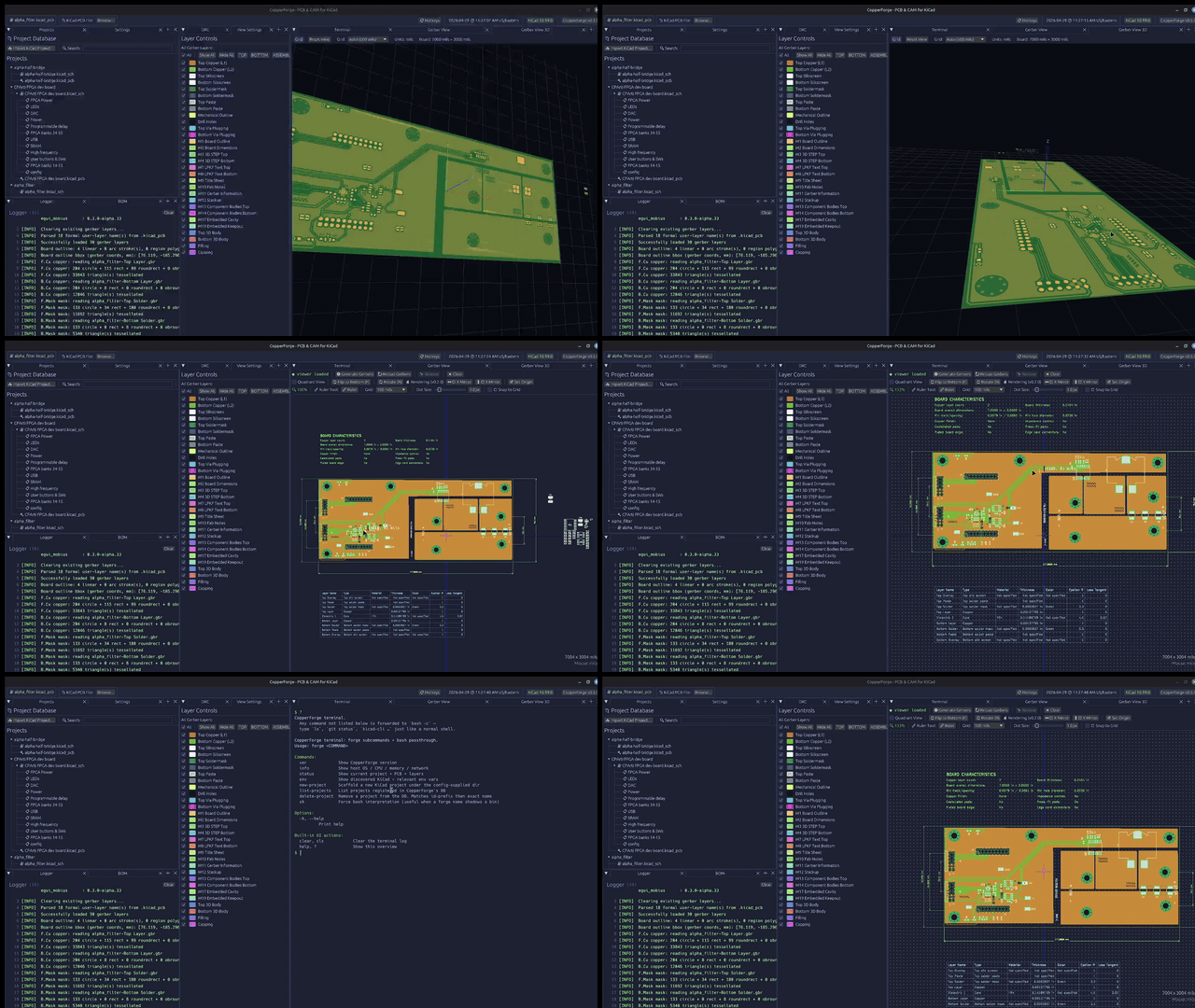
Generate KiCad gerbers, view them in 2D and 3D, export BOM and centroid, run vendor DRC, and package tagged release zips — from one app, with per-project revision history.
outputs/<rev>/<project>_<rev>[_<date>].zip
with gerbers, drills, BOM (CSV + XLSX), centroid (CPL), and a RELEASE_NOTES.md
capturing the KiCad version, host OS, and git commit at release time. PCBWay-target
releases additionally bundle a fab-specs sheet (board dimensions, SMT/THT part and pad
counts)..kicad_pcb via kiparse, no live IPC to
KiCad required. BOM is symbol-library enriched (Manufacturer, MPN, datasheet); centroid
follows the PCBWay / JLCPCB CPL convention.kicad-cli installed via PATH, Flatpak, or Snap (cached
after first launch). Reads both KiCad 10's --no-protel-ext filenames and the
traditional / Protel patterns.CopperForge ships as a wasm browser app at copperforge.dev
and as a native desktop app (Linux / macOS / Windows). Both targets share the same
Rust core in crates/copperforge-core/, so gerber rendering, BOM and centroid parsing,
release packaging, and PCBWay export behave identically where features overlap.
Click 📂 Load Example for a bundled 4-layer FPGA dev board, or upload your own CopperForge release zip. The 2D viewer, Board stats panel, and PCBWay re-export all work client-side — nothing leaves your browser.
What's in the browser today: 2D gerber viewer (grid, ruler, mirror, origin, layer presets, color picker), board stats (dimensions, component counts, SMT pads, weight estimate), BOM and centroid display, Release / Release-for-PCBWay download.
What's desktop-only: gerber generation (needs kicad-cli, native binary),
direct .kicad_pcb parsing (BOM and centroid are read from the uploaded zip instead),
the project database, and the 3D viewer.
Full feature set: gerber generation, 2D and 3D viewers, BOM and centroid export, DRC, release packaging, project database. Prebuilt binaries, no Rust toolchain required:
curl --proto '=https' --tlsv1.2 -LsSf \
  https://github.com/Atlantix-EDA/CopperForge/releases/latest/download/copperforge-installer.sh | sh
x86_64 / aarch64 Linux, x86_64 / aarch64 macOS, and x86_64 Windows are published
to Releases on every tagged version
with SHA-256 checksums alongside.
Requires Rust 1.88+.
git clone https://github.com/Atlantix-EDA/CopperForge.git
cd CopperForge
cargo run --releaseUnder active development. The release workflow, 2D and 3D viewers, BOM and centroid export, PCBWay-target release, DRC, and the project database are shipping. In-progress and planned work (multi-rev diff, more vendor packaging, expanded DRC) lives in the issues.
Native egui application sharing its core with a wasm browser
build. Both targets compile from crates/copperforge-core/.
| UI | egui 0.33, eframe 0.33, egui_dock 0.18 |
| Gerber | gerber-viewer, gerber-parser, gerber-types |
| BOM parsing | kiparse |
| Storage | redb (single-file embedded KV) |
| Release archive | zip (deflate), rust_xlsxwriter |
| Browser target | wasm32 via Trunk + eframe WebRunner |
render3d module.MIT.
| Qty | Value | Footprint | References |
|---|---|---|---|
| 37 | 100n | Capacitor_SMD:C_0402_1005Metric | C10, C11, C100, C101, C102, C104, C105, C106, C107, C108, C109, C110, C111, C112, C113, C114 +21 |
| 35 | 100 | Resistor_SMD:R_0402_1005Metric | R11, R12, R112, R113, R114, R115, R116, R117, R118, R119, R120, R121, R122, R123, R124, R125 +19 |
| 31 | 10k | Resistor_SMD:R_0402_1005Metric | R29, R31, R33, R35, R100, R139, R143, R147, R148, R149, R150, R151, R152, R153, R154, R155 +15 |
| 30 | 470n | Capacitor_SMD:C_0603_1608Metric | C16, C18, C19, C20, C21, C22, C23, C26, C28, C29, C30, C31, C32, C33, C37, C119 +14 |
| 28 | 22R | Resistor_SMD:R_0402_1005Metric | R1, R2, R3, R4, R49, R85, R86, R87, R104, R105, R106, R107, R108, R109, R110, R111 +12 |
| 16 | 10u | Capacitor_SMD:C_0603_1608Metric | C62, C63, C64, C76, C78, C79, C80, C82, C83, C84, C86, C87, C88, C124, C125, C128 |
| 16 | 4.7u | Capacitor_SMD:C_0603_1608Metric | C1, C3, C8, C17, C24, C34, C35, C42, C43, C46, C47, C58, C59, C61, C116, C118 |
| 15 | 330R | Resistor_SMD:R_0402_1005Metric | R7, R36, R37, R38, R39, R40, R41, R42, R43, R44, R45, R156, R157, R160, R161 |
| 11 | 1k | Resistor_SMD:R_0402_1005Metric | R5, R6, R26, R27, R28, R30, R32, R34, R59, R128, R134 |
| 9 | 0 | Resistor_SMD:R_0402_1005Metric | R23, R24, R25, R52, R135, R136, R137, R138, R146 |
| 9 | 47u | Capacitor_SMD:C_0805_2012Metric | C14, C15, C36, C44, C45, C60, C73, C74, C75 |
| 9 | TestPoint | TestPoint:TestPoint_Pad_D1.0mm | TP1, TP2, TP3, TP4, TP5, TP6, TP7, TP8, TP9 |
| 8 | SW_SPDT | Button_Switch_SMD:SW_SPDT_PCM12 | SW0, SW1, SW2, SW3, SW4, SW5, SW6, SW7 |
| 6 | 100k | Resistor_SMD:R_0402_1005Metric | R60, R64, R70, R71, R72, R162 |
| 6 | 2N7002 | Package_TO_SOT_SMD:SOT-23 | Q1, Q2, Q3, Q4, Q5, Q6 |
| 5 | 10n | Capacitor_SMD:C_0402_1005Metric | C69, C89, C90, C91, C92 |
| 5 | SN74LVC1T45DCK | Package_TO_SOT_SMD:SOT-363_SC-70-6 | U17, U18, U19, U21, U22 |
| 5 | SW_Push | AAWO_lib:SW_Push_TSC015A035_4.5x4.5mm_H4.5mm | BTN0, BTN1, BTN2, BTN3, BTN4 |
| 4 | 2k | Resistor_SMD:R_0402_1005Metric | R48, R101, R102, R142 |
| 4 | 2u2 | Capacitor_SMD:C_0402_1005Metric | C65, C66, C67, C68 |
| 4 | 4k7 | Resistor_SMD:R_0402_1005Metric | R8, R9, R10, R103 |
| 4 | BLM15AG601SN1D | Inductor_SMD:L_0402_1005Metric | FB1, FB2, FB3, FB4 |
| 4 | ESD9B3.3ST5G | Diode_SMD:D_SOD-923 | D24, D25, D26, D27 |
| 4 | MountingHole_Pad | MountingHole:MountingHole_2.2mm_M2_Pad_Via | H1, H2, H3, H4 |
| 4 | NetTie_2 | AAWO_lib:NetTie-2_SMD_Pad0.2355mm | NT1, NT2, NT3, NT4 |
| 3 | 120p | Capacitor_SMD:C_0402_1005Metric | C77, C81, C85 |
| 3 | 470nH/7.6A | Inductor_SMD:L_Chilisin_BMRx00040412 | L2, L3, L4 |
| 3 | PDS760 | Package_TO_SOT_SMD:TO-277B | D7, D8, D9 |
| 3 | TPS62823DLC | Package_SON:Texas_VSON-HR-8_1.5x2mm_P0.5mm | U6, U7, U8 |
| 2 | 160k | Resistor_SMD:R_0603_1608Metric | R66, R67 |
| 2 | 20p | Capacitor_SMD:C_0402_1005Metric | C12, C13 |
| 2 | 226 | Resistor_SMD:R_0402_1005Metric | R158, R159 |
| 2 | 25R5 | Resistor_SMD:R_0402_1005Metric | R46, R47 |
| 2 | 5k1 | Resistor_SMD:R_0402_1005Metric | R50, R51 |
| 2 | XLITX 3641AS | AAWO_lib:XLITX_3641AS | U15, U16 |
| 1 | 100u | Capacitor_SMD:C_1206_3216Metric | C27 |
| 1 | 10u | Capacitor_SMD:CP_Elec_4x5.4 | C103 |
| 1 | 12 MHz | Crystal:Crystal_SMD_3225-4Pin_3.2x2.5mm | Y1 |
| 1 | 120k | Resistor_SMD:R_0402_1005Metric | R65 |
| 1 | 12k | Resistor_SMD:R_0402_1005Metric | R57 |
| 1 | 12k/1% | Resistor_SMD:R_0402_1005Metric | R53 |
| 1 | 150k | Resistor_SMD:R_0402_1005Metric | R61 |
| 1 | 16k9 | Resistor_SMD:R_0402_1005Metric | R141 |
| 1 | 200k | Resistor_SMD:R_0402_1005Metric | R63 |
| 1 | 243k | Resistor_SMD:R_0402_1005Metric | R56 |
| 1 | 300k | Resistor_SMD:R_0402_1005Metric | R62 |
| 1 | 330u | Capacitor_SMD:CP_Elec_6.3x7.7 | C120 |
| 1 | 47p | Capacitor_SMD:C_0402_1005Metric | C71 |
| 1 | 49R9 | Resistor_SMD:R_0402_1005Metric | R140 |
| 1 | 4n7 | Capacitor_SMD:C_0402_1005Metric | C70 |
| 1 | 500 | Resistor_SMD:R_0402_1005Metric | R68 |
| 1 | 6.8uH/6.8A | AAWO_lib:L_TDK_SPM7054VT | L1 |
| 1 | 62k | Resistor_SMD:R_0603_1608Metric | R58 |
| 1 | 74HC14 | Package_SO:SO-14_3.9x8.65mm_P1.27mm | U13 |
| 1 | 93LC56BT-I/OT | Package_TO_SOT_SMD:SOT-23-6 | U10 |
| 1 | AD9744 | Package_SO:TSSOP-28_4.4x9.7mm_P0.65mm | U24 |
| 1 | AS169-73LF | Package_TO_SOT_SMD:SOT-23-6 | U12 |
| 1 | ASDM1-24MHz | Oscillator:Oscillator_SMD_Abracon_ASDMB-4Pin_2.5x2.0mm | U4 |
| 1 | BMUX_{lock} | LED_SMD:LED_0603_1608Metric | D19 |
| 1 | B_{n}ON | LED_SMD:LED_0603_1608Metric | D10 |
| 1 | B_{p}ON | LED_SMD:LED_0603_1608Metric | D11 |
| 1 | Barrel_Jack_Switch | Connector_BarrelJack:BarrelJack_Horizontal | J2 |
| 1 | Bn_{A} | Connector_Coaxial:SMA_Samtec_SMA-J-P-H-ST-EM1_EdgeMount | J8 |
| 1 | Bn_{B} | Connector_Coaxial:SMA_Samtec_SMA-J-P-H-ST-EM1_EdgeMount | J9 |
| 1 | Bp | Connector_Coaxial:SMA_Samtec_SMA-J-P-H-ST-EM1_EdgeMount | J6 |
| 1 | Conn_02x10_Odd_Even | Connector_PinSocket_2.54mm:PinSocket_2x10_P2.54mm_Vertical | J16 |
| 1 | DAC | Connector_Coaxial:SMA_Samtec_SMA-J-P-H-ST-EM1_EdgeMount | J18 |
| 1 | DAC GND | Jumper:SolderJumper-2_P1.3mm_Open_Pad1.0x1.5mm | JP3 |
| 1 | DONE | LED_SMD:LED_0603_1608Metric | D2 |
| 1 | DS1023 | Package_SO:SOIC-16W_7.5x10.3mm_P1.27mm | U20 |
| 1 | Delay IN | Connector_Coaxial:SMA_Samtec_SMA-J-P-H-ST-EM1_EdgeMount | J14 |
| 1 | Delay OUT | Connector_Coaxial:SMA_Samtec_SMA-J-P-H-ST-EM1_EdgeMount | J15 |
| 1 | FT232H | Package_QFP:LQFP-48-1EP_7x7mm_P0.5mm_EP3.6x3.6mm | U2 |
| 1 | INIT | LED_SMD:LED_0603_1608Metric | D1 |
| 1 | IS61WV25616EDBLL | Package_SO:TSOP-II-44_10.16x18.41mm_P0.8mm | U3 |
| 1 | JTAG | Connector_PinHeader_2.54mm:PinHeader_2x07_P2.54mm_Vertical | J3 |
| 1 | LD1 | LED_SMD:LED_0603_1608Metric | D20 |
| 1 | LD2 | LED_SMD:LED_0603_1608Metric | D21 |
| 1 | LD3 | LED_SMD:LED_0603_1608Metric | D22 |
| 1 | LD4 | LED_SMD:LED_0603_1608Metric | D23 |
The 378 most common of 413 parts.
It measures 100 × 100 mm and has 4 copper layers, 1.61 mm thick.
413 parts, built around the AS169-73LF, TPS62823DLC, AD9744AR and SN74LVC1T45DCK. The full list of its parts is on this page, with links to each part's symbol and footprint where PCBKit's library has them.
From the Atlantix-EDA/CopperForge repository on GitHub, at the commit this page was made from: the board is assets/fpga.kicad_pcb. PCBKit opens the board in the browser, with nothing to install.
Its repository publishes it under the MIT licence: you may reuse it on that licence's terms (keep the author's notice, and for a copyleft licence share your changes alike).

antmicro/artix-dc-scm
Experimental Xilinx Artix-7 driven Data Center Security Communication Module

antmicro/ecp5-dc-scm
Experimental Lattice ECP5-driven Data Center Security Communication Module

plex1/ice40_driver_pcb
Contains - variable delay IC and - signal drivers and receivers for 50 Ohms UMCC cables.


tinyvision-ai-inc/UPduino-v3.0
UPduino 3.0: new 4 layer layout, various other improvements

the-mr-music/OrangeCanBreakout
Board to test the MCP2517 SPI CAN controller together with the Orange Pi Zero Plus 2