
4 layers234 × 84 mm
Main panel
google/mozc-devices
Circuit diagrams and firmware source code for Gboard DIY keyboards
234 parts3kApache-2.0
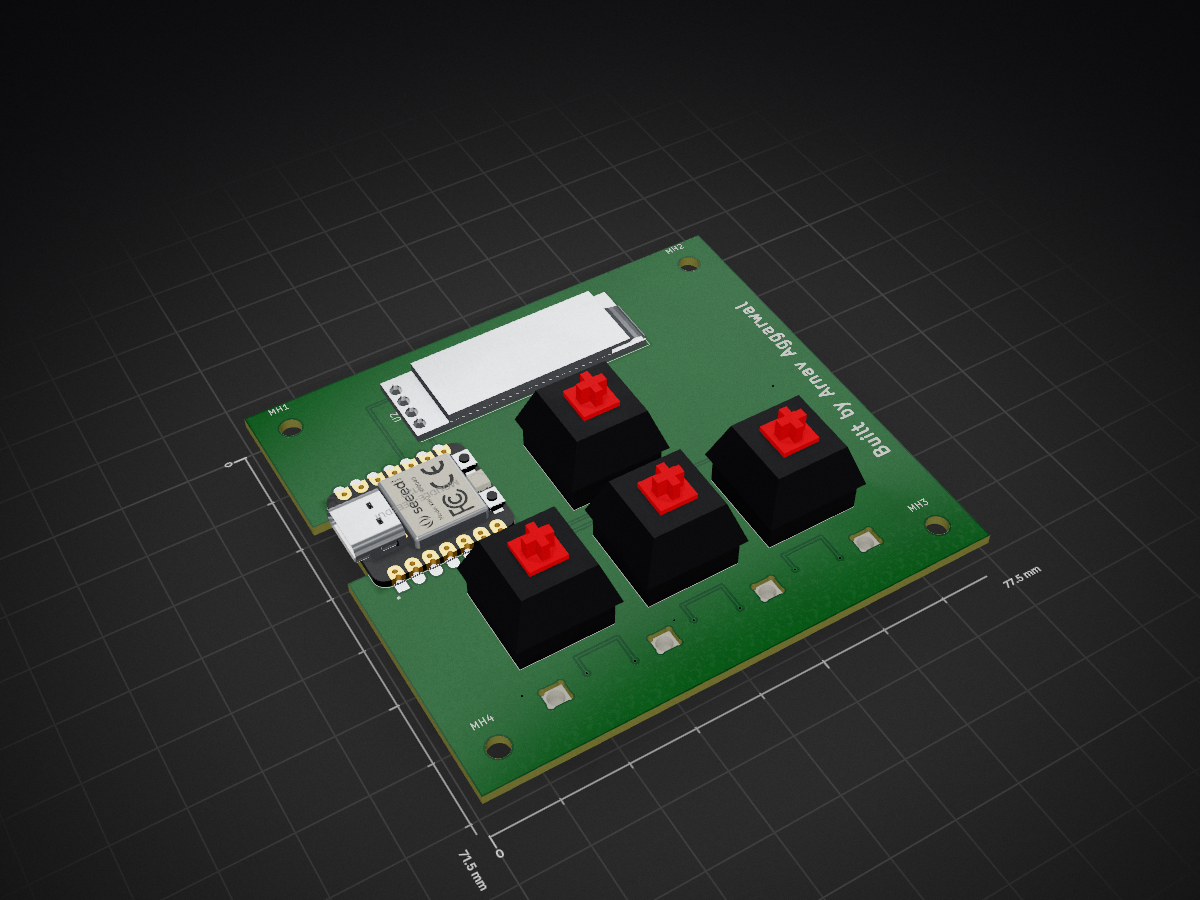
 arnavaggarwal-dev/BrawlStarsGamePadSubmit
I play Brawl Stars in an emulator on my PC, and mashing WASD on a laptop keyboard always felt bad. So I built a little four-key pad for it.
BrawlStarsGamepad is an open-source printed circuit board by arnavaggarwal-dev, from the arnavaggarwal-dev/BrawlStarsGamePadSubmit repository on GitHub. It is a 2-layer board of 77.5 × 71.5 mm with 15 parts on 19 nets, routed with 53 tracks and 10 vias.
It is built around the SK6812MINI-E. Its parts include 4 diodes, 4 switches and 2 ICs.
I play Brawl Stars in an emulator on my PC, and mashing WASD on a laptop keyboard always felt bad. So I built a little four-key pad for it.
The buttons send W A S D over USB, which is exactly what the emulator maps movement to. The 0.91" OLED shows two things at once: a small compass wheel for the direction you're holding, and three bars with the PC's live CPU, RAM and GPU load. There's a strip of RGB LEDs along the bottom edge because why not.
It runs on a Seeed XIAO RP2040 on a board I laid out in KiCad.
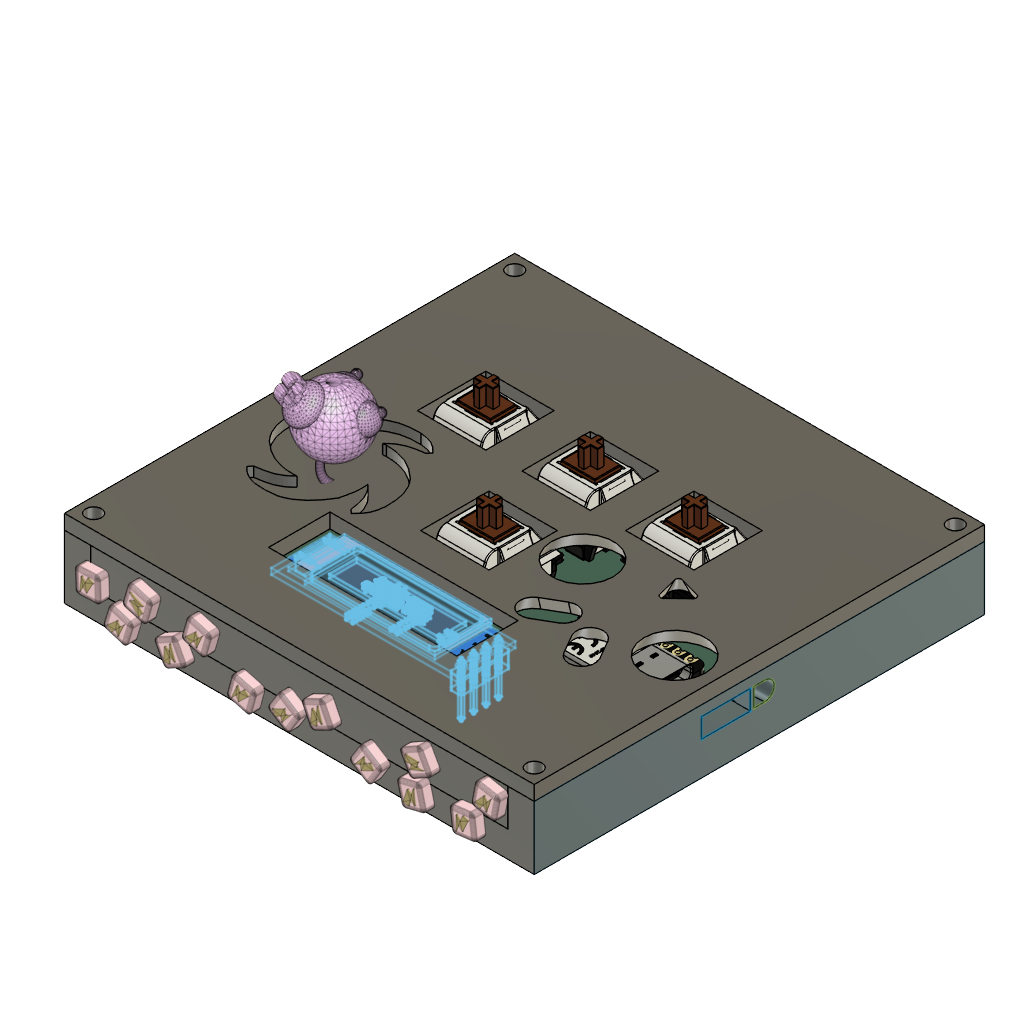
The XIAO shows up as a plain USB keyboard. Top switch holds W, left one A,
and so on. Hold two keys and the wheel reads it as a diagonal. Hold three and it
takes the last two you pressed, which is what your thumbs actually mean when you
roll from one diagonal into another.
The stats are the only part the pad can't do by itself. It has no way to know what the PC is up to. So a small PowerShell script on the PC reads the load counters and ships one line down a second USB serial port twice a second. No script running? Each stat row shows a pulsing warning triangle instead of a number.
Just the parts this build uses. Full list in BOM.csv.
| Qty | Part | Ref | Notes |
|---|---|---|---|
| 1 | Seeed XIAO RP2040 | U1 | 14-pin RP2040 board |
| 4 | Cherry MX switch (PCB mount) | SW1-SW4 | |
| 4 | SK6812 MINI-E RGB LED | D1-D4 | reverse mount, on the back |
| 1 | 0.91" OLED, SSD1306 128×32, I2C | U2 | pin order GND-VCC-SCL-SDA |
| 4 | DSA keycap, 1u blank | ||
| 4 | M3 heat-set insert | one per case boss | |
| 4 | M3×16 screw | ||
| 1 | Custom PCB (2-layer) | in /PCB | |
| 1 | 3D-printed case | in /CAD |
| XIAO | GPIO | Connected to | Function |
|---|---|---|---|
| D0 | GP26 | LED data in | SK6812 chain (D1→D2→D3→D4) |
| D10 | GP3 | SW1 (top) | W |
| D4 | GP6 | SW2 (left) | A |
| D5 | GP7 | SW3 (centre) | S |
| D6 | GP0 | SW4 (right) | D |
| D9 | GP4 | OLED SDA | I2C0 |
| D7 | GP1 | OLED SCL | I2C0 |
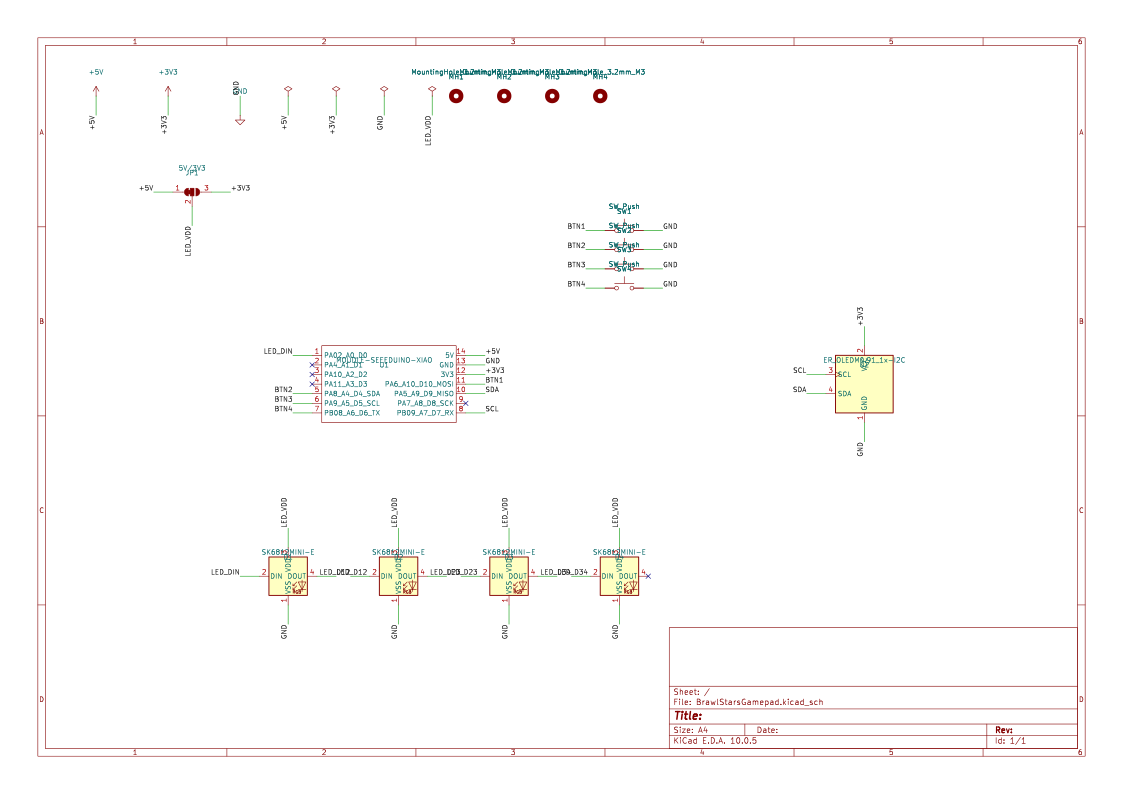
The switches go straight to ground with no external pull-ups, so the firmware
turns on the internal ones. JP1 is a solder jumper for the LED supply: bridge
1-2 for 5 V (the default, USB powered) or 2-3 for 3.3 V.
Watch out for the I2C pins. They're on GP4/GP1, not the XIAO's default pair, so
the firmware opens the bus by hand. board.I2C() will just come up empty.
Two layers, 77.5 × 71.5 mm. There's a notch cut in the left edge so the USB-C connector clears the FR4. The LEDs are reverse-mount, so they sit on the back and shine up through cutouts. Solder those from underneath.
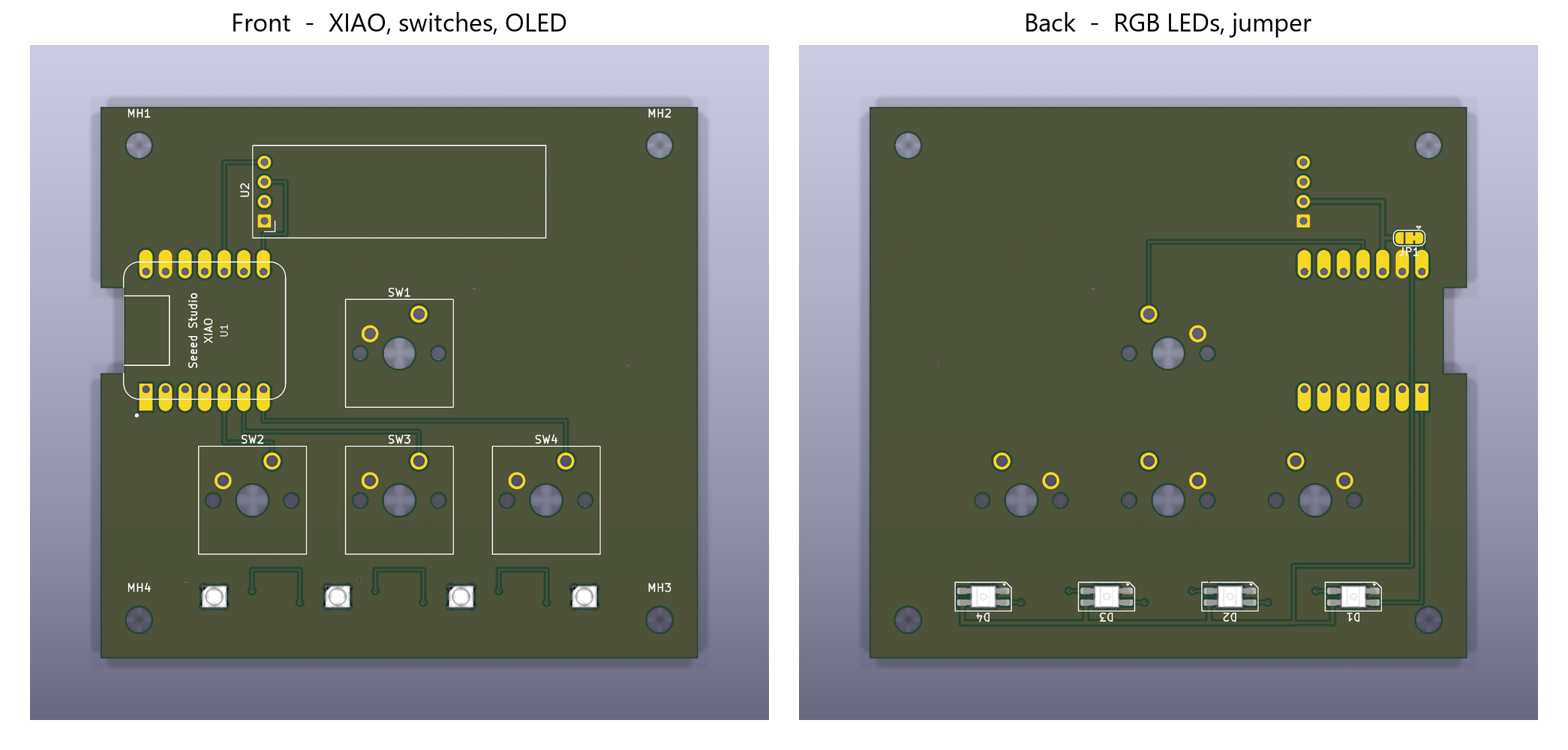
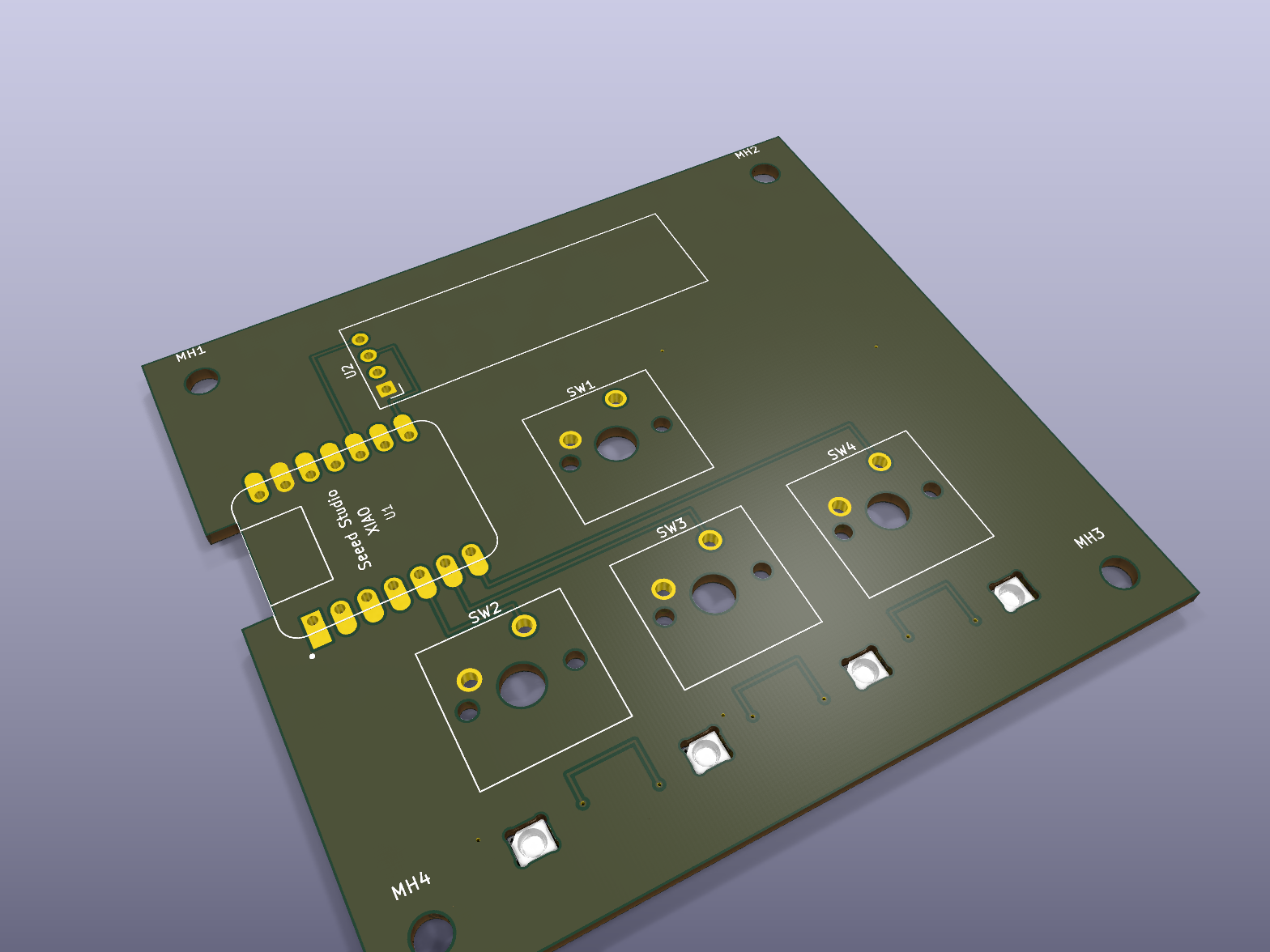
KiCad 10 project lives in PCB/.
Flash CircuitPython for the XIAO RP2040, then drop these on the CIRCUITPY drive:
Firmware/main.pyFirmware/boot.py (turns on the second serial port for the stats)and into CIRCUITPY/lib/:
adafruit_hid/
neopixel.mpy
adafruit_displayio_ssd1306.mpy
adafruit_display_text/
Those all come from the Adafruit CircuitPython library bundle. The board reboots once the files land and comes back up as a keyboard.
Before you have hardware, simulate.py runs main.py against fake CircuitPython
modules so you can sanity-check the key mapping, the wheel and the stat rows on a
PC. Just python simulate.py.
The pad plays fine without any of this. The stats pane just sits there empty. If you want it lit:
Firmware/run-stats.cmd.Firmware/install.cmd. It copies the script into
your local app data and adds a Startup entry (no admin, and it shows up in Task
Manager's Startup tab). uninstall.cmd takes it back out.CPU and RAM come from the normal Windows counters. GPU load comes from the WDDM
GPU Engine counters, the ones Task Manager uses, so it reads correctly on
NVIDIA, AMD and Intel, integrated GPUs included. Nothing to install either way,
it only touches PowerShell, which Windows already has.
The 3D model is in CAD/. GitHub can spin the STL right in the browser, so open
CAD/brawlstars_gamepad.stl and drag it around.
That one's a lightweight web preview. The full-detail file for your slicer is
CAD/brawlstars_gamepad.3mf.
CAD/        3D-printable case (.3mf source + .stl web preview)
Firmware/   CircuitPython firmware + the PC stat scripts
PCB/        KiCad schematic and board
images/ figures used in this readmeJP1 jumper drops the LEDs to 3.3 V and puts you back in
spec.| Qty | Value | Footprint | References |
|---|---|---|---|
| 4 | MountingHole_3.2mm_M3 | MountingHole:MountingHole_3.2mm_M3 | MH1, MH2, MH3, MH4 |
| 4 | SK6812MINI-E | LED_SMD:LED_SK6812MINI-E_3.2x2.8mm_P1.5mm_ReverseMount | D1, D2, D3, D4 |
| 4 | SW_Push | Button_Switch_Keyboard:SW_Cherry_MX_1.00u_PCB | SW1, SW2, SW3, SW4 |
| 1 | 5V/3V3 | Jumper:SolderJumper-3_P1.3mm_Bridged12_RoundedPad1.0x1.5mm | JP1 |
| 1 | ER_OLEDM0.91_1x-I2C | Display:ER_OLEDM0.91_1x-I2C | U2 |
| 1 | MOUDLE-SEEEDUINO-XIAO | footprints:XIAO-Generic-Hybrid-14P-2.54-21X17.8MM | U1 |
google/mozc-devices
Circuit diagrams and firmware source code for Gboard DIY keyboards

Bastardkb/Dilemma
The Dilemma is a vertical stagger low-profile keyboard with mods.

Pwnsat/FlatSat
Flatsat v1.0 is a hardware based platform for aerospace cybersecurity research

adamws/kicad-kbplacer
KiCad plugin for automatic keyboard's key placement and routing

imchipwood/dumbpad
Simple 4x4 numpad with rotary encoder. Powered by QMK via ATmega32u4 Pro Micro

makerforgetech/modular-biped
An open source framework for creating a bipedal modular companion robot.


It measures 77.5 × 71.5 mm and has 2 copper layers, 1.6 mm thick.
15 parts, built around the SK6812MINI-E. The full list of its parts is on this page, with links to each part's symbol and footprint where PCBKit's library has them.
From the arnavaggarwal-dev/BrawlStarsGamePadSubmit repository on GitHub, at the commit this page was made from: the board is PCB/BrawlStarsGamepad.kicad_pcb and its schematic PCB/BrawlStarsGamepad.kicad_sch. PCBKit opens the board in the browser, with nothing to install.
Its repository states no licence, so its author keeps all rights: ask arnavaggarwal-dev before reusing the design.