2 layers21 × 17.8 mm
Seeed Studio XIAO nRF52840 v1.3
aram-ap/daredevil
Computer Vision-Based Tactile Feedback for the Visually Impaired
80 parts3MIT

 aram-ap/daredevil3
Computer Vision-Based Tactile Feedback for the Visually Impaired
Grove - Vision AI Module V2 is an open-source printed circuit board by aram-ap, from the aram-ap/daredevil repository on GitHub, published under the MIT licence. It is a 4-layer board of 40 × 20 mm with 114 parts on 98 nets, routed with 880 tracks and 275 vias.
It is built around the SY80004DQD, CH343P and W25Q128JWSIQ, with the DF2S6.8FS,L3M, CJ1012 and RC0402JR-074K7L among its other parts. Its parts include 36 capacitors, 33 resistors, 17 diodes, 6 ICs and 5 transistors.


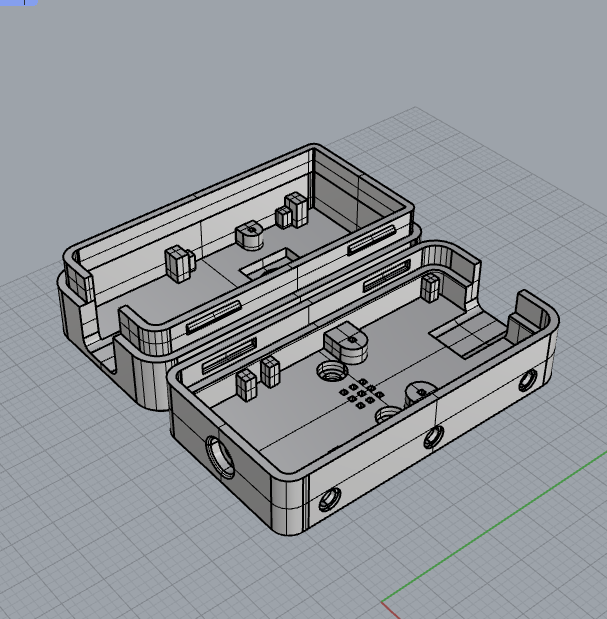
This is the library for Grove Vision AI V2 and its case.

You can find the case here as well.
You can refer to this link to download the KiCad software.
You can download the "OPL_KiCad_Library" or use command to clone:
git clone https://github.com/Seeed-Studio/OPL_Kicad_Library.git
File -> Open Project.


Perferences -> Manage Footprint Libraries


Now you have added the "XIAO footprint library"


File -> Open Project.

Perferences -> Manage Symbol Libraries


Now you have added the "OPL_Sensor-Transducer library"


Seeed Studio Fusion serves as the comprehensive service platform for Seeed Studio, a global one-stop online platform offering PCB manufacturing, PCB assembly and hardware customization with global sourcing capability. Whether you need prototyping, mass production, custom solutions for open-source products, or the transformation of your creative ideas into profitable products, Seeed Studio Fusion can meet your requirements.
Leverage our Co-Create Program to transform your advanced prototype into a commercially successful product! This program is designed to optimize your product's journey from prototype to market by handling marketing, packaging, and distribution, allowing you to concentrate on refining your product. Upon acceptance of your prototype by Seeed, it will be showcased on the Seeed Studio marketplace. You'll receive a portion of the profits for each unit sold.
| Qty | Value | Footprint | References |
|---|---|---|---|
| 18 | 100nF | MLCCs:C0402 | C13, C20, C21, C22, C23, C24, C25, C26, C27, C29, C30, C31, C32, C35, C36, C39 +2 |
| 11 | DNP | MLCCs:R0402 | D5, D6, D7, D8, R9, R12, R17, R18, R25, R27, R28 |
| 10 | 2.2k | MLCCs:R0402 | R1, R4, R13, R14, R15, R19, R20, R21, R22, R40 |
| 7 | 4.7uF | MLCCs:C0402 | C4, C6, C7, C9, C10, C28, C34 |
| 5 | 1uF | MLCCs:C0402 | C1, C2, C17, C18, C19 |
| 5 | CJ1012 | MLCCs:SOT523 | Q1, Q2, Q3, Q4, Q5 |
| 4 | 100K | MLCCs:R0402 | R6, R16, R32, R33 |
| 4 | 10k | MLCCs:R0402 | R5, R7, R23, R24 |
| 4 | B5819WS | MLCCs:D0805_SOD323 | D1, D2, D3, D4 |
| 3 | 0R | MLCCs:R0402 | R29, R30, R39 |
| 3 | 100k | MLCCs:R0402 | R10, R11, R37 |
| 3 | 10K | MLCCs:R0402 | R8, R31, R38 |
| 3 | 5.1k | MLCCs:R0402 | R2, R3, R36 |
| 3 | Test Point | Misc:TP-D35MIL | TP1, TP2, TP3 |
| 2 | 10uF | MLCCs:C0402 | C11, C37 |
| 2 | 12pF | MLCCs:C0402 | C14, C15 |
| 2 | 22K | MLCCs:R0402 | R26, R34 |
| 2 | 470nH | MLCCs:L0603 | L2, L3 |
| 2 | SW_Push | MLCCs:SW_Push_1P1T_NO_Vertical_Wuerth_434133025816 | BOOT1, RST1 |
| 2 | SY80004DQD | Ic:DFN6-0.5-1.5X1.5X0.65MM | U4, U6 |
| 1 | 10nF | MLCCs:C0402 | C3 |
| 1 | 220nF | MLCCs:C0402 | C16 |
| 1 | 24MHz | MLCCs:4P2016 | X1 |
| 1 | 510k | MLCCs:R0402 | R35 |
| 1 | CH343P | MLCCs:QFN-16-EP_3x3mm_P0.5mm_EP1x1mm | U2 |
| 1 | Conn_01x04_MountingPin | MLCCs:4P-SMD-2.0mm-RIGHT | J3 |
| 1 | Conn_01x15_MountingPin | MLCCs:FPC_DNC_15P_1.0mm | J2 |
| 1 | Green | MLCCs:LED0402 | LED2 |
| 1 | HX6538 | MLCCs:WLCSP65_5.6x2.3x0.56mm | U1 |
| 1 | MSM261D3526H1CPM | MLCCs:MIC6P-3.5X2.65X0.94MM | MIC1 |
| 1 | ST-TF-MR267 | Connector:SD-TF-MR267 | J5 |
| 1 | USB_C_Receptacle_USB2.0 | MLCCs:USB2.0-TYPE-C | J1 |
| 1 | VLS201610HBX-4R7M-1 | MLCCs:L0806 | L1 |
| 1 | W25Q128JWSIQ | MLCCs:SOIC-8_5.23x5.23mm_P1.27mm | U5 |
| 1 | WR0331-18FF4R | MLCCs:X2SON-4 | U3 |
| 1 | XIAO Connector/DNP | MLCCs:XIAO_Socket | M1 |
| 1 | Yellow | MLCCs:LED0402 | LED1 |
The 112 most common of 114 parts.
aram-ap/daredevil
Computer Vision-Based Tactile Feedback for the Visually Impaired

aram-ap/daredevil
Computer Vision-Based Tactile Feedback for the Visually Impaired

aram-ap/daredevil
Computer Vision-Based Tactile Feedback for the Visually Impaired

aram-ap/daredevil
Computer Vision-Based Tactile Feedback for the Visually Impaired


aram-ap/daredevil
Computer Vision-Based Tactile Feedback for the Visually Impaired

efogtech/endgame-trackball-hardware
Because it's cheaper than 4 layers. Yes, seriously.

aethern1k4-stack/XIAO-recreation
A recreation of XIAO nrf 52840 board for educational purposes


It measures 40 × 20 mm and has 4 copper layers, 1.2 mm thick.
114 parts, built around the SY80004DQD, CH343P, W25Q128JWSIQ and DF2S6.8FS,L3M. The full list of its parts is on this page, with links to each part's symbol and footprint where PCBKit's library has them.
From the aram-ap/daredevil repository on GitHub, at the commit this page was made from: the board is hardware/wrist_module/Library/OPL_Kicad_Library-master/Grove Vision AI V2 Library/Grove - Vision AI Module V2.kicad_pcb and its schematic hardware/wrist_module/Library/OPL_Kicad_Library-master/Grove Vision AI V2 Library/Grove - Vision AI Module V2.kicad_sch. PCBKit opens the board in the browser, with nothing to install.
Its repository publishes it under the MIT licence: you may reuse it on that licence's terms (keep the author's notice, and for a copyleft licence share your changes alike).