2 layers243.9 × 136.5 mm
Barobord
sadekbaroudi/barobord
I have spent a lot of time and money designing prototypes, testing, developing, etc. Any contributions would be greatly appreciated!
157 parts57

 AntoineAndre/alpha_dre9
Minimalist 42-key keyboard with an ISO layout
Alpha dre pcb is an open-source printed circuit board by AntoineAndre, from the AntoineAndre/alpha_dre repository on GitHub, published under the GPL-3.0 licence. It is a 2-layer board of 243.7 × 81.8 mm with 110 parts on 85 nets, routed with 807 tracks and 72 vias.
It is built around the ATMEGA32U4-AU and PRTR5V0U2X. Its parts include 42 diodes, 8 capacitors, 6 resistors, 2 ICs and 1 connector. It belongs with the keyboards and input boards and the AVR (ATmega, ATtiny) boards of this library.


Or "How to fit an ISO layout in a 40% keyboard ?"
This project started as a need to find a new mechanical keyboard with a french ISO layout support. It also aims to keep a minimalist design that we can find on most 40% keyboards. It will therefore include all the 3D CAD files and various pcb related files to conduct the project along with a documentation to build the keyboard.
This keyboard is Via and Vial compatible to give a better user experience (especially when it comes to remapping keys).

All pictures of this project can be found here (acrylic case) and here (no plate tray mount)
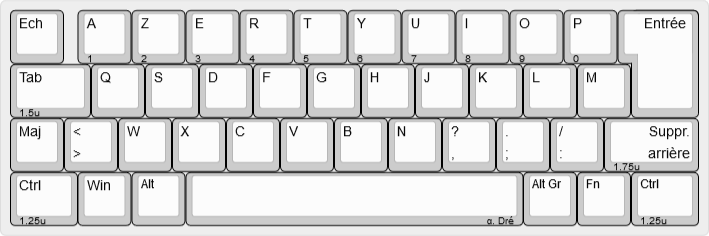
The keyboard presents 42 keys that are placed in an ISO layout, and even if the layout seems odd, most of keycaps set will fit this design. With juste 3 layers the keyboard becomes fully usable as shown in the firmware part.
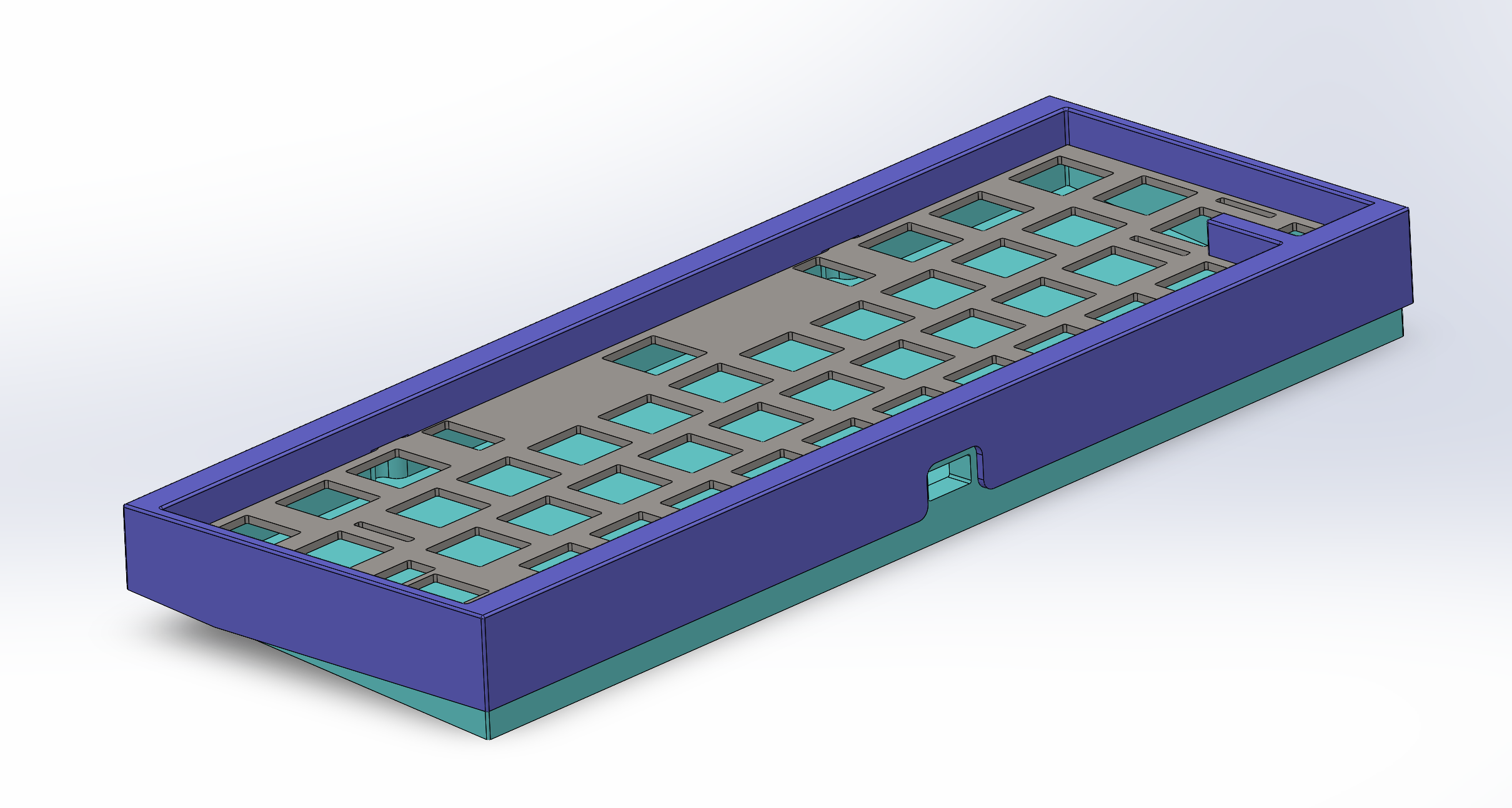
A top mounted case aimed to be 3D printed has been done to complete the build.
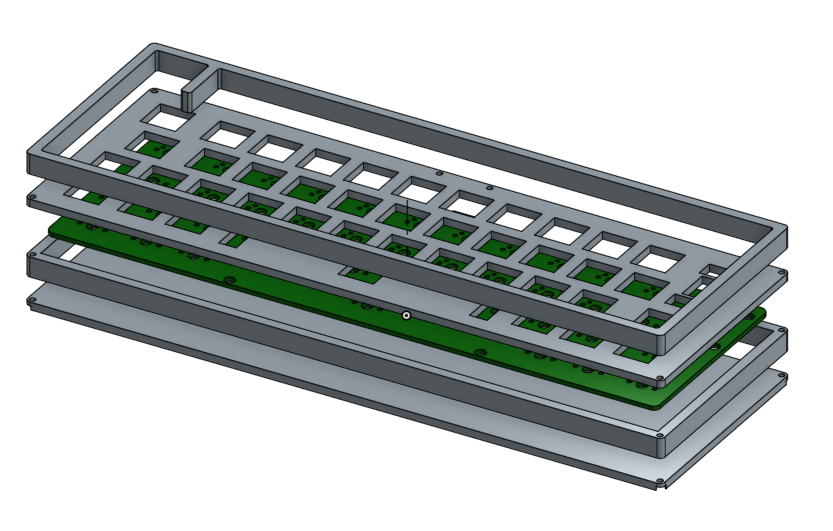
Blueprints are available in dedicated folder, short link to pdf blueprints :
The case is a high profile one (meaning the electronic parts and switches are hidden by the case) and has been designed to be manufactured with only laser cut acrylic plates of various sizes. These plates are fixed with M2 screws (M2x16) and are hidden with rubber bumps on the bottom of the case. This conception leads to a sandwich mount keyboard.
In order to give the keyboard a little angle for typing, two different feet have been design to be screwed at the back of the case.
A last option of low profile (barely no case) is available and needs practically no manufacturing. This option leads to a tray mount keyboard with no plate (this is the chosen option shown in the beginning of this presentation).
Side note on the acrylic case : the design was a bit too lose and the gap between keycaps and top layer of the case can be reduced. Furthermore the plate was designed to host plate mounted stabilizers, but the pcb was designed for pcb mounted stabs...
The pcb has been designed with Kicad software and gerbers files are available in the dedicated folder. This pcb hosts an Atmega32U4-AU for the keyboard control and is (as for other electronic components) soldered in surface.

More on the pcb design available in the documentation file.
Here is a global list of all parts needed to perform this keyboard build:
A first prototype with a simple skeleton case made out of plexiglass have been made to validate that the keyboard was responding correctly to the firmware and was usable. More on the cases will be done in the future (notably with the cut acrylic plates for the sandwich mount and with a 3d printed case).

Second prototype was made with acrylic sandwich plates (as intended in the original project). Two pictures showing the results of this case can be seen below.


A bunch of renders have been made to validate the overall looking of the keyboard.
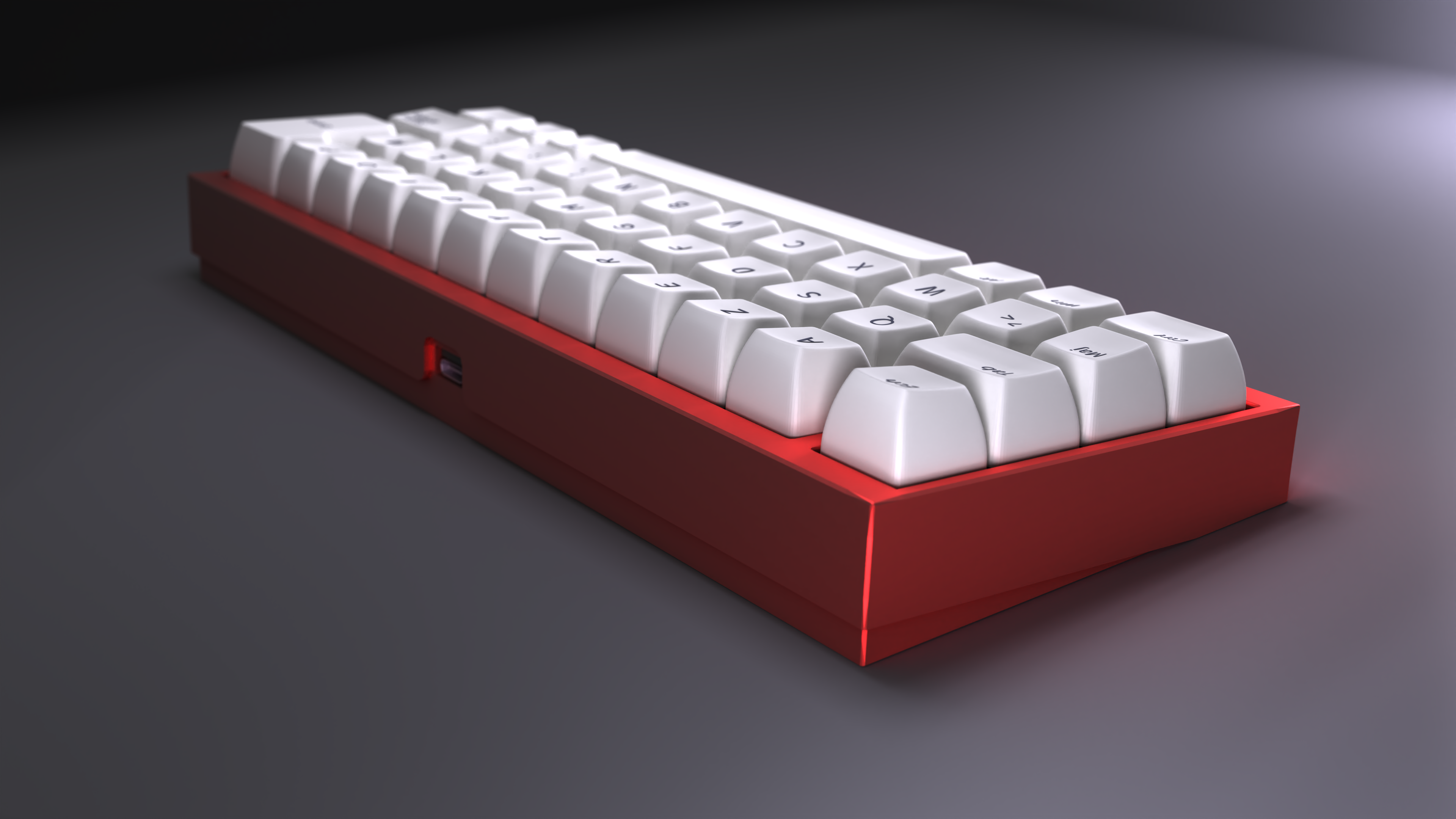
Complete set of renders can be found here
| Qty | Value | Footprint | References |
|---|---|---|---|
| 42 | D_Small | random-keyboard-parts:D_SOD-123-Pretty | D1, D2, D10, D11, D12, D13, D14, D15, D16, D17, D18, D19, D20, D21, D22, D23 +26 |
| 36 | MX-NoLED | alpha_dre_footprints:SW_Cherry_MX_1.00u_PCB_perso | MX1, MX10, MX11, MX12, MX13, MX14, MX15, MX16, MX17, MX18, MX19, MX20, MX21, MX23, MX24, MX25 +20 |
| 4 | 0.1uF | Capacitor_SMD:C_0805_2012Metric_Pad1.18x1.45mm_HandSolder | C1, C2, C3, C8 |
| 2 | 10k | Resistor_SMD:R_0805_2012Metric_Pad1.20x1.40mm_HandSolder | R3, R4 |
| 2 | 22 | Resistor_SMD:R_0805_2012Metric_Pad1.20x1.40mm_HandSolder | R1, R2 |
| 2 | 22pF | Capacitor_SMD:C_0805_2012Metric_Pad1.18x1.45mm_HandSolder | C4, C5 |
| 2 | 5.1k | Resistor_SMD:R_0805_2012Metric_Pad1.20x1.40mm_HandSolder | R5, R6 |
| 2 | MX-NoLED | alpha_dre_footprints:SW_Cherry_MX_1.25u_PCB_perso | MX4, MX42 |
| 1 | 10uF | Capacitor_SMD:C_0805_2012Metric_Pad1.18x1.45mm_HandSolder | C6 |
| 1 | 16MHz | Crystal:Crystal_SMD_3225-4Pin_3.2x2.5mm_HandSoldering | Y1 |
| 1 | 1uF | Capacitor_SMD:C_0805_2012Metric_Pad1.18x1.45mm_HandSolder | C7 |
| 1 | 500mA | Fuse:Fuse_1206_3216Metric_Pad1.42x1.75mm_HandSolder | F1 |
| 1 | ATmega32U4-AU | Package_QFP:TQFP-44_10x10mm_P0.8mm | U1 |
| 1 | AVR-ISP-6 | random-keyboard-parts:Reset_Pretty-Mask | J1 |
| 1 | Ferrite_Bead_Small | Inductor_SMD:L_0805_2012Metric_Pad1.15x1.40mm_HandSolder | FB1 |
| 1 | HRO-TYPE-C-31-M-12 | Type-C:HRO-TYPE-C-31-M-12-HandSoldering | USB1 |
| 1 | LOGO | fancy-kicad-stuff:cc | G*** |
| 1 | MX-NoLED | MX_Only:MXOnly-6.25U-ReversedStabilizers-NoLED | MX22 |
| 1 | MX-NoLED | MX_Only:MXOnly-ISO-ReversedStabilizers-NoLED | MX40 |
| 1 | MX-NoLED | alpha_dre_footprints:SW_Cherry_MX_1.50u_PCB_perso | MX2 |
| 1 | MX-NoLED | alpha_dre_footprints:SW_Cherry_MX_1.75u_PCB_perso | MX41 |
| 1 | PRTR5V0U2X | random-keyboard-parts:SOT143B | U2 |
| 1 | SW_Push | Button_Switch_SMD:SW_SPST_SKQG_WithStem | SW1 |
| 1 | Val** | isio42_pcb:info_design | Ref** |
| 1 | Val** | isio42_pcb:escargot_design | Ref** |
| 1 | Val** | isio42_pcb:alpha_dre_design | Ref** |
sadekbaroudi/barobord
I have spent a lot of time and money designing prototypes, testing, developing, etc. Any contributions would be greatly appreciated!


markstory/ursa-minor-keyboard
Design and schematics for the ursaminor keyboard


makenova/reverie
a mini 1800 keyboard based on the Elongate, Clarabelle, and Garbage Truck Keyboards

makenova/micro_redox
A family of boards inspired by the microdox and ferris

It measures 243.7 × 81.8 mm and has 2 copper layers, 1.6 mm thick.
110 parts, built around the ATMEGA32U4-AU and PRTR5V0U2X. The full list of its parts is on this page, with links to each part's symbol and footprint where PCBKit's library has them.
From the AntoineAndre/alpha_dre repository on GitHub, at the commit this page was made from: the board is pcb/alpha_dre_pcb/alpha_dre_pcb.kicad_pcb. PCBKit opens the board in the browser, with nothing to install.
Its repository publishes it under the GPL-3.0 licence: you may reuse it on that licence's terms (keep the author's notice, and for a copyleft licence share your changes alike).