
4 layers234 × 84 mm
Main panel
google/mozc-devices
Circuit diagrams and firmware source code for Gboard DIY keyboards
234 parts3kApache-2.0

 amperolithic/stratum-macropad
Personal macropad creation made for the Hack Club Stardance Challenge by following the "HackPad V5" mission.
Macropad Stratum is an open-source printed circuit board by amperolithic, from the amperolithic/stratum-macropad repository on GitHub. It is a 2-layer board of 77 × 100 mm with 32 parts on 34 nets, routed with 326 tracks and 43 vias.
It is built around the SK6812MINI-E. Its parts include 18 diodes, 10 switches, 1 IC and 1 connector. It belongs with the keyboards and input boards of this library.
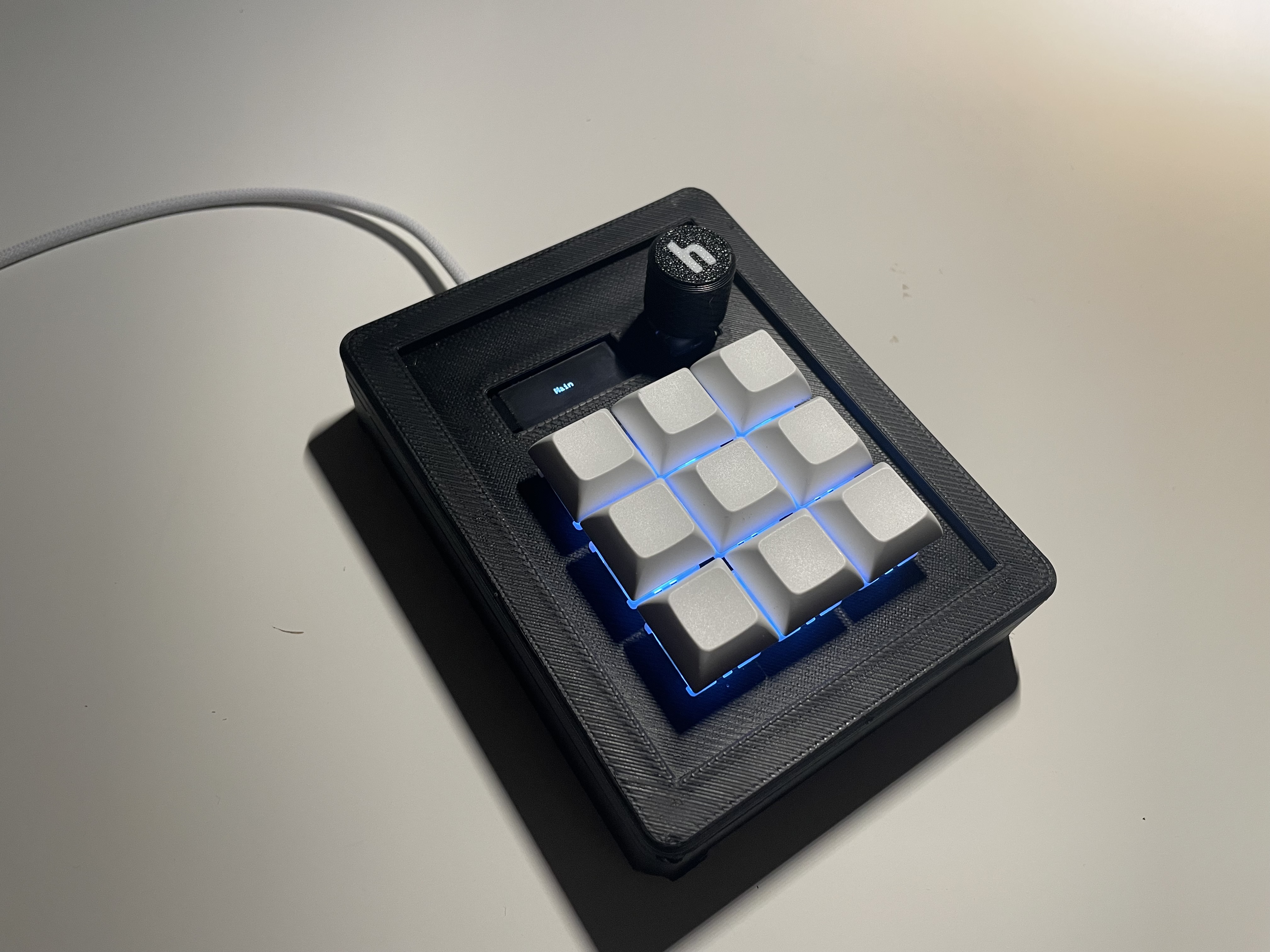
Stratum is a 9-key personal macropad creation with a rotary encoder, an OLED display and RGB backlighting under each key that uses QMK firmware. It supports five independent layers, allowing each key to perform a unique function depending on the active layer. Stratum was made as a submission for Hackpad v5 through HackClub's Stardance Challenge.
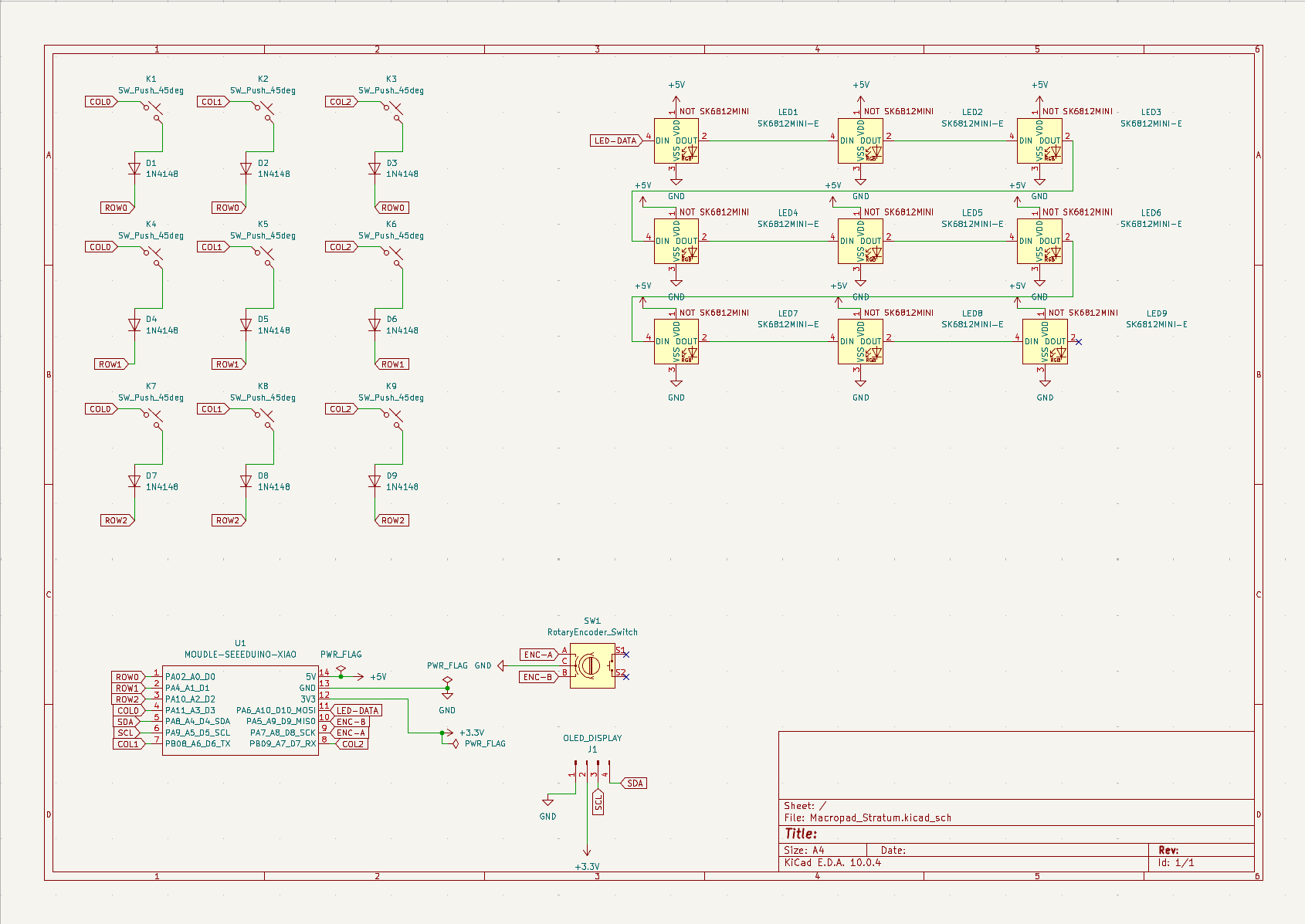
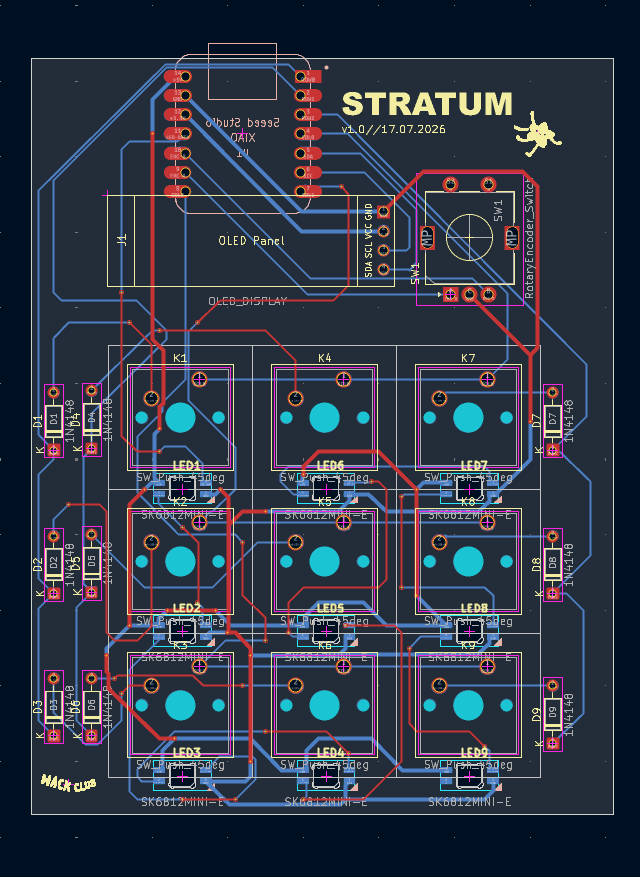
This is the PCB I made for Stratum; made in KiCad 10.0. Most of the footprints were provided by HackClub. Anything else was from KICad's default libraries or was sourced through peers on the HackClub Slack. The silkscreen uses HackClub's logo and a character from the Stardance Challenge.
Schematic:
PCB:
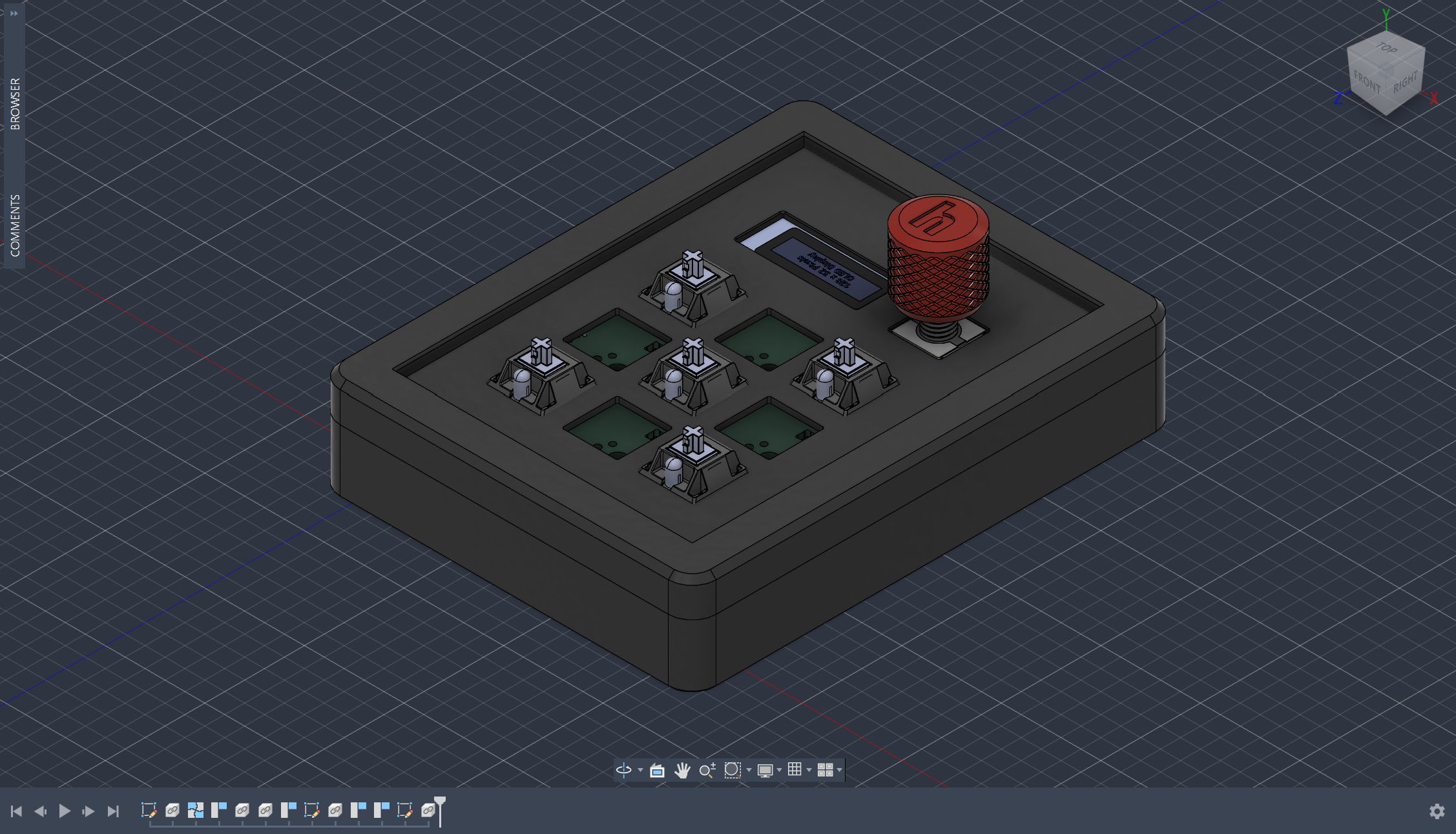
This CAD model, designed in Fusion 360, utilizes an integrated plate keyboard mount style - so it only has a top and bottom piece that are connected together with four 16mm M3 bolts that are screwed in from the bottom of the case. Right now, the case relies on self-threading since I don't anticipate needing to unscrew the macropad often after assembly. Realistically, I have noted I will need to add heat-set inserts in a future version to ensure its long-term survival. The rotary encoder cap was provided by HackClub.
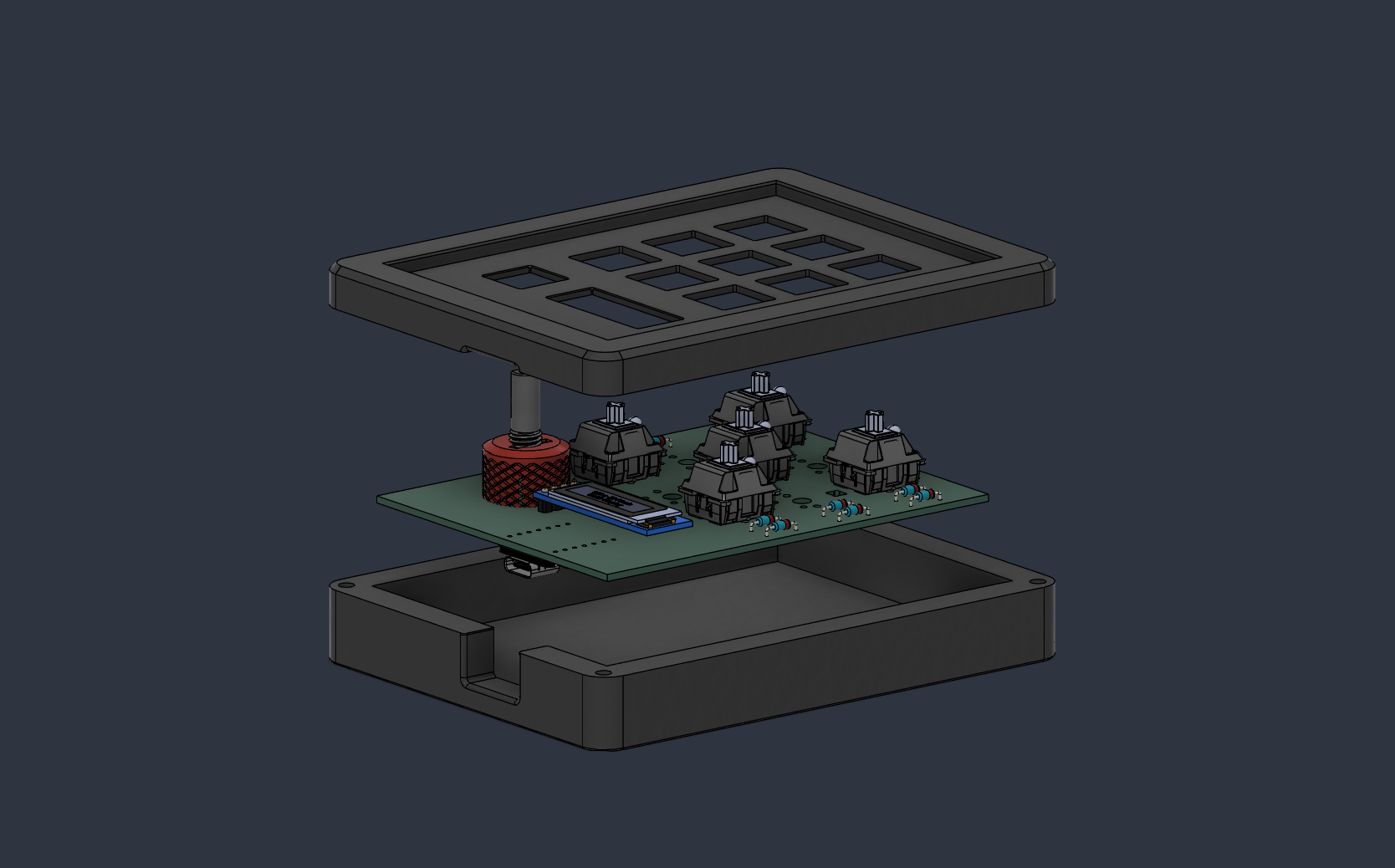
The name Stratum reflects this macropad's ability to swap between 5 distinct layers through QMK firmware. This is done through a Settings mode in which you must hold down three center keys until the OLED displays a selection menu where you can use the rotary encoder to scroll through the 5 different layers. You select with the lower-right key. An overview of notable firmware features are:
The 5 layers will likely be updated as I use the macropad and see what does and does not work. A future idea I have in mind is adding VIA support for quick macro functionality edits.
All the components needed for this macropad design:
This was my first time completely designing a piece of hardware from scratch. I used this project as an opportunity to learn PCB design through KiCad (both things I have never done before) and become accustomed to a new CAD program (before this, I had only used Tinkercad for 3D printing). This project also served as an introduction to QMK firmware. Although this project greatly increased my understanding of it (as I already had some experience coding arduino in C++), I still need more time writing QMK firmware to become comfortably familiar with it (I had a lot of external help when writing my firmware). Although it seemed to compile correctly, I have no idea if it will work as expected once I flash it to the RP2040.
Layer 0 - Main
K1 Save | K2 (close/escape) | K3 Refresh
K4 File Explorer | K5 Settings | K6 Task Manager
K7 Emoji Panel | K8 Screenshot | K9 Calculator
Layer 1 - Productivity (Docs)
K1 Citations | K2 Spell Check| K3 Clear Formatting
K4 Align Left| K5 Center | K6 Align Right
K7 Find | K8 Insert Link| K9 Print
Layer 2 - Design
K1 Undo | K2 Redo | K3 Duplicate
K4 Group | K5 Ungroup | K6 Bring Forward
K7 Zoom In | K8 Zoom Out | K9 Fit Screen
Layer 3 - Scientific (Docs)
K1 ° | K2 ± | K3 ×
K4 √ | K5 π | K6 Σ
K7 Superscript | K8 Subscript | K9 Open Latex Editor
Layer 4 - Media
K1 Play | K2 Pause | K3 Stop
K4 Previous | K5 Next | K6 Mute
K7 Spotify | K8 Youtube | K9 Libby (Audiobook App)
Thank you so much to @qcoral and the rest of the organizers of Stardance and HackClub for this wonderful hardware exploration opportunity!
| Qty | Value | Footprint | References |
|---|---|---|---|
| 9 | 1N4148 | Diode_THT:D_DO-35_SOD27_P7.62mm_Horizontal | D1, D2, D3, D4, D5, D6, D7, D8, D9 |
| 9 | SK6812MINI-E | footprints:SK6812MINI-E_fixed | LED1, LED2, LED3, LED4, LED5, LED6, LED7, LED8, LED9 |
| 9 | SW_Push_45deg | Button_Switch_Keyboard:SW_Cherry_MX_1.00u_PCB | K1, K2, K3, K4, K5, K6, K7, K8, K9 |
| 2 | LOGO | LOGO | , G*** |
| 1 | MOUDLE-SEEEDUINO-XIAO | footprints:XIAO-Generic-Hybrid-14P-2.54-21X17.8MM | U1 |
| 1 | OLED_DISPLAY | footprints:SSD1306-0.91-OLED-4pin-128x32 | J1 |
| 1 | RotaryEncoder_Switch | Rotary_Encoder:RotaryEncoder_Alps_EC11E-Switch_Vertical_H20mm | SW1 |
It measures 77 × 100 mm and has 2 copper layers, 1.6 mm thick.
32 parts, built around the SK6812MINI-E. The full list of its parts is on this page, with links to each part's symbol and footprint where PCBKit's library has them.
From the amperolithic/stratum-macropad repository on GitHub, at the commit this page was made from: the board is pcb/Macropad_Stratum.kicad_pcb and its schematic pcb/Macropad_Stratum.kicad_sch. PCBKit opens the board in the browser, with nothing to install.
Its repository states no licence, so its author keeps all rights: ask amperolithic before reusing the design.
google/mozc-devices
Circuit diagrams and firmware source code for Gboard DIY keyboards

Bastardkb/Dilemma
The Dilemma is a vertical stagger low-profile keyboard with mods.

Pwnsat/FlatSat
Flatsat v1.0 is a hardware based platform for aerospace cybersecurity research

adamws/kicad-kbplacer
KiCad plugin for automatic keyboard's key placement and routing

imchipwood/dumbpad
Simple 4x4 numpad with rotary encoder. Powered by QMK via ATmega32u4 Pro Micro

makerforgetech/modular-biped
An open source framework for creating a bipedal modular companion robot.

