
2 layers87.8 × 59.8 mm
FreeDeck SMD 2020-02
FreeYourStream/freedeck-hardware
all the stuff you need to build your own FreeDeck
37 parts772
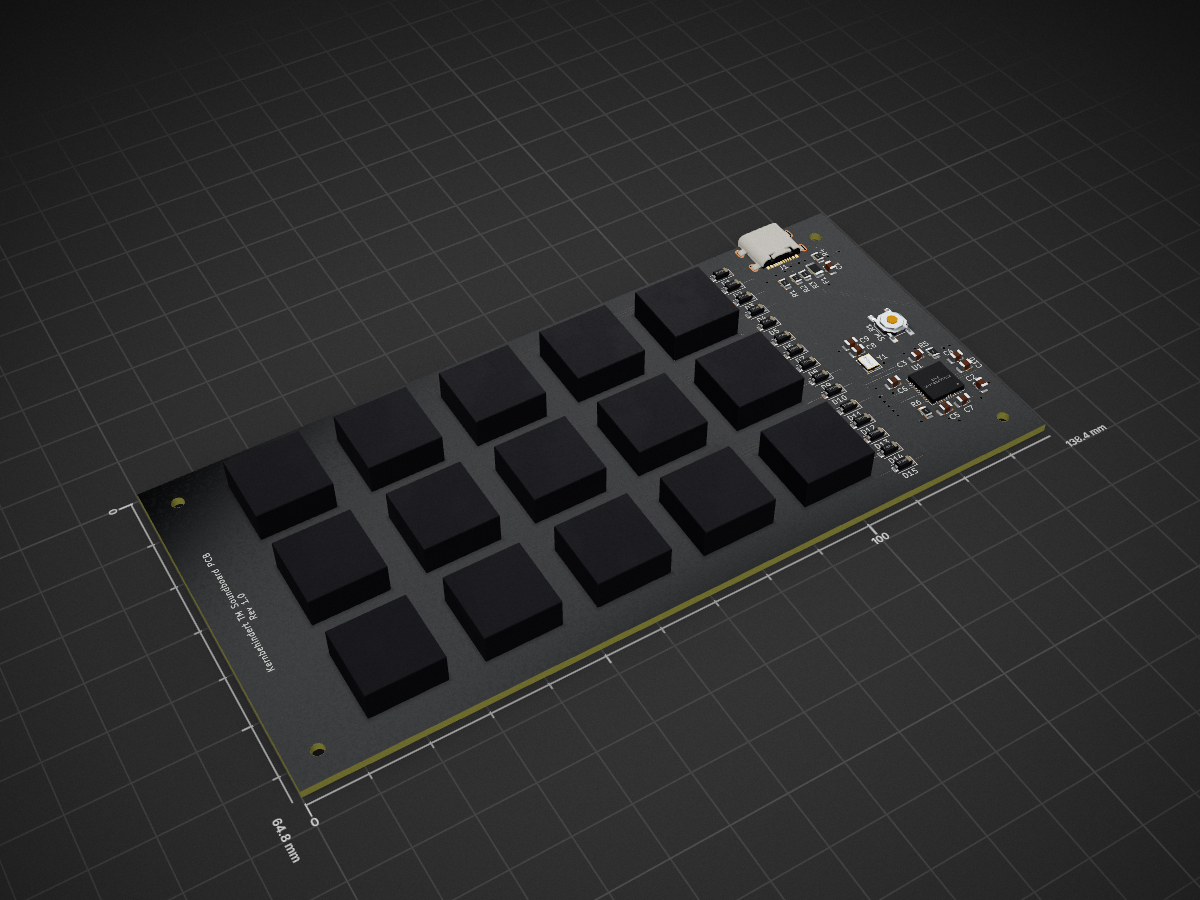
 Aceto1/Soundboard
An Arduino-based physical soundboard with a Windows Desktop GUI.
Soundboard is an open-source printed circuit board by Aceto1, from the Aceto1/Soundboard repository on GitHub. It is a 2-layer board of 138.4 × 64.8 mm with 55 parts on 57 nets, routed with 426 tracks and 27 vias.
It is built around the ATMEGA32U4-MU. Its parts include 15 diodes, 15 switches, 10 capacitors, 6 resistors and 1 IC. It belongs with the AVR (ATmega, ATtiny) boards of this library.
[Image blocked: Banner.png]
An Arduino-based physical soundboard with a Windows Desktop GUI.
1 Arduino board of your choice (e.g. ESP8266)
1 USB cable
1 CD74HC4067 analog 16 channel multiplexer
15 push-buttons
Some sort of case (or like for my prototyp: two pieces of plywood with the appropriate holes and some spacers)
Wire (I used 20AWG)
Soldering iron
Begin by inserting the buttons into the case and connecting one pole of each button with wire and solder in series. After that, also connect the last one to a 3V output of your arduino.
Then connect the other side of each button to the appropriate channel of the multiplexer (starting top left with 0 and ending bottom right with 15).
Connect the pins of the multiplexer as follows to the arduino:
S0: D5
S1: D6
S2: D7
S3: D1
SIG: A0
EN: Leave it unconnected
VB-Audio VoiceMeeter Banana - for routing the playback into your VoIP Application of choice
CH341 Driver - or the equivalent driver for your Arduino board
The latest binary of this repository
Install VoiceMeeter and the Driver, then reboot your PC. This will probably bork your sound settings in windows. We will fix that soon.
Now copy the Soundboard.exe and all other files that come with it to C:\Programs Files\Soundboard\.
Open VoiceMeeter Banana and firstly go to "Menu" at the top right and activate "Run on Windows Startup".
After that Click on "A1" and select your regular output device (speakers, headphones).
Click on "Hardware Input 1" and select your regular input device (microphone). Then only select "B1" below that.
Then, under "Virtual Inputs" just select "A1" below "VoiceMeeter VAIO" and just "B1" below "VoiceMeeter AUX".
Now go into the Windows sound settings and set "VoiceMeeter Input" as your default output device and "VoiceMeeter Output" as yout default input device.
Now connect your physical soundboard and start the application, you're all set.
Choose the COM-Port of your Soundboard. This is usually the only or one of very few COM-Ports and can be trial-and-errored.
Click a button to change it's content (title/file). Configured files are kept in the folder they were in. That means should you delete or move a file you also need to change the setting of the button.
Should you wish to start this application with Windows, just activatt he toggle button. This creates a shortcut in your Autostart folder.
Minimizing the application moves it to the system tray. This is also where the application will be on startup.
| Qty | Value | Footprint | References |
|---|---|---|---|
| 15 | D_Small | Diode_SMD:D_SOD-123 | D1, D2, D3, D4, D5, D6, D7, D8, D9, D10, D11, D12, D13, D14, D15 |
| 15 | MX_SW_solder | marbastlib-mx:SW_MX_1u | SW1, SW2, SW3, SW4, SW5, SW6, SW7, SW8, SW9, SW10, SW11, SW12, SW13, SW14, SW15 |
| 5 | 0.1uF | Capacitor_SMD:C_0805_2012Metric | C3, C4, C5, C6, C7 |
| 4 | M2 | MountingHole:MountingHole_2.2mm_M2 | REFM1, REFM2, REFM3, REFM4 |
| 2 | 10k | Resistor_SMD:R_0805_2012Metric | R5, R6 |
| 2 | 22 | Resistor_SMD:R_0805_2012Metric | R2, R3 |
| 2 | 22pF | Capacitor_SMD:C_0805_2012Metric | C8, C9 |
| 2 | 5.1k | Resistor_SMD:R_0805_2012Metric | R1, R4 |
| 1 | 10uF | Capacitor_SMD:C_0805_2012Metric | C1 |
| 1 | 16MHz | Crystal:Crystal_SMD_3225-4Pin_3.2x2.5mm | Y1 |
| 1 | 1uF | Capacitor_SMD:C_0805_2012Metric | C10 |
| 1 | 2 | Capacitor_SMD:C_0805_2012Metric | C2 |
| 1 | 500mA | Fuse:Fuse_1206_3216Metric | F1 |
| 1 | ATmega32U4-M | Package_DFN_QFN:QFN-44-1EP_7x7mm_P0.5mm_EP5.2x5.2mm | U1 |
| 1 | SW_Push | marbastlib-various:SW_SPST_SKQG_WithStem | SW_R1 |
| 1 | USB_C_Receptacle_USB2.0 | marbastlib-various:USB_C_Receptacle_HRO_TYPE-C-31-M-14 | J1 |
FreeYourStream/freedeck-hardware
all the stuff you need to build your own FreeDeck

xyphro/UsbGpib
Versatile, cheap and portable USB to GPIB converter (USBTMC class based)


Dakkaron/Fairberry
The goal of this project is to add a BlackBerry Q10 keyboard to non-BlackBerry phones. While this can easily be adapted to suit any other phone with an USB port at the bottom, I will focus on releasing files for the…


ccadic/sharpikeebo
Miniature RPI Zero 2W shield with Sharp memory Display and USB Beyboard

unit72784/Diabolic-Drive
Stealthy, modern, wireless keystroke injection tool in a universal 4 layer double-sided flash drive PCB form factor with 64 GB storage

ChrisChrisLoLo/bancouver40
A 4x10 CFX spaced low-profile mechanical keyboard.
It measures 138.4 × 64.8 mm and has 2 copper layers, 1.6 mm thick.
55 parts, built around the ATMEGA32U4-MU. The full list of its parts is on this page, with links to each part's symbol and footprint where PCBKit's library has them.
From the Aceto1/Soundboard repository on GitHub, at the commit this page was made from: the board is Hardware/Soundboard/Soundboard.kicad_pcb and its schematic Hardware/Soundboard/Soundboard.kicad_sch. PCBKit opens the board in the browser, with nothing to install.
Its repository states no licence, so its author keeps all rights: ask Aceto1 before reusing the design.